














🚗 16 best WordPress themes for driving schools 2026
A driving school website makes its first sale before a phone call. A student opens the page, scans the prices and schedule, and decides in five seconds: stay or go to a competitor.
There are several dozen themes tagged "driving school" on ThemeForest. A third haven't been updated since 2021, another portion are repainted fitness templates, and half don't work well with Elementor. Pick at random, lose money and a week of setup time.
We tested 16 current WordPress themes for driving schools: compared them by page builders, multilingual support, speed and actual fitness for driver education. Below, a targeted recommendation for each scenario.
💡 Quick overview:
- For budget launch: budget eDrive or budget Udrive at $19 with Elementor, responsive design and automatic updates, everything necessary without overpaying
- WPML out of the box: premium Rochester theme ($111), Fast & Safe with WPBakery ($59), Tain with WPML ($19), Drivega on Elementor ($39) and Omexo with LMS ($27), ready multilingual site without plugin hassles
- For chain of branches: the same Rochester on advanced admin or Driving School on Bootstrap ($149) with modular architecture and quality support
Comparison table of driving school themes
Theme | Price | Builder | WPML | Demo import |
|---|---|---|---|---|
DriCub | $59 | No | ❌ | 1-click |
eDrive | $19 | Elementor | ❌ | ✅ |
Rochester | $111 | No | ✅ | ✅ |
Fast & Safe | $59 | WPBakery | ✅ | ❌ |
Udrive | $19 | Elementor | ❌ | ❌ |
Tain | $19 | Elementor | ✅ | 1-click |
EdLane | $49 | No | ❌ | ❌ |
Drivega | $39 | Elementor | ✅ | ✅ |
Driving School HTML5 | $39 | No | ❌ | ❌ |
Papr | $39 | No | ❌ | ❌ |
Drivschol | $49 | Elementor | ❌ | ✅ |
Driving School Bootstrap | $149 | No | ❌ | ❌ |
Drive Master | $29 | Elementor | ❌ | ✅ |
Pallikoodam | $69 | Elementor | ❌ | ❌ |
Omexo | $27 | Elementor | ✅ | ❌ |
Dride | $49 | Elementor | ❌ | ✅ |
1. DriCub

DriCub, a theme with clean design and professional layout that conveys the calm confidence of a school with history. In testing on budget hosting, pages loaded quickly, not a single block broke.
The main technical advantage: unlimited color scheme. A logo of any color fits without palette distortion. One-click demo import shortens launch to half an hour: download, activate, upload content.
There's no built-in page builder, all edits through customizer and widgets. If you're used to visual assembly, it will feel cramped.
- Pros: clean design, 1-click demo import, unlimited palette, fast loading
- Cons: no built-in page builder, WPML not declared
- Price: $59
2. eDrive

eDrive, the most affordable theme in the collection with Elementor: $19 with lifetime updates. Two home page variants and 10+ internal templates cover the needs of a typical driving school site without extra spending.
In practice, the theme is fast: minimal built-in scripts, Elementor only loads what's actually used on the page. Contact Form 7 compatible out of the box, the lesson booking form will work immediately after activation.
WPML not declared, and the set of demo layouts is more modest than more expensive competitors. But for a single-language business card site, this isn't critical.
- Pros: Elementor, lifetime updates, Contact Form 7, fast loading
- Cons: only 2 home layouts, WPML not supported
- Price: $19
3. Rochester

Rochester, the most expensive theme in the collection ($111), and the price difference is justified. WPML out of the box, retina-ready graphics, Contact Form 7 without extra manipulation and detailed documentation make it a "buy and forget about technical problems" choice.
The administration interface is advanced: changing lesson schedules, instructors and rates can be done without involving a developer. Cross-browser compatibility tested on all current engines, the site won't break in Safari or Firefox.
For a small school just going online, this is overkill. But for a chain of branches or a training center with international groups, the cost pays off through savings on custom development.
- Pros: WPML, retina-ready, Contact Form 7, advanced admin, documentation
- Cons: high price for a single school
- Price: $111
4. Fast & Safe

Fast & Safe lives up to its name with speed and practicality: HTML5 and CSS3 framework, compatibility with WPBakery, Revolution Slider, WPML and Essential Grid without version conflicts. Such a combination is used when a site must not just exist, but sell: sliders with student testimonials, instructor grids, specific course landing pages.
In practice, the theme is fast even on budget hosting: the framework doesn't drag a ton of unused code. Suitable for both an instructor blog and a driver training academy.
Setting up sliders and grids takes time. If you haven't worked with Revolution Slider before, the learning curve is steep.
- Pros: HTML5 and CSS3, WPBakery + Revolution Slider + Essential Grid, WPML, cross-platform
- Cons: high entry threshold for beginners
- Price: $59
5. Udrive

Udrive, $19 with automatic updates and Elementor under the hood. Price doesn't mean austerity: the builder has become the standard for visual assembly for WordPress projects of any scale.
The focus on driving schools is visible in the structure: ready blocks for instructors, license categories, schedules and rates. With Elementor, assembling everything needed is a matter of a couple hours, even if you're opening WordPress for the first time.
The theme is minimalist and doesn't offer built-in solutions for blog, galleries or sliders. These need to be added with plugins.
- Pros: Elementor, automatic updates, minimal extra code
- Cons: no built-in blog and galleries, WPML not declared
- Price: $19
6. Tain

Tain, $19, a direct competitor to Udrive in price, but with a trump card: WPML compatibility out of the box. If you need a multilingual site and the budget is tightly limited, this is practically the only alternative.
Elementor on board means visual assembly without code, and Slider Revolution will let you showcase student reviews and course announcements. WooCommerce compatibility gives the ability to sell access to online lessons or test drives directly from the site.
SEO optimization is declared but not independently tested. Relying only on the theme for search rankings isn't wise: Yoast SEO or Rank Math will still be needed.
- Pros: WPML, Elementor, Slider Revolution, WooCommerce
- Cons: minimal ready demo layouts, SEO base requires refinement
- Price: $19
7. EdLane
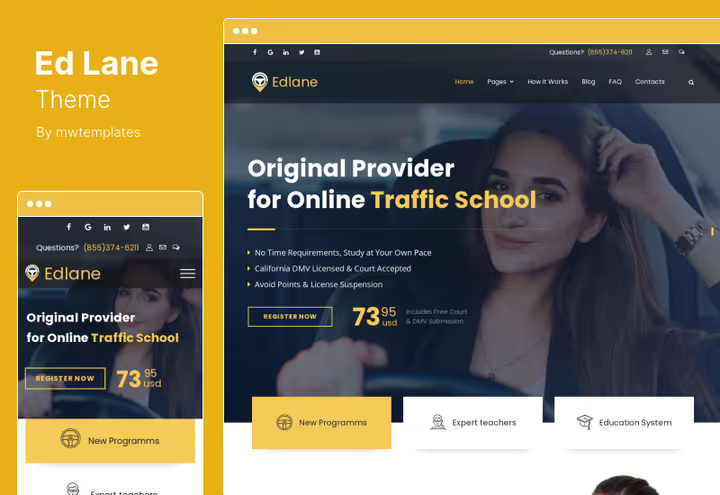
EdLane is chosen for elegance, modern design and conversion orientation. Originally designed as a theme for educational courses, but the structure fits driving schools perfectly: instructor cards, schedules, training categories.
Responsive design here isn't "bolted on top" but built into the architecture. On mobile devices, content doesn't squeeze into an unreadable strip but reorganizes logically. WooCommerce gives the ability to sell access to online theory courses or training materials.
No page builder and WPML. For a single-language site this isn't critical, but if growth is planned, consider it in advance.
- Pros: deep responsive design, WooCommerce, modern design, support
- Cons: no page builder, WPML not declared
- Price: $49
8. Drivega
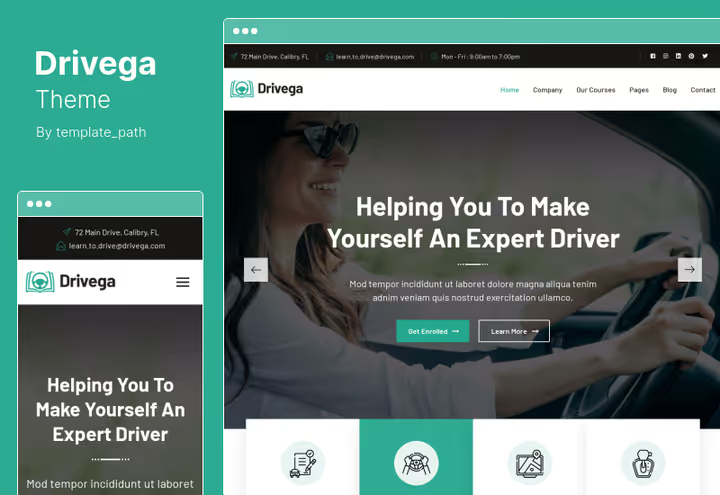
Drivega, the golden mean of the collection: $39 for Elementor, WPML, retina-ready and Contact Form 7. In practice this means the site will be equally sharp on a Full HD monitor and on a smartphone with high pixel density, and the contact form will work without additional plugins.
The framework is reliable: in our test there were no conflicts with popular SEO plugins and caching solutions. Demo import shortens the time from purchase to working prototype to a couple hours.
Typography could be richer: font settings exist, but the range of variations is more modest than Rochester.
- Pros: Elementor, WPML, retina-ready, Contact Form 7, demo import
- Cons: limited typography settings
- Price: $39
9. Driving School (HTML5)
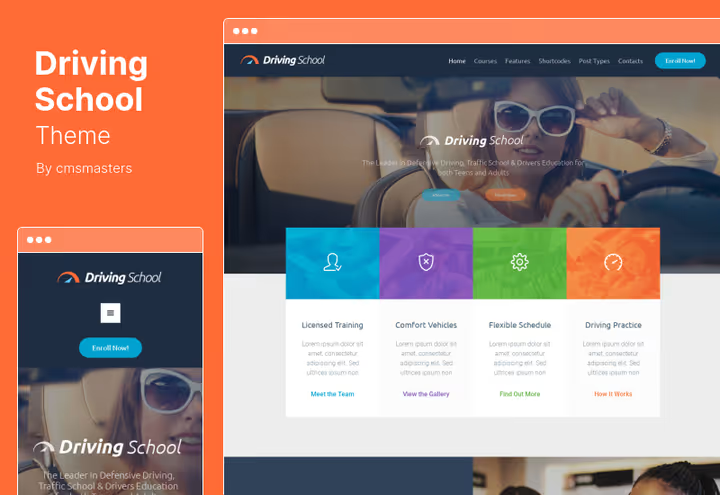
Driving School HTML5 is built on HTML5 and CSS3 with a custom administrative panel and a rich set of ready blocks. Essentially, a builder without visual interface: insert a shortcode and get a ready section.
Google Fonts, custom widgets and responsive layout, standard for a quality theme. Support includes six months of free updates.
The shortcode management model means you can't avoid studying the documentation at the start. There's no visual drag-and-drop, this is important to consider in advance.
- Pros: 99+ shortcodes, custom admin, Google Fonts, HTML5 and CSS3
- Cons: no visual builder, above-average entry threshold
- Price: $39
🔗 Driving School (HTML5) on ThemeForest
10. Papr
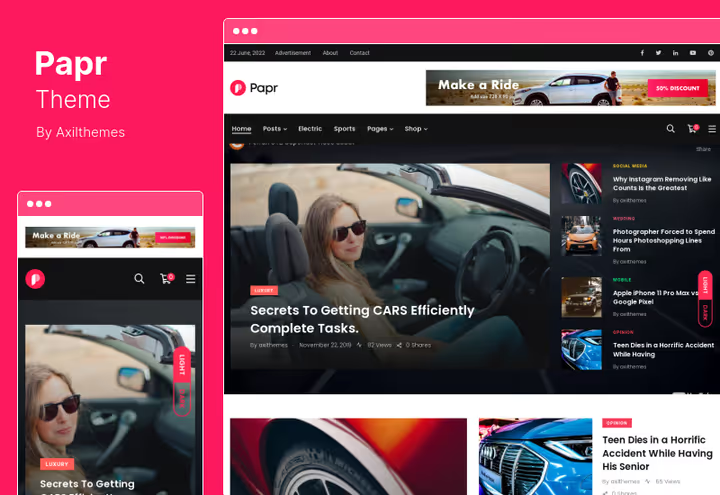
Papr, not a specialized driving school theme, but a full-fledged news magazine with 18 home variants and 6 header versions. For a driving school, a different scenario is interesting: blog about traffic rules, automotive news, SEO content to attract students through search.
Google AMP out of the box, a significant plus for mobile search. Live customizer lets you see changes instantly, and advertising spaces are prepared: you can monetize a content blog.
But this isn't a driving school theme as such. Lesson schedules, instructor profiles and lesson booking will need to be implemented with separate plugins.
- Pros: 18 home layouts, 6 headers, Google AMP, live customizer, ad readiness
- Cons: no built-in modules for driving school, plugins needed
- Price: $39
11. Drivschol

Drivschol stands out with a built-in lesson booking system: a student chooses instructor, time and license category right on the site, without third-party plugins. For a school with intensive booking flow, this saves hours of manual request processing.
Elementor on board gives visual assembly without code. The design is modern, without visual clutter: instructor and course cards are presented cleanly, emphasis on conversion. SEO optimization is basic but sufficient for launch.
WPML not declared, and for a multilingual project a separate plugin will be required. But for a single-language school focused on conversion, this isn't a minus, it's savings on unnecessary functionality.
- Pros: built-in booking system, Elementor, modern design, SEO base
- Cons: WPML not supported
- Price: $49
12. Driving School (Bootstrap)
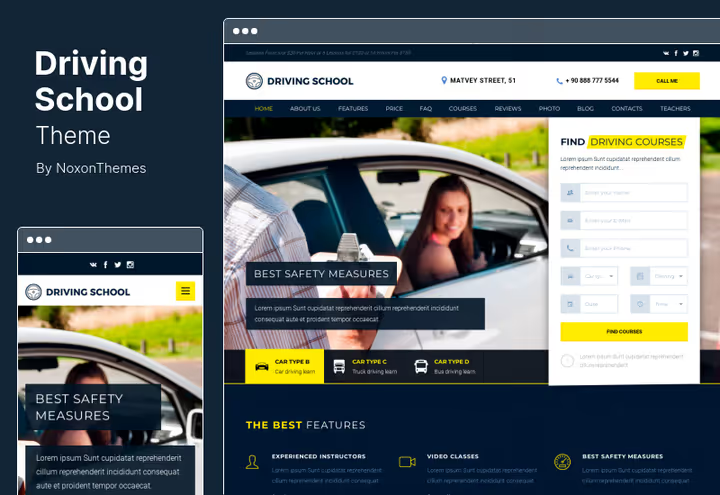
Bootstrap Driving School theme, the most expensive in the collection ($149), and the price here isn't for pretty pictures but for the Bootstrap framework at the core and modular architecture. The developer consulted with driving course owners during design, hence the well-thought-out modules for time-limited courses and automatic instruction.
Bootstrap ensures a rigid, predictable grid: layout doesn't break on any device. Six months of support included, the team actually responds, launch cases confirm this.
For a small school not planning to scale, this is overpaying. But for a network with several instructors and dozens of courses, an investment in stability.
- Pros: Bootstrap framework, modular architecture, quality support
- Cons: no page builder
- Price: $149
🔗 Driving School Bootstrap on ThemeForest
13. Drive Master

Drive Master, a fresh Elementor theme with 4 home page variants and RTL support for Arabic and Hebrew audiences. For $29 you get visual builder, responsive layout and built-in lesson booking form.
In practice, the theme is lightweight: Elementor only loads the blocks actually used on the page. The administration interface is intuitive, instructor cards, schedules and rates are edited without diving into code.
WPML not declared, and the number of demo layouts (4) is more modest than Drivschol or Dride. But for a single-language launch with RTL perspective, this is optimal entry.
- Pros: Elementor, 4 home layouts, RTL support, lightweight framework
- Cons: WPML not declared, modest set of internal pages
- Price: $29
14. Pallikoodam
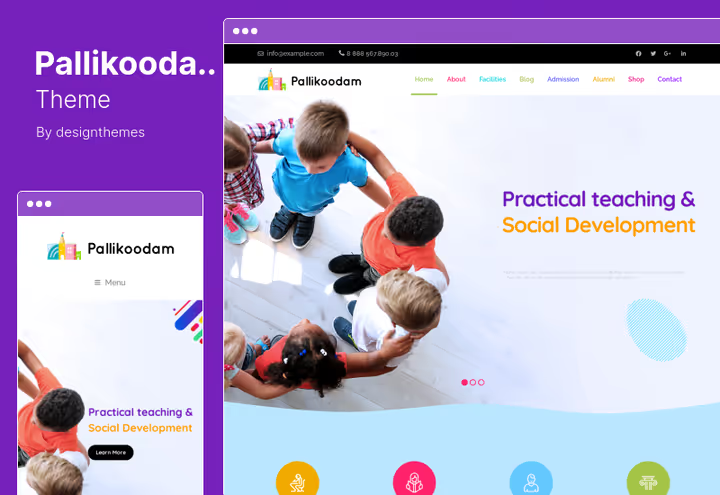
Pallikoodam is positioned as a school theme, but its arsenal fits driving schools perfectly: Elementor for visual assembly, extensive set of shortcodes for quick block insertion, social media integration and SEO optimization.
The key difference: W3C-validated code. For a project where accessibility and long-term support are important, this reduces the risk of layout "breaking" after WordPress updates.
The absence of WPML gives pause. For a multilingual project it makes sense to choose Drivega with WPML out of the box.
- Pros: Elementor, 150+ shortcodes, W3C-valid code, social media, SEO
- Cons: no WPML, without multilingual
- Price: $69
15. Omexo
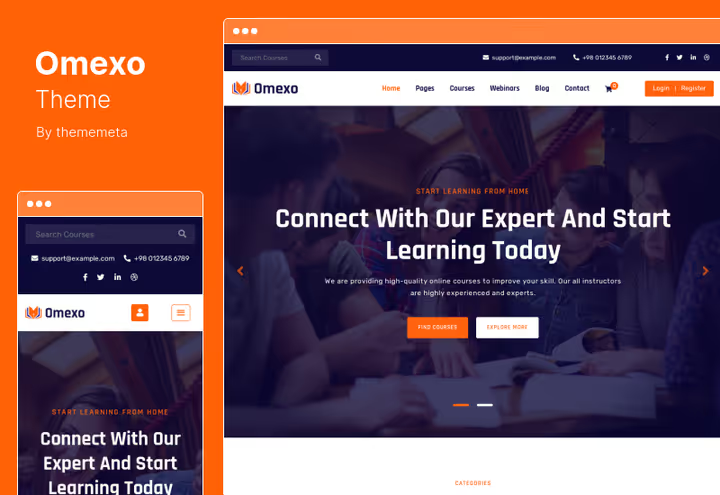
Omexo, the choice when there's an LMS need. If the driving school sells online courses on traffic rules theory, this solution closes the need for a separate LMS plugin. Elementor, WooCommerce and multilingual support come out of the box.
The theme gives responsive clean design, compatibility with all major browsers and six months of support. For a project focused on e-learning, this is the best balance of price and capabilities.
But if online courses aren't part of the business model, you're overpaying for unused LMS functionality. For a classic site without selling courses, look at budget Udrive or Tain.
- Pros: LMS functionality, Elementor, WooCommerce, multilingual
- Cons: LMS components are excessive if online courses aren't planned
- Price: $27
16. Dride

Dride, the theme with the highest rating in the collection: 5.0 rating on ThemeForest with 280+ sales. Built-in lesson booking system, Elementor and lifetime updates make it a "set and forget" choice.
8 home page variants and 23+ internal templates give room for composition: from a specific course landing page to a full site with blog and vehicle gallery. Google Maps integrated, a map to the training area is inserted with a shortcode.
WPML not declared, and this is worth considering. But for a single-language project focused on conversion and booking convenience, Dride is one of the best options.
- Pros: 5.0 rating, built-in lesson booking, Elementor, 8 home layouts, lifetime updates
- Cons: WPML not supported
- Price: $49
The video below, a live review of five top driving school themes in action, from installation to customization.
⁉️🤔 Common questions
Which driving school theme to choose if the budget is minimal?
Look at budget eDrive or Udrive, both with Elementor, responsive design and automatic updates. For a multilingual project at the same price, get Tain: WPML and WooCommerce out of the box. All three will cover basic needs: visual assembly without code, responsive design, working contact form.
What's the difference between the two Driving School themes in the collection?
The first version (HTML5) is built on a custom admin and a set of 99+ shortcodes: a solution for those ready to figure out the documentation and value flexibility without a visual editor. The second (Bootstrap) is more reliable architecturally, with modules for time-limited courses and automatic instruction. Choose the first for budget launch, the second if you plan to scale.
Is WPML needed for a driving school site?
If the audience speaks one language, WPML is optional. But if you work in a region with multiple state languages or attract foreign students, WPML compatibility becomes critical. From the collection, WPML out of the box is supported by: Rochester, Fast & Safe, Tain, Drivega and Omexo.
Can you use a "non-driving-school" theme for a driving school?
Yes. Papr (news magazine) works great as a blog about traffic rules and automotive topics, an SEO magnet for attracting students through search. Omexo will close the need to sell online courses. Pallikoodam with 150+ shortcodes will give assembly flexibility. The main thing is to understand which blocks you'll need to add with plugins: schedule, booking, instructor profiles.
What to do if the theme stopped updating after purchase?
Most themes from the collection include six months of support in the base price. After that period, the ThemeForest license gives lifetime access to downloads, but you'll need to pay extra for updates (usually a fraction of the theme price). For themes with Elementor, this risk is lower: even without theme updates, the builder will continue to work correctly. eDrive and Dride come with lifetime updates in the base price, this is the best protection against obsolescence.
Which theme is best suited for accepting online bookings?
Drivschol and Dride lead with built-in booking systems: a student chooses instructor, time and category right on the site, without third-party plugins. Omexo adds LMS for selling online courses to this. If booking through a third-party service (Google Calendar, Calendly), any theme with Contact Form 7 is enough, Rochester, Drivega, eDrive.
What to install in 2026: final matrix
The choice comes down not to "which is best" but to "which fits your scenario". Here's a targeted matrix:
- Single driving school, budget launch: eDrive or Udrive ($19), Elementor, responsive design, everything necessary without overpaying
- Single driving school, need online booking: Drivschol ($49) or Dride ($49), built-in booking system, lifetime updates
- Single driving school, multilingual site: Drivega ($39), Elementor + WPML + retina + Contact Form 7, best balance
- Chain of branches, need reliability: Rochester ($111), WPML, advanced admin, documentation, cross-browser
- Online courses as business model: Omexo ($27), LMS + WooCommerce + multilingual out of the box
- SEO blog or automotive magazine: Papr ($39), Google AMP, 18 layouts, ad readiness
- Maximum flexibility and plugins: Fast & Safe ($59), WPBakery + Revolution Slider + Essential Grid + WPML
- RTL audience and fresh design: Drive Master ($29), Elementor, 4 layouts, lightweight framework
The theme is a framework. A live site is made by content, schedules and real student reviews. Start with the demo, fill it in for an evening and show it to three colleagues. Their reaction will say more than any review. Install your chosen theme today: most themes from the collection deploy in under an hour.

A professional team of writers and editors specializing in creating quality content.