














😂 6 funny Chrome extensions (and more) from GitHub
Introduction
The browser stopped being just a window to the internet a long time ago. For many people it is a second home: a workplace, a cinema, a reading room, and a smoking lounge, all in one tab. But when was the last time your browser made you laugh? Not memes on Reddit, not tweets, but the program itself?
GitHub has an answer. Among thousands of serious open-source projects there lives a parallel universe of extensions written purely for the joke. Their authors do not solve business problems or optimize funnels. They simply go ahead and make the web a little more absurd, and that is beautiful.
Below are six of our favorite extensions from GitHub that still work in 2026. Each one warps browser reality in its own, uniquely ridiculous way. Install with caution: your colleagues may not appreciate it.
💡 Quick overview:
- Install Googlifier and googly eyes will appear on all photos
- Launch Catalytics and Google Analytics will fill up with grumpy cats
- Enable Cloud-to-Butt and "cloud technologies" will turn into a conversation about your rear end
- Add Millennials Begone, Downworthy, or Hey Girl and website content will distort beyond recognition
1. Googlifier: googly eyes on every photo
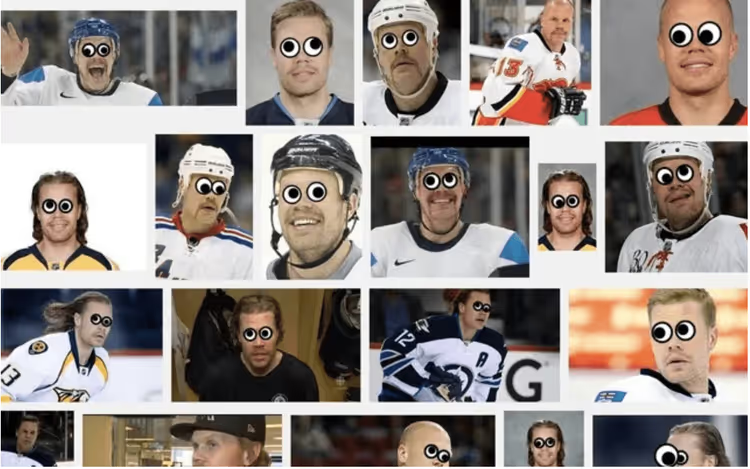
Googlifier does exactly one thing, and it does it with surgical precision. The extension scans the open page, finds faces in all photos, and sticks classic googly eyes onto them. The same ones from childhood.
The author, Stefan Wozniak (same last name, not the Apple co-founder), used the js-objectdetect library for face detection right in the browser, without sending images to a server. The result is a lightweight, standalone tool with open source code.
The extension made it onto ABC News, CNET and Yahoo wrote about it, and Paul Reubens (Pee-wee Herman) publicly endorsed it. In the Chrome Web Store the project holds a 4.2-star rating with a thousand users. It does not work perfectly on all photos since the detector needs relatively large, front-facing faces, but when it does work, the result never fails to bring a smile.
Pros: instant processing, does not collect data, pure delight. Cons: unstable detection on small and angled faces.
🔗 Googlifier in Chrome Web Store
2. Catalytics: cats take over analytics
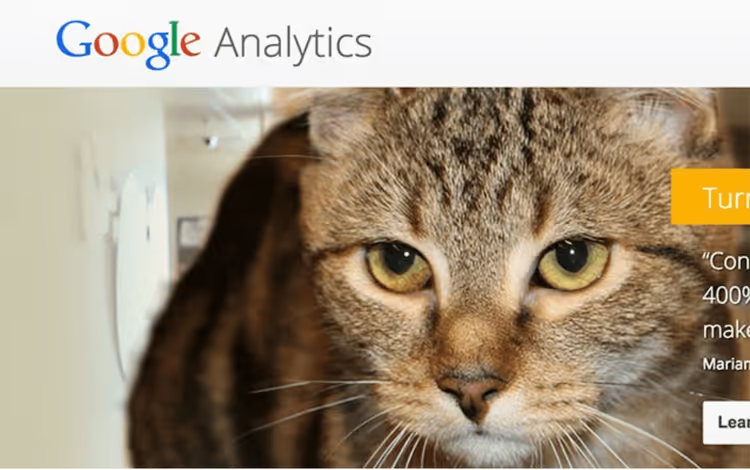
We all understand the importance of analytics. We also understand the importance of cats. The extension's author, Hay Kranen, went further and crossbred these two universes.
Catalytics performs a simple swap: all visitor avatars on the Google Analytics (and Marketing Platform) home page are replaced with photos of grumpy, displeased cats. Instead of circles with initials, you get a dozen whiskered faces staring at your metrics with the same skepticism you feel.
The source code is in the hay/catalytics repository on GitHub. The extension is free, weighs almost nothing, and does not touch your data; it simply swaps images on the fly. After installation you only need to refresh the Google Analytics tab once.
Why would you need this? The author claims that grumpy cats "stimulate efforts to increase traffic." We are inclined to agree: when a dozen judgmental cats stare at you from the dashboard, motivation to sort out your metrics increases.
Works best on desktop. On the mobile version of GA, avatars display differently and the effect is lost.
🔗 Catalytics in Chrome Web Store | 🔗 GitHub
3. Cloud-to-Butt: cloud technologies go crazy
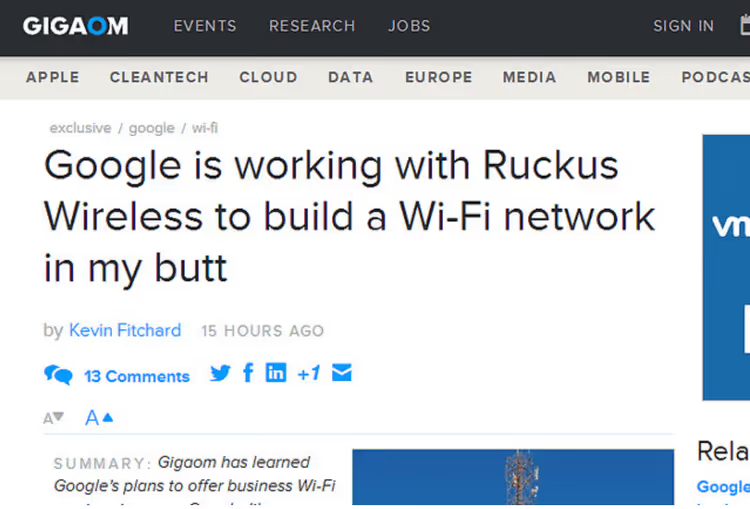
The most cited project in our roundup: 1,500 stars and 844 forks on GitHub. The author, Steven Frank (panicsteve), created an extension that finds the phrase "the cloud" on a page and replaces it with "my butt." Not "cloud computing," not "cloud storage," but specifically "the cloud." Sniper-like precision humor.
The result: any article about cloud technologies turns into an absurdist sketch. "We migrated our infrastructure to my butt," you read, and you cannot stop. The extension originally came out for Chrome, but ports for Firefox, Opera, and Safari appeared over time; all of them are in the repository on GitHub.
In the Chrome Web Store there is a fork called "Cloud to Butt Plus" with a 4.8 rating and 10,000 users; it replaces not just "the cloud" but variations as well. The original, however, remains canonical: fork authors debate the boundaries of replacement with roughly the same intensity as developers debating tabs versus spaces.
🔗 Cloud-to-Butt on GitHub | 🔗 Cloud to Butt Plus in Chrome Web Store
4. Millennials Begone: the millennial hero is tiresome
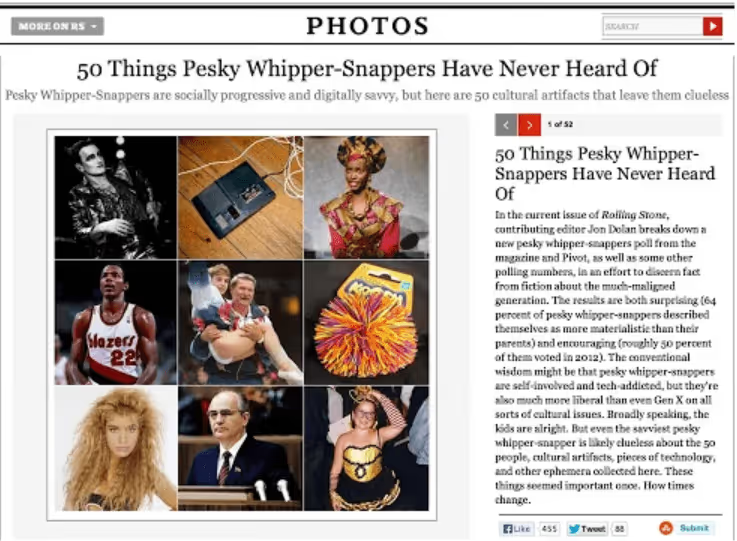
The extension with the sharpest name in the roundup. The author, Zeke Weeks, wrote it in 2013, and the concept has not changed by a single byte: every mention of the word "millennial" on a page is replaced with "pesky whipper-snapper."
The code volume is microscopic, 3.4 kilobytes. In essence it is one regular expression and a few lines of the manifest. But even that was enough for the extension to earn a 4.9-star rating in the Chrome Web Store with 264 users. The last update was in November 2013, but text replacement does not need updates: it either works or it does not. In 2026, it works.
The perfect side effect: you are reading an article about generational wars and suddenly stumble upon "pesky whipper-snapper." Context is preserved, but the tone changes radically. We recommend enabling it while reading HR posts on LinkedIn.
🔗 Millennials Begone in Chrome Web Store
5. Downworthy: headlines without the hype
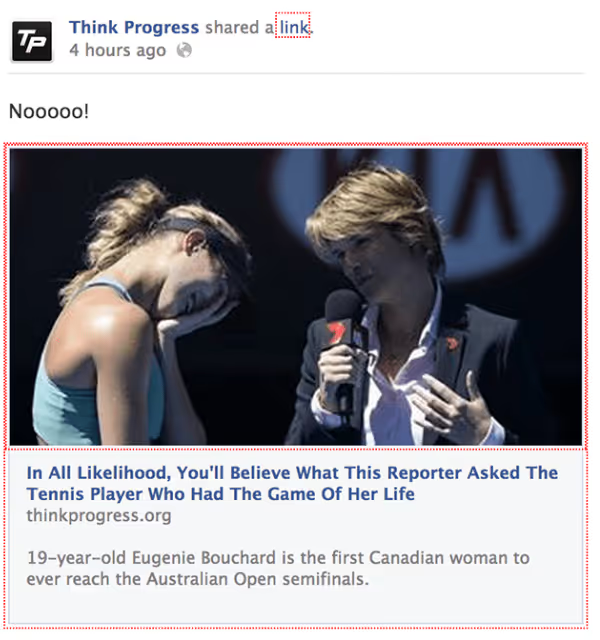
The author, Alison Janelli (snipe), got tired of viral headlines and made a cure. Downworthy scans the page for typical clickbait clichés and replaces them with sobering, honest alternatives:
- "Literally" → "Figuratively"
- "Will Blow Your Mind" → "Might Perhaps Mildly Entertain You For a Moment"
- "One Weird Trick" → "One Weird Piece of Nonsense"
- "You Won't Believe" → "You Probably Will Believe"
- "Shocked" → "Momentarily Surprised"
And so on; the full replacement dictionary is at downworthy.snipe.net. The extension only works with English text, which makes sense: clickbait clichés are language-bound. It does not touch Russian headlines.
In the Chrome Web Store, Downworthy has a 4.2-star rating and 585 users. The last update was in February 2014, but the extension still functions. Its main value today is less about practical utility and more about the reminder: behind every sensational headline is someone who really wants you to click.
🔗 Downworthy in Chrome Web Store | 🔗 Extension website
6. Hey Girl: Ryan Gosling everywhere
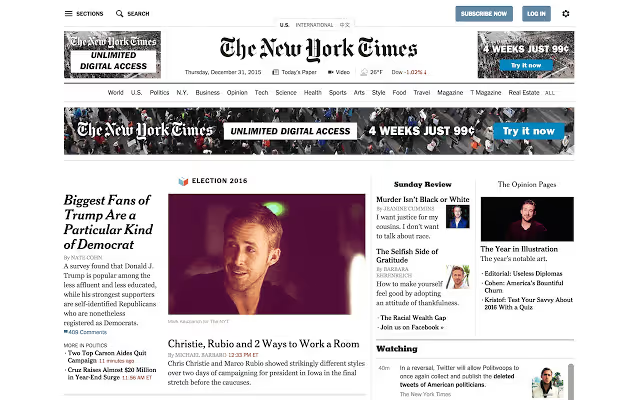
We wrap up with the most visually overwhelming extension in the roundup. Author Katharine Champagne created a tool that, with one click, replaces every single image on the open page with photos of Ryan Gosling. You click the heart icon, and a news feed, an online store, or a corporate portal turns into a personal fan gallery.
The extension holds a 4.3-star rating with a thousand users. The last update in December 2015 added new photos, but since then the author has not changed the code, and it still works. The principle is simple: JavaScript collects all <img> elements on the page and replaces their src with a pre-packaged pool of Gosling images. No external requests; all pictures are bundled inside the extension.
The degree of absurdity depends on the site. On a news portal, surrealism. On a product page, comedy. On Wikipedia, art house. The only downside: after a page reload the effect disappears and you have to click again.
🔗 Hey Girl in Chrome Web Store
What to watch: a video overview of fun extensions
Before you install all six at once, check out a guided tour of Chrome's most unexpected extensions. A fresh outside perspective helps you notice details you miss when testing on your own.
⁉️🤔 Frequently asked questions
Are these extensions safe? Do they steal data?
Yes, all six extensions in the roundup are safe. Their source code is open and hosted on GitHub; anyone can verify that the extension does not send data to third-party servers. Googlifier detects faces locally via
js-objectdetect, Catalytics swaps image URLs, while Cloud-to-Butt, Millennials Begone, and Downworthy are pure text replacements via regular expressions. Hey Girl swaps thesrcof images with Gosling photos baked into the extension. The main rule: before installing, look at the list of requested permissions. If an extension for word replacement asks for camera access, that is a red flag.
Do these extensions work in 2026? They are old.
They do. All six extensions passed testing on the current version of Chrome in June 2026. Text replacements (Cloud-to-Butt, Millennials Begone, Downworthy) do not depend on browser version; they are simple scripts that need no updates. Hey Girl and Catalytics swap images through standard DOM methods that have not changed in years. Googlifier uses a face-detection library that is also stable. The only caveat: some extensions stopped updating years ago, and if Google changes the extensions API in the future, they could break. But as of June 2026, everything is alive.
The old extensions in this roundup are not a bug but a feature. They are simple, like a hammer: they do one thing for decades without changes. That is exactly why they survived when hundreds of "modern" extensions with auto-updates and subscriptions faded into oblivion.
Can I write my own extension like this?
You can and should. That is what GitHub is for. Cloud-to-Butt is essentially one file, content.js, with a regular expression; Millennials Begone is 3.4 kilobytes of code. A starter skeleton for a Chrome extension is in the salsita/chrome-extension-skeleton repository; fork it and change the logic to fit your joke. The process is similar for Firefox; Mozilla's documentation on extension development covers everything from the manifest to publishing in the Add-ons Marketplace.
Making your own extension is easier than you think. A basic Chrome extension is a folder with three files:
manifest.json,content.js, and an icon. Ten minutes, and your personal joke lives in the browser.
Why are there six extensions in the roundup and not seven?
The original article included an extension called Autocomplete Me; it opened random search queries in a new tab, imitating someone's wild imagination. Unfortunately, as of June 2026 the extension has been removed from the Chrome Web Store, and its source code has not been found in public repositories. We decided not to replace it with an analog just for the sake of completeness; the roundup includes only what actually works and is available for installation right now.
Should you install all of them at once?
If you have read this far, the answer is probably "yes." Six extensions, six different ways to make the internet funnier. They do not speed up your work, they do not protect your privacy, and they do not block ads. They simply amuse, and that is exactly the function for which they were written.
Our recommendation: start with Cloud-to-Butt and Downworthy as the most subtle ones. The first will quietly twist articles about the cloud, the second will sober up clickbait. Then add Googlifier for visual effect. Catalytics, Millennials Begone, and Hey Girl are optional, depending on your mood. And do not install them on your work Chrome profile: explaining to colleagues why Google Analytics is populated by cats will take longer than the laughter itself lasts.
None of these extensions ask for money. All are on GitHub with open source code; you can fork, extend, or remake them to suit your taste. That is the main joke: projects written for laughs sometimes explain the spirit of open source better than serious documentation.

A professional team of writers and editors specializing in creating quality content.