














🔗 7 best WordPress redirect plugins in 2026
You changed your site structure, deleted an old post, or moved to a new domain, and now you have dozens of broken links. Each one leads to a 404 page, draining your link equity and search engine trust.
Redirects fix this problem in minutes: you specify the old URL and the new address, and the plugin silently sends visitors where they need to go. Google receives the signal "page moved permanently" and passes authority to the new URL. But which plugin should you choose when the WordPress.org directory has dozens of them?
Below are seven proven redirect management tools: from the simplest copy-paste solutions to a powerful all-in-one with conditional logic. We selected only active plugins that are updated in 2026 with a strong install base. Quick start guide, comparison, and honest downsides for each option inside.
💡 Quick overview:
- Determine how many redirects you need: up to 10, go with Simple 301 Redirects; hundreds or thousands, Redirection.
- If you're catching 404 errors in batches after restructuring your site, 404 to 301 will collect them automatically.
- Need conditional redirects (browser, login status, referrer)? Only Redirection does this for free.
- Moving content between sites or creating a clean external URL for a page? Page Links To.
Why your WordPress site needs redirects
A redirect is invisible to visitors: the page loads, the URL in the address bar changes. But for SEO, it's one of the most undervalued tools. Since 2016, Google has confirmed that 301 redirects pass PageRank without loss, with no more "decay."
Five scenarios where redirects are essential:
- You deleted or moved content. The old page earned backlinks and rankings. Redirect it to the new one, or everything burns.
- You changed your domain. The site moved to a new URL. Redirects preserve your audience and link equity from the old address.
- You merged two posts into one. The "cocktail technique" from Ahrefs: two pages rank for the same keyword, so you combine them into one powerful publication and redirect the second to the first. Traffic often doubles.
- 404 errors. Page not found, visitor leaves. With a redirect, they land on a relevant replacement.
- External links in menus. Want a menu item to point to an external resource? Page Links To handles this without editing code.
How redirects work: a brief primer
Three redirect types cover the vast majority of tasks for WordPress site owners:
Code | Name | When to use | SEO effect |
|---|---|---|---|
301 | Moved Permanently | Page moved forever | Passes link equity to the new page |
302 | Found | Temporary move (A/B test, maintenance) | Original URL stays in the index |
307 | Temporary Redirect | Like 302, but preserves request method (GET/POST) | For forms and APIs, doesn't break data transmission |
In most cases, you'll use 301. The other two types are rarely needed, but when they are, you can't do without them.
The cocktail technique: double your traffic on a single post

The idea is simple: find two of your posts that rank for the same keyword and get moderate traffic. Choose the stronger one, update it (fresh data, new sections), and set up a redirect from the second one to it. Backlinks and PageRank from both posts now work for a single page. The result: traffic growth without writing new content from scratch.
To find such "duplicates," use Ahrefs or Moz. They'll show you which queries have multiple pages ranking simultaneously.
Comparison table: all seven plugins
Plugin | Redirect types | 404 monitoring | Conditional logic | Price |
|---|---|---|---|---|
301 Redirects | 301, 302, 307 | Yes | No | Free / Pro from $49/year |
404 to 301 | 301, 302, 307 | Yes (with log) | No | Free |
Simple 301 Redirects | 301 | No | No | Free |
Redirection | 301, 302, 303, 304, 307, 308 | Yes (with log) | Yes | Free |
Page Links To | External URLs | No | No | Free |
Safe Redirect Manager | All HTTP codes | No | No | Free |
SEO Redirection | 301, 302, 307 | Yes | Yes (behavior-based) | Free |
1. 301 Redirects, Easy Redirect Manager

If you need to set up a redirect in 30 seconds and forget about it, this is your plugin. 301 Redirects by WebFactory does exactly what it promises: you enter the requested URL, choose the target (page, post, archive, or custom link), and save. Requests with query strings (?utm_source=...) pass through to the new address, so tracking tags aren't lost.
The free version includes a 404 error log and a hit counter for each redirect. For bulk operations, there's import/export: upload a CSV with old and new URLs, and you're done.
- Pros: simplest interface (Settings → 301 Redirects), CSV import for dozens of redirects at once, hit counter for each rule.
- Cons: no wildcard redirects (can't redirect an entire folder), regex and conditional logic only in Pro.
- Price: Free on WordPress.org. Pro (WP 301 Redirects) starts at $49 per year.
- Download: 🔗 301 Redirects on WordPress.org
2. 404 to 301, automatic broken page catcher

This plugin works differently from the rest: you don't create redirects manually. Instead, you set a page where all 404 errors will be sent. When a visitor opens a broken link, the plugin silently sends them to the specified URL via a 301 redirect.
For each 404 path, you can set an individual destination. The error log writes automatically: timestamp, requested URL, referrer. Email notifications alert you to new broken pages so you can create a targeted redirect before traffic disappears.
- Pros: setup in a minute, automatic collection of all 404s without manual entry, email alerts for new errors.
- Cons: the blanket approach (all 404s to one page) can confuse search engines if the target page isn't relevant; no conditional logic.
- Price: Free.
- Download: 🔗 404 to 301 on WordPress.org
3. Simple 301 Redirects
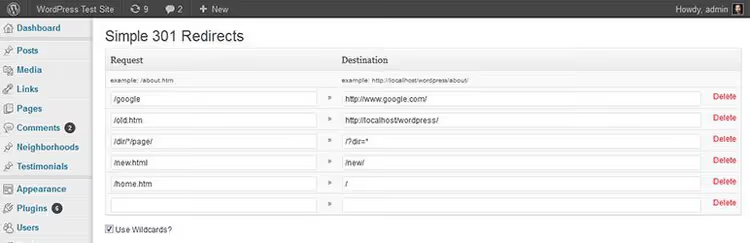
The name says it all. The plugin does one thing: creates a 301 redirect from the "old URL" field to the "new URL" field. No logging, no 404 monitoring, no regex or conditional logic. Just copy, paste, save.
For sites with three to five redirects after changing permalinks, this is the fastest solution. It supports wildcard redirects, allowing you to redirect an entire subdomain or folder.
- Pros: ultra-lightweight, wildcard redirects, installs in seconds.
- Cons: only 301, no import/export, no hit statistics. Inconvenient for dozens of redirects.
- Price: Free.
- Download: 🔗 Simple 301 Redirects on WordPress.org
4. Redirection

The most popular redirect plugin for WordPress: over 2 million active installs, 705 reviews, and a 4.5 rating on WordPress.org. Free, with no premium version at all.
Six redirect types (301, 302, 303, 304, 307, 308), a full log with IP, browser, and referrer, plus 404 tracking grouped by URL. But the main feature is conditional redirects: a rule triggers based on login status, user role, browser, IP, referrer, or cookie. Logged into admin? See the working site. Visiting as a guest? Landing page.
It imports from Simple 301 Redirects, SEO Redirection, Safe Redirect Manager, and Rank Math. It supports Apache (.htaccess) and Nginx (rewrite rule export), so redirects fire at the server level, bypassing WordPress.
- Pros: conditional logic, full log, 404 monitoring, import from other plugins, server-level redirects (Apache/Nginx).
- Cons: interface can be overwhelming for beginners (many tabs and settings), support is community forum only.
- Price: Free.
- Download: 🔗 Redirection on WordPress.org
5. Page Links To
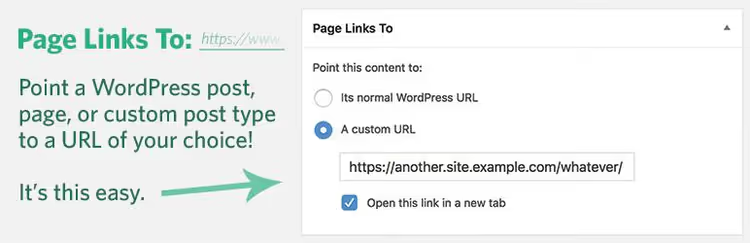
Not quite a redirect plugin in the traditional sense. Page Links To adds a meta box to the page editing screen: you enter an external URL, and the page in menus or post lists points to an external resource.
Typical scenario: the "Support" menu item should lead to Zendesk, and "Documentation" to GitBook. Or you're mirroring a column from Medium in your blog feed: you create a page with a title and external link, and it appears among your other posts.
- Pros: dead simple, external URLs for pages and menus, created by Mark Jaquith (one of the WordPress core developers).
- Cons: doesn't manage redirects in the traditional sense, no logs or 404 monitoring.
- Price: Free.
- Download: 🔗 Page Links To on WordPress.org
6. Safe Redirect Manager
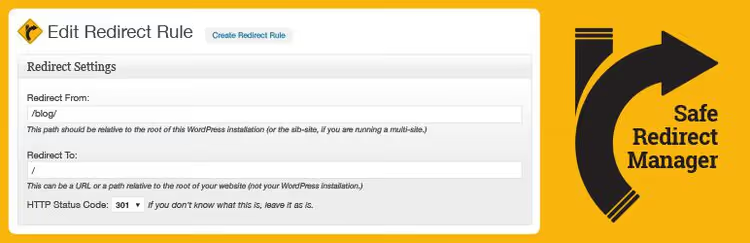
A plugin from the 10up agency (the team behind enterprise projects like Microsoft, TechCrunch, and TED). Safe Redirect Manager stores redirects as a custom post type: they can be version-controlled via Git, moved between environments, and queried through the REST API.
No 404 monitoring or logs, just "from" and "to" fields. But it supports any HTTP redirect code and runs with minimal overhead on WordPress load. For multisite setups, native support comes out of the box.
- Pros: developer-friendly (custom post type + REST API), minimal overhead, any HTTP code, multisite support.
- Cons: no logs, no 404 monitoring, no visual rule builder, you need to know the input URL.
- Price: Free.
- Download: 🔗 Safe Redirect Manager on WordPress.org
7. SEO Redirection

The most feature-packed plugin in this roundup. Conditional redirects like Redirection (based on visitor behavior), plus unique features: integration with Google Search Console for fixing crawl errors, WPML support for multilingual sites, and automatic replacement of all internal links during site migration so you don't have to fix each one manually.
Worth mentioning separately are wildcard redirects and the ability to redirect entire folders with their contents. The log shows hit counts, traffic sources, and users.
- Pros: conditional logic, Search Console integration, WPML, auto link replacement during migration, wildcard and folder redirects.
- Cons: interface can be overwhelming for beginners, some features will go unused on lightweight sites.
- Price: Free.
- Download: 🔗 SEO Redirection on WordPress.org
See also: video guide on setting up 301 redirects
A short video demonstrating step-by-step 301 redirect setup in WordPress: plugin installation, adding a rule, and verifying the result.
⁉️🤔 Frequently asked questions
Which redirect plugin is best for beginners?
If you need 2-3 redirects after changing permalinks, go with Simple 301 Redirects: two fields, copy-paste, done. For regular redirect work and 404 tracking, start with 301 Redirects by WebFactory. It has a hit counter and CSV import while keeping the interface simple.
What's the difference between 301 and 302, and when does it matter?
301 tells search engines "page moved permanently," and link weight transfers to the new URL. 302 says "temporarily," so the old URL stays in the index. For permanent moves, always use 301. 302 is useful when you temporarily redirect traffic during a redesign and plan to restore the old page.
What should I do if my site has hundreds of 404 errors?
Install 404 to 301 as a blanket fallback: all broken URLs will go to the specified page. Enable email notifications, and the plugin will send you a list of new 404s so you can gradually create targeted redirects through Redirection. This way, traffic isn't lost while you handle each URL individually.
Can I use two redirect plugins at the same time?
Technically yes, but it's not recommended: two plugins can intercept the same URL and create redirect chains (A → B → C). Each extra hop slows loading and dilutes link equity. Choose one plugin for your main task and stick with it.
Do I need a redirect when switching from HTTP to HTTPS?
Absolutely. Without a 301 redirect from HTTP to HTTPS, search engines see two versions of your site as duplicate content. Most SEO plugins (Rank Math, AIOSEO) handle this automatically when you install an SSL certificate. If you don't have an SEO plugin, any plugin from this list will do the job.
💎 Summary: which redirect plugin to choose in 2026
All seven tools are actively maintained, regularly updated, and solve different problems. The choice comes down to three factors: redirect volume, whether you need conditional logic, and your comfort with the interface.
- If you have one or two dozen redirects with minimal requirements, Simple 301 Redirects. Open, paste, close.
- If you have hundreds of redirects and need a full log with 404 grouping, Redirection. The industry standard: 2 million installs don't lie.
- If you need conditional redirects (browser, role, referrer) plus Google Search Console integration, SEO Redirection covers everything.
- If automatic 404 collection matters more than manual control, 404 to 301 catches all broken links with a single setting.
- If you're a developer or agency with a Git workflow, Safe Redirect Manager (custom post type, REST API).
In practice, most sites cover their needs with a combination of Redirection for primary work plus Page Links To for external menu links. Both plugins are free, don't conflict, and cover virtually every scenario.
Start by installing Redirection. It will automatically track your first 404 errors and show you where your site has broken link problems.

A professional team of writers and editors specializing in creating quality content.