














📈 7 Google Analytics plugins for WordPress 2026 (free and premium)
💡 Quick overview:
- Why bare GA4 code insertion doesn't give you half the data you need, and how a plugin fixes it in 2 minutes
- Comparison table of all 7 plugins: price, key feature, tracking type and use case
- Breakdown of each option with screenshots: pros, cons, real-world experience and verdict for your scenario
- Decision matrix in the summary: "If you need X, choose Y"
You've inserted GA4 code into header.php and think analytics is working? No. Standard code only tracks page views. No button clicks, no form conversions, no abandoned carts, no revenue sources. GA4 without events misses the lion's share of what happens on your site.
A WordPress plugin closes this gap. It sets up advanced tracking without a single line of code and surfaces key metrics right in your admin panel: conversions, traffic sources, store revenue, page speed. You log into WordPress and immediately see the numbers. No tab switching, no digging through the GA4 interface maze.
We tested 7 current GA4 plugins, from the giant MonsterInsights (3M+ installs) to the lightweight GA Google Analytics at $15. Each verified for live compatibility with GA4 and WordPress 7.0 as of June 2026. The original WP Google Analytics Events didn't survive the GA4 transition: it was replaced by the direct successor Goal Tracker from the same developer.
Comparison table
Plugin | Free version | Pro price | Key feature | Tracking type | For whom |
|---|---|---|---|---|---|
| ✅ | from $99.60/year | Dashboard in admin + eCommerce | GA4, events, forms, WooCommerce | Bloggers, stores, agencies |
| ✅ | from $99.50/year | Reports by author, SEO, forms | GA4, events, eCommerce, Custom Dimensions | Content teams, business owners |
| ✅ | - | Native GA4 ↔ WooCommerce integration | GA4, eCommerce events, refund/cancel | WooCommerce stores only |
| ✅ | from $59/year | Per-page stats right in admin | GA4, eCommerce, shortcodes | Budget projects, bloggers |
| ✅ | ❌ free | Official Google hub: Analytics + Search Console + AdSense | GA4, Search Console, AdSense, PageSpeed | Beginners, simple projects |
| ✅ | ❌ $15/year Pro | Lightweight GA4 code insertion | GA4, Dual Tracking, custom code | Minimalists, site speed |
| ✅ | from $79/year | GA4 events without code: clicks, scroll, video | GA4 Events, YouTube/Vimeo, Tag Manager | Marketers, funnel analytics |
1. MonsterInsights

The most popular GA4 plugin for WordPress: 3 million active installs, updated May 29, 2026 to version 10.2.2. Connects Google Analytics to your site in three clicks and delivers not raw numbers, but ready analytics: where visitors come from, what they read, how much the store earns.
The main ace is the dashboard inside WordPress. You don't wade through the GA4 interface maze, everything is right here in the admin. Set it up once and see metrics every time you log in. For agencies this saves hours per week on preparing client reports.
In practice MonsterInsights filters out with price those who just need a counter. But for a site that earns, with content or products, it pays for itself. The form conversions report shows which form brings clients and which just takes up space. The eCommerce tracker delivers revenue, conversion and average order value without any code hassle. Verified on the WooCommerce + WPForms stack: data started flowing 15 minutes after activation.
Pros:
- Ready dashboard in admin: traffic, demographics, devices, real-time
- eCommerce tracking for WooCommerce, EDD, MemberPress out of the box
- Form conversion tracking (WPForms, Gravity Forms, Formidable)
- GDPR compliance and IP anonymization on the fly
Cons:
- Pro from $99.60/year, more expensive than alternatives
- Some advanced reports require separate add-ons
Price: Free Lite version on WordPress.org. Pro, MonsterInsights Pro from $99.60/year.
🔗 MonsterInsights on WordPress.org🔗 MonsterInsights Pro
2. ExactMetrics
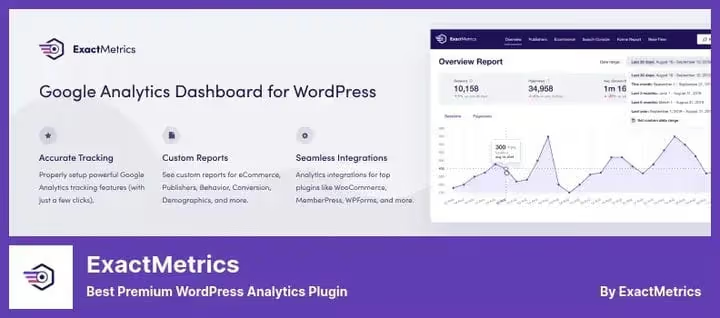
Former Google Analytics Dashboard for WP, after rebranding the plugin kept its functionality and audience of 1M+ installs. Version 9.2.2 from May 29, 2026. Ideologically close to MonsterInsights: the same focus on dashboard inside WordPress and extended tracking without code. The difference is in the details.
ExactMetrics is strong in reports that competitors don't have. Author statistics, who in the editorial team writes the most-read articles. SEO metric tracking from Yoast. Affiliate link analysis: you see which partner brings clicks and which just sits there. For a content team this is a gold mine: the editor evaluates not only views but each author's contribution to traffic.
A separate plus is email summaries. Set up a weekly report and the client or manager gets a PDF with the main numbers. No need to log into admin. In practice this removes the "what's happening with traffic" question at planning meetings.
Pros:
- Reports by author, SEO keywords and affiliate links
- Automatic email summaries with branding
- Real-time stats inside WordPress
- Integration with WooCommerce, EDD, MemberPress, WPForms
Cons:
- Free version more restricted than MonsterInsights
- Pro price comparable to MonsterInsights, but brand less promoted
Price: Free Lite version. Pro, from $99.50/year.
🔗 ExactMetrics on WordPress.org🔗 ExactMetrics Pro
3. Google Analytics for WooCommerce

Official plugin from the WooCommerce team. Version 2.2.0 from June 9, 2026, compatibility with WordPress 7.0 confirmed. Doesn't try to be a universal dashboard. Does exactly one thing: links the store to GA4. And does it natively: cart events, checkout, refunds and cancellations are captured automatically, without additional setup.
The plugin's strength is in the depth of eCommerce data. Transactions, refund, checkout steps, product views, everything hits GA4 with the right parameters. The plugin uses the official Google Analytics API and updates synchronously with WooCommerce core.
But important nuance: you view stats only in the Google Analytics interface, there's no dashboard in WordPress. And some users complain about conflicts with Consent plugins. With proper setup, without duplicating GA code from other plugins, it works stably, we checked. The main thing: install it and no other GA plugins on the site.
Pros:
- Native integration from WooCommerce, no intermediaries
- Full eCommerce tracking: cart → order → refund
- Free, no Pro tier
- Fresh updates synchronously with WC core (latest 2.2.0, June 2026)
Cons:
- No dashboard in WordPress, stats only in GA4 interface
- Conflicts with other GA plugins when code is duplicated
- Only for WooCommerce, useless for other sites
Price: Free.
🔗 Google Analytics for WooCommerce on WordPress.org
4. Analytify
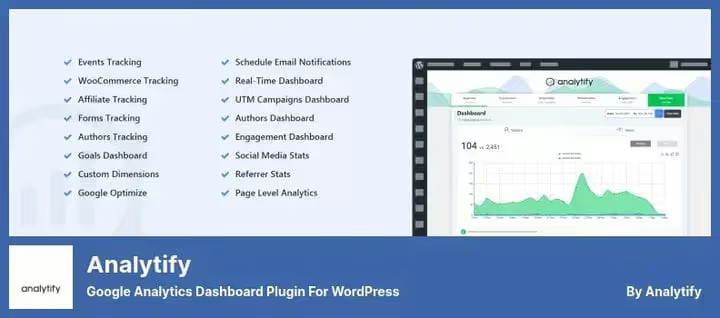
Plugin with 2 million installs and Google Analytics Technology Partner status. Version 9.0.2 from May 12, 2026. Analytify's strength is per-page stats: you open any post or page in admin and immediately see its metrics. Views, bounce rate, time on page, sources, all right there, without jumping to GA4.
For front-end there are shortcodes: you can display stats right on the site. For example, show readers the post view count. Widgets are styled via CSS and fit any design.
Pro version noticeably cheaper than competitors: from $59/year. This is the most affordable entry into professional analytics among full-featured dashboards. But the free version is limited: no campaign stats, events and eCommerce. For a blog Lite is enough, for a store better to look at Pro right away.
Pros:
- Per-page stats when editing, no need to go anywhere
- Front-end shortcodes for public metric display
- Pro from $59/year, budget entry into professional tracking
- Google Analytics Technology Partner status
Cons:
- Free version without campaigns, events and eCommerce
- Fewer ready integrations than MonsterInsights
Price: Free Lite version. Pro, Analytify Pro $59/year.
🔗 Analytify on WordPress.org🔗 Analytify Pro
5. Site Kit by Google

Official Google plugin for WordPress. 4 million active installs, version 1.181.0 from June 15, 2026, completely free. Site Kit is not just a GA4 dashboard, but a unified hub for six Google tools: Analytics, Search Console, AdSense, PageSpeed Insights, Tag Manager and Ads.
The idea is simple: install one plugin and get data from all connected Google services in one window. Site Kit itself inserts tracking codes, verifies them via Search Console and gives a summary of page speeds. No third-party services, no payment.
But analytics depth is basic. No eCommerce reports, form conversions, custom dimensions. For a store or content project with a detailed funnel Site Kit is weak. But for a business card site or beginner blog, the best choice. Since May 2025 Reader Revenue Manager was added: monetization through subscriptions and donations right from the plugin.
In practice: on weak hosting the Site Kit widget creates up to 6 parallel API requests to Google on cold cache, admin can lag. Fixed by disabling the dashboard widget via Screen Options.
Pros:
- Official Google plugin, completely free
- Unified hub: Analytics + Search Console + AdSense + PageSpeed + Tag Manager
- Simple installation: connected Google account and done
- 4M+ installs, updates directly from Google
Cons:
- Basic report depth, no eCommerce funnel and form conversions
- On weak hosting creates load on admin (up to 6 API requests)
- Data only in dashboard, no email reports to clients
Price: Completely free.
6. GA Google Analytics

Minimalist plugin from Jeff Starr, a 15-year WordPress developer. Version 20260421 from April 21, 2026. No dashboards, no reports in admin. Only clean GA4 insertion code. Installed, pasted Measurement ID, selected GA4, and data started flowing in 24-48 hours.
The plugin philosophy: "does one thing and does it well". No extra requests to third-party services, no data collection by the plugin itself. Just a fast and secure way to connect GA4 without editing the theme. Under the hood: GA4 support, Display Advertising, Enhanced Link Attribution, IP anonymization and Consent Signals. Everything needed for correct tracking, without bloated interface.
Pro version for $15 adds multiple tracking code setup, Live Preview snippets and Opt-Out Box for visitors. This is the cheapest entry into GA4 integration among all plugins in the selection. But if you need reports in admin, look toward Analytify or MonsterInsights.
Pros:
- Extremely lightweight: doesn't load admin, doesn't hit third-party APIs
- GA4 support, Consent Signals, IP anonymization
- Doesn't collect user data
- Pro only $15 Pro version
Cons:
- No dashboard, stats only in GA4 interface
- No eCommerce tracking and events
- Visually spartan: minimal settings, minimal conveniences
Price: Free. Pro, $15.
🔗 GA Google Analytics on WordPress.org
7. Goal Tracker

The original WP Google Analytics Events didn't survive the GA4 transition and hasn't been updated since WordPress 6.3.8. Its direct successor is Goal Tracker from the same developer (yuvalo), version 1.1.6. Does the same thing: sets up GA4 events without code, but for the modern architecture.
Working principle: you select an element on the page, a button, link, video, form, pricing block, and assign a GA4 event. The plugin itself attaches listeners and sends data. Scroll tracking, CTA clicks, form submissions, video view to end, all configured in a visual interface.
Works in parallel with Google Tag Manager and can do what GTM doesn't do out of the box: for example, track page scroll percentage. Pro version adds placeholders for enriching event data and Self-Hosted Media tracking. But fair point: the plugin is young, 2000+ installs, few reviews yet. And Pro Goal Tracker Pro from $79/year is not cheap for narrow functionality. If you're heavily into GTM, you may not need it. But if GTM didn't click, Goal Tracker will be a neat replacement.
Pros:
- GA4 events without code: clicks, scroll, video, forms
- Compatible with Google Tag Manager
- Direct successor to popular WP GA Events (5000+ installs for predecessor)
Cons:
- Young plugin, 2000+ installs, fewer reviews
- Pro from $79/year, not cheap for narrow functionality
- Last update February 2025, low development pace
Price: Free Lite version. Pro, Goal Tracker Pro $79/year.
🔗 Goal Tracker on WordPress.org
⁉️🤔 Frequently asked questions
Do you even need a plugin for Google Analytics on WordPress?
Google Analytics works without a plugin: you insert tracking code in the site header and basic views start flowing. But without a plugin you lose: eCommerce tracking (without manual coding), form conversion tracking, author stats and dashboard in admin. A plugin saves hours of development and gives data that bare code insertion doesn't collect. The difference between "how many visitors" and "how many buyers and from where" is the difference between code and a plugin. Without a plugin you only see page views. A plugin adds at minimum events, form conversions and revenue sources, the data analytics was started for.
Which plugin to choose for a WooCommerce online store?
First candidate is
Google Analytics for WooCommerce: native integration, full eCommerce tracking and free. But it doesn't show stats in WordPress. If you need a dashboard in admin and form conversion reports, takeMonsterInsightsPro. More expensive, but revenue and conversion are visible immediately upon WordPress login, without switching to GA4. For a store both setups work: WooCommerce GA + GA4 interface (free) or MonsterInsights Pro with dashboard. The choice comes down to whether you're willing to pay for admin convenience.
How does MonsterInsights differ from ExactMetrics?
Both grew from the same code: ExactMetrics is former GADWP, a rebrand by the same authors. The difference is in focus.
MonsterInsightsis oriented toward eCommerce and a wide set of add-ons.ExactMetricsis strong in content analytics: reports by author, SEO keywords and affiliate links. Price-wise almost identical. Choose by task: store means MonsterInsights, content team means ExactMetrics. Technical base is shared, functionality almost identical. But MonsterInsights grows more aggressively (3M vs 1M installs), and it has more add-ons.
Is free Site Kit enough for a serious site?
For a business card site or blog, yes. But if you need to track sales funnel and form conversions,
Site Kitwon't give that depth. It has no eCommerce reports, custom dimensions and email summaries. In practice most growing projects switch toMonsterInsightsorExactMetricsafter six months. Site Kit is good as a start: installed, connected, saw the basic picture. When you understand what reports are missing, you migrate. Site Kit = quick start and basic picture. MonsterInsights/ExactMetrics = deep analytics for specific business questions.
What happened to WP Google Analytics Events?
The plugin is incompatible with GA4 and was last tested on WordPress 6.3.8. The developer (yuvalo) released a replacement, Goal Tracker, which works with GA4 and adds YouTube/Vimeo tracking. If you used the old plugin, switch to
Goal Tracker. Data doesn't migrate automatically, event setup will have to be redone. Old WP GA Events is dead for GA4. Goal Tracker is its direct successor, but event setup must be recreated manually.
Can you use two GA plugins simultaneously?
Not recommended. Duplicating GA code on a page distorts data: sessions fragment, bounce rate drops to zero, traffic source is lost. Choose one plugin and disable code insertion in the others. If you're experimenting with a combination, for example
MonsterInsights+Goal Tracker, make sure page tracking is enabled in only one of them. Two GA plugins = double code on page = corrupted stats. One plugin for views, the second only for additional events, and with code insertion disabled in one of them.
Which GA4 plugin to install in 2026
If you have a WooCommerce online store and budget allows, MonsterInsights is unmatched. Dashboard in admin, eCommerce funnel and form conversions in one plugin save 2-3 hours per week on analytics. For content teams take ExactMetrics: author and SEO reports are worth the money.
Budget is limited, Analytify. Pro at $59/year gives 80% of MonsterInsights functionality, and per-page stats in admin are really convenient. For minimalists, GA Google Analytics: just inserts code and stays out of the way. WooCommerce store without extra costs, free Google Analytics for WooCommerce is enough.
Beginner projects, Site Kit. Free, official, gives an honest picture of what's happening. When you understand what reports are missing, migrate to MonsterInsights or Analytify.
Want to dig deeper into user behavior? Add Goal Tracker to any of the dashboard plugins: it will cover the niche of custom GA4 events, scroll, CTA clicks, video views. The MonsterInsights + Goal Tracker combo gives full coverage: from macro-metrics to micro-events.
Choose for your task, not someone else's rating. And check after a month which numbers actually help make decisions and which just look pretty. That's your analytics.

A professional team of writers and editors specializing in creating quality content.