














🚀 5 best WooCommerce statistics and reporting plugins in 2026
💡 Quick overview:
- Connect WooCommerce to Google Analytics through the official WooCommerce plugin, this is the foundation without which reports won't collect
- Strengthen tracking with Enhanced Ecommerce if standard GA4 events aren't enough
- Track abandoned carts and recover lost revenue, the plugin will collect email addresses and send reminders automatically
- Display key metrics directly in WordPress admin through the MonsterInsights dashboard
- Connect Metorik if you need 75+ ready-made reports, customer segmentation and email automation without a separate service
Standard WooCommerce reports provide only basic figures: how many orders and for what amount. This is enough for a small store until the first scaling. Then you need answers to specific questions: where customers come from, which step loses conversion, which products are most often abandoned in carts and how much you actually earn after subtracting costs.
The problem is that Google Analytics itself doesn't work well with WooCommerce, you need a plugin layer to pass transactions, product views, cart events. And if you add abandoned carts, email recovery, customer segmentation and profit reports, one plugin won't be enough.
We've collected 5 tools that cover WooCommerce analytics from raw data collection to ready dashboards and automation. Each one is verified for relevance in 2026, and screenshots help understand how the plugin looks inside the admin panel.
Plugin | Focus | Free | Active installations |
|---|---|---|---|
Google Analytics for WooCommerce | GA4 + transactions | Yes | 100,000+ |
Enhanced Ecommerce Google Analytics | Enhanced Ecommerce | Yes / Pro | 2,000+ |
Abandoned Cart Lite | Abandoned carts + email | Yes / Pro from $1 | 30,000+ |
MonsterInsights | Dashboard + all metrics in admin | Yes / Pro from $99/year | 3,000,000+ |
Metorik | 75+ reports, segments, automation | 30 days / from $20/month | 4,000+ |
1. Google Analytics for WooCommerce
The official plugin from the WooCommerce team, the entry point for analytics for any store. It works as a bridge: takes events from WooCommerce and passes them to GA4 in the right format. After installation you don't need to manually mark up transactions, product views, add to cart and checkout steps, the plugin does this automatically.
The plugin supports Global Site Tag (GA4) and ecommerce tracking out of the box. You see in GA4: which source led to a purchase, what the average order value was, at which checkout step customers leave.
Advantages: actively updated (version 2.2.0 from June 2026, compatible with WordPress 7.0 and WooCommerce 10.7+), doesn't load the database, minimal codebase. In our experience, setup on a typical store takes 5 minutes: copy the Measurement ID from GA4, paste it in the field, save.
Disadvantages include a limited set of events, basic Enhanced Ecommerce (views, clicks, cart, purchase) is there, but custom events can't be added without code. Reviews on wordpress.org are mixed: some users complain about conflicts with cookie plugins.
Setup is simple: after activation go to WooCommerce → Settings → Integration → Google Analytics.

Paste the Measurement ID from GA4, set the domain, enable the needed tracking options and click "Save changes". In a few minutes data starts flowing into Google Analytics.
🔗 Google Analytics for WooCommerce on WordPress.org
2. Enhanced Ecommerce Google Analytics for WooCommerce
The plugin from Dotstore fills the gap of the official solution: it provides detailed Enhanced Ecommerce tracking with dynamic remarketing, custom dimensions and tracking of each funnel step. If the official WooCommerce Google Analytics passes basic events to GA4, this plugin marks up impressions, product clicks, checkout steps, purchases and returns.
In practice this means: you see not just "a hundred purchases for a specific amount", but exactly which products were viewed, at which step they left, from which pages they clicked "add to cart". The plugin can pass custom parameters, for example, product category, brand or variant, for building segments in GA4.
The free version covers 80% of the needs of an average store. The Pro version adds integration with Facebook Pixel, Google Ads conversions and returns tracking. According to reviews, the plugin is lightweight (several files), doesn't conflict with themes and caching.
Disadvantages: minimalist interface, setup requires a clear understanding of GA4 (which events you need and why). For a beginner it might be overkill, better start with the official WooCommerce plugin, and connect this one when basic tracking stops being enough.
🔗 Enhanced Ecommerce Google Analytics on WordPress.org
3. Abandoned Cart Lite for WooCommerce
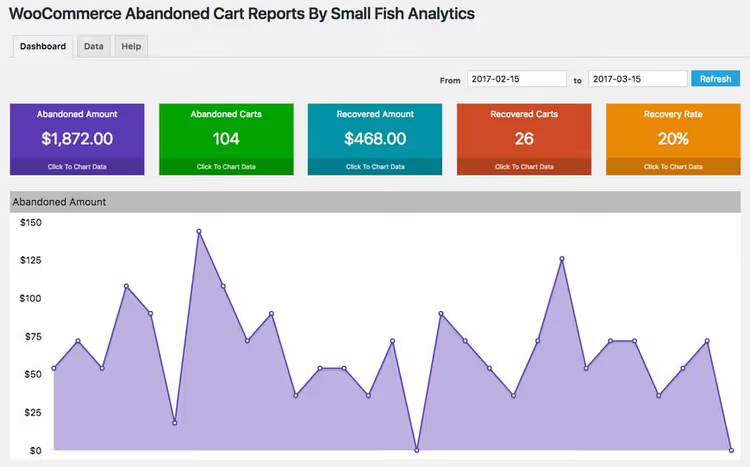
According to Baymard Institute, up to 75% of carts in online stores remain abandoned, and each lost cart is unrealized revenue. Abandoned Cart Lite from Tyche Softwares solves this problem: the plugin captures the user's email at the moment of entry at checkout and marks the cart as abandoned if the purchase isn't completed within a set interval.
The plugin tracks carts of guests and logged-in users. For each abandoned cart you see: customer email, contents, amount, time. The administrator can manually send a reminder email or set up automatic mailing: one, two or three emails at set intervals.
The free version includes: email capture at checkout, email templates (with merge codes), reports on abandoned and recovered carts, administrator notifications. The Pro version (from $1) adds SMS and Messenger reminders, exit-intent popup, return coupons, auto-deletion of old carts.
In our experience, even basic setup (one email an hour after cart abandonment) returns a noticeable share of abandoned orders. With an average order value of several dozen dollars on a hundred abandoned carts, recovered revenue measures in hundreds of dollars, the free plugin pays off instantly.
Disadvantage: there are complaints about false triggers (the plugin records bot carts). Fixed by setting up exclusions by IP and domains in settings.
🔗 Abandoned Cart Lite on WordPress.org
4. MonsterInsights

The most popular Google Analytics plugin for WordPress with 3 million active installations. MonsterInsights solves the main pain of store owners: the need to constantly go into Google Analytics and figure out dozens of reports.
After connecting, all key metrics are right in the WordPress admin: total revenue, conversion, average order value, top products, traffic sources, abandoned carts. The plugin automatically sets up WooCommerce tracking, no need to add code or manually configure events in GA4.
The free version shows: audience (countries, devices, age), popular pages, traffic sources. The Pro version (from $99/year) adds: eCommerce report (revenue, conversion, top products), abandoned cart report, form tracking, search console, page speed, outbound link tracking and affiliate clicks.
In practice, MonsterInsights is indispensable when the store is managed by more than one person: the owner sees revenue and conversion on the dashboard, the marketer sees traffic sources and campaigns, the SEO specialist sees search queries from Search Console. All in one window, without switching between tools.
Limitations: Pro version is paid (although the subscription is inexpensive for a store with noticeable turnover), the free version doesn't show eCommerce data.
🔗 MonsterInsights on WordPress.org
5. Metorik

Metorik is not just a plugin, but an external analytics platform tailored for WooCommerce. The helper plugin (less than 100 KB) syncs store data to Metorik servers, and all processing, reports and segmentation happens on their side, zero load on your hosting.
The arsenal has 75+ built-in reports: sales and returns, customers and cohorts, subscriptions, cost and profit, taxes, order sources. You can compare periods, build a custom segment (for example, "customers with high LTV who bought product X in the last 3 months"), save it and use it for email campaigns or CSV export.
A separate ace is built-in email automation. Metorik can send abandoned carts, welcome sequences, post-sale emails without a third-party service like Mailchimp. Delivery through Postmark, real-time audience sync.
Price: from $20/month (up to 100 orders/month), there's a 30-day free period. For a store with hundreds of orders per month this is justified: you get Shopify Analytics-level analytics, but for WooCommerce.
Disadvantage: the plugin is just a bridge, all data goes to an external service. For a micro-store (10-20 orders/month) the price tag might be excessive, start with MonsterInsights Pro.
Video: how to choose an analytics plugin for WooCommerce
If you're visual and prefer to watch a live overview before installation, here's a video with a breakdown of WooCommerce analytics plugins and their setup on a real store:
⁉️🤔 Frequently asked questions
Is it mandatory to install an analytics plugin if WooCommerce already shows orders?
Yes, if you want to understand not only "how much you sold", but also "where buyers came from, at which step they leave, which products they view but don't buy". Built-in WooCommerce reports show sales, but don't show: traffic sources, behavior on the site before purchase, conversion by channels, abandoned carts with contacts, cost. Standard WooCommerce gives a report "Sold for amount X for period Y". MonsterInsights will add to this "Z people came from search, of them W% bought, average order value N". The difference between "I'm selling" and "I know how I'm selling" is the difference between a store and a business.
How does GA4 differ from Universal Analytics for WooCommerce and should I think about this?
Universal Analytics (old version) stopped receiving data in July 2023, only GA4 works now. If the store still has the old UA- tracking code, replace immediately, data isn't being collected. All plugins from this list support GA4: official WooCommerce GA, Enhanced Ecommerce, MonsterInsights, all work with Measurement ID (G-XXXXXXXXXX) and GA4 events. GA4 uses an event model instead of session-based: each action (product view, click, purchase) is a separate event with parameters. This gives flexibility in building funnels, but requires correct event setup on the plugin side. The plugins from the list above do this for you.
Can I install two analytics plugins simultaneously?
Technically possible, practically not needed. Two plugins sending events to one GA4 stream double hits and distort data: one purchase counts as two, conversion doubles, behavioral metrics break. Exception: Metorik works as an external platform and doesn't conflict with GA4 plugins, because it collects data directly from WooCommerce, not through Google Analytics. If changing one plugin to another: deactivate the old one, activate the new one, check in GA4 Real-Time that events come without duplicates. Half an hour on verification saves weeks of guessing "why conversion skyrocketed".
Which plugin to choose for a small store with 10-20 orders per month?
Combination: official WooCommerce Google Analytics (free, GA4 tracking) + Abandoned Cart Lite (free, abandoned cart recovery). This is enough to see order sources and recover some lost sales. When orders reach 50+/month, connect MonsterInsights Pro ($99/year) for a dashboard in admin and eCommerce reports. At 10 orders/month, Metorik for $20/month doesn't pay off mathematically. At 200 orders, it pays off with one customer segment for repeat sales. Choose according to scale.
Does the abandoned cart plugin collect email without consent, is this legal?
Yes, if you comply with GDPR/152-FZ. Abandoned Cart Lite captures email only when the user entered it in the form field at checkout (not earlier). Sending a reminder email about an incomplete order is considered legitimate interest, but each email must contain an unsubscribe link. The plugin includes merge code
{{cart.unsubscribe}}, insert it in all templates without fail.
Which WooCommerce analytics plugin to install in 2026
The choice comes down to store scale and specific task, not just "which is best". If you need pure tracking to GA4 without extras, take official WooCommerce Google Analytics, it's free and updates every 2-3 weeks. If standard events aren't enough and you need to see the entire funnel from view to return, Enhanced Ecommerce Google Analytics will provide the missing detail.
If the main pain is abandoned carts and lost revenue, Abandoned Cart Lite will close the question for $0. If managing the store not alone and metrics should be in front of the team's eyes, MonsterInsights Pro will bring everything into admin. And if you've grown to hundreds of orders and want enterprise-level analytics without a team of analysts, Metorik (from $20/month) will provide 75+ reports, segmentation, cohorts, email automation and zero server load.
Start with GA4 tracking and abandoned carts (both free). Tomorrow you'll already see which channels bring sales and recover the first lost orders. Then scale according to needs.

A professional team of writers and editors specializing in creating quality content.