













 AIIllustrative image: AI-generated
🚀 6 best plugins for WooCommerce abandoned cart recovery in 2026
You launch ads, people visit, add items to their cart... and leave. Not at checkout, but they just close the tab. According to Baymard Institute, the average abandoned cart rate in e-commerce is 69.23%, meaning almost 7 out of 10 potential buyers drop off at the finish line.
This isn't about bad products or pricing. Most often, carts are abandoned due to distraction, unexpected shipping costs, or "I'll check later." And without automation, you won't get these people back.
Good news: properly configured abandoned cart recovery brings back 10 to 15% of lost sales. We've collected 6 tools for WooCommerce that do this automatically, and honestly compared them by price, features, and use cases.
💡 Quick overview:
- Choose a tool for your budget and store volume: from completely free plugins to SaaS with analytics
- Set up an automated email sequence: first after 20 minutes, second after 24 hours, third with a coupon
- Track the percentage of recovered carts in the dashboard and adjust email copy for your audience
- Compare prices in the table below and pick an option based on order volume
Comparison table: 6 plugins for abandoned cart recovery
Plugin | Type | Free version | Paid from | Installs / clients |
|---|---|---|---|---|
Metorik | SaaS | Yes (up to 100 orders) | $30/mo | 1,000+ |
Retainful | Plugin + SaaS | Yes (500 emails/mo) | $14/mo | 20,000+ |
Metrilo | SaaS | 14-day trial | $199/mo | 1,000+ |
WooCommerce Recover Abandoned Cart | Plugin | No | $49 one-time | 3,900+ sales |
Cart Abandonment Recovery | Plugin | Yes (fully) | Free | 30,000+ |
Abandoned Cart Lite | Plugin | Yes | $119/year | 30,000+ |
1. Metorik
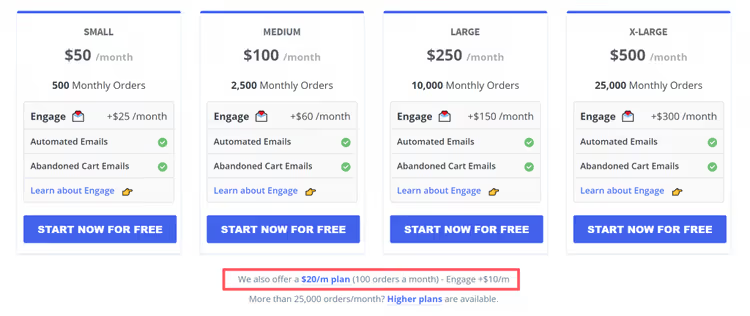
Metorik started as an analytics tool for WooCommerce, but with the launch of the Engage module it became a full-fledged platform for abandoned cart recovery. Strong point: segmentation. You can send a different email to a customer with a large order amount and someone who added one inexpensive item.
Dynamic coupons are generated automatically and tied to a specific order. The customer recovers their cart with one click on a button in the email, without re-entering their address and login.
Pros:
- Detailed analytics at every funnel stage
- Email personalization based on cart contents and order amount
- Free start for small stores
Cons:
- Engage is paid separately from the main plan
- Entry threshold for growing stores: from $30/mo for analytics plus $10/mo for Engage
Price: free up to 100 orders per month. Then from $30/mo for analytics + from $10/mo for Engage.
2. Retainful

Retainful is the direct successor to the niche once occupied by the now-closed Jilt. It's a WordPress plugin with a SaaS backend: you install a lightweight connector from the repository, and all email logic lives on the service side. This approach doesn't load your hosting and doesn't conflict with caching.
On the free plan, you get full functionality: unlimited automations, email builder with 200+ templates, subscription forms, and popups. The only limitation is volume: 500 emails per month. For a store with a hundred abandoned carts, that's more than enough.
Retainful on WordPress.org has 20,000+ active installs and a 4.7-star rating. Built-in SMS and WhatsApp support, with no markup from the service, you only pay the provider (Twilio or Meta).
Pros:
- Full functionality on the free plan
- SMS and WhatsApp in one sequence with email
- White-glove onboarding included even on the free plan
Cons:
- 500 emails per month on the free plan, insufficient for large stores
- Paid plans are tied to contact volume, not emails
Price: free (500 emails/mo). Pro: $14/mo for 10,000 emails.
🔗 Retainful on WordPress.org🔗 Retainful website
3. Metrilo
Metrilo combines CRM, analytics, and marketing automation in one tool. Unlike specialized abandoned-cart solutions, here you get a complete customer profile: which pages they viewed, what they bought before, at what stage they left.
For cart recovery, Metrilo offers a visual email builder with drag-and-drop. You can dynamically insert a list of abandoned items or provide a direct link to the customer's cart without re-authentication.
The main advantage: sending conditions go deeper than the binary "abandoned / not abandoned." You can set up one sequence for repeat customers and another for new visitors. The logic: a repeat customer needs just a reminder, while a new one needs additional incentive.
Pros:
- Full CRM with customer history in one window
- Detailed sending conditions based on customer profile
- 14-day trial without a credit card
Cons:
- Abandoned cart available only on the Premium plan ($299/mo)
- High entry threshold for small businesses
Price: from $199/mo (basic plan). Premium with abandoned cart: $299/mo.
4. WooCommerce Recover Abandoned Cart
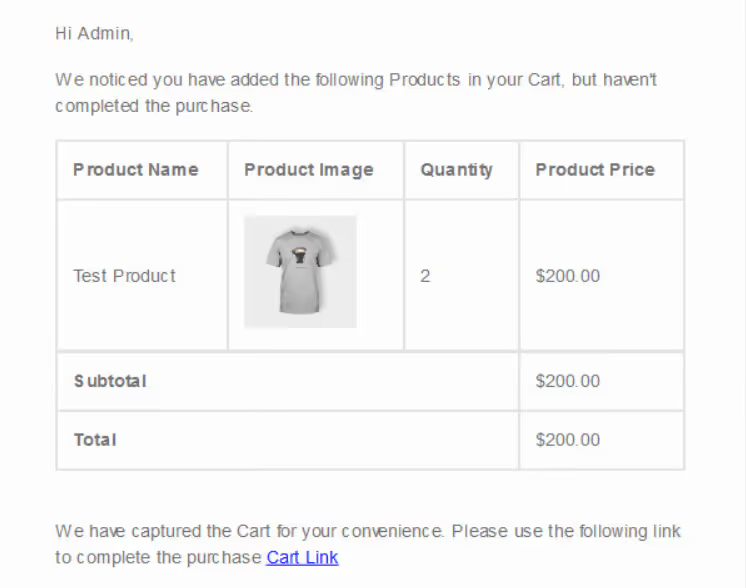
CodeCanyon bestseller with 3,900+ sales. Unlike SaaS solutions, this plugin lives entirely inside the WordPress admin: you don't depend on an external server, and cart data doesn't leave your site.
Inside: automatic email scheduler, TinyMCE template editor, merge tags for inserting customer name and cart contents. Built-in analytics show how many carts were recovered and for what amount.
The main trump card: one-time payment. For $49 you get a lifetime license with 6 months of support. For a startup store or one with a limited budget, this is the most predictable option: no monthly charges, no tie to email volume.
Pros:
- One-time payment, no subscription
- Data stays on your server
- Simple setup through standard WordPress editor
Cons:
- Interface looks outdated compared to SaaS competitors
- No built-in coupons in the base version (only through template)
- Updates and support limited to 6 months
Price: $49 (one-time license).
🔗 WooCommerce Recover Abandoned Cart on CodeCanyon
5. Cart Abandonment Recovery for WooCommerce

Completely free plugin from the CartFlows team, with 30,000+ active installs. Unlike Abandoned Cart Lite, there's no cut-down free version and paid upgrade: all functionality is available immediately.
The plugin captures email at the checkout step. As soon as the customer starts entering data, the cart is recorded. Then a configurable email sequence triggers with intervals you set yourself.
The dashboard shows the number of abandoned and recovered carts, revenue from each sequence, and email conversion. For a small store that needs "set and forget," this option completely covers the task.
Pros:
- Absolutely free, no premium upgrade
- Simple installation and minimal setup
- Clear dashboard with recovery metrics
Cons:
- No drag-and-drop email builder
- No built-in coupons and dynamic discounts
- No segmentation by order amount or customer type
Price: free.
🔗 Cart Abandonment Recovery on WordPress.org
6. Abandoned Cart Lite for WooCommerce
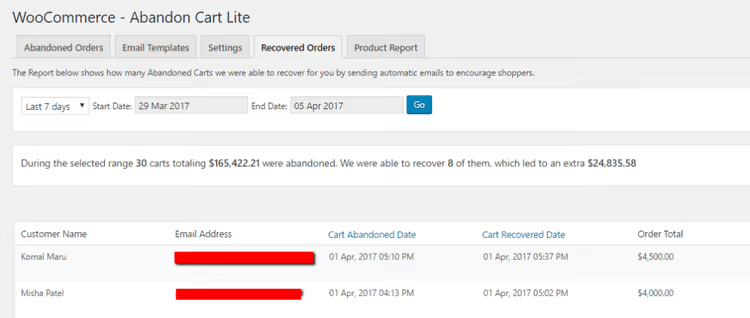
The most popular free abandoned cart plugin in the WordPress repository: 30,000+ installs and a 4.5-star rating. The free version provides basic but functional features: TinyMCE template editor, merge tags, email timing configuration, and defining what counts as an abandoned cart.
You can send emails through the standard WooCommerce template or connect your own CSS. Basic statistics show a list of abandoned and recovered orders.
The Pro version for $119 per year adds dynamic coupons, email open tracking, extended analytics, and support for custom variables in templates. This is a compromise option: start free, and when store volume grows, enable paid features.
Pros:
- Free version is fully functional
- Tens of thousands of installs and active community
- Clear transition from Lite to Pro
Cons:
- Email editor interface inferior to SaaS solutions
- Coupons and open analytics only in Pro
- Premium features require annual subscription
Price: free (Lite). Pro: $119/year.
🔗 Abandoned Cart Lite on WordPress.org🔗 Abandoned Cart Pro
When to send abandoned cart emails
Choosing the plugin is half the battle. The other half is proper timing. According to Shopify data, the first email's conversion is maximum when sent 20 minutes after leaving the site: 5.2% versus 2.6% when sent after 24 hours.
The optimal three-email sequence looks like this:
- After 20 minutes: reminder about cart contents, no discount. Goal: bring back a distracted customer.
- After 24 hours: second email emphasizing product benefits or social proof. Don't offer a coupon yet.
- After 48-72 hours: final email with a time-limited coupon. Incentive for those who were waiting for a discount.
Some SaaS tools, such as Metorik Engage, offer ready-made sequences based on industry data. If you're setting everything up manually, stick to the "20 minutes, 24 hours, 48 hours" rule and don't start with a coupon.
⁉️🤔 Frequently asked questions
What counts as an abandoned cart in WooCommerce?
An abandoned cart is one where a customer added an item but didn't complete checkout. Most plugins record the cart when a visitor starts entering their email on the checkout page, and allow you to configure a timeout: for example, consider a cart abandoned after 15 minutes of inactivity.
Do abandoned cart plugins work with guest customers?
Yes, but with a caveat: the customer must have entered their email at some point, in a subscription form, on a product page, or at the start of checkout. Without an email, recovering a guest's cart is impossible. Most SaaS tools (Metorik, Retainful) capture email before registration completion.
Which plugin to choose if the store is just launching?
Cart Abandonment Recovery: completely free, with 30,000+ installs, configurable in 10 minutes. If you need dynamic coupons and more flexibility, take Abandoned Cart Lite with the prospect of upgrading to Pro ($119/year). When order volume exceeds 100 per month, look toward Retainful or Metorik.
Can I use the plugin together with a caching plugin?
Yes. Most modern abandoned cart plugins (Retainful, Metorik) work through JavaScript tracking or server API and don't conflict with caching. Older plugins relying on PHP sessions may glitch, check the documentation before installation.
What percentage of carts can actually be recovered?
According to Baymard Institute data, the average recovery rate through email is 10-15% of all abandoned carts. With a well-configured three-email sequence and dynamic coupons, you can raise this figure to 20-25%. But it's important to understand that 69% of abandoned carts are fundamentally unrecoverable: the customer left because they were comparing prices or changed their mind.
Let's sum up. If you have a small store and minimal budget, start with Cart Abandonment Recovery. It's free, requires no setup, and simply works. Need coupons and flexibility, take Abandoned Cart Lite, and when volume grows, enable Pro for $119 per year.
Store is growing, over 100 orders per month, connect Retainful. For $14 per month you get omnichannel sequences (email + SMS + WhatsApp), which no one else has in this price segment.
If analytics is more important to you than price, Metorik covers the entire funnel from traffic sources to LTV. And when you need a full CRM with each customer's profile, Metrilo, but be ready for a bill from $199 per month.
One-time payment and no subscriptions, WooCommerce Recover Abandoned Cart from CodeCanyon for $49. The interface isn't the freshest, but the functionality is proven on thousands of stores.
Choose a tool for your situation, set up a three-email sequence with proper intervals, and claim those 10-15% of sales that are currently just walking away.

A professional team of writers and editors specializing in creating quality content.