














🎥 5 best video gallery plugins for WordPress 2026 (free and paid)
You added a video to your site, but it looks like a random insertion in the middle of the text. No structure, no grid, visitors don't know where to look. Sound familiar?
A good video gallery brings videos together into a unified showcase, keeps visitors engaged and works for brand recognition. But WordPress out of the box doesn't know how to build video galleries. The built-in Embed block shows one video, and that's it. To get a grid with filters, playlists, lightbox and auto-updates from a YouTube channel, you need a separate plugin.
We tested 6 tools, from free YouTube widgets to premium all-in-one solutions with support for Vimeo, Wistia and self-hosted video. In this collection, only live plugins that were updated in 2026 and are compatible with WordPress 6.7+.
💡 Quick overview:
- Decide on your video source: YouTube only or a mix of Vimeo, Wistia and self-hosted
- For a YouTube-only scenario, take
Feeds for YouTubeorAutomatic YouTube Gallery. For mixed photo+video:Envira Gallery. For grids with filters and animation:Essential Grid - A free version of any plugin from the collection is enough to start, each has a working Lite version or demo
- After installation, configure caching for API requests to YouTube, without it the gallery slows down the page
Comparison table: all 6 plugins in 30 seconds
Plugin | Best scenario | Video sources | Free version | Pro price | Site |
|---|---|---|---|---|---|
| Simple showcase with hover effects | YouTube, Vimeo, Wistia, MP4 | ✅ Free | $15/year | total-soft.com |
| Photo + video in one gallery | YouTube, Vimeo, Wistia, Twitch, self-hosted | ❌ (Lite demo) | $99.50/year | enviragallery.com |
| Blog with YouTube content | YouTube | ✅ | $99/year | |
| Auto-stream channel to site | YouTube | ✅ | $49/year | smashballoon.com |
| Grids with filters and animation | YouTube, Vimeo, self-hosted, social media | ❌ (demo) | from $39/year | essential-grid.com |
| SEO-optimized YouTube showcase | YouTube | ✅ | from $39/year | wordpress.org/plugins/automatic-youtube-gallery/ |
1. Envira Gallery
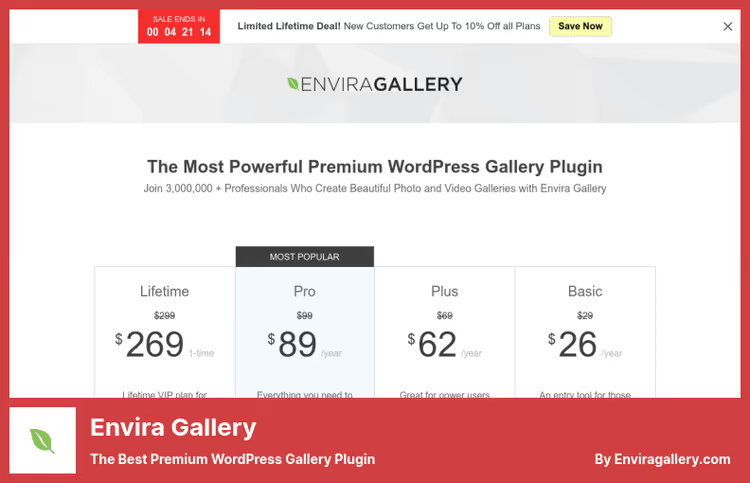
Envira Gallery, a veteran among WordPress galleries with 3+ million installations. The plugin started as a photo gallery, but in the Pro version it got full video support: YouTube, Vimeo, Wistia, Twitch, DailyMotion, VideoPress and self-hosted MP4. You build a gallery in a visual drag-and-drop constructor, choose a template, and get a responsive grid with a lightbox where video starts with one click.
The strong side of Envira, mixed galleries. In one grid, photos, videos and audio files peacefully coexist. For a photographer who publishes both shots and backstage clips, an ideal format.
Pros:
- Support for 7+ video platforms + self-hosted MP4
- Lightbox with thumbnails for navigation and share buttons
- Lazy loading out of the box, gallery doesn't slow down the page
- Import from Dropbox and conversion of standard WP galleries in one click
Cons:
- Video features only in Pro; basic version, photos only (Envira pricing)
- Price bites for a small site where you need one video gallery
- Social media and sharing settings require separate activation, not everything out of the box
Price: Basic, $39.50/year (photos), Plus, $69.50/year, Pro, $99.50/year (video), Ultra, $199.50/year. (source) Envira plans
🔗 Envira Gallery on official site
2. Video Gallery, Video Gallery - YouTube Gallery

Video Gallery - YouTube Gallery (in the WordPress.org catalog, Video Gallery - YouTube Gallery & Responsive Video Playlist) turns a collection of YouTube videos into a cinematic playlist with a large player and a ribbon of thumbnails below it. Version 4.0.2, released in February 2026, was completely rewritten for the Block Editor: you add videos by YouTube ID, and the gallery is assembled in real time in the editor sidebar.
The plugin automatically creates a separate SEO page for each video, with comments, description and clean URL. For a blog that publishes video content regularly, this closes the question with indexing.
Pros:
- Visual Block constructor, not a single shortcode, real preview in admin
- Auto pages for each video (SEO-friendly, with comments)
- Setup wizard creates gallery and grid pages in one click
- Light code, doesn't load extra on the front
Cons:
- YouTube only: neither Vimeo nor self-hosted video are supported
- Pro version needed for channel auto-sync and lightbox (Video Gallery - YouTube Gallery pricing)
- Changing video order in the grid is not obvious, several users complain in reviews
Price: Free version on WordPress.org. Pro, $99/year (auto-sync, lightbox, masonry and coverflow layouts). (source) Video Gallery - YouTube Gallery plans
🔗 Lite on WordPress.org🔗 Pro version
3. Feeds for YouTube (Smash Balloon)

Feeds for YouTube connects to your YouTube channel via API and automatically pulls new videos to your site. You choose the layout, list, grid or gallery, and the plugin builds a feed that inherits your theme styles. No manual link copying: you published a video on YouTube, it appeared on the site.
The main advantage, performance. Smash Balloon caches API responses and doesn't load the YouTube iframe until the visitor clicks on the thumbnail. The page with the gallery stays fast, even if there are 50 videos in the feed. With a million active installations, this is the most popular YouTube plugin in the WordPress ecosystem.
Pros:
- Channel auto-sync, new videos on the site without manual addition
- Three layouts (list, grid, gallery) + Load More button
- API caching and deferred iframe loading, minimal impact on speed
- Subscribe button right in the gallery, YouTube subscriber growth
Cons:
- YouTube only: videos from Vimeo or self-hosted are not supported
- Pro needed for live streams, carousel and keyword filtering (Smash Balloon pricing)
- Requires YouTube API key to work, extra step during setup
Price: Free version on WordPress.org. Pro, $49/year (live streams, carousel, filters, custom post-view actions). (source) Smash Balloon plans
🔗 Feeds for YouTube on WordPress.org🔗 Pro version on Smash Balloon
4. Essential Grid

Essential Grid from the ThemePunch team (creators of Slider Revolution), this is a grid builder that works with any content: video, photos, audio, iFrame, WooCommerce posts and social media feeds. For video, YouTube, Vimeo and HTML5 self-hosted are supported, plus direct embed links from Instagram and Twitter.
The plugin comes with 60+ ready-made grid templates and dozens of animations. You configure the layout, filters by tags, pagination and transitions, and get a showcase that looks like custom development. With 34,000+ sales on CodeCanyon, this is one of the most sought-after grid builders for WordPress.
Pros:
- 60+ grid templates, from masonry to carousel with fixed height
- Filters by tags right in the gallery: visitor sorts videos without reloading the page
- Export/import grids between projects
- Visual editor, the same as Slider Revolution (familiar interface)
Cons:
- Price starts from annual subscription for 1 site; for a freelancer with 10+ projects, the cost grows (Essential Grid plans)
- Steep learning curve: 60+ templates require time to master
- No free version on WordPress.org, only commercial license
Price: Starter, from $39/year (1 site), Enthusiast, from $99/year (3 sites), Scale, from $299/year (up to 250 sites). (source) Essential Grid licenses
🔗 Essential Grid on official site
5. Automatic YouTube Gallery

Automatic YouTube Gallery from Plugins360 Labs, a free plugin that builds a video gallery from YouTube using five scenarios: username, channel ID, playlist, search query or list of URLs. You configured the source once, and the gallery updates itself.
Version 2.7.2 (compatible with WordPress 7.0) includes a Gutenberg block, shortcode builder for the classic editor and sidebar widget. The plugin caches YouTube API responses, and for GDPR pulls a consent overlay before loading the video. The Pro version adds four themes (Popup, Inline, Slider, Playlist) and JSON-LD SEO markup, this is critical if you want Google to show your video pages as a rich result.
Pros:
- 5 filling sources: channel, playlist, search, username, list of URLs
- API caching for fast loading, even with 50+ videos on the page
- GDPR overlay out of the box (free)
- Gutenberg block + shortcode + widget, embeds in any environment (Elementor, Divi, WPBakery)
Cons:
- Pro version needed for SEO markup (JSON-LD, Open Graph, deeplinking)
- Slider and Popup themes, only in Pro
- Some users complain that the playlist doesn't update automatically after adding new videos
Price: Free version on WordPress.org. Pro, from $39/year (SEO markup, 4 themes, deeplinking). (source) Plugin plans
🔗 Automatic YouTube Gallery on WordPress.org
⁉️🤔 Frequent questions
Can I do without a plugin at all, just insert video via Embed?
You can, if you have one or two videos on a page. The built-in Embed block in WordPress inserts a YouTube iframe directly into the content, and each such iframe pulls ~1.5 MB of JavaScript even before clicking play. Three videos, 4.5 MB of extra weight on the page. Plugins like
Feeds for YouTubeandAutomatic YouTube Galleryreplace the preview with a placeholder image, and load the iframe only on click, saving traffic by multiples. Yes, the standard Embed block is enough for one or two clips. But as soon as video becomes a content strategy, you need a plugin with caching, lazy loading and a grid. Otherwise the site will drop in Core Web Vitals and search positions.
Which plugin to choose if I have a YouTube channel and I want to automatically show new videos on the site?
Feeds for YouTube(Smash Balloon), the best choice for channel auto-stream. You connect the YouTube API, specify the channel, and new videos appear on the site themselves. The free version has a grid and list, the Pro plan adds a carousel and live streams. If the budget is zero, takeAutomatic YouTube Gallery. It also knows how to auto-update the gallery from a channel, playlist or search query. Pro will be needed only for SEO markup and slider.
What to replace YourChannel with, it's still working, right?
Formally
YourChannelis still in the WordPress.org catalog, but the last update was 2 years ago, and the plugin has not been tested with the last three major WordPress versions. In practice, this means risk of incompatibility with WP 6.7+, vulnerabilities without patches and potential conflicts with PHP 8.2+. Both scenarios thatYourChannelcovered (channel stream to site + playlists) are covered by the pairFeeds for YouTube+Automatic YouTube Gallery, with fresher code and active support. Don't risk it. 10,000+ active installations ofYourChannel, this is inertia, not a quality guarantee. Move toFeeds for YouTube: migration will take 10 minutes (change API key and insert new shortcode).
Do I need a Pro plan or is the free version enough?
For 80% of scenarios, the free one is enough. Paid features that are really worth paying extra for: channel auto-sync (so you don't add videos manually), JSON-LD SEO markup (for rich results in Google) and extended layouts, masonry, carousel, filters by tags. If you're streaming a channel to a site, take Pro from
Feeds for YouTube. If you're making a mixed photo-video gallery for a portfolio,Envira GalleryPro. For everything else, freeVideo Gallery - YouTube GalleryandAutomatic YouTube Galleryare more than enough.
How do video gallery plugins affect site speed?
With proper setup, they hardly affect it. All plugins in this collection cache YouTube API responses and use lazy loading for iframes. Worst scenario, direct embed video via standard WordPress block: each video adds ~1.5 MB to page load, even if the visitor didn't click Play. With a plugin, the same page with 10 videos will lose 50-100 KB on thumbnails and 0 KB on players before the first click. After installing any plugin from the list, go to settings and enable API caching. In
Feeds for YouTubeandAutomatic YouTube Galleryit's enabled by default, inVideo Gallery - YouTube Gallery, it's configured separately.
What to install in 2026: verdict by scenarios
If you have a YouTube channel and the task is for new videos to appear on the site themselves, take Feeds for YouTube. The free version is enough to start, the Pro plan covers live streams and carousel.
For a mixed photo-video gallery with lightbox and sharing, Envira Gallery Pro. There are simply no other options with such a set of sources. Need a free showcase with a cinematic player, Video Gallery - YouTube Gallery (4.0.2 for Block Editor). Want a grid with filters by tags and animation, Essential Grid. And when the budget is minimal but SEO is important, Automatic YouTube Gallery with its JSON-LD markup in Pro.
All six plugins are alive, updated and work on WordPress 6.7+. Try the free versions, each has Lite or demo, and choose for your task, not someone else's rating.

A professional team of writers and editors specializing in creating quality content.