














💡 How to add social networks to a WordPress site with Flow Flow
Social media is not just a feed of memes. For businesses and blogs, it's a trust channel: a follower sees activity, visits the site, and stays. The problem is that social networks are fragmented. Facebook, Instagram, X, Pinterest, YouTube, each has its own interface and plugin. Installing five plugins for five social networks? Bulky and inconvenient.
Flow Flow solves this task with a single plugin. It gathers posts, photos, and videos from a dozen and a half social networks into a unified styled feed right on your WordPress site. No hacks, no extra server load. We tested it, setting up from scratch takes about half an hour.
In this guide, a step-by-step deployment of Flow Flow: from purchase to publishing the feed. All screenshots are current for version 4.9 (June 2026).
💡 Quick overview:
- What Flow Flow is: a plugin that gathers feeds from Facebook, Instagram, X, YouTube, Pinterest, TikTok, and a dozen other social networks into a single stream on your site
- Step 1: purchasing a license on CodeCanyon, downloading and installing the plugin
- Step 2: configuring general parameters, moderator roles, date format, caching
- Step 3: adding social networks, for each you specify login, token, or hashtag
- Step 4: assembling the stream, layout, grid, card style, filters, and shortcode
- Step 5: publishing the stream on a site page via shortcode or editor
What Flow Flow is and which social networks it pulls
Flow Flow is a premium plugin from developer Looks Awesome, sold on CodeCanyon. As of June 2026, the plugin has over 23,000 sales and a rating of 4.6 out of 5. The last update was released on June 11, 2026, the product is alive and actively supported.
The PRO version for $49 pulls 14 sources: Facebook, X (Twitter), Instagram, TikTok, YouTube, Pinterest, Tumblr, Vimeo, Flickr, Dribbble, SoundCloud, Foursquare, WordPress, and RSS, current pricing on the Flow Flow site. The free version is limited to four social networks (Facebook, X, Instagram, Pinterest) and Masonry layout, enough for testing, but for a production site it's better to get PRO.
The main advantage of Flow Flow over competitors is smart server-side caching. The feed doesn't load from scratch with every visitor. Plus adaptive grid, built-in lightbox for photos, and moderation by words, names, and URLs, you can filter out trolls and spam without additional plugins.
Step 1: purchase, download, and install the plugin
For a license, go to the Flow Flow page on CodeCanyon. For a personal site, a Regular license is enough, for client projects look at the extended one, it pays for itself with the first project.

After payment, download the plugin archive from the CodeCanyon downloads page. Note: if you selected the "All files and documentation" option, the archive needs to be unpacked, inside will be a separate zip file flow-flow.zip, which is uploaded to WordPress.

Technically, installation is standard: WordPress Admin → Plugins → Add New → Upload Plugin → Choose File flow-flow.zip → Install → Activate. After activation, a Flow Flow section appears in the left menu.
Step 2: configure general parameters
Before adding social networks, check out Flow Flow → Settings. Here you set basic parameters that affect the entire feed's operation.

What to pay attention to first:
- Moderator role, which site users can moderate the feed. By default administrator, but can be delegated to editors.
- Date format, post date display format. Match it to your site's locale.
- Number of saved posts, how many posts to keep in cache. For an active feed, set 50-100.
Other parameters, notifications, integration with page builders, proxy settings, can be left at default or tweaked once you get the hang of it.
Step 3: add social networks
Go to Flow Flow → Feeds and click the green "Create Feed +" button. A popup window will open.

Click the green button to open the new feed creation wizard. The interface is minimalist, you won't get confused.
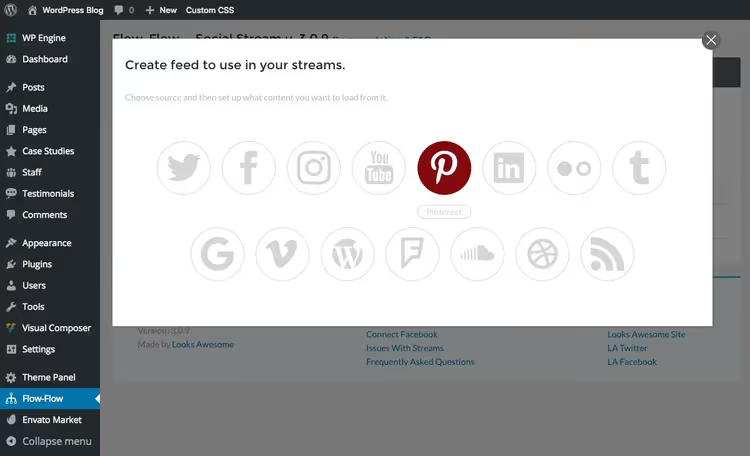
Select a social network from the dropdown list. For example, take Pinterest, it's the easiest to add: you only need the user login or board name. No tokens or apps required.

After selecting the social network, set parameters: feed refresh frequency (from 5 minutes to once a week), number of posts to load (1, 5, 10, or 20 at a time), enable or disable pre-moderation. Click "Add Feed", the feed is added.
Now repeat for each needed social network. Facebook, X, Instagram, YouTube, and several others require prior authorization via access tokens or creating a developer app. Don't worry, Flow Flow simplifies the process.

In the Auth section, the plugin collects all authorization fields in one place. For each social network there's a link to official Flow Flow documentation with step-by-step instructions: how to register an app, get a token, specify access rights. Follow the instructions, it's a one-time setup taking 5-10 minutes.
Pinterest, Flickr, Vimeo, WordPress, and RSS require no authorization, they can be added immediately after plugin installation.
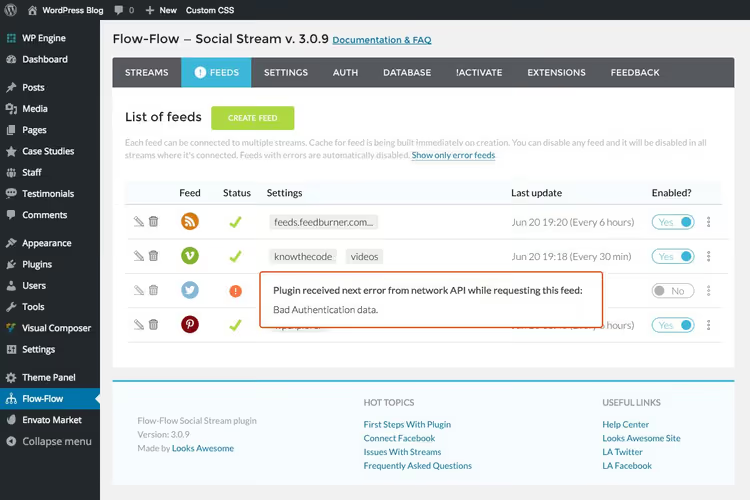
If you made a mistake in settings when creating a feed or forgot to add authorization, you'll see an orange exclamation icon. Hover the cursor to read the error description, fix the settings, and enable the feed again.
Step 4: assemble a stream from added social networks
Once all social networks are added, they need to be assembled into a single stream. Go to Flow Flow → Streams and click "Create Stream +".

Sources
Give the stream a name and start adding feeds via the dropdown menu. Each added feed displays in the "Connected Channels" section.

After adding, feeds display as a list in the lower part of the window.
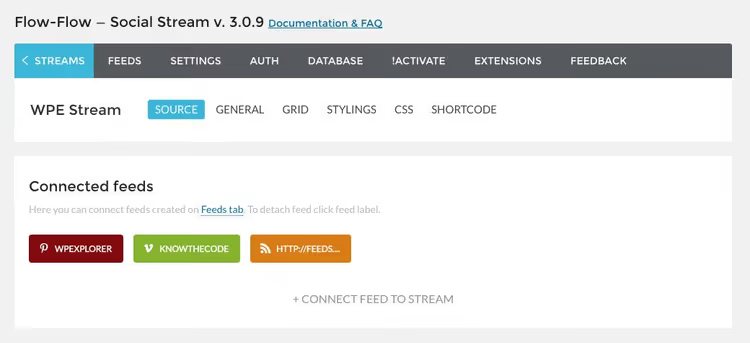
One stream can contain any number of feeds from different social networks. Want three X accounts, two Instagram, and Facebook in one stream? No problem.
General stream settings
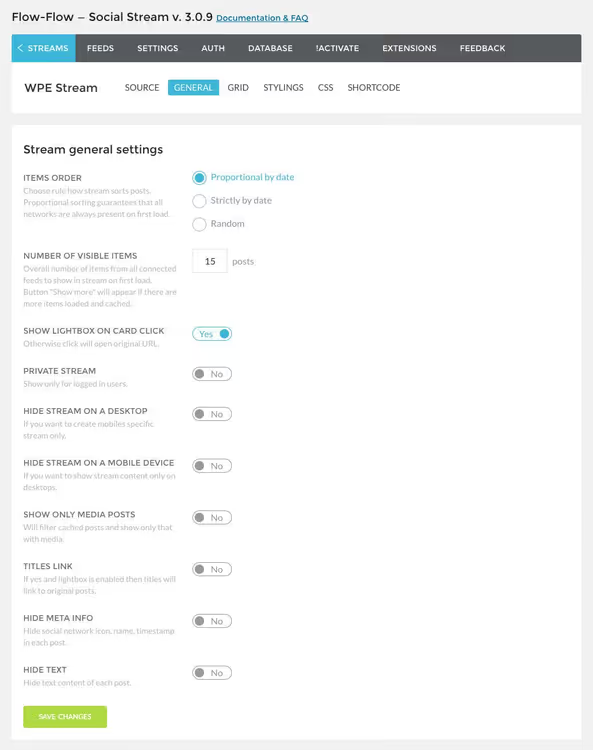
On the General tab, you set sort order, posts per page, lightbox enablement, mobile display, and privacy parameters.
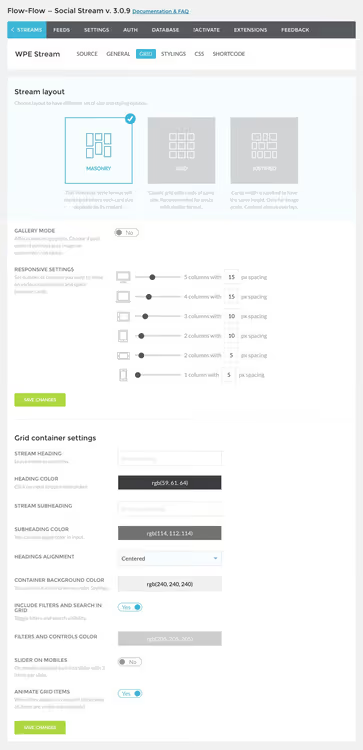
Grid
The Grid tab manages layout. Available PRO version layouts: Masonry (tile layout), Equal Grid (even grid), Justified (width alignment), and Slider (carousel). Here you also configure number of columns, spacing between cards, and header display.
Card style
On the Style tab, a card builder with drag-and-drop elements. Change colors, avatar position, social network icons, and text. The setup is flexible, the feed can be matched to any site design.

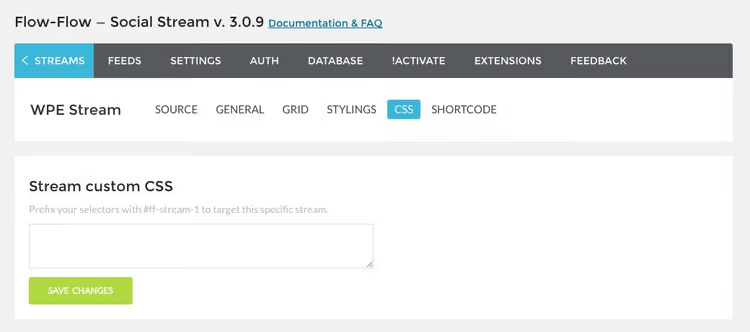
Custom CSS
The Custom CSS tab is for developers and those who aren't afraid of code. Add your own styles if built-in settings aren't enough.
Shortcode
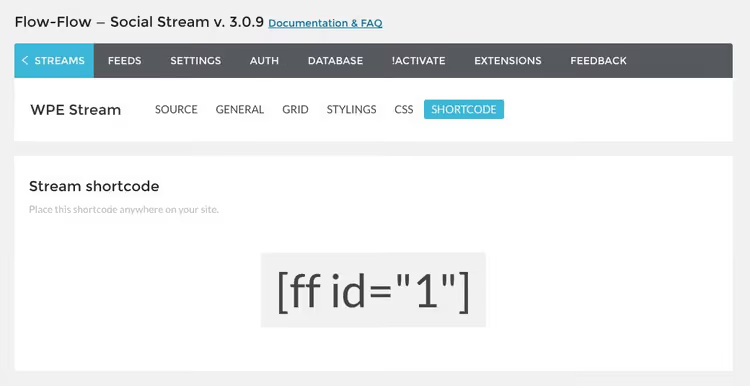
The last tab is Shortcode. Here lies the ready stream shortcode. Copy it, you'll need it for step 5.
Step 5: publish the stream on the site
All that's left is to display the feed on a site page. Two options.
Via shortcode. Create a new page (or post), insert the shortcode into the text editor, and publish. The feed will appear on the page where you inserted the shortcode.
Via page editor. If you use a visual builder (WPBakery, Elementor, Gutenberg), Flow Flow adds its own block. Click the "+" icon for a new element, find Flow Flow Social Stream, and select the needed stream from the dropdown list.

When using a visual builder, the process is even simpler. Click the "+" icon to add a new element to the page.

Find Flow Flow Social Stream in the list of available blocks and select the needed stream from the dropdown menu. Save, and the feed will appear on the page.

Select the stream, save the page, and publish. The feed will appear on the site immediately, with caching, adaptive grid, and all configured design.
Capabilities beyond the feed: Flow Flow extensions
Looks Awesome developers released two paid extensions for Flow Flow that may be useful for business.
Ads & Branding adds advertising and branded cards to the feed. You can sell ad space in the stream, show your own banners, or pin a card with brand information above other posts. Works like an ad network inside the social feed, without additional plugins.
Broadcasting turns the feed into a broadcast for a large screen. Scenario: conference, office lobby, exhibition. The social feed is displayed on a projector or TV in real time, guests see tweets, posts, and photos from the event. Supports all the same social networks as the main plugin.
Both extensions are sold separately from the main Flow Flow license, check prices on the plugin documentation page.
⁉️🤔 Frequently asked questions
Does Flow Flow slow down the site? Does it slow loading?
No, thanks to server-side caching. The feed doesn't load data from social networks with every visitor. Posts are cached on your server, and images are processed once when building the grid. In practice, the difference in page load time with and without Flow Flow feed is within the margin of error.
How is Flow Flow better than free alternatives?
Three things. First, simultaneous support for 14 social networks in one stream (free plugins usually pull 1-2 networks). Second, card design builder: you're not tied to one template, any element can be moved and recolored. Third, moderation: exclusion by words, usernames, and URLs right from admin, without editing code.
Can Flow Flow be used with Gutenberg?
Yes, the plugin is compatible with the Gutenberg block editor, adds its own "Flow Flow Social Stream" block. Works with both the classic editor (shortcode), WPBakery, and Elementor.
What to do if the feed stopped updating?
First, check authorization tokens in the Auth section. Social networks periodically revoke tokens or change APIs. Second, check feed status in the Feeds tab: an orange icon means an error, hover over it to see the reason. Third, clear the plugin cache in settings. If that doesn't help, contact Looks Awesome support, they respond within a day.
Does Flow Flow support TikTok?
Yes, TikTok support was added in version 4.9. TikTok feed is embedded in the general stream alongside Instagram, YouTube, and other social networks.
Is Flow Flow worth its $49: final verdict
For most WordPress sites, the answer is clear: yes, it's worth it. For the price of one and a half to two separate plugins for each social network, you get one tool that covers all social networks at once, with caching, moderation, and flexible design.
If you need a simple feed from one Instagram, look at free options like Smash Balloon. But if the site should have several social networks in a unified stream, Flow Flow is the best on the market. Try the free version, it's available on the official Flow Flow site with a limit of 4 social networks. If you like how the logic and interface work, get PRO for $49 and deploy a full-featured feed with design matched to your site.

A professional team of writers and editors specializing in creating quality content.