














⚡ 7 best WordPress frontend editing plugins in 2026
Remember that moment when a client asks to "just fix a couple of paragraphs," and you realize they'll have to dive into the WordPress admin, find the right page, wait for the editor to load, and worry about breaking the layout? For non-technical users, the WordPress backend is foreign territory.
Fortunately, frontend editing plugins solve this problem radically: users edit text, images, and layouts directly on the page, seeing results instantly. No admin panel, no dashboard.
Below are 7 current plugins for WordPress frontend editing in 2026, from powerful page builders to lightweight content editing tools. Each has been tested on live projects.
💡 Quick overview:
- If you need to drag blocks and build layouts from scratch, go with Elementor (free start) or WPBakery (premium powerhouse with 45+ elements).
- If budget is tight but you want visual layout building, Live Composer and Brizy offer powerful functionality for free.
- If the task is narrower, to let clients edit ONLY text and images on finished pages, look at Editus, PostEase, or built-in Gutenberg.
Plugins for visual page building
These tools give full control over design: rows, columns, sliders, forms, everything assembled via drag-and-drop. Suitable for those building a site from scratch or changing page structure.
1. WPBakery Page Builder
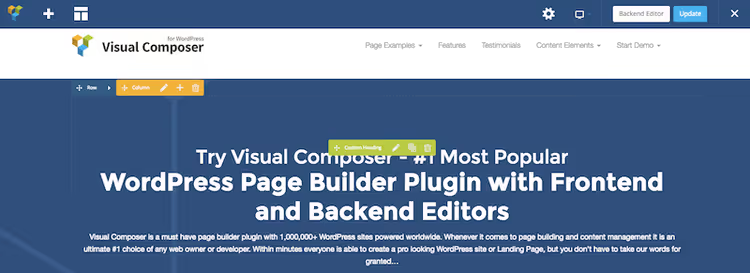
WPBakery (formerly Visual Composer) is one of the oldest and most widespread page builders for WordPress. The plugin is used by over 5 million sites, and in 2025 it received AI integration to speed up layout work.
It works in two modes: backend (element grid) and frontend (visual drag-and-drop). Switching between them takes one click. Available are 45+ content elements and 60+ ready-made templates. Another 150+ third-party addons extend functionality: sliders, galleries, forms.
Many premium themes (like Total) include WPBakery in the package with additional modules and settings, providing even more capabilities at no extra cost.
- Pros: intuitive drag-and-drop, compatibility with most themes, huge addon ecosystem, AI acceleration.
- Cons: requires getting used to (learning curve), when switching themes layout can break, pages need rechecking.
Price: from $45 (one-time license for one site).
🔗 WPBakery on CodeCanyon | 🔗 Official site
2. Elementor

Elementor is the most popular page builder for WordPress: over 15 million active installations. The free version includes 23 basic widgets and ready-made templates, Pro adds another 24+ advanced blocks (sliders, forms, dynamic data).
The main advantage is real-time preview and open source code. If you know CSS and PHP, Elementor is easy to customize. The plugin is translated into 50+ languages and works with most themes.
Note: the best features (Theme Builder, dynamic popups, custom fields) are only available in Pro. But for most tasks the free version is more than enough.
- Pros: intuitive interface, huge template library, active community, free start.
- Cons: Pro functionality is paid, on weak hosting can slow down the admin.
Price: free / Pro from $59/year.
🔗 Elementor on WordPress.org | 🔗 Elementor Pro
3. Brizy

Brizy is a new generation builder with a minimalist interface. Instead of a "pile" of settings in side panels, Brizy shows only needed options directly above the element. Smart & clutter free is a marketing slogan, but it works.
The plugin includes 36+ elements, 150+ ready-made design blocks and works with any themes. The Pro version adds popups, WooCommerce integration, dynamic templates and custom post types. A separate plus is Brizy Cloud service for those who want to build pages without installing WordPress at all.
- Pros: very clean interface, quick learning, Pro functionality available by subscription.
- Cons: fewer addons and extensions than Elementor, Pro subscription is annual.
Price: free / Pro from $99/year.
🔗 Brizy on WordPress.org | 🔗 Brizy Pro
4. Live Composer
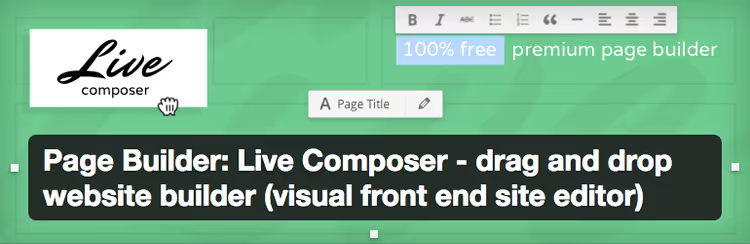
Live Composer is a free open-source builder with frontend editing. Right on the page, a green "Activate Editor" button enables drag-and-drop mode. You add rows, columns, text, images, and immediately see the result.
Over 60,000 active installations, 4.8 stars on WordPress.org. In 2025, version 2.0 was released with a redesigned interface and full WooCommerce support. Pro extensions add breadcrumbs, Google Maps, mega menus, animations.
Important: Live Composer uses its own content approach, elements are NOT via shortcodes (unlike many competitors), so when switching themes content stays clean.
- Pros: completely free, clean code without shortcodes, open source, WooCommerce integration.
- Cons: doesn't work with existing content (only new pages), adds custom post types on installation.
Price: free / Premium extensions from $39/year.
🔗 Live Composer on WordPress.org | 🔗 Premium Extensions
Plugins for frontend content editing
These tools are narrower, focused on PRECISE editing of text and images. Not about building pages, but about letting clients fix a heading, replace a photo, and click "Update," all without entering the admin panel.
5. Editus
Editus (formerly Lasso) is a premium plugin from the developers of Aesop Story Engine. This is precisely a content editor: text, links, images and featured images can be edited, but page layout cannot. Access to the editor is through a small toolbar that appears above the post with one click.
The plugin is paid and relatively expensive: $99 for three sites. But the interface is minimalist, and extensibility through ASE addons (maps, galleries, timelines) provides additional storytelling capabilities.
- Pros: simple interface, compatibility with most themes, featured image support.
- Cons: pricey for "just an editor," no visual layout building.
Price: from $99 (three sites).
6. PostEase

PostEase is a fresh and fast-growing plugin for frontend editing. Free. Works simply: a logged-in user with needed permissions sees a Quick Edit button on any post or page, clicks it, gets a modal window with TinyMCE editor (the same one as in classic WordPress), edits title, content, custom fields and saves via AJAX.
The role model is flexible: you can give editors access to some post types, authors to others, and subscribers none at all. Supports media uploads inside the editor and works on top of Elementor / Divi / Brizy, doesn't conflict with builders.
The plugin is fresh (late 2025), so active installations are 30+ so far, but the architecture is clean and secure (nonces, capability checks, AJAX saving).
- Pros: free, TinyMCE out of the box, flexible role model, doesn't conflict with builders.
- Cons: no Gutenberg blocks support yet (in roadmap), few reviews.
Price: free.
7. Gutenberg

Gutenberg is no longer a "plugin," since WordPress 5.0 it's the built-in block editor. Blocks (paragraph, heading, image, gallery, columns, quote) are inserted and rearranged directly on the page. With each release it grows in capabilities: full-fledged Full Site Editing (FSE) allows editing header, footer, sidebars, all visually.
Free and always at hand: no need to install a separate builder if tasks are modest. And if tasks are serious, Gutenberg plays nice with any third-party builder.
- Pros: built into core, free, backward compatibility, active development.
- Cons: inferior to Elementor/WPBakery in widget richness, learning curve for beginners (blocks ≠ free drag-and-drop).
Price: free (in WordPress core).
Comparison table
Plugin | Type | Free? | Elements | Price (from) | Rating |
|---|---|---|---|---|---|
WPBakery | Builder | ❌ | 45+ | $45 one-time | 4.6/5 |
Elementor | Builder | ✅ / Pro | 23+24 | $59/year | 4.7/5 |
Brizy | Builder | ✅ / Pro | 36+ | $99/year | 4.6/5 |
Live Composer | Builder | ✅ / Premium | 30+ | $39/year | 4.8/5 |
Editus | Editor | ❌ | - | $99 for 3 sites | 4.5/5 |
PostEase | Editor | ✅ | - | $0 | 4.5/5 |
Gutenberg | Editor | ✅ | - | $0 | In core |
⁉️🤔 Frequently asked questions
Do I need a page builder if my theme already has a built-in builder?
If the built-in functionality is sufficient, you don't need one. Duplicate builders slow down the site and create style conflicts. Install a third-party plugin only if the built-in builder doesn't provide needed flexibility. Practice shows: most premium themes include WPBakery or Elementor in the package, in which case installing a second builder is unnecessary. Use what's already paid for.
Free Elementor or paid WPBakery, which to choose?
For starting, Elementor: 23 free widgets, templates, community. Get WPBakery if you need one-time payment (not subscription) and work with themes that include it (Total, Jupiter). In flexibility both are roughly equal. In our experience: if the site is commercial and budget allows, Elementor Pro pays for itself instantly (Theme Builder + popups). If it's a landing page or personal blog, free Elementor is enough.
Can I edit Elementor pages through PostEase or Editus?
Yes, PostEase works on top of any builder, it opens post content in TinyMCE editor without touching builder layout. Editus is also compatible with most themes and builders. It's a convenient combination: design through Elementor, and text edits through PostEase. Main rule: do NOT edit pages laid out by a builder through the standard WordPress backend editor, you risk breaking shortcodes and layout.
What to do if an old plugin (MotoPress, OTW Content Manager, Frontier Post) stopped updating?
Several previously popular plugins (MotoPress Content Editor closed in 2021, OTW Content Manager abandoned, Frontier Post closed in 2024 due to vulnerability) are no longer supported. If your site is on them, migrate to living alternatives: builder → Elementor or Brizy; frontend posting → PostEase. Migrating content from a dead builder is painful. Better not let it get to that: check plugin status on wordpress.org every six months.
How does Brizy differ from Elementor?
Brizy bets on minimalism: the interface shows only needed options in context, fewer distracting panels. Elementor gives more control and extensions. The choice comes down to preferences: Brizy if you value speed and simplicity, Elementor if you need maximum widgets and addon ecosystem. Performance is good for both with proper hosting. The difference is in learning curve: you sit down with Brizy in an hour, with Elementor in an evening.
Which frontend editing plugin to choose in 2026?
The final breakdown is simple:
- Building a site from scratch with minimal budget → Elementor Free + Gutenberg for everyday edits.
- Building a commercial site, ready to pay once → WPBakery (especially if theme includes it).
- Want the cleanest and simplest interface → Brizy (free start) or Live Composer (open source).
- Need to let client edit ONLY text → PostEase (free, role model) or Editus (premium).
- Everything is already on Gutenberg and don't want to change anything → correct decision. Gutenberg gets stronger every year.
Main rule: one builder per site. Two means conflicts, three means guaranteed problems with layout and speed.

A professional team of writers and editors specializing in creating quality content.