













 AIIllustrative image: AI-generated
⚡ 10 A/B testing tools for WordPress in 2026
What you'll find in this review
💡 Quick overview:
- Choose Nelio A/B Testing if you want fully native integration inside the WordPress admin, tests for pages, headlines, themes, menus, and heatmaps without external dashboards.
- Pick Optibase if you need a modern visual editor with a free tier and multi-platform support, works on WordPress, Webflow, and any sites.
- Use Thrive Optimize if you already build pages through Thrive Architect, one-click testing inside the familiar visual editor.
- Go with Split Hero if the task is simple, testing headlines, buttons, and images without diving into a complex platform.
- Install Split Test for Elementor if the entire site is built on Elementor, tests for sections, widgets, and entire pages right in the editor, without external services.
- Connect VC Splitter Pro if you work with WPBakery Page Builder, A/B testing for layouts, callouts, and signup forms inside the familiar builder.
- Choose OptinMonster if the focus is on lead generation, testing popups, opt-in forms, and floating bars with a built-in A/B engine.
- Use ABConvert if the store is on WooCommerce, testing prices, descriptions, and product page layouts with live catalog protection.
- Consider VWO if you have a growing team with traffic from 50K visits per month, server-side testing, segmentation, and deep analytics.
- Implement Optimizely if you're enterprise with a dedicated experimentation team, full-stack testing, feature flags, and multi-armed bandit.
Do you actually need A/B testing?
You invest time and money in traffic, but conversion stands still. Headlines are written at random, buttons are placed on intuition, and landing pages haven't changed in months. Sound familiar?
According to W3Techs, WordPress powers 43% of all websites on the internet, but only a small fraction of owners have ever run a split test. The reason isn't a lack of tools. After Google Optimize shut down in September 2023, the WordPress A/B testing market was shaken up: some plugins went to the archive, others updated to modern standards. But new players appeared with visual editors, free tiers, and server-side testing without flicker.
We've gathered 10 relevant A/B testing tools for WordPress in 2026, not a single dead plugin, only what works now. We've broken it down by scenarios: from the native WordPress approach to enterprise platforms, from testing popups to WooCommerce products. At the end, a short video breakdown for those who want to see everything in action.
Comparison table: all 10 tools in 30 seconds
Tool | Best for | Starting price | Free tier | Visual editor |
|---|---|---|---|---|
Nelio A/B Testing | Native WP integration | $24/mo | Yes (heatmaps) | ✓ |
Optibase | Multi-platform teams | Free | Yes (5K visits) | ✓ |
Thrive Optimize | Thrive Suite users | $299/year (suite) | ✕ | ✓ |
Split Hero | Simple headline tests | $49/mo | ✕ | ✓ |
Split Test for Elementor | Elementor sites | Free | Yes | ✓ |
VC Splitter Pro | WPBakery sites | $10/mo | ✕ | ✓ |
OptinMonster | Popups and lead generation | $18/mo | ✕ | ✓ |
ABConvert | WooCommerce stores | $9.99/mo | Yes (limited) | ✕ |
VWO | Mid-market teams | $357/mo | ✕ | ✓ |
Optimizely | Enterprise programs | Custom | ✕ | ✓ |
1. Nelio A/B Testing, native A/B platform inside WordPress

🔗 Nelio on WordPress.org🔗 Live demo
Nelio is one of the few A/B tools that lives entirely inside the WordPress admin. No external dashboards, separate logins, or tab switching, everything from test setup to viewing results happens in wp-admin. In our view, this is the most organic path for those who don't want to step outside the WordPress ecosystem.
What you can test: pages, posts, headlines, menus, themes, widgets, CSS, practically any site element. From button color to complete landing page redesign through custom CSS.
Heatmaps and data: on paid tiers, built-in click heatmaps. Calculations happen on the Nelio cloud, so the plugin doesn't load your server or slow down the site during experiments. Results update in real time right in the admin.
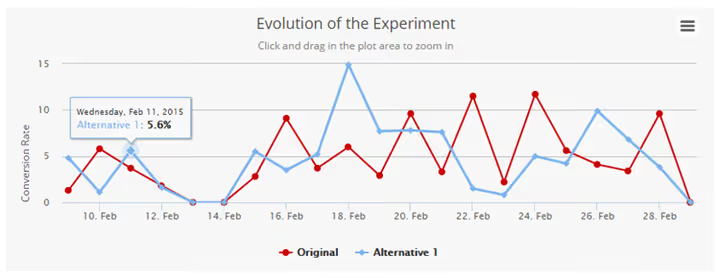
In practice, Nelio handles low-traffic sites well, where other tools require weeks to achieve statistical significance, Nelio's cloud calculation delivers results faster. The free version includes heatmaps and basic tests; paid pricing ranges from $24/mo for Basic to $121/mo for Enterprise (annual payment saves about 20%).
Pros: everything in WordPress, heatmaps built in, cloud calculations without hosting load. Cons: interface looks dated compared to modern standalone tools, weak audience segmentation, no split URL on the free tier.
2. Optibase, modern visual editor with a free tier

Optibase came from the Webflow world and brought to WordPress what was missing for years: a clean visual editor that works with any theme and any page builder. No Elementor needed, no Thrive needed, the script hooks into the DOM and lets you edit text, buttons, and images visually.
Key feature: the free tier includes 5,000 visits per month, A/B tests, split tests, multivariate testing, plus built-in heatmaps and session recordings. No competitor offers this set on a free tier.
The script is lightweight, without flicker, Core Web Vitals don't suffer. GDPR and CCPA compliance out of the box. Paid tiers: Basic for $69/mo, Business for $139/mo, Professional for $289/mo. All paid tiers include heatmaps and session recordings at no extra charge.
Pros: full CRO suite on the free tier, visual editor without builder dependency, multi-platform. Cons: WordPress plugin is younger than competitors, personalization requires a paid tier.
3. Thrive Optimize, testing for Thrive Suite users

If you build landing pages through Thrive Architect, Thrive Optimize is a natural next step. This is an addon that adds a "create variant" button right in the Thrive visual editor. Select a block, click "variant", change text or color, test launched.
You can test any element built through Thrive Architect: headlines, buttons, images, sections, forms. Automatic winner selection by specified conversion goal. No external services, everything inside the Thrive ecosystem.
Thrive Optimize isn't sold separately, only as part of Thrive Suite for $299/year (all Thrive plugins included). This is good value if you already use other Thrive products; if not, $299 for one testing tool is pricey.
Pros: deep integration with Thrive Architect, visual drag-and-drop, automatic winner. Cons: works only with Thrive pages, no heatmaps or session recordings, only page-level tests.
4. Split Hero, quick headline testing without complex platforms

Split Hero does exactly what the name promises: tests headlines, button text, and images, elements with the fastest impact on conversion. The product philosophy: "launch a test faster than in 2 minutes".
Server-side content swapping eliminates flicker, visitors see the ready page, not "blinking" variants. Clean minimalist dashboard, compatibility with any WordPress theme. The plugin is paid, from $49/mo, no free tier.
Pros: ultra-fast launch, server-side swapping without flicker, absence of cluttered interface. Cons: only content tests (no full-page and split URL), no visual editor (variants entered as text), no heatmaps.
5. Split Test for Elementor, A/B tests inside the Elementor editor

🔗 Split Test for Elementor on WordPress.org
A free plugin that adds A/B testing right into the Elementor interface. In the advanced settings of any module, a "Split Test" option appears, set variants and track performance on the Splittest tab in the WordPress admin.
The plugin architecture uses data on your server, no visitor information is transmitted to third parties. This is a plus for those working with sensitive data and compliance requirements.
In practice, the plugin handles testing sections and widgets best, headlines, buttons, call-to-action blocks. You can test entire pages, but it's not as convenient as in Nelio or Optibase.
Pros: completely free, lives inside Elementor, data on your own server. Cons: only for Elementor sites, fewer features than paid competitors, no split URL.
6. VC Splitter Pro, A/B tests for WPBakery Page Builder
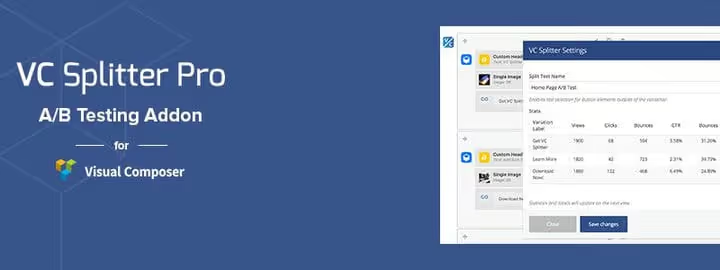
Using WPBakery (formerly Visual Composer) instead of Elementor? VC Splitter Pro adds a split testing module to the WPBakery interface. Create layout variants inside the module, give the test a name, and the system starts counting.
Statistics update each time you open the module in the page editor, no need to go to a separate dashboard. You can test callouts, landing pages, signup forms, and headlines, everything built through WPBakery.
Reasonable price: $10/mo, an order of magnitude lower than enterprise solutions. Contests are periodically held with lifetime license giveaways among active users.
Pros: deep integration with WPBakery, affordable price, statistics inside the editor. Cons: only for WPBakery, no heatmaps or session recordings, small community.
7. OptinMonster, testing popups and lead forms with built-in A/B

OptinMonster isn't a classic A/B tool. This is a lead generation platform where A/B testing is built in as a native function. If your goal is to optimize email capture, exit-intent popups, and floating bars, testing happens in the same interface where you create these elements.
Available 100+ ready templates. Smart display rules: cursor exit beyond window, scroll depth, referral source, device. Integrations with popular email platforms, from Mailchimp to ActiveCampaign.
Pricing: Basic from $18/mo, Plus $48/mo, Pro $73/mo, Growth $123/mo (annual payment). A/B testing and advanced targeting starting with the Pro tier.
Pros: focused on lead generation, 100+ templates, smart display triggers. Cons: tests only OptinMonster elements (not pages or headlines), multiple campaigns simultaneously can affect loading speed.
8. ABConvert, A/B testing for WooCommerce product pages

If you run a WooCommerce store, ABConvert is a specialized tool specifically for e-commerce tests. Tests prices, descriptions, images, and product page layouts.
The main feature is live catalog protection. The test product variant (Version B) doesn't appear in public listings, isn't indexed by search, and doesn't intersect with live orders. SKU and stock remain untouched. You can safely test even the entire product line.
Pricing: free tier with limited functionality, paid from $9.99/mo. This is one of the most affordable ways to start testing a WooCommerce store without sales risk.
Pros: focused on WooCommerce, SKU-safe testing, affordable price. Cons: only e-commerce, no visual editor, no testing of non-product pages.
9. VWO, platform for growing teams

VWO (Visual Website Optimizer) is a veteran of the CRO market with WordPress integration through a lightweight snippet. Not a plugin, and that's a plus: the fewer plugins, the faster the site.
VWO's arsenal: visual and code editors, server-side testing of dynamic content, detailed audience segmentation, Bayesian and frequentist statistics to choose from. Integrations with Google Analytics, CRM, and CDP.
Starting price is high: Web Testing from $357/mo with annual payment. Heatmaps, session recordings, and surveys are separate products with their own pricing. For sites with traffic below 50K visits per month, it's excessive.
Pros: powerful statistics, server-side testing, deep segmentation. Cons: expensive entry, learning curve, heatmaps and recordings are add-ons.
10. Optimizely, enterprise experimentation standard

Optimizely is the industry standard for large experimentation programs. The old WordPress plugin was removed from the repository, but the service itself works through a JavaScript snippet on any site, WordPress included.
What it offers: full-stack testing (web, mobile, server-side), multi-armed bandit for automatic traffic redistribution in favor of the winning variant, feature flags for gradual releases, advanced analytics with behavioral and demographic segmentation.
Pricing is custom, meaningful use starts at $50,000+/year. This is a tool for teams running 20+ experiments simultaneously with a dedicated CRO specialist.
Pros: full-stack, multi-armed bandit, feature flags, best segmentation on the market. Cons: enterprise budget, requires technical team, heavyweight for simple tests.
⁉️🤔 Frequently asked questions
Question: Google Optimize shut down, what should I use instead for free?
The closest analog to the "free + Google Analytics integration" model is the GA4 + manual experiment setup combination through the Google Analytics 4 API. But this requires technical preparation. Among ready solutions, Optibase's free tier (5,000 visits/mo), free Nelio (heatmaps + basic tests), and completely free Split Test for Elementor for Elementor sites. Each covers its segment, choose based on your builder or budget.
Question: How much traffic is needed for an A/B test to give a reliable result?
Minimum threshold is about 1,000 unique visitors per variant per month. Less than that, the test will run for months without statistical significance. For low-traffic sites (up to 5,000 visits/mo), tools with cloud calculation like Nelio work better, they aggregate data faster through external server computations. On high-traffic projects, you can confidently use VWO or Optimizely, they're built for large data volumes and multiple parallel experiments.
Question: Can I test WooCommerce products without the risk of breaking the catalog?
Yes, ABConvert does exactly this. The test product variant (Version B) is hidden from public listings, not indexed by search, and doesn't intersect with live orders. SKU and stock levels remain untouched. The buyer sees only one product version, you simply compare variant conversion at the analytics level.
Question: Is a visual editor mandatory or can I get by with code?
For most tests, a visual editor is sufficient, you change button text, color, block placement. A code editor is needed when testing dynamic content (database prices, personalized recommendations) or server-side logic. VWO and Optimizely offer both modes, Optibase and Nelio are mainly visual. Split Hero and ABConvert have no visual editor, variants are set as text.
Question: Which tool should I choose if I'm just starting out and the budget is minimal?
Starter scenario: install free Nelio A/B Testing, get heatmaps and basic tests right in the admin. If the site is on Elementor, add free Split Test for Elementor. When budget appears, switch to Optibase for the visual editor and session recordings (from $69/mo). Don't spread yourself across enterprise solutions until you've tested at least 10 hypotheses on free tools.
Bottom line: which tool to choose in 2026
The WordPress A/B testing market has matured. One-day plugins are gone, Google Optimize shut down, and in their place came tools with visual editors, server-side testing without flicker, and free tiers with honest functionality.
Quick selection matrix:
- You want everything in the WordPress admin: Nelio A/B Testing, from $24/mo.
- Need a free full-stack: Optibase pricing, free tier 5K visits.
- Already on Thrive Suite: Thrive Optimize, included in $299/year.
- Testing only headlines and buttons: Split Hero, $49/mo.
- Site on Elementor: Split Test for Elementor, free.
- Site on WPBakery: VC Splitter Pro, $10/mo.
- Focus on popups and lead generation: OptinMonster, from $18/mo.
- WooCommerce store: ABConvert, from $9.99/mo.
- Growing team with budget: VWO, from $357/mo.
- Enterprise with 20+ experiments: Optimizely, custom.
Start with one hypothesis this week. Change button text, compare two headlines, test a capture form. One successful A/B test often pays for the annual tool subscription, proven on dozens of our editorial sites.

A professional team of writers and editors specializing in creating quality content.