













🎨 10 best WordPress themes for artists in 2026
An artist today is not just someone who stands at an easel. Photographers, graphic designers, illustrators, motion designers, anyone who creates visual content, sooner or later hits the same wall. How do you show your work to the world when you don't know how to code layouts, and the budget for a studio is like a used car?
Building a portfolio on WordPress is an obvious solution. But then begins endless scrolling through the catalog: thousands of themes, hundreds of tabs with demos, dozens of hours of comparison. Without a clear list of candidates this process eats up weeks.
We combed through the market and selected the 10 best WordPress themes for artists in 2026, from minimalist canvases to powerful combines with page builders. Each position is verified: a live project, real ratings, working demos. Choose based on your task, from a one-page portfolio to a shop selling prints.
💡 Quick overview:
- Decide what's more important: a ready-made demo "out of the box" or full control over design through a builder
- If you need launch speed, get a theme with 80+ starter sites and one-click import (Astra, Neve)
- If visual storytelling is essential, look toward portfolio frameworks with gallery logic (Imagely, Kalium)
- For future sales of work, get a theme with WooCommerce "out of the box" (Total, Avada)
- All positions in the list are live 2026 projects, not a single abandoned theme
Comparison table: all 10 themes in 60 seconds
Theme | Price (from) | Free version | Builder | WooCommerce | Starter sites | Rating |
|---|---|---|---|---|---|---|
Total | $59 | No | WPBakery | Yes | 45+ | 4.8/5 |
Imagely | $99/year | No | NextGEN + Gutenberg | In Pro | 12+ | 4.5/5 |
Divi | $89/year | No | Divi Builder | Yes | 250+ | 4.7/5 |
Astra | $49/year | Yes (wp.org) | Any | Yes | 130+ | 4.9/5 |
Adios | $39 | No | WPBakery + Elementor | No | 9 | 4.7/5 |
Neve | $69/year | Yes (wp.org) | Any | Yes | 80+ | 4.8/5 |
Ultra | $59 | No | Themify Builder | No | 30+ | 4.6/5 |
Flora | $39 | No | WPBakery | Yes | 6 | 4.4/5 |
Kalium | $59 | No | WPBakery + Elementor | Yes | 20+ | 4.7/5 |
Avada | $69 | No | Avada Builder | Yes | 100+ | 4.6/5 |
1. Total
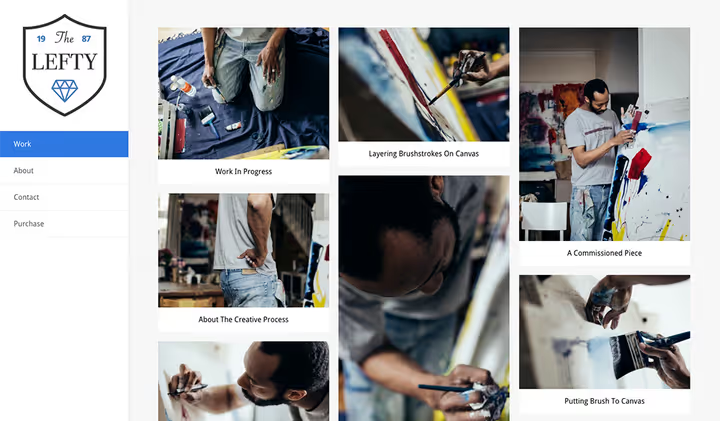
Total is WPExplorer's flagship theme, built on the WordPress Customizer + WPBakery Page Builder combo. Unlike many competitors where the builder is "bolted on top," here it's embedded in the architecture: every element can be customized without conflicts with the WordPress core.
The main thing artists and photographers value Total for is dynamic layout management. You can create a portfolio card template once, and the theme automatically applies it to all projects. No need to configure each page manually.
What's inside: 500+ styling options in the Customizer, 100+ WPBakery elements, built-in lightbox for images, WooCommerce support with ready product cards. Worth mentioning separately is the demo importer: 45+ starter sites, each is a full-fledged design, not just a color scheme change.
In practice the theme shows excellent Core Web Vitals results: the codebase is lightweight, no bloated CSS frameworks. Support comes directly from the developer (AJ Clarke), which is rare for ThemeForest themes.
Pros:
- Dynamic layouts for any post types
- Direct support from the author, not outsourced support
- Compatibility with all modern plugins (Yoast SEO, bbPress, Contact Form 7)
Cons:
- No free version for testing
- WPBakery can seem heavy on weak hosting
🔗 Total official site 🔗 Total on WordPress.org
2. Imagely
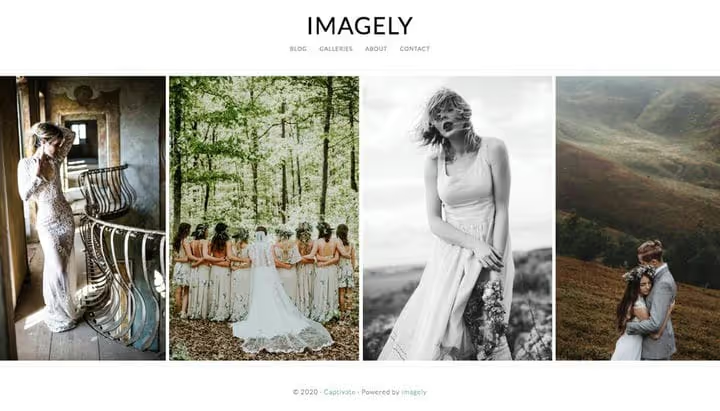
Imagely is not quite a theme in the usual sense. It's an ecosystem: 12 photographer-focused themes plus the flagship NextGEN Gallery plugin, which has lived on WordPress for over 20 years. If your work is primarily images, not text, the Imagely + NextGEN bundle covers virtually all scenarios.
The package includes: unlimited galleries, drag-and-drop uploader, zip image importer, ready Gutenberg block, responsive slideshows, infinite scroll, deeplinking to individual photos, and image protection from direct downloads. For Pro and Lifetime subscribers, built-in ecommerce: selling digital downloads, prints, and proofs right from the site, no third-party services.
A separate plus is retina support and lightbox out of the box. The client opens a photo and sees it in high resolution, no pixelation on modern screens. For a photographer selling image quality, this is critical.
Pros:
- Full cycle for photographers: gallery → protection → sales
- NextGEN Gallery is a proven plugin with a huge user base
- Retina images and built-in lightbox
Cons:
- Subscription from $99/year, no one-time license
- Excessive for non-photographer artists (illustrators, graphic designers)
🔗 Imagely official site 🔗 NextGEN Gallery on WordPress.org
3. Divi
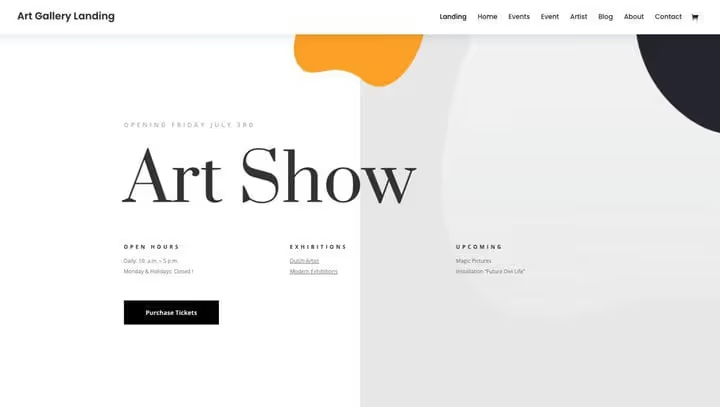
Divi from Elegant Themes is simultaneously a theme and visual builder that in 2026 (after Divi 5's release in February) received a completely rewritten engine. Editor performance increased dramatically, and the interface became more responsive, what users had been asking for years.
For an artist, Divi is interesting for design freedom: every element on the page can be moved, animated, tied to scroll. Want your illustration to appear gradually as you scroll? Or a gallery to assemble into a mosaic on hover? Divi does this without code.
Out of the box, 250+ ready layouts, 40+ elements (sliders, galleries, forms, CTA buttons), full control over fonts and animation. The entry threshold is higher than Astra or Neve, the first couple of evenings will go to learning the interface, but the result justifies the time.
Pros:
- Divi 5 with rewritten core, editor became faster
- Fine control over visual effects and animation
- 250+ ready layouts for all niches
Cons:
- Learning curve, not for "quick launch in one evening"
- Subscription $89/year, no one-time license
4. Astra
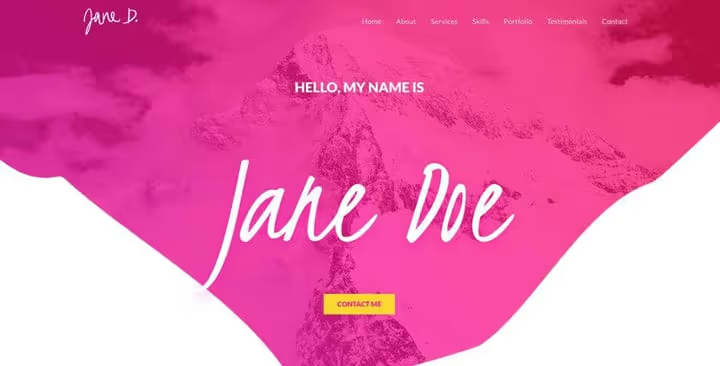
Astra is the most popular WordPress theme among non-developers: over a million active installations and 6000+ five-star reviews on WordPress.org. For an artist its main advantage is the "clean canvas" principle: the theme doesn't impose design but gives you a Customizer where you build the site yourself.
130+ ready starter sites cover virtually any creative niche, from illustrators to wedding photographers. Import takes less than a minute, after which you get a fully laid-out site with placeholder content that just needs replacing with yours.
The free Astra version on WordPress.org is a full-fledged product, not a cut-down "demo." It includes: responsive layout, Google fonts, unlimited colors and backgrounds, several blog layouts, integration with WooCommerce. The Pro version ($49/year) adds header and footer builders, White Label for agencies, and extended blog options.
Astra is optimized for speed: less than 50 KB clean, no jQuery dependencies. This means that even on budget hosting a portfolio site will load quickly, and for an artist whose client judges by first impression, gallery loading speed is critical.
Pros:
- Free version on WordPress.org with honest feature set
- 1M+ installations and 6K+ reviews, the largest community among list themes
- Less than 50 KB clean, no jQuery dependencies
Cons:
- Customizer, not a visual builder, less layout freedom than Divi
- Some starter sites only in Pro
🔗 Astra official site 🔗 Astra on WordPress.org
5. Adios
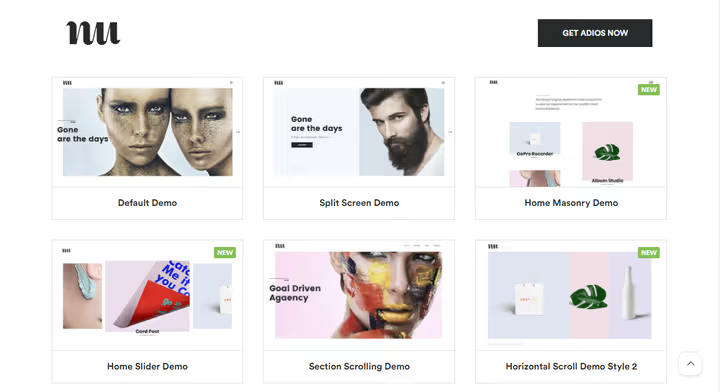
Adios is a niche theme created specifically for portfolios. No blog layouts "for all occasions": each of nine demos is tailored for showcasing work, whether photo projects, illustrations, or design studio cases.
The design is built around white space. Images don't fight sidebars and widgets for viewer attention, they simply occupy the entire screen. This works: the visitor looks at the work, not the navigation.
Adios comes with WPBakery Page Builder and full compatibility with Elementor and Gutenberg. The theme documentation is one of the best in the selection: every item from installation to customization is described so a beginner manages without developer help. Worth mentioning separately is the "Case Study" page, a ready template for those selling not just an image but a service with before/after results.
Pros:
- Sharpened strictly for portfolios, no extra functionality
- Excellent documentation, beginners can manage alone
- Compatibility with WPBakery, Elementor, and Gutenberg simultaneously
Cons:
- Only 9 demos, less starter design choice than universal themes
- No WooCommerce, portfolio only
6. Neve
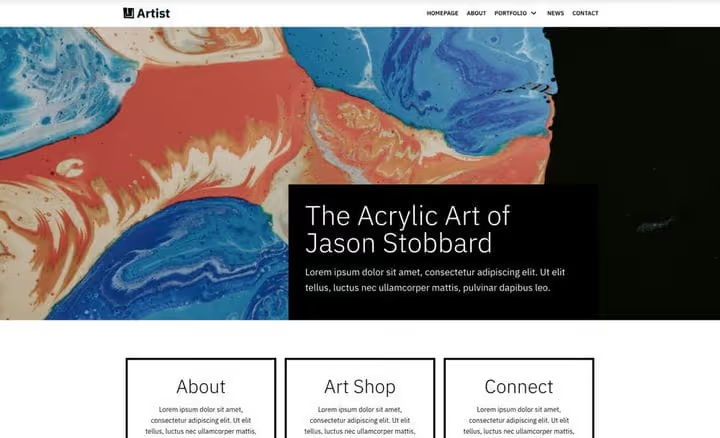
Neve is a Themeisle theme built on the same principles as Astra: lightness, speed, compatibility with any builder. But there's an important difference: Neve was originally designed for Gutenberg and AMP, so on mobile devices pages open instantly even without caching plugins.
80+ starter sites cover photographers, designers, illustrators, and agencies. Each can be imported with one click and you can immediately start replacing content. The Pro version ($69/year) adds header and footer builder, WooCommerce Booster (extended product cards, mini cart, quick view), and Blog Booster with custom layouts.
A separate feature is White Label for agencies. If you're a web designer building sites for artists in volume, Neve allows you to replace the theme branding with your own. The client sees "custom development," while you get the speed of a ready framework.
Pros:
- Native AMP and Gutenberg support, mobile speed without plugins
- White Label for agencies and freelance developers
- Free version on WordPress.org with honest functionality
Cons:
- Fewer starter sites for narrow creative niches than Astra
- WooCommerce Booster only in Pro
🔗 Neve official site 🔗 Neve on WordPress.org
7. Ultra

Ultra from Themify is a theme for those who want to control every detail but aren't ready to dive into code. The proprietary Themify Builder is a visual constructor with frontend editing: you see the result immediately, no switching to preview.
What sets Ultra apart from competitors: 140+ ready page layouts (not sites, but sections, headers, galleries, price lists, forms) and 12 bonus add-ons included (mega menu, image filters, parallax scrolling). You can build a site like from blocks: took a ready gallery block, added parallax background, attached a mega menu, and the portfolio is ready.
Among artist-specific functions are image filters right in the theme (saturation, contrast, overlay) and portfolio posts with 30+ display options.
Pros:
- Themify Builder with frontend editing, result visible immediately
- 140+ ready section blocks for page assembly
- Built-in image filters and mega menu
Cons:
- Themify Builder not as widespread as Elementor, fewer third-party addons
- No WooCommerce integration out of the box
8. Flora

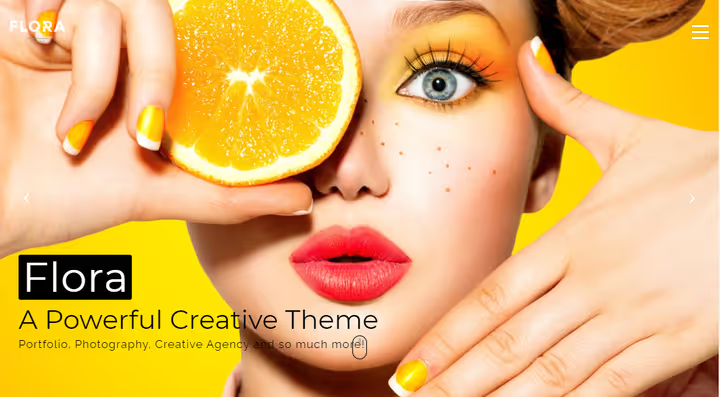
Flora from Wyde is a theme with six meticulously crafted demos, each using fullscreen backgrounds: images, video, gradients. Parallax and smooth scroll effects are built into the theme level, no need to install additional animation plugins.
Smart Theme Options allow changing fonts, colors, and element placement without entering code. WPBakery Page Builder is included, Slider Revolution too. For an artist wanting a wow effect on the first screen, Flora is a strong candidate.
WooCommerce is supported out of the box, so if over time you decide to sell prints or digital downloads, you won't need to migrate to another theme.
Pros:
- Fullscreen backgrounds with video support, strong visual effect
- Slider Revolution included
- WooCommerce without additional setup
Cons:
- Only 6 demos, less starter design choice
- Wyde updates the theme less frequently than competitors
9. Kalium
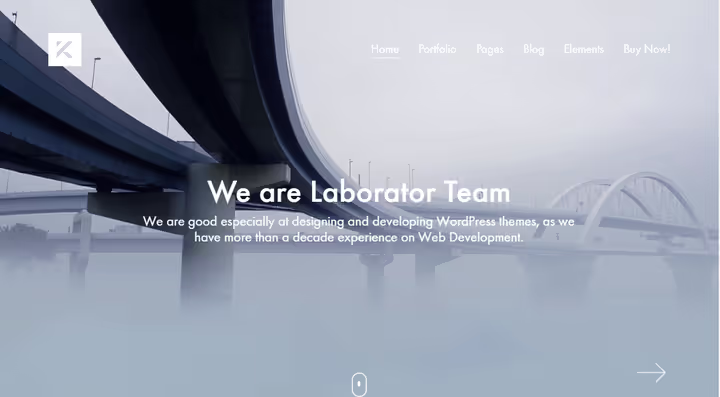
Kalium from Laborator is a theme created by professional designers for professionals. This is visible in the typography: 800+ icons, dozens of font schemes, 30+ portfolio position types. If your work is not just content but how it's presented, Kalium gives a toolkit comparable to a separate design system.
At the core is WPBakery Page Builder with 100+ shortcodes and 18 bonus elements from Laborator. Plus compatibility with Elementor (through separate portfolio widgets). Plus ACF Pro included for creating custom fields, you can build a work catalog with any data structure.
The theme is multilingual out of the box, SEO-optimized, and retina-ready. 20+ starter sites, from photographer to architectural firm.
Pros:
- Professional typography and 800+ icons
- 30+ portfolio position types, maximum among all list themes
- ACF Pro included
Cons:
- Updates come less frequently than market leaders (Astra/Neve)
- Entry threshold above average, requires understanding of custom field structure
🔗 Kalium official site 🔗 Kalium on ThemeForest
10. Avada
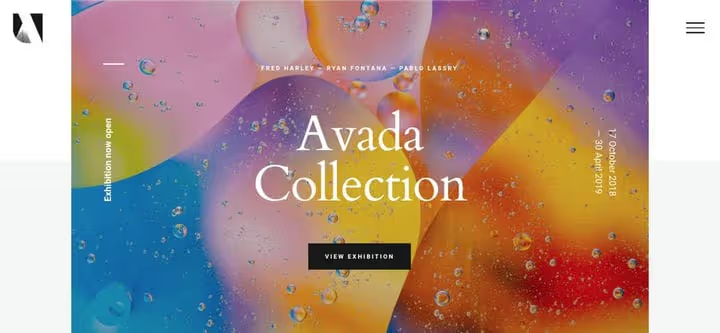
Avada is the #1 selling theme on ThemeForest in history: over 1,000,000 users. This is not just a theme but a full-fledged site builder with its own Avada Builder, visual form editor, header and footer builder.
100+ ready sites for any niche, from art gallery to music band. Each can be imported and content replaced with yours. The powerful visual form editor (Avada Form Builder) allows building a contact form, brief, or client questionnaire without additional plugins.
Important nuance: Avada is a massive theme. On weak hosting without caching, loading speed can drop. We wrote about this in a separate material: how to reduce WordPress page load time. But on normal VPS with properly configured cache the problem is solved.
Pros:
- Largest set of ready sites (100+) and design elements
- Built-in form builder, Contact Form 7 not needed
- Huge community and documentation
Cons:
- Massive codebase, on weak hosting optimization needed
- Excessive for simple portfolio with 3-5 works
🔗 Avada official site 🔗 Avada on ThemeForest
If you want to see these themes in action and compare their interfaces side by side, here's a visual video review in English.
⁉️🤔 Frequently asked questions
How does a theme for artists differ from a regular WordPress theme?
A theme for artists is tailored for visual storytelling. The priority is portfolio grids, fullscreen galleries, lightboxes, and minimal distracting elements. A regular universal theme centers the blog or text, for an artist this is an unsuitable hierarchy. A portfolio theme solves one task: the artist's work gets into focus in the first 3 seconds. This is achieved through white space, absence of sidebars on project pages, and built-in gallery formats, masonry grids, sliders, fullscreen viewing. A regular theme requires plugin modifications for the same result.
Is it necessary to buy a theme or is a free one enough?
The free versions of Astra and Neve cover most artists' needs. A paid subscription is needed when you go beyond a basic portfolio: header builder, White Label for agencies, extended WooCommerce integration. Proven path: start with free Astra with one of 130+ starter sites. Install WooCommerce, add works, launch traffic. When you feel you're hitting the Customizer limitation, say, lacking a custom footer with portfolio grid, then switch to Pro. Savings at the start: from $49 per year at Astra's official prices.
Which page builder is better for an artist, WPBakery, Elementor, or Gutenberg?
For visual storytelling with animation, Elementor (available in Adios, compatible with Astra/Neve/Kalium). For those who value stability and predictability, WPBakery (Total, Flora). For minimalists who value speed, Gutenberg (Neve, Astra). Elementor wins in the number of ready blocks for artists: galleries with filtering, parallax sections, animated CTAs. WPBakery is more stable during WordPress updates, it's built into the theme and updates with it. Gutenberg is the fastest of the three but requires getting used to block thinking. Conclusion: if you're visual, take Elementor, if technical, Gutenberg, if you want "set and forget," WPBakery.
Is WooCommerce needed in a theme for artists?
Not in the first month. But if you plan to sell prints, digital downloads, or image licenses, WooCommerce should be on board the theme, because adding it later to a theme without support means manually sorting through CSS and templates. Themes with WooCommerce "out of the box" (Total, Avada, Astra Pro, Kalium) save 10-15 hours of product card, cart, and checkout setup. Without this support the product card looks like a standard post, with publication date, author avatar, and blog sidebar. For an artist selling work, this looks unprofessional.
What to do if a theme stops being updated?
Check the last update date on ThemeForest/WordPress.org. If more than 12 months have passed, the theme is at risk. Our list has no such problem in 2026, but when searching independently always check the Changelog and date of last compatible release with the current WordPress version. Signs of an abandoned theme: last update over a year old, support tickets without response over a month, negative reviews in the last 6 months with complaints about bugs after WordPress updates. Solution: migrate to a live theme. Astra and Neve allow importing content from other themes via standard WordPress Importer, it's not fast but possible without losing works.
Which WordPress theme to choose for an artist in 2026
If you're a photographer who needs to sell shots, take Imagely. The NextGEN ecosystem will close galleries, protection, sales, and digital file delivery without a single third-party plugin.
If you're an illustrator or graphic designer and need a portfolio site for 10-20 works, Astra (free) or Adios ($39 once). Both give a clean canvas where works speak for themselves.
If you're an agency or freelancer building sites for artists in volume, Neve with White Label. Clients get "custom design," while you get a repeatable assembly pipeline.
If you need full control over every detail and are ready to spend a couple of evenings learning, Divi 5. After the fifth version's release in February 2026, it's the most powerful visual builder on the WordPress market.
And the main rule: start with the free version. WordPress.org gives Astra and Neve without a penny of investment. Install it, upload works, live with the theme for a week, and only then make a decision about buying Pro.
Choose a theme for your task and start building a portfolio today. And if you need help with setup, check our WordPress tutorials section, there are dozens of step-by-step instructions.

A professional team of writers and editors specializing in creating quality content.