













 AIIllustrative image: AI-generated
🚀 6 best WordPress plugins for boosting conversion and sales (CRO) in 2026
Conversion doesn't grow on its own. Traffic flows, but sales stall, which means the site isn't persuasive.
The six plugins below address key CRO touchpoints: analytics, SEO, A/B testing, lead generation, upsells and notifications. Each has been tested in practice, each solves a specific problem.
💡 Quick overview:
- Connect
MonsterInsightsfor end-to-end analytics, without it you don't know where you're losing visitors. - Set up
YoastSEOfor search visibility, organic traffic provides the cheapest conversions. - Launch an A/B test in
Nelio AB Testing, headlines, buttons and layouts are validated by numbers, not intuition. - Add upsells through
UpsellWP, average order value grows without additional traffic. - Set up HelloBar to collect email through popups and bars, when you have a lead magnet.
A CRO approach based on real numbers and live examples, in this 17-minute breakdown:
Comparison table
Plugin | CRO Type | Free Version | Pro Price | WP 7.0 |
|---|---|---|---|---|
| Analytics | Yes | $99/year | Yes |
| Surveys and leads | Yes (wordpress.com) | $47-50 | N/A |
| SEO optimization | Yes | $103/year | Yes |
| A/B tests and heatmaps | Yes (500 views/month) | $35/month | Yes |
| Upsells and cross-sells | Yes | From $79/year | Yes |
| Notifications and popups | Yes (5000 views/month) | $29/month | Yes |
1. MonsterInsights
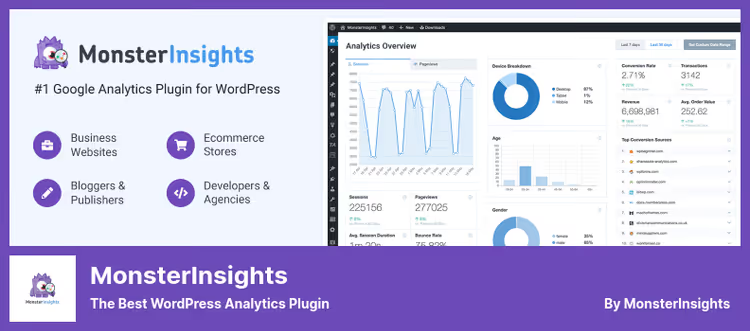
MonsterInsights, Google Analytics inside the WordPress admin panel. No code, no switching between tabs.
The plugin displays key metrics right in the dashboard: traffic sources, popular pages, form conversions, WooCommerce revenue. You see which channels bring sales and which just burn budget.
Pros:
- GA4 connection in 3 clicks, without editing
header.php - eCommerce event tracking for WooCommerce and Easy Digital Downloads
- File download tracking, shows which PDFs/archives users download
- Compatible with Google AMP (for those still using it)
Cons:
- Pro version ($99 per year) needed for form tracking and custom events
- Interface not fully translated, some reports in English
Price: free Lite version on WordPress.org; Pro, $99/year.
🔗 MonsterInsights on WordPress.org🔗 MonsterInsights website
2. Survey Funnel
Survey Funnel by WPeka, a visual survey and quiz builder for lead generation. In practice, surveys convert better than static landing pages: users engage with the process and more willingly leave their contact information.
The plugin builds surveys drag-and-drop: questions, answer options, opt-in form at the end. After completion, the contact goes to CSV or integrates with email services.
Pros:
- No-code builder, survey assembled in 10-15 minutes
- Display survey on specific pages or by exit trigger (exit intent)
- Detailed statistics for each question and answer
- Export results to CSV for offline analysis
Cons:
- Distributed through wordpress.com and club.wpeka.com, not through wordpress.org
- Free Lite version only available on wordpress.com (requires account)
- Has documented vulnerabilities (CVE-2025), keep the plugin updated
Price: one-time payment (includes 12 months support).
🔗 Survey Funnel on WordPress.com🔗 WPeka Club website
3. YoastSEO

YoastSEO, the de facto standard for WordPress search optimization. 13+ million active installations speak for themselves.
The plugin analyzes readability (Flesch Reading Ease for Russian), keyword density, meta tag length and heading structure. Traffic light (red/yellow/green) highlights issues before publication, which is faster than editing a post after indexing.
Pros:
- Snippet Preview, preview Google snippet before publication
- Automatic XML sitemap and canonical URL out of the box
- Social Cards, customize preview for Facebook and Twitter
- Regular updates (v27.8, June 2026) and WP 7.0 compatibility
Cons:
- Free version, one keyword per page
- Pro for $103 per year needed for multiple focus phrases and AI meta tag generation
- Overloads editor interface with notifications (fixable in settings)
Price: free Lite version; Pro, $103/year.
🔗 YoastSEO on WordPress.org🔗 Yoast website
4. Nelio AB Testing
Nelio AB Testing, the most powerful A/B tester living right inside the WordPress admin panel. No external SaaS panels: tests are created, launched and analyzed inside the site.
The plugin can test more than just headlines. Pages, widgets, WooCommerce products, themes, menus, CSS snippets, everything that affects conversion. Heatmaps and scroll maps show where users actually look.
Pros:
- Native integration with Gutenberg and Elementor, doesn't break layout
- Automatic application of winning variant (hands-free)
- Calculations on Nelio cloud, doesn't load your server
- AI-Assisted Test Suggestions, test ideas based on page analysis
- Version 8.4.0 (May 2026), WP 7.0 compatibility
Cons:
- Free version limited to 500 page views per month
- Pro from $35/month, more expensive than competitors, but pays for itself with test quality
Price: free version (up to 500 views/month); Premium, from $35/month.
🔗 Nelio AB Testing on WordPress.org🔗 Nelio Software website
5. UpsellWP

UpsellWP by the Flycart team, a replacement for the outdated Cart Upsell. The plugin adds upsells and cross-sells to the checkout page, cart and thank you page.
Works simply: buyer adds product to cart, proceeds to checkout, and sees an offer "Frequently bought together…" with a discount. One click adds the item to the order. No popups, no pressure.
Pros:
- Three types of offers: checkout upsells, order bumps, frequently bought together
- Condition settings: cart amount, product category, specific product
- Flexible appearance customization (colors, headlines, discounts)
- Free version on WordPress.org with basic functionality
- 5000+ active installations, WP 7.0 compatibility
Cons:
- Pro version needed for post-purchase upsells
- No built-in upsell effectiveness analytics in free version
Price: free Lite version; Pro, from $79/year.
🔗 UpsellWP on WordPress.org🔗 UpsellWP website
6. HelloBar
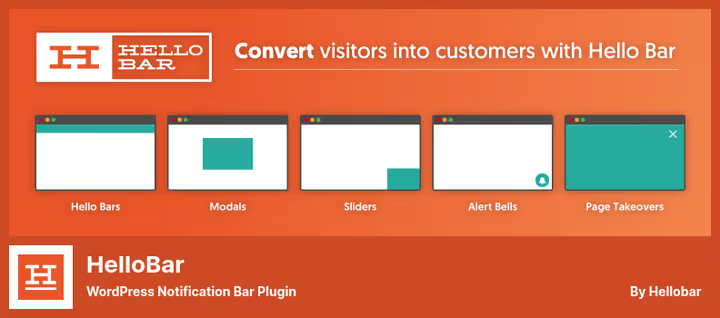
HelloBar, a veteran among popup notification plugins. More than 600,000 sites use it to collect email addresses and announcements through bars, modal windows and sliders.
The plugin allows displaying notifications by triggers: time on page, scroll percentage, exit intent. The free version provides 5000 displays per month and basic design settings.
Pros:
- 100+ ready-made popup and bar templates
- A/B testing of notifications inside the platform
- Export collected email to Mailchimp, AWeber, Zapier
- Requires no coding skills, visual editor
Cons:
- Low rating on WordPress.org: users complain about trojans on hellobar.com site (2024), login issues
- Free version, 5000 views per month, then you pay
- Requires registration on external service, visitor data passes through HelloBar
Price: free version (5000 displays/month); Pro, from $29/month.
🔗 HelloBar on WordPress.org🔗 HelloBar website
⁉️🤔 Frequently asked questions
What is CRO and why does a WordPress site need it?
CRO (Conversion Rate Optimization), a systematic approach to increasing the percentage of visitors performing a target action. For a WordPress site this means: a headline that gets clicked; a button that gets pressed; a form that gets filled out. The six plugins from this collection address the main growth points for conversion without involving a developer.
Do I need YoastSEO if I already write good content?
Yes. Good content without technical SEO foundation loses a significant portion of search traffic. YoastSEO automates meta tags, canonical URL, breadcrumbs and schema markup, things an editor won't do manually. Plus the readability traffic light highlights passive voice, paragraph length and keyword density before publication.
What to choose: free Nelio AB Testing or paid Google Optimize?
Google Optimize closed in September 2023. Nelio AB Testing is its direct replacement for WordPress, and with native admin panel integration. The free version (500 views/month) is enough for testing headlines on a small blog. For an online store with traffic from 5000 uniques per month, get Premium ($35/month).
Can I skip MonsterInsights and view GA4 directly?
Technically yes. Practically, no. GA4 outputs raw data that needs to be filtered, segmented and interpreted. MonsterInsights shows ready-made reports in the WordPress admin panel: which channel brought the most sales, which posts are read longer, at which form step users leave. This saves 20-30 minutes a day.
Which upsell plugin is better: UpsellWP or the old Cart Upsell?
Cart Upsell for WooCommerce is no longer maintained (last update, 2023, rating 1.0 out of 5). UpsellWP by the Flycart team is its modern replacement with three types of offers, WP 7.0 compatibility and 5000+ active installations. Switch to UpsellWP if you're still on Cart Upsell.
Should you install all 6 plugins at once?
No. The optimal strategy is to implement one at a time in priority order.
Start with MonsterInsights. Without numbers, there's no foundation for improvements. After a week of data, connect Nelio AB Testing and test headlines on the two most popular pages. When the test shows a winner, optimize the content through YoastSEO. Only after that add Survey Funnel for lead generation and UpsellWP to grow average order value. Connect HelloBar last, notifications work better when there's something to show (lead magnet, discount, webinar).
No plugin replaces understanding your audience, but these six provide the tools to turn that understanding into numbers.

A professional team of writers and editors specializing in creating quality content.