














📢 How to use pop-ups without harming SEO
Pop-ups are annoying. That's a fact anyone who's ever closed five popups in a minute on a random site would agree with. But here's the paradox: those same windows bring site owners up to 9% conversion into subscribers and buyers, according to SumoMe data. A good popup pays for itself in days, a bad one buries reputation and search rankings.
The main question isn't "to use or not to use," but "how to make sure Google doesn't penalize you and visitors don't flee." Since 2017, the search engine has penalized intrusive interstitials on mobile devices, but at the same time clearly described what's acceptable. The line is thin, and we'll walk it in this material: from Google's rules to setting up campaigns in a professional tool.
💡 Quick overview:
- What intrusive interstitials are and which popups Google considers acceptable
- Eight principles of a popup that converts rather than irritates
- How to set up triggers based on time, scroll, and exit intent to avoid sanctions
- Why exit-intent is recognized as safe and how to implement it through OptinMonster
Why pop-ups work
A popup is an interruption. It intercepts attention at the moment when a visitor is already interacting with content and directs that attention into a specific funnel: subscription, purchase, registration. Neither a sidebar banner nor a footer link provides such concentration of attention.
SumoMe research based on nearly two billion impressions revealed: the average conversion of pop-ups is 3.09%. The top 10% of campaigns reach 9.28%, every tenth pair of eyes turns into a target action. For comparison, sidebar banner conversion rarely exceeds 0.5%.
The secret is in the moment. A popup appears when a visitor has already shown interest: read half an article, spent 40 seconds on the page, or scrolled to a certain block. This isn't cold capture, but a response to behavior. That's exactly why behavioral triggers, scroll, time on page, exit intent, outperform "show immediately on entry" by multiples.
How Google views pop-ups
On January 10, 2017, Google introduced sanctions against intrusive interstitials on mobile devices. The logic is simple: a user clicks on a search result, expects to see content, and gets a full-screen advertising curtain. This degrades experience, so such pages lose positions in mobile search.
Important nuance: sanctions concern only mobile pages and only interstitials that stand between a search transition and content. Popups that trigger later, based on scroll, time, or exit intent, don't fall under the penalty. This was confirmed by John Mueller from Google in one of his webinars.
What Google allows
 AIIllustrative image: AI-generated
Google is comfortable with popups that don't block access to content. The official Search Central blog lists acceptable scenarios:
- Windows required by legislation: age verification, cookie consent, login confirmation for closed sections.
- Banners and inline bars that take up a reasonable portion of the screen and are easily closable.
- Content hidden behind tabs and accordions, expandable blocks are not considered interstitials.
General rule: if a visitor can continue reading without closing the window, or closes it with one tap, Google has no objection.
What Google prohibits
 AIIllustrative image: AI-generated
Scenarios where content is inaccessible without interacting with the popup fall under sanctions:
- Classic interstitials and advertising splash screens appearing before the main page loads or between transitions.
- Popups that trigger instantly when opening a page and cover text.
- Windows that users are forced to close to continue reading.
- Standalone interstitials requiring closure before accessing material.
- Layouts masquerading as interstitials, when the top part of the page looks like a popup.
From this list, other undesirable formats also logically follow: full-screen overlays, welcome mats, intrusive lightboxes, and interstitials with offers to install mobile applications (Google published a separate case study on app-download interstitials).
8 principles of an effective pop-up
Creating a popup that converts and doesn't irritate is an engineering task with concrete variables. Here are eight aspects that determine the result.

1. Headline. The first thing a visitor sees. The headline should instantly communicate the essence of the offer. Good examples: "Discount on first order," "Free SEO checklist," "Subscribe to weekly newsletter." Vague formulations like "Special offer" or simply "Free" without details reduce trust, people want to understand what they're clicking on.
2. Description. One or two paragraphs that remove objections. Why is this valuable? What will the subscriber get? The Federal Trade Commission of the United States requires advertising not to mislead, and even outside FTC jurisdiction, readers intuitively distinguish honest offers from spam. Reveal what the popup is for, and the result will be higher.
3. Visual appeal. Colors, fonts, and images work for recognition, but the line between "stylish" and "cheap" is thin. Outdated graphics or a garish palette are associated with spam. Stick to current design trends and the visual style of your site, the popup should look like its organic part, not a foreign block.
4. Context. The popup must match the page where it appears. In a blog, it's appropriate to offer a subscription to a newsletter or lead magnet on the article's topic. In a store, a discount or information about a promotion. A contextual request always converts better than a universal "Subscribe to news," identical on all pages.
5. Display moment. Timing is everything. A window popping up a second after entry is a guaranteed bounce. A popup after half the page or 30-60 seconds of reading is a response to demonstrated interest. Most lead collection plugins support triggers based on time, scroll, and exit intent.
6. Value proposition. The reader spends attention interacting with the popup, give something in return. Discount, exclusive content, free trial period, links to in-depth materials. Value should be obvious and concrete.
7. Minimum actions. The path from click to result is one step. A subscription form should consist of one field (email), a coupon should apply automatically, a link should lead directly to the target resource. Each extra click or form field cuts off part of the audience.
8. Element of curiosity. A mysterious discount or "secret" tips work like clickbait, but with a caveat: the promise must be fulfilled. Clicked, got value. Otherwise, the visitor will remember the deception and ignore the next popup.
And finally: no universal formula replaces analytics for a specific site. Track each popup's conversion through the plugin's built-in reports or Google Analytics, A/B test headlines and triggers, iteratively improve the result.
How to implement pop-ups without harming SEO
Theory is clear. Now, specific technical techniques that separate an SEO-safe popup from a risky one.
Exit-intent as the main trigger. When a visitor moves the cursor to the tab close button or address bar, an exit intent trigger fires. John Mueller confirmed that such interstitials don't fall under the penalty, since they appear not between a search click and content, but at the end of the session. The user has already familiarized themselves with the material, you're offering them the next step.
Time delay. Set a delay of 30-60 seconds after page load. During this time, the reader immerses themselves in content and forms interest. A popup before immersion is interference, a popup after is service.
Interval between displays. The same user shouldn't see a popup with every transition between pages. Good plugins use cookies for tracking: showed the window, remembered, don't show again for a set period (day, week). Returning visitors can be offered another window with a new offer.
Device separation. The safest approach is to completely hide overlay popups on mobile and leave only unobtrusive inline forms or floating bars. Or create separate campaigns for mobile with reduced size and simplified interface.
Compliance with Coalition for Better Ads standards. Since February 2018, Chrome's built-in blocker filters advertising that doesn't meet Better Ads standards, including full-screen popups, large sticky ads, and auto-playing audio. Your pop-ups should pass this filter not only for SEO, but also to be seen at all.
Tool for professional campaigns
Theory can be applied in any popup plugin, but if you need maximum capabilities without hiring a developer, we recommend OptinMonster, as of publication, over 1.2 million sites use this tool.
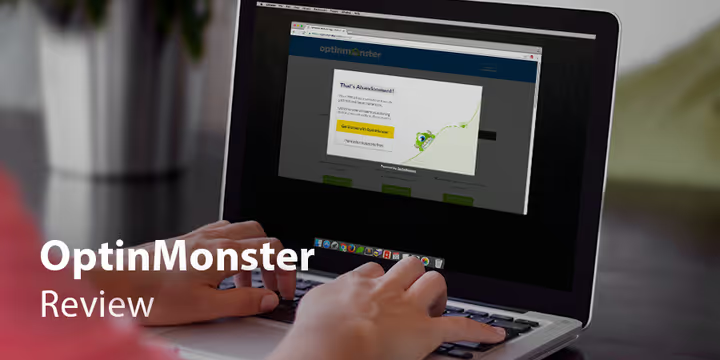
OptinMonster covers the full cycle: from creating a popup to conversion analytics. Among formats are lightboxes, floating bars, welcome mats, slide-ins, inline forms, discount wheels. For each format, a visual drag-and-drop builder is available, requiring no code (although custom CSS is supported).
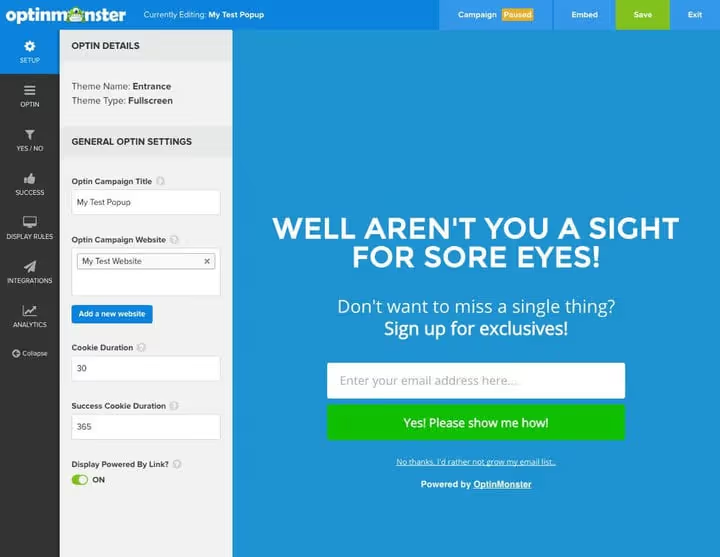
Key advantage is targeting depth. Behavioral triggers: exit-intent, scroll, inactivity, time on page. Segmentation by referral source, geolocation, device, cookies. OnSite Retargeting recognizes returning visitors and shows them a new offer instead of a repeat subscription request.
Built-in analytics shows each campaign's conversion, supports A/B split testing and Revenue Attribution, tying leads to actual sales. You see not just the number of subscriptions, but the money a specific campaign brought in.
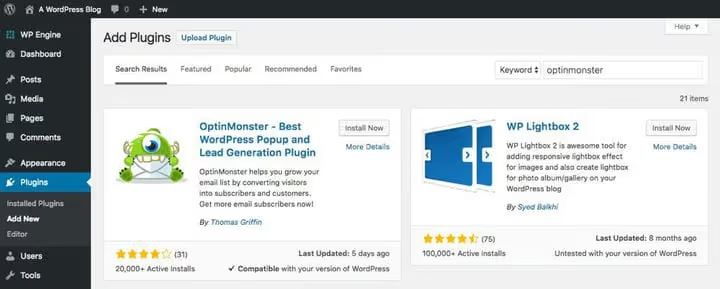
For WordPress, installation comes down to connecting a connector plugin and authorizing in the account. Pricing starts at $7 per month, there's a free trial period.
More about how Google's rules regarding popups work and why exit-intent remains a safe trigger in John Mueller's webinar:
⁉️🤔 Frequently asked questions
Do pop-ups affect Google ranking?
Yes, but only if they're intrusive and on mobile devices. Since 2017, Google has demoted pages where an interstitial blocks access to content immediately after a search transition. Popups triggered by time, scroll, or exit intent don't fall under sanctions. Desktop popups aren't affected at all.
What conversion for pop-ups is considered good?
According to SumoMe data, the average indicator is 3.09%. The upper bar (top 10% of campaigns) reaches 9.28%. Aim for 3-5% as a realistic target range for start and increase through A/B testing headlines, offers, and triggers.
Can you show a popup immediately upon entering the site?
Technically, yes. From an SEO perspective on mobile, it's risky. Google considers instant full-screen popups intrusive if they stand between a search click and content. Better to use a time or scroll delay.
Is it mandatory to hide popups on mobile devices?
Not mandatory, but strongly recommended for overlay formats. Inline forms and small-sized floating bars are acceptable. If an overlay is necessary, make it easily closable and not covering the entire screen.
What is exit-intent and why is it safe?
Exit-intent is a technology that tracks cursor movement to the tab close button or browser address bar. When a user is about to leave, a popup fires with a final offer. John Mueller from Google confirmed that such windows don't violate rules, since they appear not between a search click and content, but at the end of the session.
Is it worth implementing popups on a site in 2026?
The answer is yes, if done smartly. A good popup with a behavioral trigger, contextual offer, and one field for email gives 3-9% conversion without penalties from Google. A bad one, instant, full-screen, without value, buries both loyalty and positions.
If you're on WordPress and want to launch campaigns without a programmer, try OptinMonster, it covers all scenarios out of the box. Targeting, A/B tests, analytics, and compatibility with any email services allow you to set up a system that pays for itself from the first couple hundred impressions.

A professional team of writers and editors specializing in creating quality content.