














💰 How to use Patreon for WordPress content crowdfunding
You launched a blog on WordPress, spent months on content, built an audience. But the site barely makes money. Hosting and domain costs are barely covered, let alone your own time. Sound familiar?
Crowdfunding through Patreon isn't a magic pill, but a working tool. It turns readers into patrons: people pay a small amount each month or per new post and get access to exclusive content, early publications, or simply the ability to say "thank you." No middlemen, no complex accounting, no launching an online store.
In this guide, an honest breakdown of Patreon mechanics for WordPress authors: current fees, the official integration plugin, and a step-by-step launch plan from day one to your first payment.
💡 Quick overview:
- We'll break down Patreon's current fee structure and how much actually remains for the author after all deductions
- We'll create an account and set up the creator page, step by step, with tips on packaging your offer
- We'll run a pre-launch audience warmup and launch the page without emptiness
- We'll connect the official Patreon Connect plugin to WordPress and accept the first payment
What Patreon is and how it works

Patreon is a paid membership platform. A creator makes a page, readers subscribe, and Patreon automatically processes payments each month or for each published post. You get predictable income from content you're creating anyway.
The key difference from one-time donations: patrons pay regularly. This turns crowdfunding from a "chip in what you can" campaign into stable cash flow.
Fees: what's current now
Patreon updated its fee structure in August 2025. The old Lite, Pro, and Premium tiers are gone. All new creator pages on the standard plan have a single rate:
- Patreon platform fee: 10% of each patron payment according to official platform pricing. Fixed rate with no tiers.
- Payment processing: 2.9% + $0.30 for US payments, 3-5% for international transactions. This goes to the payment provider (Stripe or PayPal), not Patreon.
- Payouts: standard monthly withdrawal is free. Expedited payouts have a separate fee.
The final math: from a $10 subscription the creator receives roughly $8.40-$8.70 depending on the patron's location, fees eat 13-16%. Not 90% as it might seem at first glance. Keep this in mind when setting tier prices.
Why WordPress authors choose Patreon
- Predictable income. You see the exact monthly amount from each patron, no surprises.
- Compatibility with other sources. Affiliate links, Google AdSense, course sales, Patreon doesn't conflict with any monetization method.
- You retain content rights. The platform doesn't claim ownership, unlike some publishing partnerships.
- Platform handles payments and support. You don't need an accountant to manage hundreds of micro-transactions per month.
But there's a catch: Patreon only works when you already have an audience. Nobody will find your page through the platform's search, traffic must come from your site, newsletter, or social media. So before launching it's worth investing in WordPress SEO optimization and building your subscriber base.
Step 1. Create a creator account on Patreon
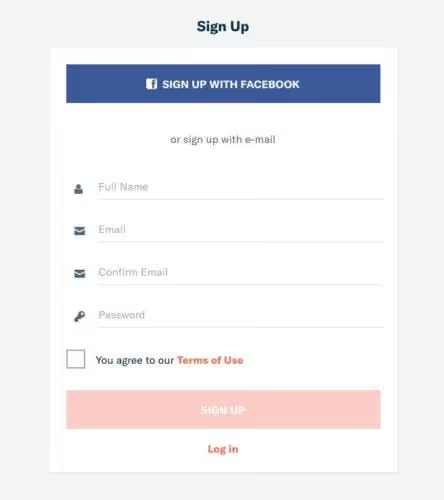
If you already have a regular Patreon account (as a reader), go to settings and choose "Become a creator." If the platform is new to you, click Start My Page on Patreon's homepage. Registration is via email or Google account, the process takes a couple of minutes.
At this stage you're not asked to fill in all fields immediately, just a creator account gets created. But right after registration the system will open the page setup wizard, and it's better to approach it prepared.
Step 2. Set up your creator page
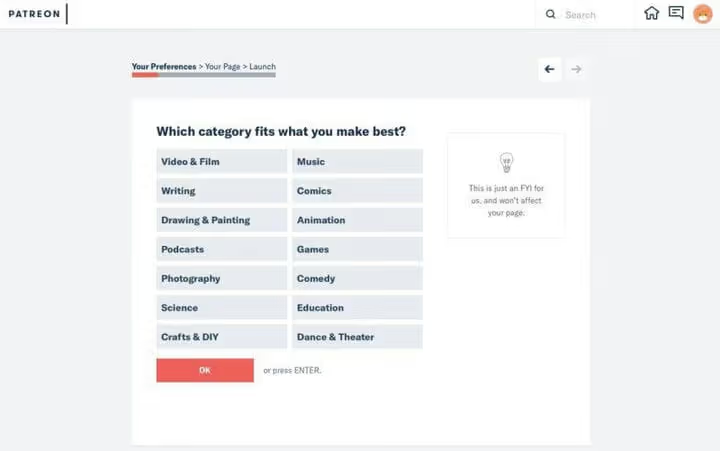
The page creation wizard will guide you through several screens. Prepare four things in advance:
- Profile photo and cover. Images exactly like those on your social media: patrons should recognize the brand.
- Payment schedule. Decide how often to charge: monthly or per post. Monthly model provides predictability; "per publication" model suits creators with irregular content schedules.
- Description and pitch. A paragraph or two about who you are, what you create, and why someone should support you financially. A good approach is a short 60-90 second video message: trust in a creator with a face is significantly higher.
- Membership tiers and rewards. What patrons get: early access to posts, exclusive content, closed Discord chat, personal consultation. Two to three tiers with clear value differences are enough to start.
Everything can be changed after launch, the wizard doesn't impose hard constraints. But the more thoughtful the page at launch, the higher the conversion of first visitors into patrons.
Step 3. Run a pre-launch audience warmup
When the page is ready, the "Launch" button makes it publicly searchable within the platform. But pressing it immediately is a mistake.
First tell your audience about the upcoming launch. Write a blog post, announce on social media, add to your newsletter. Explain: what patrons will get, how much it costs, and why you're launching Patreon right now. People are more willing to support a creator when they understand a concrete goal: equipment upgrade, hiring an editor, freeing time for in-depth articles.
Use Patreon's preview tools, they show the page through a visitor's eyes before public launch. Walk through each screen, check texts for typos, make sure buttons lead where they should.
Minimum pre-launch plan: one blog post plus two to three social media mentions over a week. After that press "Launch" and duplicate the announcement with a link to the live page.
Step 4. Connect WordPress to Patreon through the official plugin

When the Patreon page is working, one last step remains: linking it to the site. Previously third-party plugins were used for this, but the most popular one, CodeBard Patron Button and Widgets, was closed in March 2024 due to security issues.
The correct path now is the official Patreon Connect plugin from the platform itself. It's free and maintained by Patreon developers. Version 1.9.17, tested up to WordPress 6.8.5, 3000+ active installs.
What Patreon Connect provides:
- Adds call-to-action buttons to your site, patrons log in through their Patreon account in one click.
- Allows locking specific posts or site sections for patrons of certain membership tiers. Content is stored on your WordPress, access is verified through Patreon API.
- Syncs posts between Patreon and WordPress, you can publish on both platforms simultaneously.
- Works with any modern themes and doesn't conflict with other plugins, including Paid Memberships Pro.
Installation is standard: find "Patreon Connect" in "Plugins → Add New" in the WordPress admin or download from wordpress.org. After activation the plugin will guide you through OAuth authorization, you need to grant access to your Patreon account. No code, the whole process takes five minutes.
For creators using Paid Memberships Pro, there's a separate integration, the plugins work together without conflicts.
Video: connecting WordPress to Patreon in 10 minutes
Before configuring, watch the step-by-step video. It covers plugin installation, OAuth connection, and creating the first gated post:
⁉️🤔 Frequently asked questions
How much do WordPress authors actually earn on Patreon?
Income depends on audience size and content value, not on niche. An author with 10,000 monthly blog visitors and roughly one percent patron conversion gets about 100 subscribers. With an average pledge of a few dollars and standard platform fees, net income is a few hundred dollars per month. The key driver isn't traffic itself but reader trust: people pay creators they've read for months and trust.
Can you launch Patreon without an existing audience?
Formally, yes. Practically, no. Patreon doesn't drive traffic from within the platform (unlike YouTube or Medium). All visitors to your page come from links on your site or social media. Zero subscribers at launch means zero patrons. First grow your blog audience to at least 2,000-3,000 visitors per month, then launch Patreon.
What's better: monthly subscription or per-post payment?
Monthly model gives the creator predictable income and is simpler for the patron: charged and forgotten. "Per post" model is beneficial with regular publications (2-4 per month), but creates uncertainty for patrons who don't know how much will be charged in a given month. For WordPress authors with a predictable article schedule, monthly model is the optimal choice.
Does Patreon Connect conflict with other WordPress plugins?
No. The plugin follows WordPress coding standards and is tested with popular themes and builders. When using Paid Memberships Pro there's an official integration: content locked through PMP is automatically verified against patron status in Patreon. The only nuance from user reviews on wordpress.org: the Pro version (1.6.4+) had connection issues, but the free version 1.9.17 works stably.
What membership tier should I set first?
One tier in the range of a few dollars with one tangible reward: early post access or an exclusive article once a month. Second tier with additional value: personal consultation or participation in a closed chat. Don't overcomplicate at launch: three or more tiers make sense after the first few dozen patrons, when it becomes clear who's paying and for what.
Can I use Patreon if my site is in Russian and the audience is from CIS countries?
Yes. Patreon accepts Visa and Mastercard payments from any countries. The platform interface is in English, but patrons see your page with your description, you can write in Russian. The only nuance: payouts go to a card or PayPal account that supports international transfers.
Is it worth connecting Patreon to your WordPress site
Patreon won't make you rich in a month. But it's one of few tools that turns a reader into a source of regular income, without ad networks, without selling links, and without trading audience data.
Launch takes less than an hour: registration, page setup, installing the Patreon Connect plugin. The rest is audience work you're doing anyway.
If you already have 2,000+ visitors per month and you're producing content people wouldn't be ashamed to pay for, connect Patreon now. The audience won't pay on its own: you need to show the value and provide a convenient tool for support.

A professional team of writers and editors specializing in creating quality content.