













 AIIllustrative image: AI-generated
🌐 How to translate a WordPress website: a step by step guide
Your WordPress site works only for the audience that reads its language. But what if half of your potential customers search in Spanish, German, or Arabic and simply do not understand a word?
Translating your site into multiple languages opens markets you may not have even considered. According to W3Techs, WordPress powers 43% of all websites on the internet, yet only a small fraction are truly multilingual. The rest lose traffic simply because "building a site in 5 languages" sounds like technical hell: subdomains, hreflang, content duplication, SEO cannibalization.
Weglot solves this without a single line of code. You install the plugin, choose your languages, and within 5 minutes your site speaks them. Then the system kicks in: first-level AI translation, a visual editor for corrections, professional translators on demand, and full autopilot for multilingual SEO.
In this guide, you will find step-by-step Weglot setup on WordPress: from installation to professional translation. No fluff, with real screenshots of every step.
💡 Quick overview:
- Install the Weglot Translate plugin from the WordPress directory and create an account to get your API key
- Configure the source and target languages, choose the language switcher appearance, and save your changes
- Edit translations through the visual editor or translations list, order professional translation if needed
- Verify multilingual SEO: Weglot automatically creates unique URLs, hreflang tags, and translated meta tags for each language
Why translate your site at all
A multilingual site is not "nice to have." It is a direct growth lever at three funnel levels.
First, reach. You expand your addressable audience to countries where English is not the primary search language. A user from Mexico searches for a solution in Spanish and finds your translated post instead of a local competitor's site.
Second, traffic. Each new language creates an additional index of pages in Google. With proper SEO (unique URLs, hreflang, translated title and description), the search engine starts ranking you in multiple language search results simultaneously. No content duplication and no "merging."
Third, conversion. People buy in the language they think in. A localized page with a native interface and currency converts far better than an English "wall of text" with a Google Translate button in the corner.
What Google requires from a multilingual site
For translated pages to be indexed rather than hanging as dead weight, you need to follow three rules that are directly outlined in Google's documentation.
Unique URLs for each language. No ?lang=es in the query string, only subdirectories (site.com/es/) or subdomains (es.site.com). Google must see a separate page, not a parameter.
Translated source code. JavaScript solutions that dynamically swap text in the browser are not read by search engines. The translation must be at the server level, in the HTML that the crawler receives. Otherwise, the index remains monolingual.
Explicit multilingual signals. hreflang tags in the <head> or a language sitemap are what Google uses to understand: "here is the English version, and here are its Spanish and French variants, do not merge them."
Without these three points, all translation is cosmetic. Traffic will not grow.
User experience: three things you cannot miss
Even a perfectly indexed translation will fail if visitors do not understand how to use it.
Automatic language detection. The user's browser reports its Accept-Language to the site. A good plugin automatically redirects visitors to the appropriate language version without requiring an extra click on a flag.
Language persistence during navigation. Switched to the German version? All internal links should lead to German pages. Resetting the language when clicking "Home" is a surefire way to lose visitors.
Quality control. Machine translation works for a draft. But high-traffic pages (landing pages, pricing, key articles) should be proofread manually or handed to a professional translator. Weglot provides built-in tools for this, and that is where we are headed next.
How Weglot solves all of this at once
Weglot is a SaaS plugin that works as a translation proxy. After installation, it automatically detects all site content (posts, pages, menus, widgets, WooCommerce products), translates it through its AI model, and serves visitors the finished language version. The translation appears in the source code, not as a JavaScript substitution.
The plugin serves over 110,000 sites and has a 4.8/5 rating on WordPress.org. It is compatible with any theme, page builders (Elementor, Divi), and SEO plugins (Yoast, Rank Math). Under the hood is a proprietary AI Language Model that learns from your edits, glossary, and brand tone.
The technical work you do not do manually, but Weglot does:
- generates subdirectories for each language (
/es/,/de/); - inserts hreflang tags;
- translates meta tags (title, description, Open Graph);
- creates and updates a multilingual sitemap.
All you do is install and follow three setup steps.
1. Installing the Weglot Translate plugin
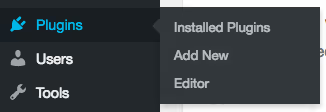
Go to the WordPress admin panel: Plugins → Add New. Type "Weglot" in the search bar.
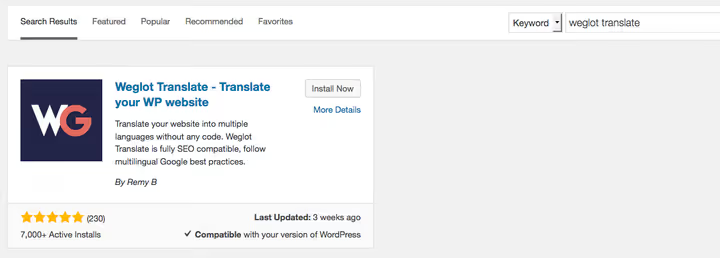
Find Weglot Translate and click "Install Now." After installation, the button changes to "Activate," click that too.
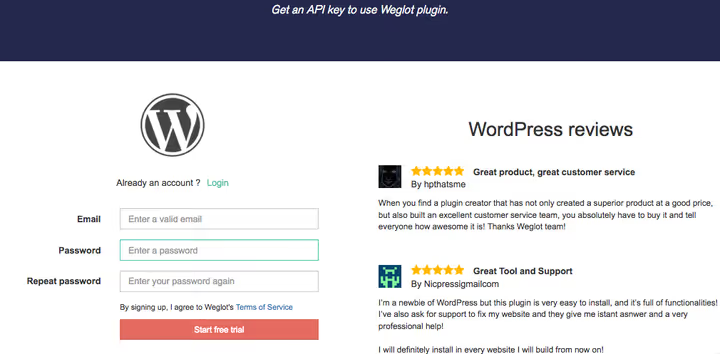
A "Weglot" item appears in the admin sidebar menu. Go to it and click the "Log in" link, the system will prompt you to create a Weglot account. Enter your email and password. You will receive a confirmation email containing your API key.
The API key is the only thing that connects your site to the service. No edits to wp-config.php or .htaccess.
2. Configuration: language, button, and auto-detection
Stay in the plugin settings (admin panel → Weglot). The first field is API key. Copy it from the email and paste it here:
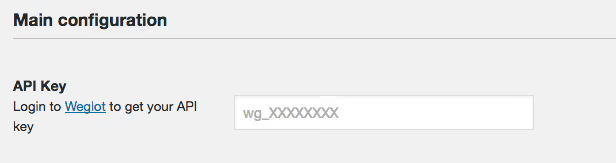
Next is the "Original language" dropdown. Select the language your site is currently written in. This is usually Russian, English, or German.

Then comes "Destination languages." Here you can specify up to 20 languages (depending on your plan). They are added using two-letter codes: es (Spanish), de (German), fr (French), and so on. Weglot supports over 110 languages.

Last is language button styling. You can choose: flags, language names, their combination, as well as position on the page (bottom right corner by default, but easily moved to the menu, footer, or sidebar).
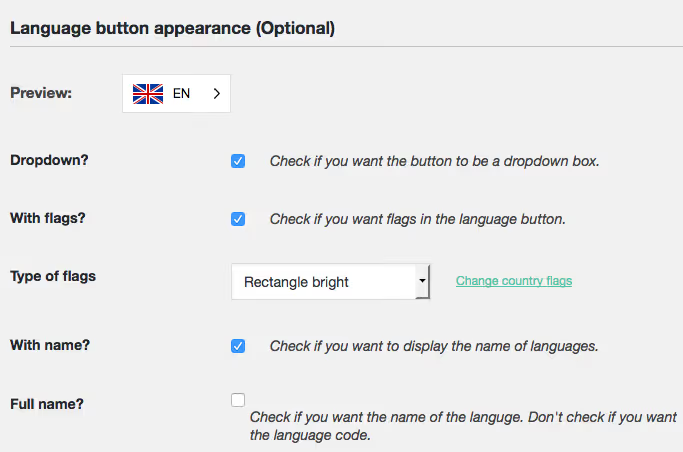
Below the main fields is a block of additional options. Here you can exclude specific pages from translation, block particular content blocks (for example, brand names), and enable automatic language detection based on the visitor's browser Accept-Language.
Click "Save." The language switcher appears on the site instantly, and you can switch and see translated pages.
3. Editing and managing translations
Weglot immediately produces a first-level machine translation. You can leave it as is, edit it manually, or replace it with a professional translation. The Weglot dashboard provides two tools for this.
Visual editor
You are on your site seeing it through a visitor's eyes, but with an additional Weglot panel. Hover over any text block, click the green pencil, and edit the translation right in the page context.
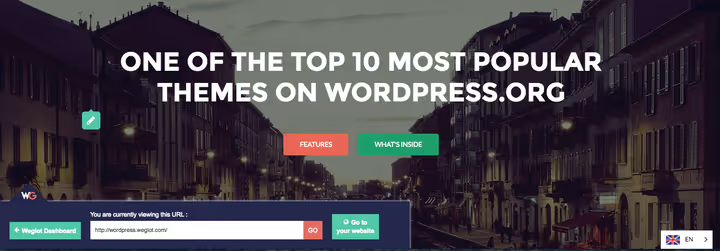
Changes are saved and displayed instantly. Convenient for editing headlines, buttons, and short blocks where context and layout matter.
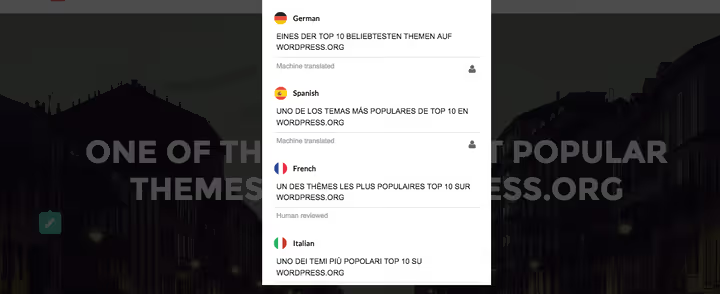
The visual editor works only on live public sites. It is not available on local servers or staging environments.
Translations list
A table mode: on the left is the source text, on the right is the translation for the selected language. All strings are grouped by URL. There is a search feature: type a word and instantly find all its occurrences in translations.
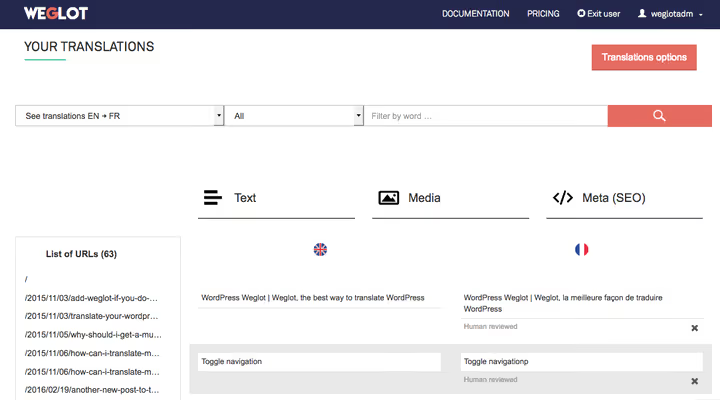
This is also where you configure translation rules: "never translate this word" (brand, trademark) or "always translate like this." Useful when AI consistently makes mistakes with the same term.
Professional translation
If machine quality is not enough, Weglot lets you order translation from connected professional agencies without leaving the dashboard. Select pages or individual strings and click the order icon:
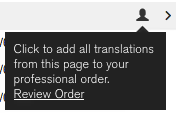
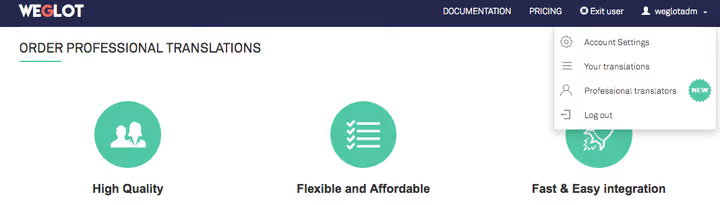
The order is created in the "Professional Orders" section. Status and deadlines are also shown there. Agencies are vetted by Weglot, and the translation arrives already integrated into your site.
How much Weglot costs
Weglot operates on a subscription model with a 14-day free trial. Prices start at €15/month (Starter plan, ~$17) and depend on two parameters: number of translated words and number of languages.
Plan | Words | Languages | Price (€/month) | Who it suits |
|---|---|---|---|---|
Free | 2,000 | 1 | 0 | Landing page or small portfolio |
Starter | 10,000 | 1 | 15 | Personal blog, early-stage project |
Business | 50,000 | 3 | 29 | Small business, company website |
Pro | 200,000 | 5 | 79 | Growing project, active blog |
Advanced | 1,000,000 | 10 | 299 | High-traffic site, news portal |
Extended | 5,000,000 | 20 | 699 | Large international project |
Enterprise | Custom | Custom | On request | Corporate level, SLA, SSO |
The word limit is fixed for the entire account, not monthly. So 50,000 words on the Business plan is the total volume of unique translated words across all languages. For most WordPress sites, this is more than enough.
Current prices are always on the Weglot pricing page.
⁉️🤔 Frequently asked questions
Do I need to edit theme code or .htaccess for Weglot to work?
No. The plugin is installed the standard way, through the WordPress admin panel. No edits to theme files,
wp-config.php, or.htaccessare required. Language subdirectories and hreflang tags are generated on the fly by the service itself.
Can I use Weglot on a local server or staging environment?
Yes, translation will work on any environment where the site is accessible via URL. But the visual editor works only on a live public site. For local development, use the translations list (table mode), it is fully functional.
How is Weglot different from WPML and Polylang?
WPML and Polylang are self-hosted plugins: translations are stored in your database, and you manage each post manually through the WordPress interface. Weglot is a SaaS solution: translations are stored in the cloud, detected and updated automatically, and SEO setup (hreflang, subdirectories) configures itself. WPML gives more manual control, Weglot provides launch speed and eliminates technical hassle.
Can I translate a WooCommerce site through Weglot?
Yes, Weglot is fully compatible with WooCommerce. It translates products, categories, cart, checkout, email notifications, everything generated by standard WooCommerce hooks. It works out of the box without additional modules.
How long is the free trial period?
14 days, no card required. After the trial, you can stay on the free Free plan (up to 2,000 words and 1 language) or upgrade to a paid plan.
What happens to translations if I deactivate the plugin?
Translations are stored in the Weglot cloud and linked to your account. When the plugin is deactivated, translated pages stop displaying, but data is not lost. After reactivating and entering the API key, everything is restored.
Should you install Weglot on your site
Weglot delivers "turnkey" WordPress translation where other plugins require manual configuration of every aspect. This does not mean it is the best for everyone, but for the typical scenario of "I want 3 languages, everything working and indexed, and I do not want to touch code," this is probably the most direct path.
Choose Weglot if:
- you need to launch multilingual support today, not after a week of configuration;
- you do not want to figure out hreflang, sitemaps, and language subdirectories;
- you are comfortable with the SaaS model: translations in the cloud, monthly subscription, autopilot.
Consider WPML if:
- you want to store translations in your own database and fully control the data;
- you need fine-grained multilingual configuration at the field level (for example, ACF);
- the site already runs on WPML and migration is unjustifiably complex.
Try the free 14 days, the language switcher will appear on your site within 5 minutes of installation. Then decide whether it is worth €15 per month.

A professional team of writers and editors specializing in creating quality content.