













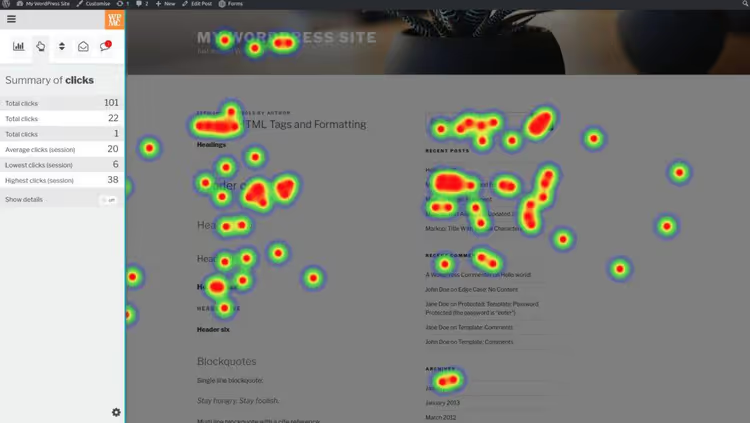
🔥 4 best WordPress heatmap plugins and tools in 2026
You open WordPress analytics and see the numbers: views, bounces, time on page. But what exactly are people doing on the site? Which button do they click, and which one do they completely ignore? How far down do they scroll and where do they drop off?
Heatmaps answer these questions visually, using color to show hot and cold zones on the page. And you don't need a separate expensive service: some tools live right inside WordPress, others connect with a single snippet.
I've gathered 4 current solutions for WordPress heatmaps in 2026: two standalone plugins (data on your server) and two SaaS tools (more powerful, but with external analytics). I compared prices, map types and scenarios, choose for your task.
💡 Quick overview:
- Decide on the tool type: standalone plugin or SaaS
- For a free start, take Aurora Heatmap
- For a complete picture of user behavior, Hotjar will work
- Compare prices and map types in the table below
Comparison table: all 4 tools in 30 seconds
Tool | Type | Click maps | Scroll maps | Movement maps | Session recordings | A/B tests | Free version | Plan starts |
|---|---|---|---|---|---|---|---|---|
Aurora Heatmap | Plugin | ✅ | ❌ | ❌ | ❌ | ❌ | ✅ unlimited clicks | $19/mo |
Nelio A/B Testing | Plugin | ✅ | ❌ | ❌ | ❌ | ✅ | ✅ trial | $29/mo |
Hotjar | SaaS | ✅ | ✅ | ✅ | ✅ | ❌ | ✅ up to 2K/day | $32/mo |
Crazy Egg | SaaS | ✅ | ✅ | ❌ | ✅ | ✅ | ✅ 30 day trial | $29/mo |
Two standalone heatmap plugins for WordPress
These plugins store everything on your server: heatmap data doesn't leave, and the analytics panel is right in the WordPress admin. A plus for privacy, a minus is fewer features compared to SaaS.
1. Aurora Heatmap

Aurora Heatmap is the simplest entry into the world of WordPress heatmaps. You activate the plugin, it automatically starts collecting click maps. No settings, API keys or snippets.
The free version from WordPress.org gives unlimited click maps, a rare generosity. Data is stored for 1 month, which is enough for operational content optimization. 20,000+ active installations and a 4.7/5 rating as of June 2026 confirm: the plugin is alive and stable.
The premium version adds two additional heatmap types:
- Breakaway, where visitors go after the page
- Attention, zones of greatest visual attention
And also removes the 1-month data storage limit. If you want to start with heatmaps today and without a budget, this is the best option.
Price: free (click maps without limits). Premium, from $19/mo or $199/year.
🔗 Aurora Heatmap on WordPress.org
2. Nelio A/B Testing
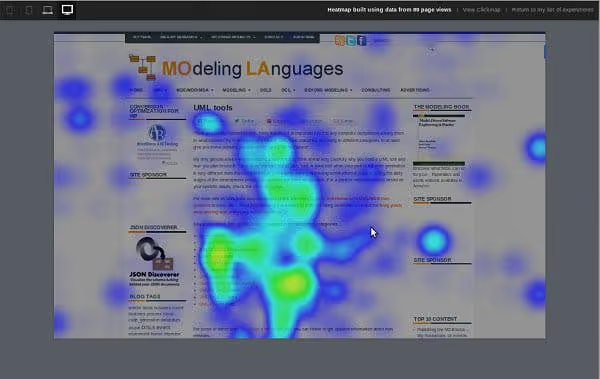
Nelio A/B Testing is a conversion optimization combine harvester where heatmaps are one of many features. The plugin's main focus is split testing: headlines, pages, menus, widgets, themes and even WooCommerce products.
The heatmap here is not an end in itself, but an auxiliary tool: before you launch an A/B test, you look at where users are clicking now, and based on this formulate a hypothesis for variant B.
If you don't need A/B testing, Nelio is excessive. But if you've matured to systematic conversion optimization, this is the only plugin that gives both heatmaps and split tests from one WordPress admin.
Important: in early 2026, a CVE-2025-67944 vulnerability was discovered for versions ≤8.1.8, keep the plugin updated.
Price: free trial version, then from $29/mo.
🔗 Nelio A/B Testing on WordPress.org
Two SaaS heatmap tools for WordPress
SaaS solutions store data on external servers, and you get deeper analytics without loading your hosting. They connect via a JavaScript snippet or a ready-made WordPress bridge plugin.
3. Hotjar
Hotjar is the de facto standard for behavioral analytics. Since 2025, the service has been operating under the Contentsquare wing, but the product line and pricing remained independent.
Heatmap types that Hotjar provides:
- Click maps, for each page element
- Movement maps, mouse cursor trajectory
- Scroll maps, scroll depth in percentages
- Export and sharing, download a map or send a link to the team
On top of heatmaps, Hotjar offers session recordings (video of a real user's actions), funnel analysis and form field tracking. You can segment heatmaps by device types, separately for mobile, tablets and desktop.
For WordPress there's an official Hotjar bridge plugin, you install it, insert the site ID, and tracking works.
Free plan: up to 2,000 page views per day with a limited number of reports. For most small sites this is more than enough.
Price: limited free plan. Paid, from $32/mo.
4. Crazy Egg

Crazy Egg is a direct competitor to Hotjar with a couple of unique aces. First, segmentation here is deeper: you can filter heatmaps not only by device type and geo, but also by referrer, search query and UTM parameters. For marketers who are running paid traffic, this is critical.
Second, Crazy Egg has a built-in visual A/B test editor: you found a cold zone on the heatmap, immediately created a page variant with changes and launched a split test, without leaving the service. Hotjar doesn't have this.
As for the heatmaps themselves, click maps and scroll maps work predictably well. Crazy Egg doesn't provide mouse movement maps (that's Hotjar's field).
In 2026, the lineup expanded to 5 plans with a free tier: Free (limited), Starter, Plus, Pro and Enterprise. Previously there was only a 30-day trial, now you can use it for free permanently, albeit with reduced functionality.
Price: 30-day free trial of full functionality. Paid, from $29/mo.
⁉️🤔 Frequently asked questions
How does a heatmap differ from regular analytics like Google Analytics?
GA4 and heatmaps solve different tasks. GA4 is a macro-picture of traffic and channels: where they came from, how many pages they viewed, what percentage left. A heatmap is a micro-picture of interaction with a specific page: where they clicked, how far they scrolled, what they hovered over. In practice they're used together: GA4 says which page to optimize, the heatmap says what exactly to change on it. For small business, a free bundle of GA4 + Aurora Heatmap is often enough.
Do I need SaaS or is a WordPress plugin enough?
The choice comes down to three questions. First, privacy: a plugin stores data on your server, SaaS on an external one. Second, analytics depth: SaaS provides session recordings, funnel analysis and segmentation by a bunch of parameters; plugins are limited to heatmaps and basic metrics. Third, hosting load: SaaS removes it completely, a plugin writes data to your database. For a site on cheap hosting with 50+ pages, a SaaS option is more reliable, you don't risk hitting MySQL limits.
Free heatmaps, is it real or a trick?
Real, but with a couple of caveats. Free plans almost always cut depth: either by storage time (Aurora, 1 month), or by number of pages, or by number of reports (Hotjar, "limited" without a specific number). For the vast majority of WordPress sites, these limits are sufficient. It makes sense to pay when you need: a) session recordings, b) several heatmap types simultaneously, c) reports for clients or team, d) data storage longer than a month for "before and after" redesign comparison.
Can you use two heatmap tools simultaneously?
You can, but you shouldn't. Two trackers on one page create three problems: slower loading (each snippet = an additional network request), data intersection (a click counted by both trackers is duplicated in reports), and debugging complexity (unclear which script caused the console error). If you really need to compare two tools, run them on different pages or sequentially: collect data in Hotjar for a week, the next in Crazy Egg, and compare patterns.
Which tool is best for a WooCommerce online store?
For WooCommerce, three features that plugins don't have are critical: session recordings (video of a specific user's path from product card to checkout), funnel analysis (at which cart step the maximum number of people drop off), and form tracking (in which checkout field users make mistakes or abandon filling). Both Hotjar and Crazy Egg have all this. The choice between them: if you have paid traffic with UTM tags, Crazy Egg (UTM segmentation is stronger). If not, Hotjar (interface is friendlier, free plan is more generous at low volumes).
What to install on the site in 2026: final breakdown
Four tools, three bundles for different tasks.
If the budget is zero and you need heatmaps yesterday, install Aurora Heatmap. Free, no settings, click maps without limits. After a month of use, you'll already know more about user behavior than a year of looking at GA4.
If you've matured to A/B testing and want heatmaps as part of the conversion cycle, take Nelio A/B Testing. Split tests of headlines, pages and WooCommerce products from one WordPress admin. The trial version is free, and full access from $29/mo is a reasonable price for a project that's serious about conversion.
If a complete picture of user behavior is important, Hotjar. Session recordings, funnel and form analysis, device segmentation. The free plan is enough to start, and the Business plan for $32/mo is a reasonable price for understanding where you're losing conversion.
Choose for your specific task, not for the longest feature list. A heatmap is an action tool, not just a pretty picture.

A professional team of writers and editors specializing in creating quality content.