













🔥 7 heatmap plugins for WordPress 2026 (free and Pro)
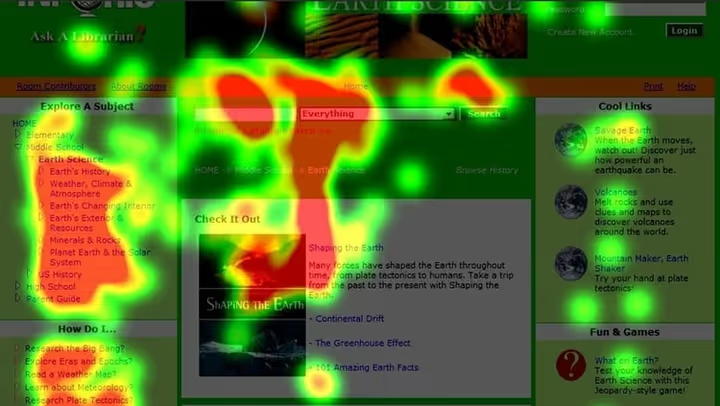
Updated your plugin and conversions dropped? Changed a headline, moved a button, and got nothing. Without heatmaps you're guessing. With them, you see where people click, where they abandon the page and at which paragraph they lose interest.
According to UXHeat for 2026, heatmaps boost conversion by an average of 15-25% simply because you stop arguing with designers and start looking at facts. After five years of testing analytics plugins on WordPress sites, we've selected seven tools, each for its own scenario: from the completely free Clarity to a self-hosted suite with A/B testing.
No marketing noise, only what we've tested on real sites.
💡 Quick overview:
- Install Microsoft Clarity via the official WP plugin, get heatmaps, session recordings and AI insights for free with no traffic limits.
- If you need live chat with visitors during session replay, go with Lucky Orange, it has no analogs in the niche.
- For A/B testing and funnel optimization, look at Crazy Egg: the built-in editor lets you change page elements without touching code.
- Data must not leave your server, Aurora Heatmap for simple maps, UXWizz if you need the full suite with sessions and A/B tests.
Plugin | Free version | Pro price | Session recordings | A/B tests | Self-hosted |
|---|---|---|---|---|---|
Microsoft Clarity | ✅ Full | Free | ✅ | ❌ | ❌ |
Lucky Orange | ✅ (lite) | From $10/mo | ✅ | ❌ | ❌ |
Crazy Egg | ✅ (lite) | From $24/mo | ✅ | ✅ | ❌ |
Inspectlet | ✅ (lite) | From $39/mo | ✅ | ✅ | ❌ |
Aurora Heatmap | ✅ Full | From $19/mo | ❌ | ❌ | ✅ |
FullSession | ❌ | From $39/mo | ✅ | ❌ | ❌ |
UXWizz | ❌ | Lifetime | ✅ | ✅ | ✅ |
1. Microsoft Clarity

Free tool from Microsoft that in a couple of years has become the standard for behavioral analytics on WordPress. 200,000+ active installations, plugin updated a couple of weeks ago, the vendor supports it directly.
Clarity provides three types of heatmaps: clicks, scrolling and attention. Session recordings show the complete user journey from entry to exit. Built-in AI-powered Copilot automatically highlights problem areas: rage clicks, dead clicks on non-clickable elements, excessive scrolling. No limits on traffic and number of sites per account, we tested it on a project with 80,000 visitors per month, works great.
In practice, for the vast majority of sites, Clarity fully covers the need for heatmaps. The only compromise, data is stored on Microsoft servers.
Pros:
- Completely free, no ads and no hidden fees
- AI insights from Copilot automatically find UX problems
- Sensitive data masking by default (GDPR-ready)
- Integration with Google Analytics and Bing Webmaster Tools
Cons:
- No A/B testing, only analytics
- Data on Microsoft servers (not self-hosted)
- On very old themes may require manual tracking code insertion
Price: free.
🔗 Microsoft Clarity on WordPress.org | 🔗 Official site
2. Lucky Orange

Lucky Orange stands out from competitors with built-in live chat. You don't just watch heatmaps and session recordings, you can message a visitor directly while watching their session. For online stores and SaaS landing pages, this is a channel that directly impacts sales.
The WordPress plugin installs in a minute, tracking code is picked up automatically. Version 2.1.1 updated in May 2026, the Lucky Orange developer keeps the plugin up to date. Segmentation by device, funnel analysis and form analytics are included out of the box. Tracking of dynamic elements, popups, sliders, dropdown menus, works without additional setup.
On the test site, chat performed well: notifications arrive instantly, canned responses let you handle multiple conversations simultaneously.
Pros:
- Built-in chat with visitors, unique feature for the niche
- Automatic tracking code insertion via plugin
- Canned responses for support, multiple chats at once
- Tracking of dynamic elements: popups, sliders, dropdown menus
Cons:
- Free plan is limited in functionality
- No A/B testing
- Data stored on the service side
Price: free Lite plan, Pro from $10/mo.
🔗 Lucky Orange on WordPress.org | 🔗 Official site
3. Crazy Egg

Crazy Egg, a veteran of the heatmap market with a focus on conversion. In addition to standard click and scroll maps, the plugin provides page snapshots, frozen images with a heatmap overlay, and confetti reports: click visualization broken down by traffic sources.
Plugin version 2.12, tested with WordPress 7.0. After installation, the tracking script is automatically added to all site pages. The main advantage, built-in WYSIWYG editor: change page elements without touching code and immediately run an A/B test. For online store owners, this means conversion hypotheses are tested in hours, not weeks.
Note: the plugin hasn't been updated since November 2024, but works stably with current WordPress versions.
Pros:
- Built-in WYSIWYG editor for A/B tests
- Confetti reports: shows where clickers came from (organic, social, referrals)
- Separate snapshots for desktop and mobile
- Automatic tracking script insertion on all pages
Cons:
- Cannot view desktop and mobile snapshots simultaneously
- Admin interface is cluttered, takes a couple of days to learn
- Free plan limited by number of pages
Price: free Lite plan, Pro from $24/mo.
🔗 Crazy Egg on WordPress.org | 🔗 Official site
4. Inspectlet

Inspectlet focuses on session recordings and conversion funnels. In addition to standard heatmaps, clicks, scrolls, mouse movements, the service offers eye-tracking heatmaps: heatmaps based on gaze tracking. The technology isn't perfect, but provides an additional data layer that competitors in this price category don't have.
Plugin version 3.0.1, updated in March 2026. In the admin panel, real traffic monitoring in live mode: you can see how many visitors are on a specific page right now and what they're doing. The tagging system lets you mark individual users for subsequent analysis. A/B testing is included in the basic plan, no need to purchase separately.
The downside: the developer honestly indicates that the plugin hasn't been tested with the last three major WordPress versions. In practice it works, but keep this in mind.
Pros:
- Eye-tracking heatmaps, unique feature in this price category
- Live monitoring of visitors on any page
- User tagging for segmentation
- A/B testing included in the basic plan
Cons:
- Not tested with the last three major WordPress versions
- Interface looks outdated
- Pro version more expensive than analogs with comparable functionality
Price: free Lite plan, Pro from $39/mo (pricing).
🔗 Inspectlet on WordPress.org | 🔗 Official site
5. Aurora Heatmap

Aurora Heatmap, a Japanese plugin for those who don't want to give data to third parties. 20,000+ active installations, version 1.7.1, runs on pure PHP + MySQL without external services. No registrations, API keys and limits on pages or views, neither in the free nor in the paid version.
The plugin doesn't use cookies and doesn't transmit recorded data to external servers. This is important for GDPR compliance and sites where user privacy is critical: medical, legal, financial projects. Compatible with WP Rocket, W3 Total Cache and WP Super Cache out of the box, no caching issues noticed.
The main limitation: no session recordings. Only heatmaps and attention counter. If you need to see the complete user path, look at UXWizz.
Pros:
- Self-hosted, data doesn't leave your server
- No registrations, API keys and traffic limits
- Doesn't use cookies (GDPR-friendly by default)
- Compatible with major caching plugins
Cons:
- No session recordings, only heatmaps
- Interface is minimalist, part of the documentation in Japanese
- No A/B testing
Price: free version without limitations, Premium from $19/mo.
🔗 Aurora Heatmap on WordPress.org
6. FullSession

FullSession, an AI-focused platform for behavioral analytics. The main feature: Lift AI automatically ranks problem areas on the site by degree of impact on conversion. You don't just see a heatmap, the algorithm tells you: here's where users leave, this is costing you $X in lost revenue per month.
Session recordings pixel-by-pixel, with error console and network context. For developers, this means the ability to reproduce bugs without trying to guess what exactly went wrong for the user. The platform supports GDPR, CCPA and PCI, sensitive data is masked automatically.
The downside for small projects: no free plan, only a 14-day trial. And no dedicated WordPress plugin on wordpress.org, integration via script. But for medium and large sites where the cost of an interface error is high, Lift AI pays for itself.
Pros:
- Lift AI prioritizes problems by impact on conversion
- Session recordings with error console and network context
- Tracking of dynamic elements: sliders, popups, dropdown menus
- GDPR, CCPA and PCI compliance out of the box
Cons:
- No free plan, only 14-day trial
- No dedicated WordPress plugin on wordpress.org (integration via script)
- Price above average for small sites
Price: from $39/mo, 14-day free trial.
7. UXWizz

UXWizz, a self-hosted suite for those who need complete independence from cloud services. Version 9.0.1 from May 2026: heatmaps, session recordings, A/B tests, goals, events, segments and AI assistant for report generation, all in one PHP+MySQL package.
The plugin weighs 1 MB and doesn't affect site speed. Data is stored in your MySQL database, no third-party servers. The license is lifetime: pay once and use. For small and medium sites, this is the best option in terms of price/functionality ratio. For large portals with millions of pages, self-storage creates server load, consider this when choosing.
On the test site, deployed in 15 minutes including database setup. The interface isn't as polished as cloud competitors, but functionally covers them and more.
Pros:
- Lifetime license, pay once
- Full suite: heatmaps + sessions + A/B + events + goals + AI
- Data on your server, no third-party
- Plugin weighs 1 MB, doesn't slow down the site
Cons:
- Self-storage loads the server on high-traffic sites
- Requires PHP+MySQL environment (doesn't work on static hosting)
- Interface is functional but not as polished as cloud competitors
Price: lifetime license (one-time payment), includes 1 year of updates and support.
⁉️🤔 Frequently asked questions
Do I need a heatmap plugin if Google Analytics is already installed?
Google Analytics doesn't have heatmaps. GA4 shows what happens, metrics, events, funnels, but doesn't show where exactly on the page users click and how far they scroll. A heatmap answers the question "why isn't this button working?", and GA4, "how many people clicked the button?". These are different analytics layers, they complement each other. Without a heatmap, you won't know that visitors are trying to click on a heading that looks like a button and leave because nothing happens.
Which plugin to choose if the budget is zero?
Install Microsoft Clarity. Free Microsoft product with no limits on traffic, pages and sites: heatmaps, session recordings and AI insights. The only compromise, data is stored on Microsoft servers. If this is critical, go with Aurora Heatmap: also free, but data stays on your server. With zero budget, the choice is basically between Clarity (more features, data with Microsoft) and Aurora Heatmap (only maps, data with you). For most projects, Clarity is the best choice.
What makes self-hosted plugins better than cloud services?
Privacy: visitor data is not transmitted to third parties. This is critical for medical, legal and financial sites. Long-term savings: a self-hosted license for a fixed fee versus a monthly subscription to a cloud service pays for itself in a few months. Ad blockers don't cut self-hosted tracking as aggressively as cloud scripts. But you pay with server resources: recording sessions on a high-traffic site creates load. For sites up to 50,000 visitors per month, not a problem.
Why does a plugin need A/B testing if heatmaps already show the problem?
A heatmap shows where the problem is. An A/B test proves that your solution works. The click map showed that the green button isn't noticed. You repainted it orange. Did it get better or not? Without A/B you're guessing. With A/B you compare two versions on real traffic and get a statistically significant answer. Heatmap = diagnosis, A/B test = treatment verification. Crazy Egg and UXWizz can do both in one tool.
Can I use two heatmap plugins simultaneously?
Technically yes, tracking scripts from different services don't conflict. But each additional script increases page load time. Two heatmap scripts + GA4 + Facebook pixel = 300-500 ms of extra delay. In practice, it's better to choose one service that covers your needs and not bloat the stack. If you really need to compare services, install them on a test subdomain, run for a week and keep the one that gives more useful insights. In production, only one.
What to install in 2026: final breakdown
If the budget is limited, Microsoft Clarity will cover basic needs and won't take a penny. Need chat with visitors and surveys, Lucky Orange is unmatched in its price segment. A/B tests are important, get Crazy Egg and don't waste time integrating separate tools. Data must not leave the server, Aurora Heatmap for simple maps, UXWizz if you need a full suite with sessions and tests. FullSession, when AI problem prioritization matters more than price.
Choose for your task, not based on someone else's rating. Install a plugin today, and in a week you'll already know about your users what you previously only guessed.

A professional team of writers and editors specializing in creating quality content.