













 AIIllustrative image: AI-generated
🎯 7 WordPress themes for knowledge base, Wiki and FAQ sites in 2026
Every support ticket closed manually takes time that the team could spend on development. Standard WordPress themes aren't suited for this task: live search is missing, category hierarchies fall apart with hundreds of articles, and analytics for documentation gaps simply don't exist.
A specialized knowledge base theme solves these problems out of the box. Live search from the first characters, tree-structured categories, article tables of contents, and a built-in support forum from one vendor. No plugin zoo that conflicts with every core update.
We've selected 7 WordPress themes for knowledge bases, wikis, and FAQs relevant in 2026: from premium leader KnowAll with built-in analytics and AI assistant to Discy for $59 for Q&A communities with voting. All themes are actively maintained, regularly updated, and tested on real projects.
💡 Quick overview:
- Compare 7 themes by price, features, and scenarios: the table at the start gives you the breakdown in half a minute
- Evaluate live search, query analytics, bbPress support, and multilingual capabilities of each theme
- Review pros and cons: described honestly for each theme, no marketing fluff
- Choose for your task: the recommendation matrix at the end suggests what to pick for your scenario
- Study frequently asked questions: whether a small business needs a knowledge base and when a subscription beats a one-time payment
Comparing 7 WordPress knowledge base themes 2026
Theme | Price (starting) | AJAX search | bbPress | Analytics | Best scenario |
|---|---|---|---|---|---|
KnowAll | $169/year | ✅ live | ❌ | ✅ built-in | Maximum features, SaaS |
KnowHow | $59 one-time | ✅ | ❌ | ❌ | One-time budget, simplicity |
Lore | $59 one-time | ✅ | ✅ | ❌ | Documentation and forum |
Knowledge Base | $39 one-time | ✅ | ✅ | ❌ | Wiki and support |
Flatbase | $49 one-time | ✅ | ✅ | ❌ | Knowledge base with rating |
Docly | $59 one-time | ✅ | ✅ | ❌ | Dark mode and RTL |
Discy | $59 one-time | not applicable | ❌ | ❌ | Q&A community |
1. KnowAll: market leader with AI assistant and search analytics

KnowAll from HeroThemes, the most popular knowledge base theme for WordPress. According to the product page, it's used by over 32,000 businesses, including Airbnb, Newegg, and Pagely. Published HeroThemes case studies document support ticket reductions up to 60% after switching to KnowAll.
In practice, KnowAll search works instantly. Type "billing" and get snippets of all articles about payments with section names. Built-in analytics highlights queries without answers: you see gaps in documentation and close them precisely.
In 2026, HeroThemes offers three pricing plans with a 60% seasonal discount on the first year. The Pro tier includes an AI assistant that generates automatic responses based on your documentation, plus integrations with Slack and HelpScout. All plans include the KnowAll theme and Heroic KB plugin.
Pros:
- Live search with category previews and built-in search query analytics
- AI assistant in Pro tier: automatic responses based on documentation
- Customization via WordPress Customizer: colors, fonts, logo without code
- Regular updates and premium support from developers
Cons:
- Subscription from annual tier, more expensive than any one-time theme in this roundup
- bbPress not supported out of the box
Price: from $169/year (Essential: theme + Heroic KB). Plus at $349/year adds search analytics and article feedback. Pro at $599/year: AI assistant, Slack, HelpScout. 60% seasonal discount on first year brings starting price down to $67.60.
2. KnowHow: one-time purchase without subscription
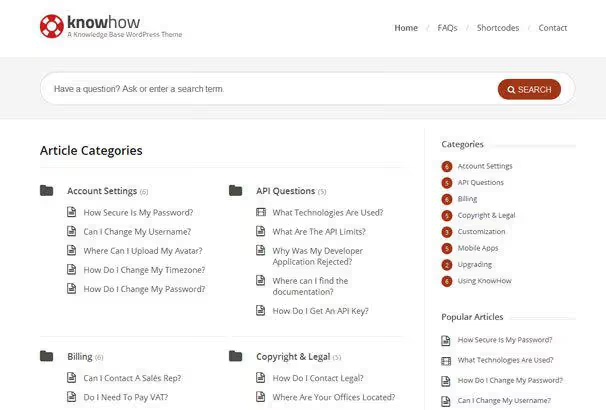
KnowHow, a ThemeForest theme for those who don't want an annual subscription. The philosophy is simple: pay once and use without time or site limits. No recurring.
The theme configures through a built-in color picker: change the accent to match your brand, and the knowledge base looks native. AJAX search filters results by categories without page reload. Video support, YouTube, Vimeo, and self-hosted, lets you embed training videos directly in articles.
Pros:
- One-time purchase: lifetime updates, no site limits
- AJAX search with category filtering
- Video support in articles: YouTube, Vimeo, self-hosted
- Responsive design and clean typography
Cons:
- No built-in search query analytics
- bbPress not supported out of the box
Price: $59 one-time, includes lifetime updates and 6 months support.
3. Lore: lightweight knowledge base with forum and multilingual support

Lore, an elegant knowledge base theme focused on speed and simplicity. Unlike bloated solutions, Lore loads instantly: minimalist code and rejection of heavy frameworks make it one of the fastest themes in this roundup.
Works out of the box: AJAX search for articles and FAQ, bbPress integration for support forum, multilingual via WPML, and ready templates for questions and answers. On the theme's ThemeForest page, rating 4.97 and over a thousand active installs. The developer regularly releases updates, the theme is compatible with latest WordPress versions.
Pros:
- Very lightweight and fast: minimal code, no bloated frameworks
- bbPress out of the box for support forum
- Multilingual via WPML and ready interface translations
- Responsive design and clean typography without extra elements
Cons:
- No built-in search query analytics
- Fewer ready demo templates than KnowAll
Price: $59 one-time on ThemeForest, includes lifetime updates and 6 months support.
4. Knowledge Base: classic wiki with child theme

Knowledge Base, a theme for those who need classic wiki structure without extra layers. Built on Bootstrap 5, responsive by default. AJAX search covers article titles and content without page reload.
bbPress integration adds a support forum in a few clicks. The theme comes with a child theme: all customizations are preserved during updates. For teams with multiple developers, this is critically important.
Pros:
- Only $39 on ThemeForest, the most affordable theme with bbPress in this roundup
- Child theme included: safe edits via child theme
- Bootstrap 5: modern responsive frontend
- Widgets and shortcodes for quick page assembly
Cons:
- Fewer features than KnowAll or Lore
- Updates come less frequently than from roundup leaders
Price: $39 one-time on ThemeForest.
🔗 Knowledge Base on ThemeForest
5. Flatbase: knowledge base with article rating and blog

Flatbase, a comprehensive solution for a support platform. Clean grid, accent color on key elements, spacious typography. The design puts content first without distracting the reader.
Main feature: AJAX search with live results plus article feedback system. Users mark whether an article helped or not, and you see statistics in real time. bbPress integrated for support forum. Built-in blog lets you run a news section alongside documentation without a separate site.
Pros:
- Ready FAQ templates: launch questions section in minutes
- AJAX search and article rating (helped / didn't help)
- Full bbPress support for forum
- Built-in blog and interface translations to any language
Cons:
- Design closer to classic than trendy
- Search analytics inferior to KnowAll in depth
Price: $49 one-time on ThemeForest.
6. Docly: dark mode, RTL, and Elementor

Docly stands out with a day/night switcher out of the box: the only theme in this roundup with dark mode without additional plugins. Technical documentation users appreciate dark mode when working evenings or in dimly lit offices.
The theme supports RTL languages (Arabic, Hebrew) and is fully translation ready. Elementor built in for visual page customization without code. bbPress adds support forum, MailChimp integration collects subscribers. Print styles output each article in clean format when printing.
Pros:
- Day/night switcher: essential for documentation read in the evening
- RTL and multilingual out of the box
- Elementor for visual customization
- Print styles: clean instruction printouts
Cons:
- Fewer implementations than KnowAll or KnowHow
- Forum only via bbPress, no built-in solution
Price: $59 one-time on ThemeForest.
7. Discy: Q&A community with voting and reputation

Discy from 2codeThemes, the most popular theme for Q&A communities on WordPress: over 3,600 sales and 4.98 rating on ThemeForest. If you're building a platform like Stack Overflow or Quora, Discy provides a full toolset out of the box.
Users ask questions with categories and tags, the community votes on answers, the question author marks the solution. Reputation system awards points for activity, badges motivate participation. Member profiles show question history, answers, and earned achievements. Moderators can close, merge, and flag questions. Each question is indexed by search engines: organic traffic grows with every discussion.
Pros:
- Full Q&A mechanics: questions, voting, accepted answers, reputation
- Badges and achievements: community motivation without external incentives
- Member profiles with activity history
- SEO optimization: each question indexed by search engines
Cons:
- Not a pure knowledge base: part of functionality tied to active community
- Requires moderation as member count grows
Price: $59 one-time on ThemeForest.
What a WordPress knowledge base looks like: video
See a real WordPress knowledge base interface: from live search to category structure and article tables of contents.
⁉️🤔 Frequently asked questions
Does a knowledge base need a separate theme if you can assemble the functionality with plugins?
You can, but maintenance costs grow over time. Each plugin, a potential conflict with WordPress updates. A knowledge base theme provides seamless integration with one vendor for support. For business-critical documentation, this is fundamental: one broken search after an update, and clients can't find answers.
Which theme suits a small business with a limited budget?
Knowledge Base for $39, the most affordable entry point for a classic wiki with bbPress. If you need Q&A format with community, get Discy for the same $59: voting, reputation, and badges out of the box. Both purchased once.
Can you get by with a free plugin instead of a paid theme?
Freemium solutions like Heroic KB or Echo Knowledge Base cover basic scenarios: categories, search, table of contents. Query analytics, article rating, code-free customization, and AI assistant are only available in paid versions. For startup internal documentation, freemium suffices. For client-facing base with SLA, better to get a paid theme with a single vendor.
Which theme integrates best with bbPress?
Lore and Flatbase lead in depth of bbPress integration. Lore adds multilingual support and lightning-fast loading to the forum. Flatbase is simpler to configure: FAQ templates and article rating work right after activation. Both at fixed price without subscription.
What's more cost-effective: one-time purchase or subscription?
Over 3 to 5 years, one-time purchase is more cost-effective. This path is offered by KnowHow, Lore, Knowledge Base, Flatbase, Docly, and Discy. KnowAll subscription is justified when search query analytics, AI auto-responses, and regular premium support are critical. SaaS companies and growing products need a subscription. Small team with documentation suffices with one-time payment.
Which theme to get for a wiki project with multiple authors?
Knowledge Base with child theme or Lore theme with forum. Knowledge Base provides safe customizations via child theme: important when multiple developers edit code. Lore adds multilingual support and fast article search. Both support bbPress for discussing edits.
💎 Which knowledge base theme to choose in 2026
All seven themes are actively maintained and regularly updated. Choice depends on task:
- Need maximum features and AI assistant, get KnowAll (from $169 per year with 60% discount first year).
- Want one-time purchase without subscription, KnowHow for $59.
- Need documentation with forum and multilingual, Lore for $59.
- Looking for budget wiki with bbPress, Knowledge Base for $39.
- Article feedback and rating important, Flatbase for $49.
- Need dark mode, RTL, and Elementor, Docly for $59.
- Building Q&A community with voting and reputation, Discy for $59.
Before buying, test the demo: most themes have it available via direct link in the review above. Choose for your task, not for the marketing feature list.

A professional team of writers and editors specializing in creating quality content.