














🚀 GeneratePress review: the legendary WordPress theme in 2026
Choosing a WordPress theme feels like placing a bet for several years ahead. Switch themes a year later and you'll spend your weekends reconfiguring: SEO will drop, the design will drift, and some plugins will start conflicting. Meanwhile, Google data shows that 53% of visitors leave before a page finishes loading if it takes longer than three seconds. A heavy theme hurts on both fronts.
GeneratePress launched in 2014 and after 12 years has not tried to become "everything for everyone." Canadian developer Tom Usborne went the opposite direction: less code, modular architecture, zero dependency on jQuery. On WordPress.org this translates to 600,000+ active installations, over 7 million downloads, and a 5/5 rating with 1,300+ reviews.
Below is an honest breakdown of GeneratePress in 2026: what changed since version GP 3.0, how much the paid version costs, and when you should consider competitors. Real tests, interface screenshots, no marketing fluff.
💡 Quick overview:
- Install free GeneratePress from the WordPress repository, weighs under 10 KB (gzip)
- Check baseline speed: Lighthouse 100/100 on a clean install without plugins
- Enable the modules you need in Customizer, disabled modules do not load a single byte of code
- Configure your logo, layout, colors, and fonts without code through the standard WordPress Customizer
- Install GenerateBlocks to create landing pages and custom layouts in Gutenberg
- Purchase GP Premium for $59/year if you need all 14 modules, support, and the starter site library
What GeneratePress is and why people choose it
GeneratePress was created by Canadian developer Tom Usborne and first published in the WordPress.org repository in 2014. Over 12 years it evolved from a modest alternative to bloated themes into a full ecosystem: the theme, the GenerateBlocks block builder, and the GenerateCloud pattern library.
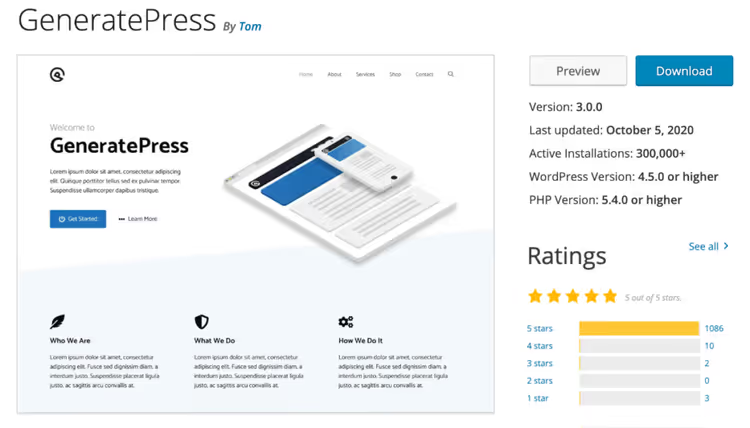
According to the GeneratePress listing on WordPress.org, the theme has over 600,000 active installations and more than 7.1 million downloads. The average rating is 5 out of 5 with 1,300+ reviews. Few themes maintain a perfect rating at that scale.
The core idea behind GeneratePress is modularity. The base theme weighs under 10 KB (gzip). Everything else is optional. This approach is the exact opposite of Avada or Divi, where hundreds of features are baked in permanently and cannot be disabled.
With the release of version GP 3.0, Tom rewrote the theme using Flexbox, removed jQuery from the core, and reduced the overall size by another 55%. Today GeneratePress is fully compatible with the WordPress block editor and supports Full Site Editing.
Key features out of the box
In practice, even the free version delivers more than the description suggests:
- Under 10 KB (gzip) on a fresh install. One CSS file, one JS file. No heavy frameworks, no jQuery in the core.
- Modular architecture. WooCommerce, blog, menus, colors: disable unneeded modules and they do not load a single line of code.
- Flexbox instead of outdated float grids. Predictable behavior on mobile without extra styles.
- Built-in schema.org microdata. Articles, breadcrumbs, navigation: the theme delivers structured data to search engines right away.
- Compatibility with key plugins: Yoast SEO, WooCommerce, Easy Digital Downloads, BuddyPress, bbPress, WPML. Conflicts are rare.
- WCAG 2.0 compliance. Accessibility that most themes overlook.
- Deep integration with WordPress Customizer. All settings in the standard interface, no separate panels.
- 250+ public hooks and filters in the GitHub repository. Developers will appreciate this.
- System fonts by default. No Google Fonts loading unless you explicitly enable them.
Performance: how we tested
We tested GeneratePress on a clean WordPress installation without plugins or additional scripts. This is the only way to get an honest picture of what the theme itself delivers.
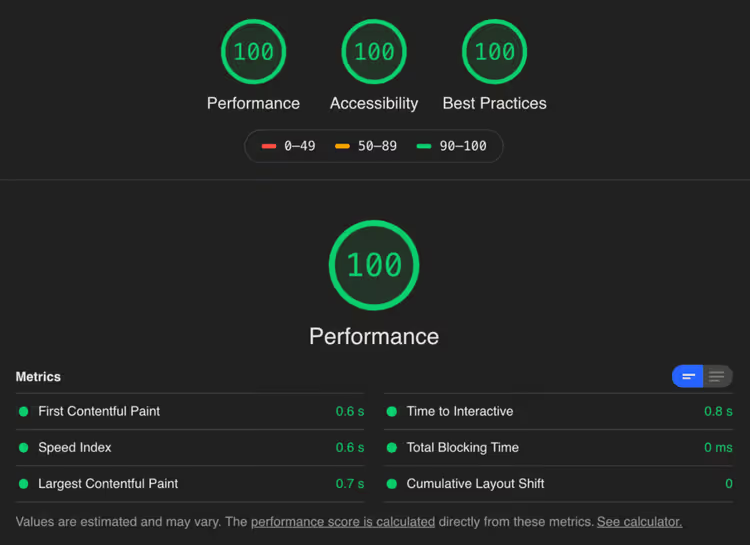
Google Lighthouse on desktop: 100/100 for performance. For themes with jQuery and heavy CSS frameworks, this result is unattainable. In practice a clean GeneratePress installation holds this score consistently.
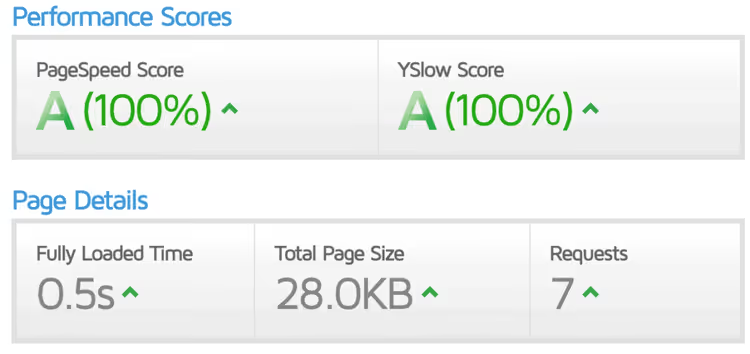
GTmetrix on the same installation shows a fully green scale. Full load time is under one second. The number of requests is minimal: the theme does not load unnecessary assets.
The theme core size is 7.1 KB (gzip). Main files: main.min.css (5.0 KB) and main.min.js (2.1 KB). That is everything the theme loads without additional modules.
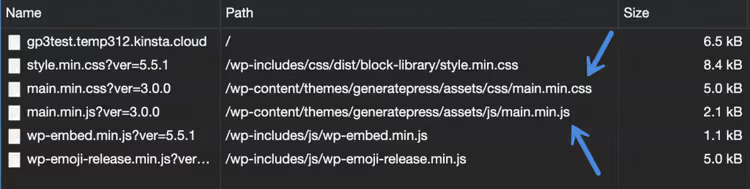
Starting with GP 3.0, the theme generates dynamic CSS: only styles actually used appear on the page, and they are cached in a separate file. CSS for comments loads only where comments are enabled. What is disabled does not load a single line.
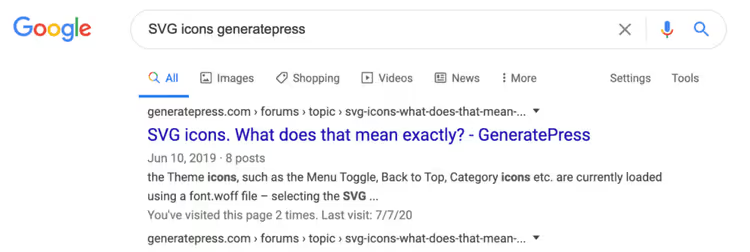
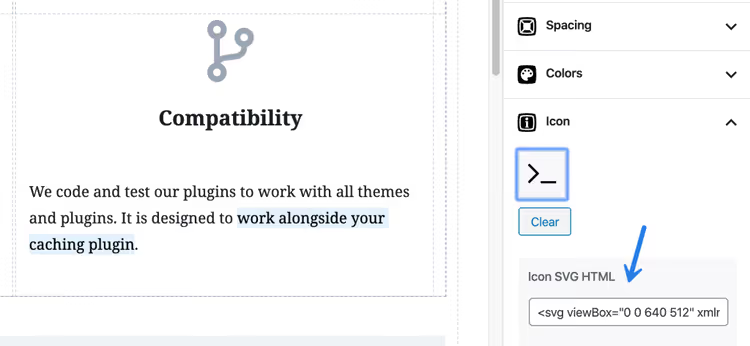
The built-in SVG icons instead of FontAwesome deserve a separate mention. GeneratePress includes its own basic icon set. You can insert the SVG code of any other icon without connecting third-party libraries.
Customization without code: Customizer, Elements, and hooks
One of GeneratePress's strengths is full integration with the standard WordPress Customizer. No proprietary control panels: all settings are where you are used to working.
Site appearance
Logo, favicon, and tagline are changed through Site Identity. The theme supports SVG logos: simply install the free Safe SVG plugin to sanitize SVG files.

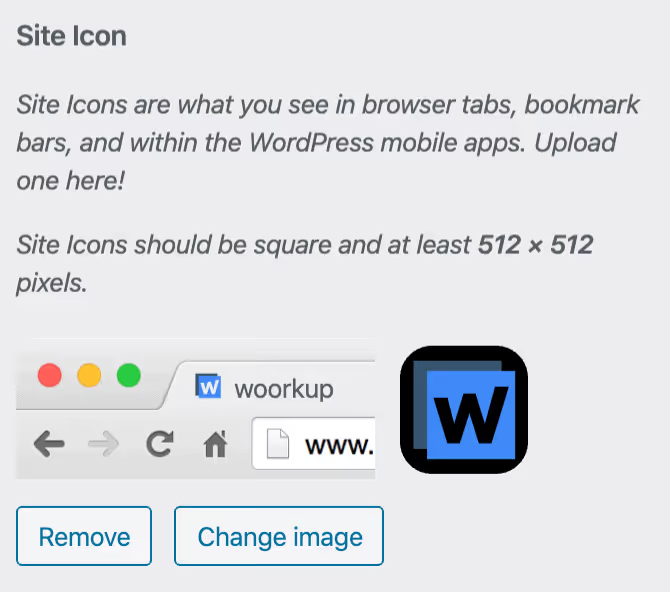
Favicon is configured through the customizer: WordPress automatically crops the uploaded image and generates all required formats for different devices.
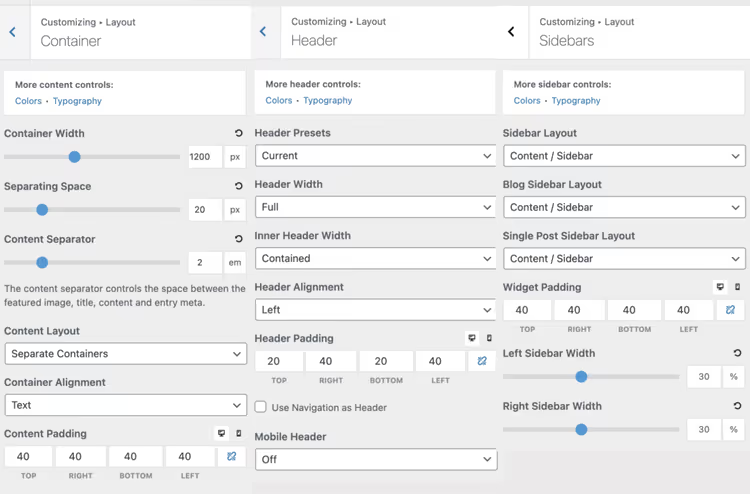
The layout is flexible: container width, padding, sidebar on the left or right, full-width for individual pages.
The blog can be displayed in columns (grid) or masonry instead of the standard post list, with control over thumbnail size and alignment.
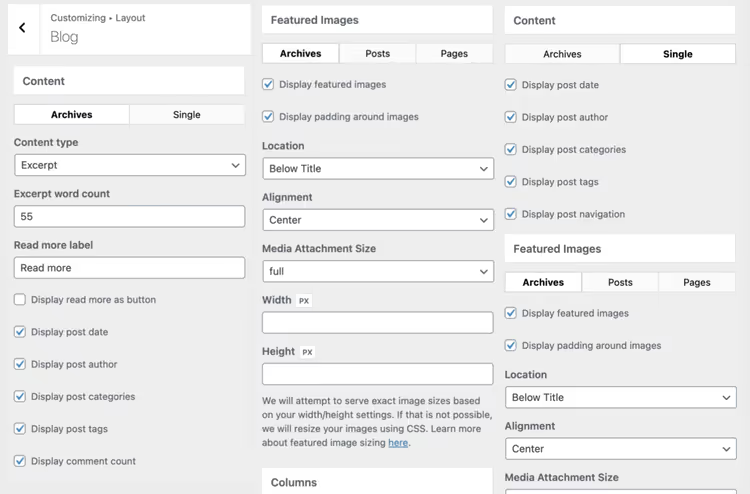
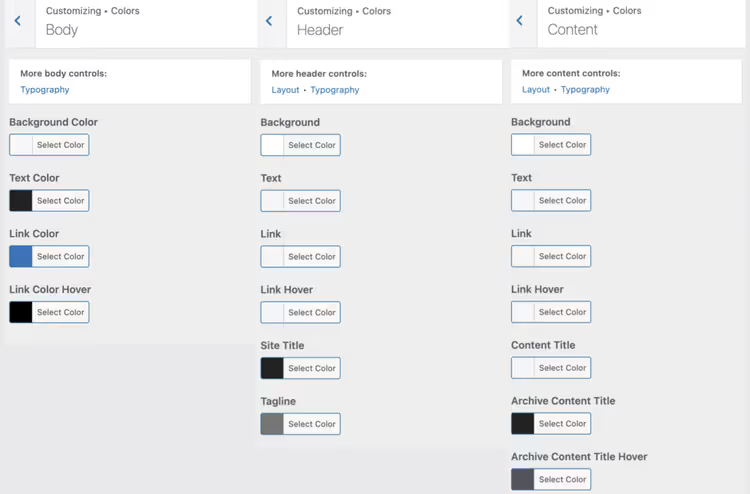
Colors and typography are configured separately for each interface element: body, header, navigation, buttons, widgets, footer. System fonts are enabled by default; no font files slow down your site.
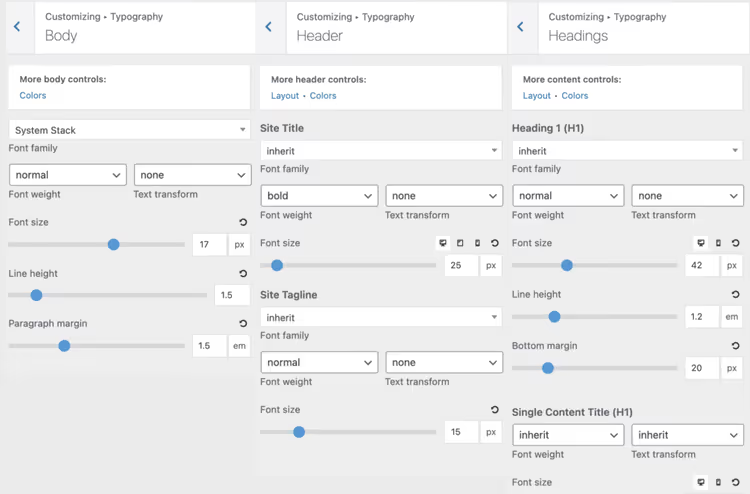
For fine-tuning typography you can select size, family, and weight for each text type, including Google Fonts and local font hosting.
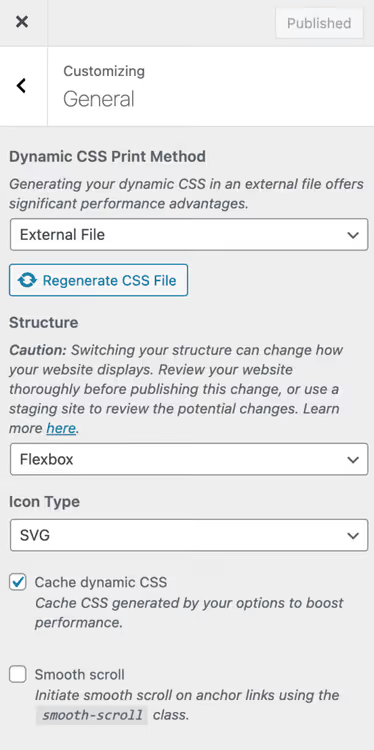
In the General section you choose the structure: Flexbox or Floats (always choose Flexbox). There you also enable dynamic CSS as an external file for better caching and activate dynamic CSS caching.
Elements: an alternative to a child theme
The Elements module lets you add custom content, PHP code, and hooks to any area of your site. Essentially it replaces a child theme: you can insert analytics scripts, social buttons, custom CSS, or PHP through 40+ hook points (wp_head, wp_footer, before_header, after_header, and others).
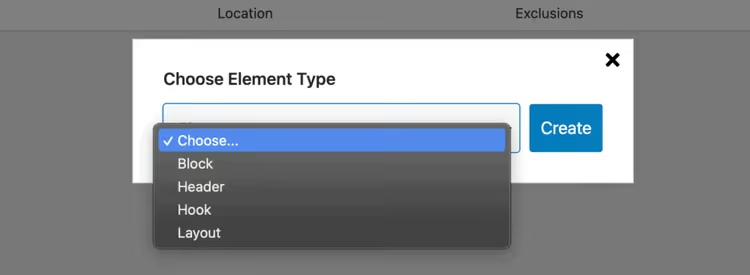
For each hook you choose the content type: HTML, CSS, or PHP. You write the code, select the hook, and it executes in the right place on your site.
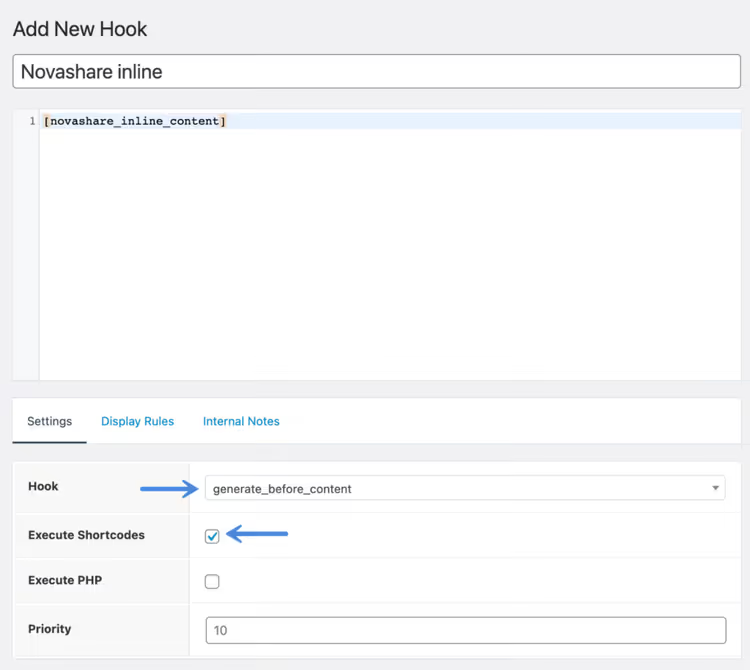
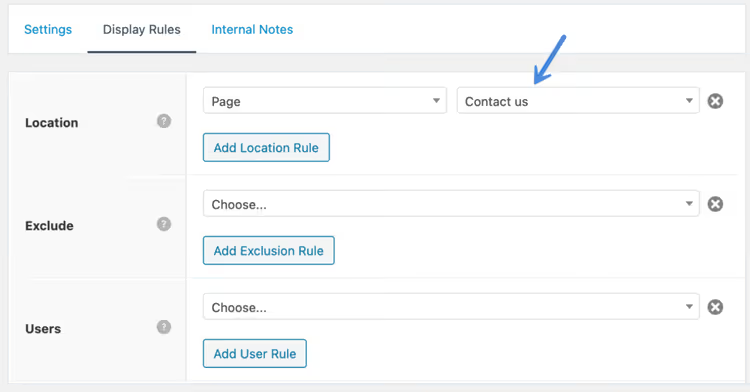
Display rules are flexible: specific pages, post types, user roles. You can add exclusions and change behavior depending on whether the visitor is logged in or not.
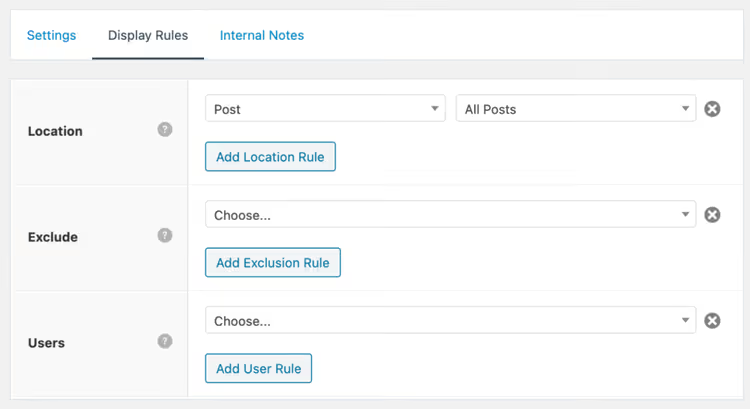
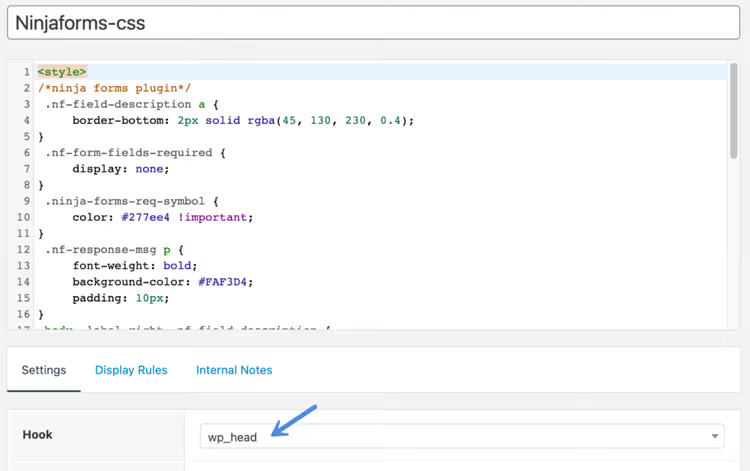
An example from our practice: you need to add 40 lines of CSS for the contact page but not load them sitewide. Create a hook via wp_head, insert the CSS, and in Display Rules specify only the "Contact" page. No child theme, no overloaded functions.php.
The display area selection is flexible: a single page, section, or post type.
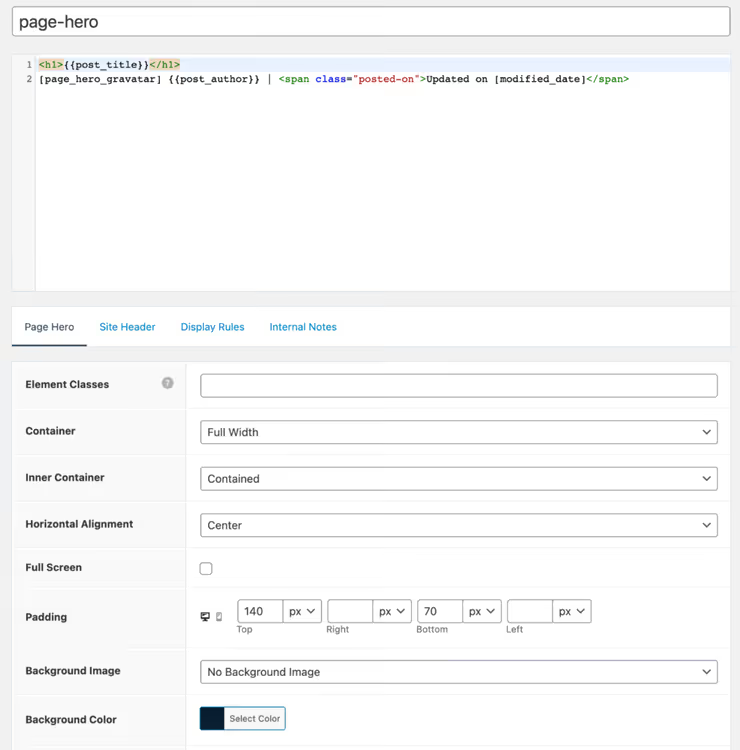
Header Elements allow you to override the header design for a specific post or an entire section. Using GeneratePress template tags you can build a unique design: minimalist, with centered typography, or with a background image.
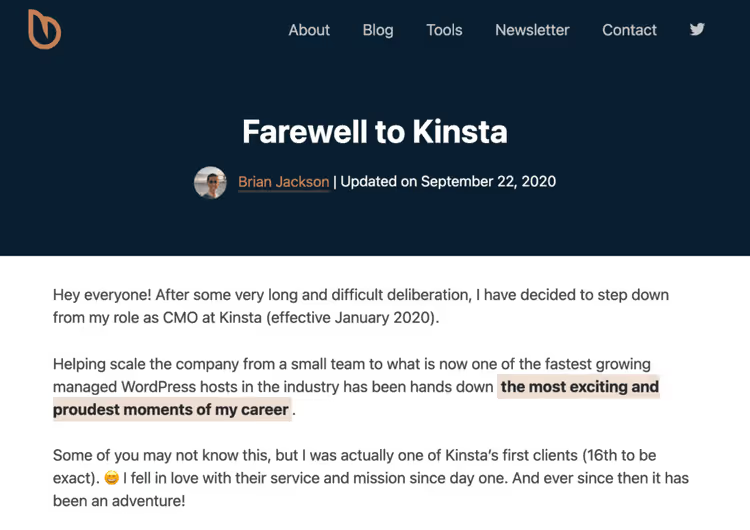
Here is an example result: a blog header with minimalist centered typography, created entirely through Elements without a single line of code in theme files.
Settings at the individual page and post level
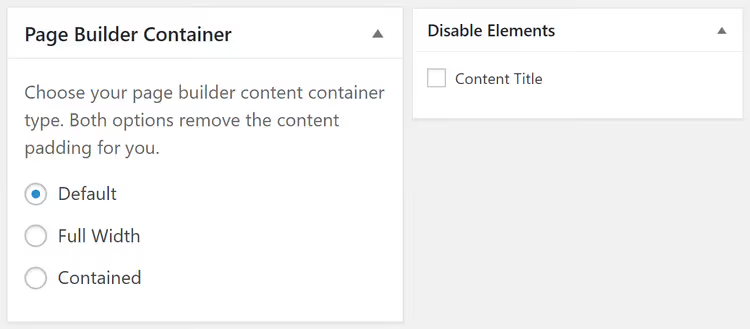
At the level of each page or post you can override the sidebar layout, disable the title, navigation, or footer, and choose full-width instead of the standard template.
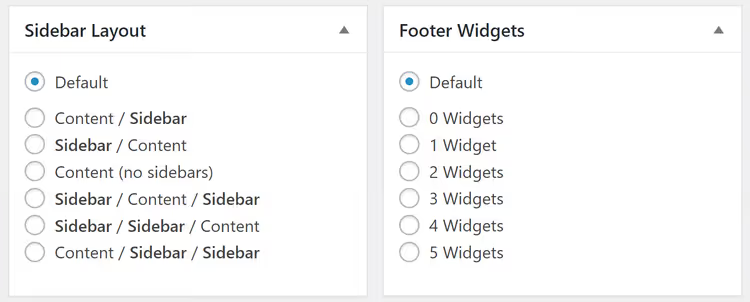
For landing pages this is convenient: with one toggle you remove everything unnecessary and get a clean full-width page.
Custom CSS and PHP without editing theme files
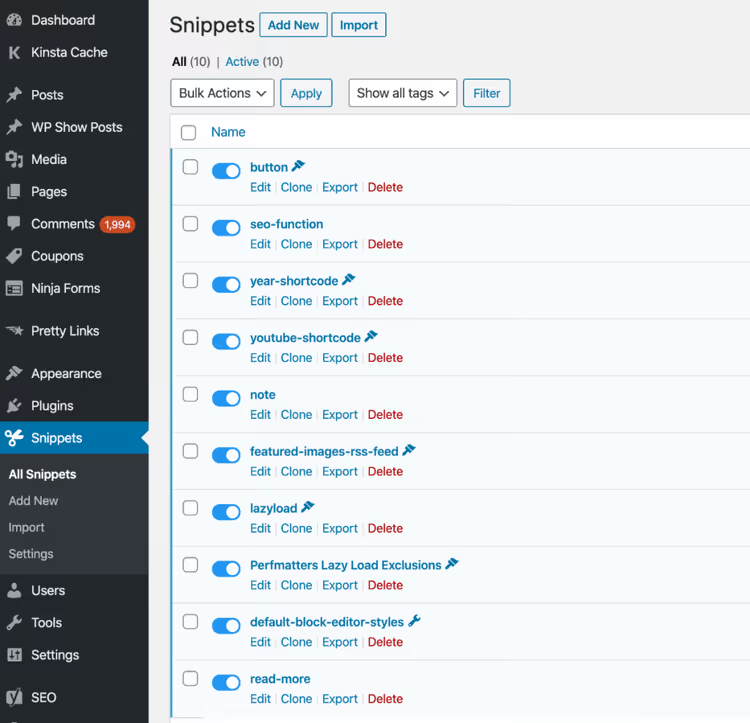
For custom CSS, use the Additional CSS section in the standard customizer. For PHP snippets, Tom recommends the free Code Snippets plugin: you add PHP fragments without editing theme files.
GP Premium modules: what the paid version unlocks
The free version of GeneratePress is a starting point. To unlock its full potential you need GP Premium ($59/year). Here is the complete list of modules:
- Colors. Style any interface element directly in Customizer: body, header, navigation, buttons, widgets, forms, footer. No additional CSS needed.
- Typography. Choose size, family, and weight for each text type. Supports Google Fonts and local font hosting.
- WooCommerce. Control over typography, colors, and store layout: catalog, product card, cart.
- Elements. Dynamic hero sections, advanced hook system, and custom layouts. Replaces a child theme: PHP, HTML, and CSS anywhere on your site through 40+ hook points.
- Menu Plus. Sticky menu with appearance effects, logo in menu, mobile header, off-canvas navigation.
- Blog. Post layouts in columns or masonry, image size and alignment settings.
- Backgrounds. Background images for any site area.
- Spacing. Control over padding and margins: header, content, widgets, menu, sidebar width.
- Secondary Nav. A second navigation area with the same settings as the main one.
- Copyright. Custom text in the site footer.
- Disable Elements. Hide header, navigation, or footer on specific pages and posts.
- Import/Export. Transfer customizer settings between sites in one click.
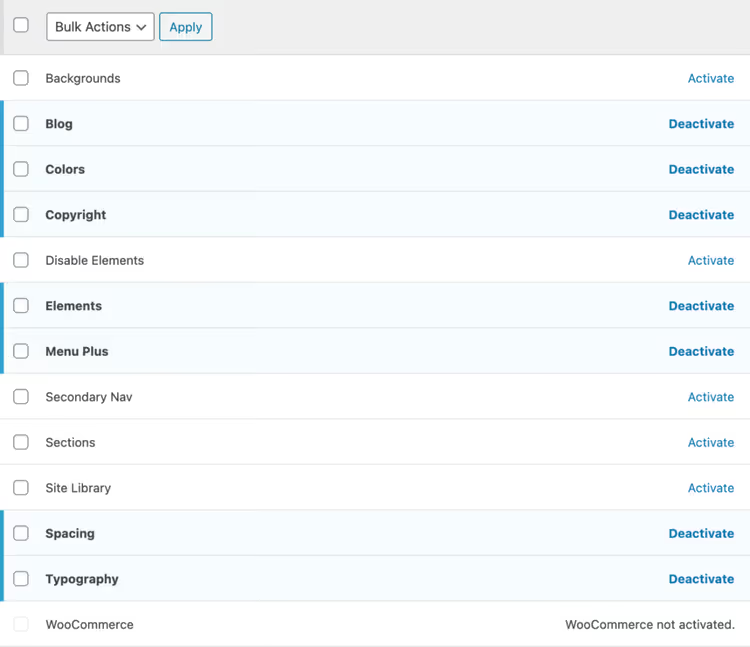
An important point: all inactive modules produce zero code. If you enable only Colors and Typography, only their scripts and styles reach the page. One GP Premium license covers up to 500 sites, including client sites, which changes the economics for agencies and freelancers.
GenerateBlocks: a native block builder
In 2020 Tom released GenerateBlocks, a set of lightweight blocks for the Gutenberg editor. This is not another page builder like Elementor: GenerateBlocks adds exactly one CSS file per page, uses no JavaScript, and does not generate inline styles.
It includes four blocks:
- Container. A Flexbox container with responsive width and padding settings.
- Grid. A responsive grid with control over the number of columns on desktop, tablet, and mobile.
- Headline. A heading with fine-tuned typography settings.
- Buttons. Buttons with gradients, icons, and hover effects.
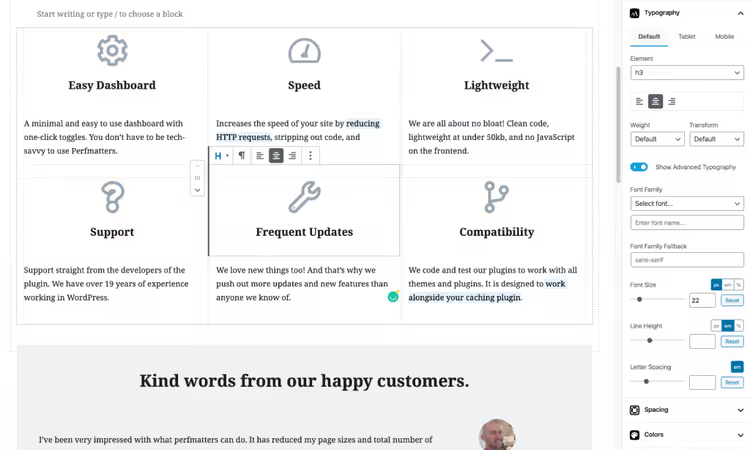
The responsive Grid changes the number of columns on the fly: desktop, tablet, mobile. Convenient for galleries, feature grids, and product cards.
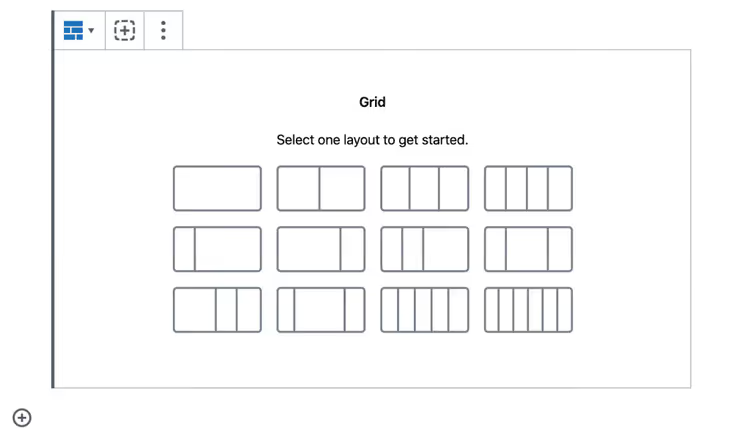
The free version of GenerateBlocks is available in the WordPress repository. The Pro version at $99/year adds:
- Pro Patterns: over 300 ready-made design patterns.
- Global styles: set colors and typography once and apply everywhere.
- Dynamic blocks: pull custom fields (ACF, Meta Box) directly into your layout.
- GenerateCloud: a cloud for sharing patterns and styles between sites ($99/year separately).
The GeneratePress + GenerateBlocks combination covers virtually any page-building task. From landing pages to WooCommerce stores: everything is assembled with the mouse without code, and the output is clean semantic HTML.
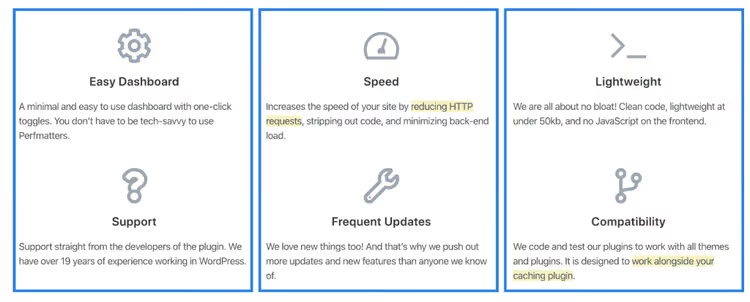
In practice the pricing table shown below was built exclusively with GenerateBlocks: no additional plugins, just clean blocks and minimal CSS.
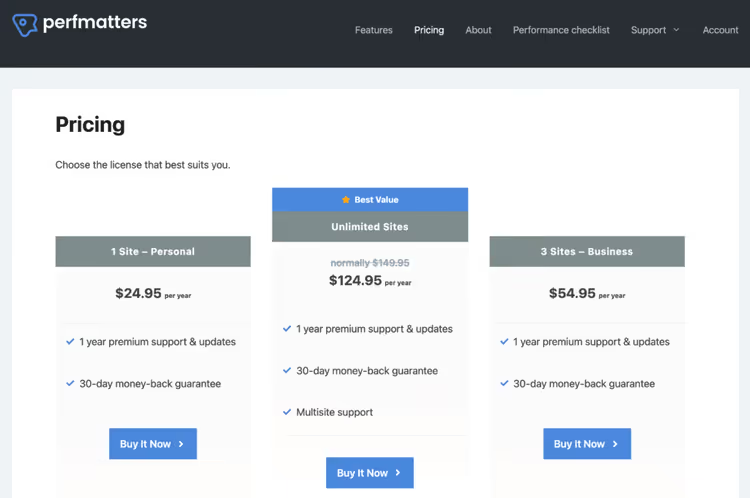
GeneratePress pricing and plans in 2026
As of June 2026, GeneratePress offers four options:
Plan | Price (USD) | What's included |
|---|---|---|
Free | $0 | Theme + basic Customizer settings |
GP Premium | $59/year | All 14 modules + 100+ starter sites + Theme Builder + forum support + up to 500 sites |
GenerateBlocks Pro | $99/year | 300+ patterns + global styles + dynamic blocks + 20+ starter sites |
GeneratePress One | $149/year (full) / $99 first year | GP Premium + GenerateBlocks Pro + GenerateCloud + 80+ starter sites + 200+ patterns + priority email support |
All paid plans include use on an unlimited number of sites (up to 500), including client sites. Renewals are discounted from the full price. Refunds: 30 days, no questions asked.
On the official pricing page promotions run periodically. Updates are released on average 2-3 times a month: new features, security fixes, and optimizations.

Who GeneratePress is right for (and who should look elsewhere)
Choose GeneratePress if you:
- Value loading speed and understand that every extra kilobyte costs you visitors.
- Want to control every design detail without an overloaded interface.
- Are a developer or agency deploying the theme to dozens of clients: one license covers up to 500 sites.
- Work within the Gutenberg ecosystem and want to stay with blocks without switching to a third-party page builder.
- Are building an online store on WooCommerce or Easy Digital Downloads.
Consider other solutions if you:
- Do not want to open the Customizer and prefer visual drag-and-drop: Elementor + Hello Elementor will be more convenient.
- Are looking for a theme with hundreds of built-in "one-click" demo designs: Astra has more free Starter Templates.
- Plan complex custom logic without a developer: Elements covers basic customizations, but serious changes will require knowledge of hooks and PHP.
Watch the GeneratePress video review: a live demonstration of the interface, settings, and speed tests on a real site:
⁉️🤔 Frequently asked questions
Do I need to pay for GeneratePress if there's a free version in the repository?
The free version is a fully functional foundation for a blog or simple site: lightweight, fast, and functional. Premium at $59/year unlocks 14 modules: advanced typography, WooCommerce, Elements (a child theme replacement), sticky menu, element disabling on specific pages, and a library of 100+ starter sites. For most commercial projects Premium pays for itself immediately.
GeneratePress or Astra: which to choose in 2026?
Both themes rank among the leaders in the "lightweight and fast" category. Astra is more aggressive in marketing and offers more free Starter Templates. GeneratePress wins on architecture: a modular system without forcing unused features, cleaner code, no jQuery in the core. For a developer or someone who values minimalism and control: GeneratePress. If you need "beautiful out of the box" with minimal setup, possibly Astra.
Does the theme slow down with a large number of plugins?
No. The modular architecture means: an unused module is completely disabled, its code does not reach the page. With properly configured caching and image optimization, sites on GeneratePress with 30+ plugins maintain 95+ Lighthouse scores on desktop.
Is GenerateBlocks necessary if I'm already using GeneratePress?
Not necessarily. The free version of GenerateBlocks covers the need for grids, containers, and responsive buttons: it adds one CSS file per page without JavaScript. Pro with patterns and dynamic blocks is for those who regularly build complex pages and want to reuse design solutions.
Can I switch to GeneratePress without losing content?
Yes. Content (posts, pages, media files) is stored in the WordPress database and does not depend on the theme. When you switch themes you reconfigure the appearance through Customizer, but all text and media content stays in place. The library of 100+ starter sites speeds up the process: import a ready-made design and replace the demo content with your own.
Does GeneratePress work with WordPress Full Site Editing?
Yes. Starting with version GP 3.x, the theme fully supports Full Site Editing. You can edit templates, header, and footer directly through the Site Editor. Theme Builder in GP Premium gives more control over templates for posts, archives, and search pages.
Is GeneratePress worth getting in 2026?

GeneratePress does not try to be "everything at once." It does not overwhelm you with hundreds of demo designs and does not require learning a proprietary interface. Instead it provides a clean, fast foundation and lets you add functionality to exactly the level you need.
Over 12 years Tom Usborne and his team have proven the key point: a theme can simultaneously suit beginners (through Customizer and starter sites) and developers (through hooks, filters, and Elements). The 5/5 rating on the theme page in the WordPress repository with 600,000+ active installations speaks for itself.
If you need a theme you can build a site on today and not redo in a year, download the free version and test it. When you need all the modules and priority support, $59 per year for GP Premium is worth it.
🔗 GeneratePress on WordPress.org | 🔗 Official GeneratePress website

A professional team of writers and editors specializing in creating quality content.