














🧪 Testing PHP code on old versions without installation: 2026 guide
You wrote working PHP code on the latest version, pushed it to production, and got a flood of bug reports from clients on old hosting. Sound familiar? Syntax that seems "obvious" to you turns into a fatal error on PHP 7.0. Installing a dozen outdated versions locally to check every snippet is a half-day task, if even possible.
The problem runs deeper than it appears. Old PHP versions disappear from official repositories, don't compile on modern Linux kernels, and conflict with extensions. WordPress still runs on servers where the host was too lazy to update PHP. As a result, your plugin or theme breaks for hundreds of users simply because you used a typed string argument or short array syntax.
But there's a tool that solves this problem in seconds: 3v4l.org, a free online PHP code tester on 300+ versions simultaneously. No installation, no virtual machines. In this guide, I'll show you how to catch incompatibilities before release and demonstrate real-world errors that we ourselves shipped to production.
💡 Quick overview:
- Paste a PHP code snippet into 3v4l.org and run it across all versions, from PHP 4.3.0 to the latest 8.5
- Review the grouped output: the site shows where code works, where it throws errors, and where behavior differs
- Study two classic incompatibility examples that break WordPress plugins on old hosting, with code and links to live tests
- Compare alternative verification methods: Docker containers, PHPBrew, built-in PhpStorm inspector, their pros and cons
- Watch an EN video demonstrating the TemPHPest + 3v4l workflow directly from VSCode
Why manual installation of old PHP versions is painful
If you administer a Linux server, you've surely noticed: old, unsupported PHP branches simply disappear from package managers. The ppa:ondrej/php repository, the main source of PHP packages for Ubuntu, honestly warns during installation:
Only supported versions of PHP for supported Ubuntu releases are provided.
As of June 2026, officially supported branches are 8.2, 8.3, 8.4, and 8.5. PHP 8.1 retired in December 2025. PHP 7.4 has long been history. But on shared hosting and outdated VPS, you still encounter PHP 7.0, or even 5.6. Checking code against them locally is a quest.
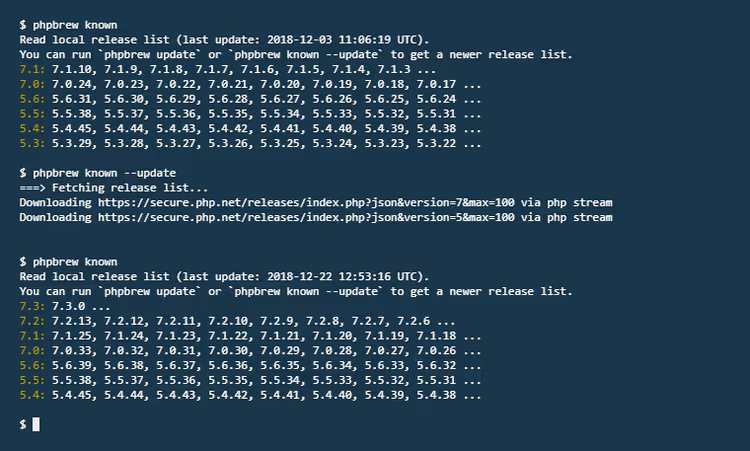
PHPBrew once saved the day: the utility could compile any PHP version from source and switch between them with one command. But the project has barely been updated since 2020, and compiling PHP 5.6 on Linux kernel 6.x is quite the puzzle with patches and compatibility flags. Docker containers are simpler but require writing a Dockerfile for each version, downloading images, and still eating up gigabytes of disk space.
There's an alternative, and it works right in your browser.
3v4l.org: your online tester for 300+ PHP versions
3v4l.org (leetspeak for "eval") is an online sandbox that executes your PHP code on more than 300 interpreter versions simultaneously. From ancient PHP 4.3.0 to the latest 8.5. The project creator compiled and maintains every significant version released throughout the language's history.
The mechanics are simple to the point of genius: paste a snippet into the left panel, hit eval(), and within seconds you get a table of results. The site groups versions by output: green rows mean code ran identically, yellow/red mean behavior differs or an error occurred. You immediately see at which minimum PHP version your syntax becomes acceptable.
What's especially valuable: 3v4l.org shows error text for each problematic version. Not an abstract "incompatible," but specific Parse error: syntax error, unexpected '[' in ..., with line number indicated. This saves hours of debugging.
Each test gets a unique URL, the link can be attached to a ticket, sent to a team lead, or used as documentation: "Here's proof that match expressions break on PHP 7.4."
Example 1: short array syntax, a landmine for WordPress
A developer writes in JavaScript, switches to PHP, and out of habit creates an array:
1 $a = [];
Looks harmless. On your local machine with PHP 8.4 it works. On a test server with PHP 8.2, also works. Push to production, and clients with PHP 5.6 get a white screen.
Short array syntax [] appeared only in PHP 5.4. Before that, only array(). And although PHP 5.4 came out in 2012, WordPress.org statistics showed for decades a significant share of installations on PHP versions below 5.4. The situation has improved now, but WordPress plugins still must account for compatibility nuances.
Run this snippet through 3v4l.org, and you get a definitive verdict:
1 PHP 5.3.x and older: Parse error: syntax error, unexpected '[' 2 PHP 5.4.x and newer: OK
No guesswork, no reading the manual for every construct. Time saved: 30 seconds instead of 15 minutes googling "which PHP version supports short array syntax."
Example 2: type hints, when code silently breaks on old PHP
Type declarations make PHP stricter and more predictable. But the evolution of type hints was uneven, and this creates a trap. Look at this code:
1 function handleException(Exception $e) {} 2 function greet(string $name) {} 3 function processItems(array $items) {} 4 5 handleException(new Exception('Test')); 6 greet("hello"); 7 processItems([1, 2, 3]);
Seems like three identical declarations. But testing on 3v4l.org reveals a surprise:
Argument type | Minimum PHP version |
|---|---|
Class name ( | PHP 5.0 |
| PHP 5.1 |
| PHP 7.0 |
| PHP 5.4 |
Scalar types string, int, and bool arrived only in PHP 7.0, 12 years after class types! If your plugin declares a minimum PHP version of 5.6, and you used function register(string $username), on old hosting this produces a cryptic fatal error:
1 Catchable fatal error: Argument 1 passed to greet() must be an instance of string, 2 string given in...
The message is confusing: "must be an instance of string, string given." The client reads this as gibberish and writes an angry review. The reason is simple: PHP 5.6 doesn't understand scalar type hints and tries to interpret string as a class name.
With 3v4l.org you catch such incompatibilities in a minute, not after a dozen bug reports.
Alternatives: IDE, Docker, and console utilities
3v4l.org covers most compatibility checking scenarios, but not all. Here's what else is in the arsenal, with pros and cons.
PhpStorm. JetBrains' built-in inspector highlights syntax incompatible with the selected PHP version: you specify "PHP 7.4" in settings, and the editor underlines match(), typed properties, str_contains(). However, PhpStorm costs money (subscription from $99/year), and the check is static, there's no actual code execution. The inspector won't show the difference in array_key_last() behavior between versions, while 3v4l.org will.
Docker. The most flexible approach: docker run -v $(pwd):/app php:5.6 php /app/test.php runs code in an exact environment. But testing 10 versions requires 10 containers, 10 different images, and an automation script. For quick snippet verification, it's overkill.
Local PHPBrew. As mentioned above, the project is frozen, and building ancient PHP versions on a modern kernel requires dancing with patches. In 2026, it's easier to open 3v4l.org.
GitHub Actions / CI. A matrix of PHP versions in CI (for example, strategy.matrix.php: ['7.4', '8.0', '8.1', '8.2', '8.3', '8.4', '8.5']) catches problems with every push. This is a must-have for libraries, but for WordPress plugin authors writing in Sublime Text or VSCode without CI, 3v4l.org remains the most accessible and fastest tool.
Video: TemPHPest + 3v4l directly from VSCode
The TemPHPest extension for VSCode integrates 3v4l.org into the editor: select code, press a keyboard shortcut, and get results on all PHP versions without opening a browser. The extension author recorded a short demonstration:
The VSCode + TemPHPest + 3v4l.org combo provides nearly seamless experience: write code, immediately check compatibility, fix errors. Works faster than switching between editor and browser.
⁉️🤔 Frequently asked questions
Is 3v4l.org free?
Yes, completely. No registration, no limits on number of runs, no ads. The service is open source, running on the creator's personal server. If you use it regularly, you can support the author through GitHub Sponsors, which helps pay for hosting and electricity.
Which PHP versions are available on 3v4l.org?
All significant releases, starting from PHP 4.3.0 (released in 2002) and ending with the latest 8.5 (November 2025). Each minor release is a separate line in the results table. Total count, more than 300 versions. If a needed version isn't in the list, the author adds new releases promptly.
Can you test entire projects or only snippets?
3v4l.org is designed for isolated code fragments, functions, classes, individual algorithms. You can paste several hundred lines, but without
requireandincludewith composer autoloading and database connections. For full integration testing of a project, Docker containers or GitHub Actions with a PHP version matrix are better suited.
Is it safe to paste sensitive code on a third-party server?
No. Code on 3v4l.org gets a public URL and is technically accessible via direct link. Don't use the service for confidential data, API keys, passwords, proprietary business logic. For proprietary code, run a local Docker container:
docker run -v $(pwd):/app php:7.4 php /app/private-code.php.
How is 3v4l.org better than built-in IDE checking?
Static analysis in IDE (PhpStorm, PHPStan) checks syntax and types but doesn't execute code. 3v4l.org actually runs the snippet through interpreters of all versions and shows actual output, differences in behavior of
array_key_last(),json_encode(), andpreg_match()between versions. Plus, it doesn't require purchasing an IDE, works in a browser.
What to choose for PHP code compatibility checking in 2026
For daily work as a theme and plugin author, the scheme is this. A snippet that raises doubts goes straight to 3v4l.org. Result in 5 seconds, link to the test is attached to the commit. A project where compatibility with a dozen PHP versions is important, a matrix in GitHub Actions: set it up once, and every push runs automatically. Quick check of someone else's code before code review, TemPHPest in VSCode (free, integrated with 3v4l.org).
The main thing that changed compared to 2020 (when the original version of this material first appeared): PHP 5.6 has finally left most hosting platforms, the minimum bar became PHP 7.4, and on the horizon is PHP 8.5 with new features and new potential incompatibilities. But the principle remains unchanged: check compatibility before release, sleep soundly. 3v4l.org makes this check trivial.

A professional team of writers and editors specializing in creating quality content.