














🔗 9 affiliate link cloaking plugins for WordPress 2026 (free and paid)
A link like vendor.com/?ref=123456&tracking=abc scares off both visitors and search engine bots. It looks like spam, it's awkward to insert into text, and most importantly, some sites intercept direct affiliate clicks and take the commission for themselves.
The problem is old, but in 2026 the tools for solving it have become noticeably more numerous. Link cloaking turns a cumbersome affiliate URL into a short address on your site. You retain control over the redirect, get click statistics, and protect your income.
Below are nine working plugins for cloaking affiliate links in WordPress, from lightweight free solutions to tools for professional performance marketers. Four plugins from the original 2022 list have been discontinued: MTS URL Shortener, EasyAzon, and Auto Amazon Links were removed from the WordPress.org catalog due to vulnerabilities, and the free version of ClickerVolt was closed. We've replaced them with current and actively developed alternatives.
💡 Quick overview:
- If you're a beginner and want minimal setup, install Pretty Links or ThirstyAffiliates.
- If you have a WooCommerce store, get WooCommerce Cloak Affiliate Links plus BetterLinks for analytics.
- If all your income is from Amazon Associates, your choice is AAWP (product boxes and bestsellers).
- If you need conditional redirects and deep integration with ad networks, get Affiliate Links.
- If you're running paid traffic and need funnels and split tests, ClickerVolt (commercial).
Plugin | Type | Price | Key feature |
|---|---|---|---|
Simple URLs | Basic | Free / Pro from $29/mo | Easy start, Lasso ecosystem |
Pretty Links | Analytics | Free / Pro from $99/yr | Detailed click statistics |
ThirstyAffiliates | Editor | Free / Premium $49/yr | Button in visual editor |
WooCommerce Cloak | Specialized | Free | Disallow in robots.txt for SEO |
Easy Affiliate Links | Universal | Free / Premium $29 | Selective masking for Amazon |
BetterLinks | Modern | Free / Pro from $49/yr | UTM builder, A/B tests |
Affiliate Links | Universal | Free / Pro | Conditional redirects, ad integrations |
AAWP | Amazon Pro | From $49/yr | Product boxes, bestsellers |
ClickerVolt | Performance | Pro $95/yr | Funnels, split tests, Edge Computing |
1. Simple URLs
Simple URLs is a lightweight plugin for creating and managing redirects straight from the WordPress admin. It lets you replace long affiliate links with short, clean URLs on your site. The plugin works through its own post type in the admin menu, which prevents conflicts with page permalinks.
After installation you get a centralized panel for all outbound links: change the URL once in the dashboard, and it automatically updates everywhere it's used. When writing a post, you can find a link through search right in the editor, without leaving the page.
Note that the free version now works as a bridge to the Lasso ecosystem. You'll be gently nudged toward upgrading to Lasso Pro for advanced analytics and product grids. The plugin itself is actively developed: according to the WordPress.org catalog, version 151 came out in June 2026.
- Pros: simple installation and use, doesn't conflict with permalinks, built-in link search in editor, basic click counting.
- Cons: pushy banners promoting Lasso Pro, no advanced analytics without paid subscription, rating 3 out of 5 on WordPress.org.
- Price: free; Lasso Pro from $29 per month.
- Download: 🔗 Simple URLs on WordPress.org | 🔗 Lasso Pro
2. Pretty Links
Pretty Links is one of the most popular plugins for cloaking and tracking affiliate links. It provides solid redirect functionality with detailed statistics: you see not only total clicks but also unique visits for each link.
The plugin supports several redirect types: permanent 301, temporary 302, and 307. This allows flexible link management depending on the task. The interface is built on JavaScript and AJAX, everything works smoothly without page reloads.
Click reports include detailed breakdowns: IP address, browser, visitor operating system. Data can be exported to CSV for further analysis. The built-in click graph by day helps assess campaign effectiveness.
- Pros: detailed statistics for each click, different redirect types, report export to CSV, visual click graph.
- Cons: advanced features (automatic link insertion, A/B tests) only in Pro.
- Price: free Lite version; Pretty Links Pro from $99 per year.
- Download: 🔗 Pretty Links on WordPress.org | 🔗 Pretty Links Pro
3. ThirstyAffiliates

ThirstyAffiliates stands out by embedding directly into the WordPress visual editor as a separate button. Click the TA button in the toolbar, and you can find any affiliate link by name or create a new one through Quick Add, without leaving the post.
After installation the plugin requires almost no setup: redirects work immediately. Standard links, shortcodes, and even images with search functionality are supported. Hierarchical categorization helps segment links by campaigns or products.
The advanced link selector (gear icon after the TA button) opens additional options: you can choose redirect type, set nofollow and sponsored attributes for SEO.
- Pros: deep integration with visual editor, quick link creation without leaving the post, hierarchical categorization, commission protection through optimal redirects.
- Cons: Pro version at $49 may be overkill for small sites, support not always responsive.
- Price: free Lite version; Premium $49 per year.
- Download: 🔗 ThirstyAffiliates on WordPress.org | 🔗 ThirstyAffiliates Pro
4. WooCommerce Cloak Affiliate Links
A specialized plugin for WooCommerce stores. It masks all external links in products and store pages, preventing visitors and search bots from seeing direct affiliate URLs.
The key feature is automatic addition of the Disallow directive to robots.txt for external links. This tells search engines not to follow affiliate URLs, which positively affects store SEO. Three redirect types are configurable: 301, 302, and 307.
The plugin is completely free and contains no tracking features. If you need click statistics, you'll need an additional tool. But for basic link cloaking in WooCommerce it does exactly what it promises.
- Pros: completely free, automatic SEO protection through robots.txt, simple redirect setup, doesn't overload the store with extra functionality.
- Cons: no click tracking at all, only for WooCommerce, updates released rarely.
- Price: free.
- Download: 🔗 WooCommerce Cloak Affiliate Links on WordPress.org
5. Easy Affiliate Links
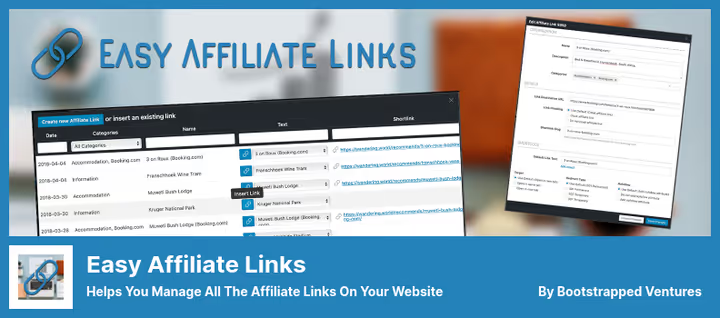
Easy Affiliate Links provides tools for tracking all links on your site, both cloaked and not. The plugin is compatible with the classic editor, Gutenberg, and the Elementor text widget.
A useful feature is automatic disclaimers and short links with optional masking. There's categorization for convenient grouping of dozens or hundreds of affiliate URLs.
Working with Amazon Associates deserves special mention. The program's terms explicitly prohibit masking links to Amazon. Easy Affiliate Links allows you to selectively unmask specific links, so you don't violate the rules and lose your account.
- Pros: selective masking for Amazon, compatibility with Gutenberg and Elementor, UGC and sponsored attributes for links, automatic disclaimers.
- Cons: Pro version is paid, interface not the most modern.
- Price: Lite free; Premium $29.
- Download: 🔗 Easy Affiliate Links on WordPress.org | 🔗 Easy Affiliate Links Pro
6. BetterLinks

BetterLinks is a modern plugin from the WPDeveloper team that combines link shortening, cloaking, redirects, and analytics in one tool. The drag-and-drop interface makes link management intuitive.
The plugin supports all major redirect types (301, 302, 307, and cloaked) and includes a UTM builder for tracking marketing campaigns. Built-in broken link checking helps keep your site in order. For marketers, the bot blocking feature is especially valuable: click statistics become cleaner.
The Pro version adds dynamic redirects for A/B testing, automatic keyword-to-link replacement, integration with Google Analytics and Facebook Pixel. One-click migration from Pretty Links and ThirstyAffiliates is provided, switching plugins happens without data loss.
- Pros: modern interface, A/B tests in Pro, built-in UTM builder, easy migration from competitors, active development (update June 2026).
- Cons: advanced analytics and dynamic redirects only in Pro, relatively new plugin.
- Price: free version; BetterLinks Pro from $49 per year.
- Download: 🔗 BetterLinks on WordPress.org
7. Affiliate Links

Affiliate Links is a plugin acquired by the wecantrack platform in late 2024 and actively developed since. It creates clean links like mysite.com/go/link and automatically tracks clicks on the server side, which prevents tracking blocking by visitors.
The plugin's main strength is conditional redirects. You can set up forwarding based on the visitor's language, browser, or platform. A user from Germany will land on the German version of the store, and an iPhone owner on the App Store page. One URL, different destinations.
The free version includes detailed click statistics (browser, language, platform), link categorization, and a shortcode generator. The Pro version adds automatic content monetization (the plugin finds non-monetized links and replaces them with affiliate ones), a broken link tester, and integrations with Google Analytics, Google Ads, Facebook Ads, TikTok Ads, and other ad networks.
- Pros: conditional redirects, server-side tracking without blocking, deep integration with ad networks, automatic monetization in Pro.
- Cons: advanced integrations only in Pro, around 3,000 active installations (less than competitors).
- Price: free version; Pro from $99 per year.
- Download: 🔗 Affiliate Links on WordPress.org
8. AAWP

AAWP (Amazon Affiliate for WordPress) is a premium plugin for Amazon Associates professionals. Unlike automatic solutions, it emphasizes display control: product boxes, bestseller lists, product comparisons, everything is manually customized for specific articles.
The plugin connects to the Amazon API and pulls current prices, ratings, and availability. Multiple affiliate IDs with automatic link localization are supported: a visitor from Germany will see the price in euros on Amazon.de, and from the US in dollars on Amazon.com.
It includes product box templates, pop-ups with product information, add-to-cart functionality, and a bestseller builder. For content sites with a high stake in Amazon traffic, this is one of the best tools.
- Pros: professional product boxes, automatic link localization, multiple affiliate IDs, bestseller lists.
- Cons: paid version only, focused exclusively on Amazon, requires API setup.
- Price: from $49 per year.
- Download: 🔗 AAWP on developer site
9. ClickerVolt

ClickerVolt is a tool for performance marketers for whom simple click counting isn't enough. The free version on WordPress.org was discontinued in 2022, but the commercial product on clickervolt.com continues to develop using Edge Computing technology: click processing happens at the network edge, making tracking noticeably faster and cheaper than cloud alternatives.
The plugin records a click immediately after it happens and lets you build funnels of unlimited depth: a visitor clicks on link A, then gets redirected to B, then to C, and each step is tracked. Link split testing with automatic selection of the best variant by conversion is supported.
Retargeting pixels fire on click, the audience isn't lost but collected for re-engagement in ad networks. The plugin is compatible with Google Ads, Bing Ads, and Facebook Ads.
- Pros: ultra-fast click tracking on Edge Computing, unlimited funnel depth, split testing, retargeting pixels on click.
- Cons: commercial version only (no free tier), overkill for simple sites, oriented toward paid advertising.
- Price: $95 per year.
- Download: 🔗 ClickerVolt on developer site
Watch a short overview of the link cloaking process in WordPress, using the steps that most of the listed plugins go through:
⁉️🤔 FAQ
What is affiliate link cloaking and why is it needed?
Cloaking replaces a direct affiliate link like
vendor.com/?ref=123456with a short URL on your site:yoursite.com/go/product. The visitor sees a clean link, and you retain control over the redirect. You also protect your commission: some sites can intercept direct affiliate clicks and take the commission for themselves.
How does cloaking differ from simple link shortening?
Shortening (Bitly, TinyURL) simply makes the URL shorter. Cloaking creates a redirect from your domain and often includes click tracking, changing the redirect type, adding nofollow/sponsored attributes, and bot protection. WordPress cloaking plugins do both, plus provide click analytics.
Is it mandatory to cloak affiliate links for SEO?
There's no direct requirement. But cloaking solves three SEO tasks: it shortens the URL length (short links look better in search results), allows centralized management of nofollow/sponsored attributes, and adds Disallow for external links in robots.txt. The latter is especially important for WooCommerce stores with dozens of external URLs.
Can you cloak Amazon Associates links?
Amazon Associates terms explicitly prohibit hiding or redirecting links to Amazon products. Accounts get blocked for violations. If you work with Amazon, get a plugin with selective masking (Easy Affiliate Links) or a specialized tool for Amazon (AAWP), which works through the API and doesn't require manual redirects.
Which plugin should I choose if I have a WooCommerce store?
If you only need to hide external links and protect SEO, the free WooCommerce Cloak Affiliate Links is enough. If you also need click statistics, look at Pretty Links or BetterLinks. Both work with WooCommerce without conflicts and provide detailed click analytics.
What to choose for your task: final breakdown
Choosing a plugin comes down to three questions. First: are you working with Amazon? If yes, AAWP for professional control over product boxes and bestsellers. Second: do you need detailed statistics and A/B tests? Pretty Links and BetterLinks cover this need with room to spare. Third: laser focus on paid traffic conversion, then ClickerVolt is unmatched.
If you're just starting out, get Pretty Links or ThirstyAffiliates. Both work immediately after activation and don't require API dancing. For WooCommerce stores the ideal combo is WooCommerce Cloak Affiliate Links plus BetterLinks for analytics. And when you grow into paid traffic, ClickerVolt will be waiting.
Which plugin do you use on your site? Write in the comments, interested in comparing experiences.

A professional team of writers and editors specializing in creating quality content.