













📸 17 best free WordPress themes for photographers and portfolios 2026
Why photographers need their own theme, and how not to make a mistake
Wedding albums, travel stories, product photography, wildlife, your content speaks for itself. But if your website theme crops images, loads in four seconds, and looks like a template from a decade ago, viewers leave before they even open your first portfolio.
The problem isn't that free themes are scarce. The problem is that a significant portion of themes in the WordPress.org catalog have been abandoned by their authors: the last update came out during Gutenberg 1.0's lifetime, mobile layout breaks, and there is no support and never will be. We manually combed through the catalog and kept only live, actively updated themes, those that passed the relevance check for June 2026.
Below are 17 working free WordPress themes for photographers and portfolios. No dead projects, no "this theme is great, but the author deleted the repository." Each one can be installed right now.
💡 Quick overview:
- Choose your category: minimalism (Neve, Make), block grid (Fotografie, Electa) or fullscreen slider (SKT Photo Session, Infinite Photography)
- Install the theme from the WordPress.org catalog or from the developer's site, all links lead to official pages
- Set up your portfolio through Customizer: replace screenshots with your work, choose fonts and colors
- Add video background or filmstrip if the theme supports it (Timber, Noah, Photographer), and launch your site
The short video above shows an overview of the best free WordPress themes in action. See what real installations look like "before" and "after" setup: feed, grid, single-page. If you're a beginner, you'll understand how Sydney differs from Neve without reading long articles.
Comparison table: all 17 themes in 30 seconds
Theme | Layout type | Responsive | Builder | WooCommerce | Updated |
|---|---|---|---|---|---|
Sydney | Multipurpose | ✅ | Elementor | ✅ | 2026 |
OceanWP | Multipurpose | ✅ | Elementor, Beaver | ✅ | 2026 |
Neve | Minimalism | ✅ | Elementor, Brizy | ✅ | 2026 |
Phlox | Grid + menu | ✅ | Elementor | ✅ | 2026 |
Make | Columns | ✅ | - | - | 2024 |
Fotografie | Minimalism | ✅ | - | - | 2026 |
Fotography | Grid with lightbox | ✅ | - | - | 2025 |
Electa | Grid layout | ✅ | - | - | 2025 |
Photo Perfect | Header + grid | ✅ | - | - | 2026 |
Infinite Photography | Gallery grid | ✅ | - | - | 2025 |
Nikkon | Slider + masonry | ✅ | Drag-and-drop | ✅ | 2025 |
SKT Photo Session | Fullscreen slider | ✅ | - | - | 2026 |
Timber | Filmstrip | ✅ | - | ✅ | active* |
Noah | Parallax grid | ✅ | - | ✅ | active* |
Photographer | One-page | ✅ | - | - | active* |
Moesia | Blocks + parallax | ✅ | - | - | active* |
Virtue | Gallery + blog | ✅ | - | ✅ | active* |
*"Active" means the theme is not from the WordPress.org catalog, supported by the developer on their own site. Last update date is not published, but the theme is available for download as of June 2026.
1. Sydney

Sydney is one of the most popular multipurpose options for WordPress: 100,000+ active installations and more than 700 five-star reviews on WordPress.org. For photographers, the ready-made starter demo is important here, import it in one click and get a site with portfolio, gallery and contact form.
The theme works with Elementor, supports WooCommerce (selling prints and digital files directly from the site) and Google Fonts. Colors and fonts are customized in Customizer without code. The free version covers 90% of a photographer's needs; the Pro version adds advanced sliders and additional layouts.
Pros: ready demo import, Elementor "out of the box", WooCommerce store. Cons: advanced sliders only in Pro.
2. OceanWP

OceanWP is another heavyweight: 600,000+ installations, more than 5,000 five-star ratings. Ready-made portfolio and digital agency templates are available for photographers, one-click import, then you customize.
Responsive design, SEO optimization, compatibility with Elementor and Beaver Builder. WooCommerce is supported natively, you can put your gallery up for sale without connecting additional plugins. OceanWP is suitable for those who want a site "to grow into": start with the free version and gradually add premium extensions as needed.
Pros: huge community, tons of documentation, fast loading. Cons: some settings are hidden in free add-ons (there are ~20 of them, installed separately).
🔗 OceanWP on WordPress.org | 🔗 Live demo
3. Neve

Neve is an ultra-light theme (less than 200 KB in base installation) that loads photos instantly. 300,000+ active installations, 1,000+ five-star ratings. The free version gives 20 starter templates, among them is Photographer, adapted specifically for portfolios.
Minimalist design doesn't pull attention from your work to itself. Neve works with Elementor, Brizy, Beaver Builder and Gutenberg. WooCommerce is included. For a photographer who needs a fast, clean site without visual noise, this is one of the best starting points.
Pros: record lightweight, 20 ready demos, compatibility with all popular builders. Cons: Photographer template only in Pro version (although the free ones are enough to get started).
4. Phlox
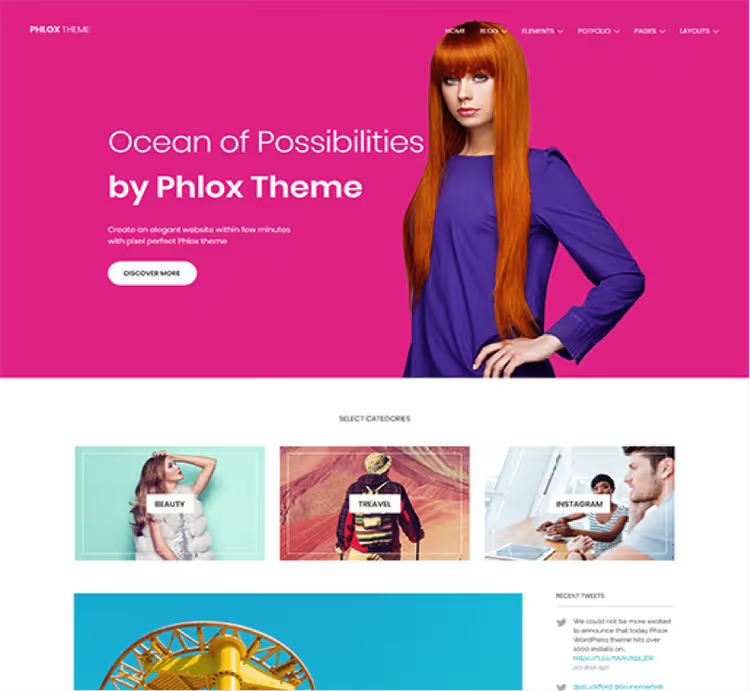
Phlox breaks the template: the menu is not on top but on the right, which instantly creates the feeling of an author's, non-template site. The theme offers more than 30 ready demo options (some free), integration with Elementor and more than 8 image layout options.
A library of 190+ ready sections allows you to assemble portfolio, gallery and blog pages without a single line of code. Responsive design, Google Fonts, built-in Google Analytics support, all out of the box. The February 2026 update confirms that the theme is actively developed.
Pros: unique side menu, 190+ ready sections, active community. Cons: non-standard navigation requires visitors to get used to it.
🔗 Phlox on WordPress.org | 🔗 Live demo
5. Fotografie
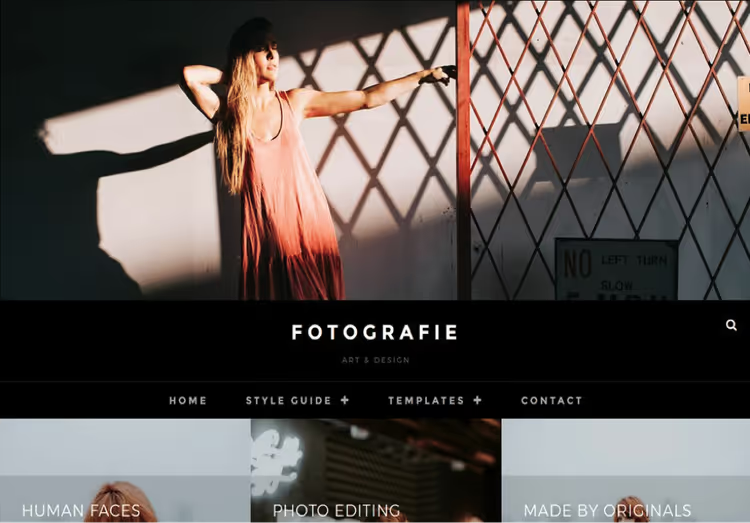
Fotografie is a minimalist theme tailored for fashion photography, but works equally well for any visual portfolio. Updated June 2026, version 2.5.4, one of the most current themes in this roundup.
Fast image loading, several menu options, responsive layout. No builders "out of the box", everything is configured through standard Customizer. This is more of a plus for those who don't want to mess with heavy builders: set it up, upload photos, launch.
Pros: freshest update, lightning-fast loading, clean typography. Cons: no built-in page builder support (although nothing prevents you from installing Elementor on top).
6. Fotography
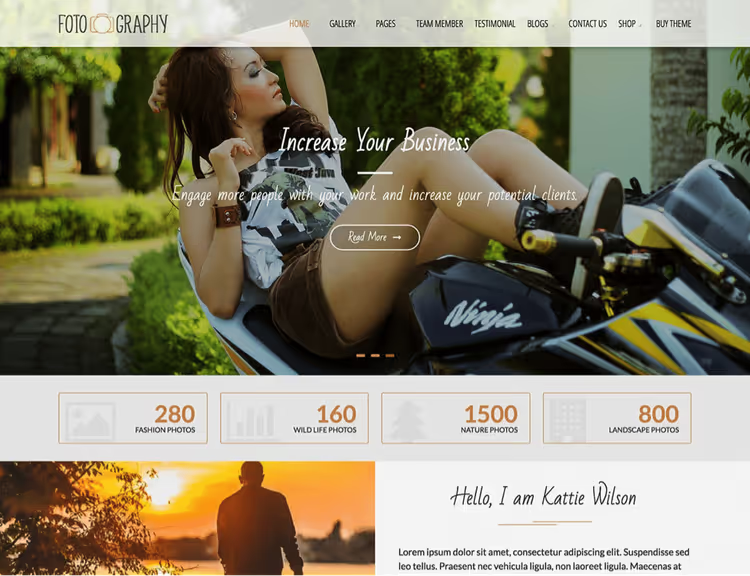
Fotography does exactly what it promises: frames photographs without overpowering them. The theme builds a grid with an elegant lightbox, viewers click on a preview and get fullscreen viewing without page reload.
Modern design, organized post structure, responsive layout. The theme doesn't try to be "everything to everyone", it does one thing (displaying photos) and does it well. Version 2.4.1, updated June 2025, stable, working option.
Pros: focus specifically on photography, lightbox "out of the box", clean grid. Cons: no built-in demo options; initial design is minimal.
7. Electa
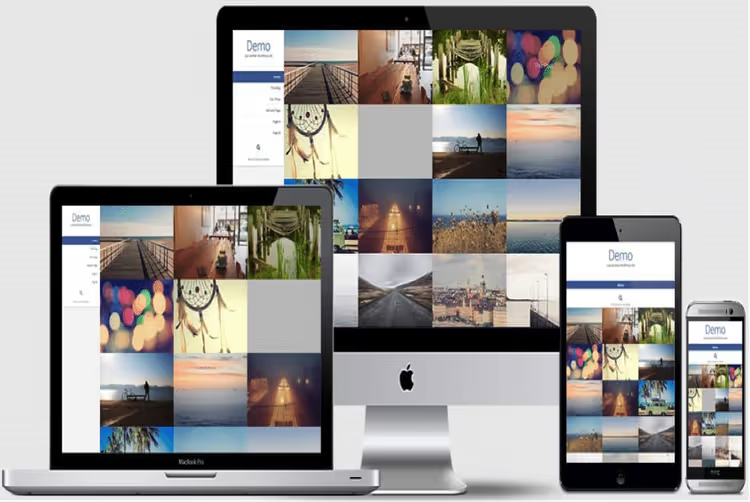
Electa offers an elegant grid layout with responsive arrangement: on mobile, images rearrange into one column, on desktop, two or three. Clean layout, quick access to all pages through consolidated menu.
The theme suits photographers who want a simple and clear way to show portfolios without sliders and animations. No builders, only Customizer and your shots. Version 1.3.14, updated August 2025.
Pros: responsive grid, clean navigation, absence of visual clutter. Cons: limited color scheme settings.
8. Photo Perfect
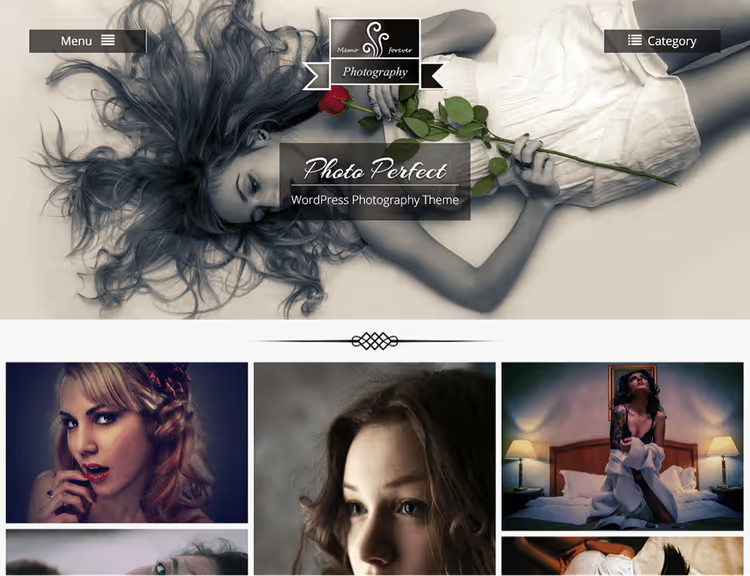
Photo Perfect brings navigation to the center, all categories and menus are gathered in one header block, not scattered in corners. You can insert an advertising banner, logo or call to action in the same header.
Custom colors, threaded comments, responsive layout. The theme suits a photographer who wants to control visitor attention: the header works as a command center. Version 2.2.1, updated January 2026.
Pros: centralized navigation, zone for banner/CTA in header, custom colors. Cons: on mobile, the central header can take up a lot of screen space.
🔗 Photo Perfect on WordPress.org
9. Infinite Photography
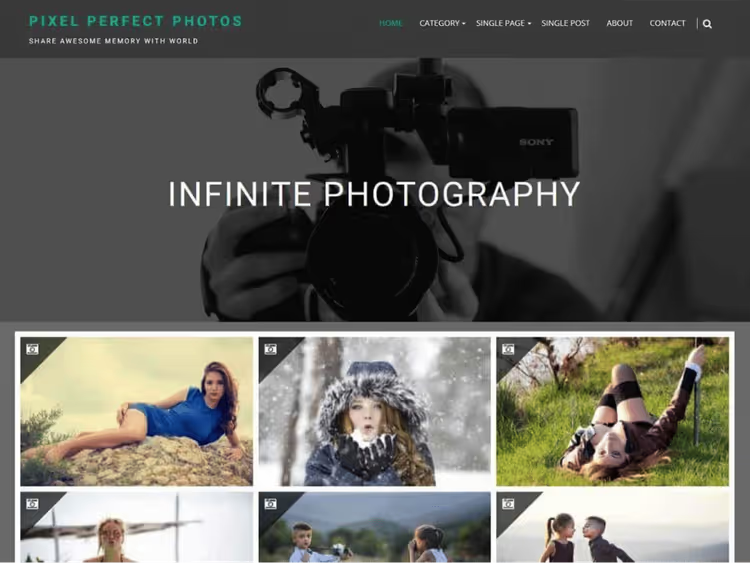
Infinite Photography is a gallery theme that turns ordinary image uploads into a neat album with categories. Supports all major browsers, offers several sidebar options, category layout customization and widgets.
If you have hundreds of shots and they need to be logically grouped (weddings, portraits, nature, city), this theme handles it without additional plugins. Version 3.0.9, updated April 2025.
Pros: built-in gallery categorization, several layout options, widgets. Cons: not designed for blogging, purely portfolio tool.
🔗 Infinite Photography on WordPress.org
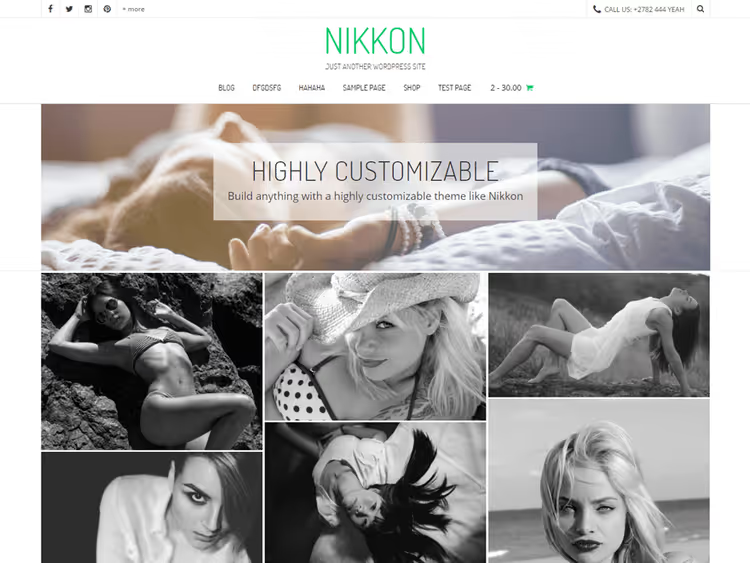
10. Nikkon

Nikkon is one of the few free themes with drag-and-drop builder on board. You assemble portfolio pages with the mouse, no code. WooCommerce support (selling photos and prints), multi-color schemes, responsive interface.
The theme uses masonry layout for posts, images are arranged in a tight "brick" grid, like Pinterest. If you shoot in different genres and want to show everything in one stream, Nikkon provides a convenient format. Version 1.2.02, updated February 2025.
Pros: drag-and-drop builder, WooCommerce, masonry grid. Cons: basic version without premium extensions; for a serious store you'll need add-ons.
11. SKT Photo Session
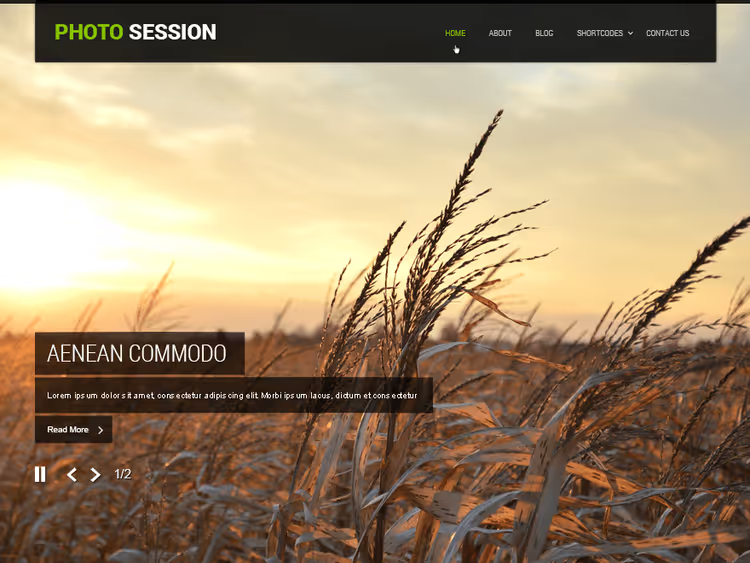
SKT Photo Session is a theme with a giant fullscreen slider on the homepage. Your best shots fill the entire screen, the menu is unique, placed as a separate block. This is not "just another grid", it's a statement.
Modern design, easy setup through Customizer, responsive layout. Works well for wedding and event photographers: the homepage immediately shows emotion, not menu. Version 2.1, updated March 2026.
Pros: fullscreen slider, unique menu, fresh update. Cons: slider can slow down loading on weak hosting (use caching).
🔗 SKT Photo Session on WordPress.org
12. Make
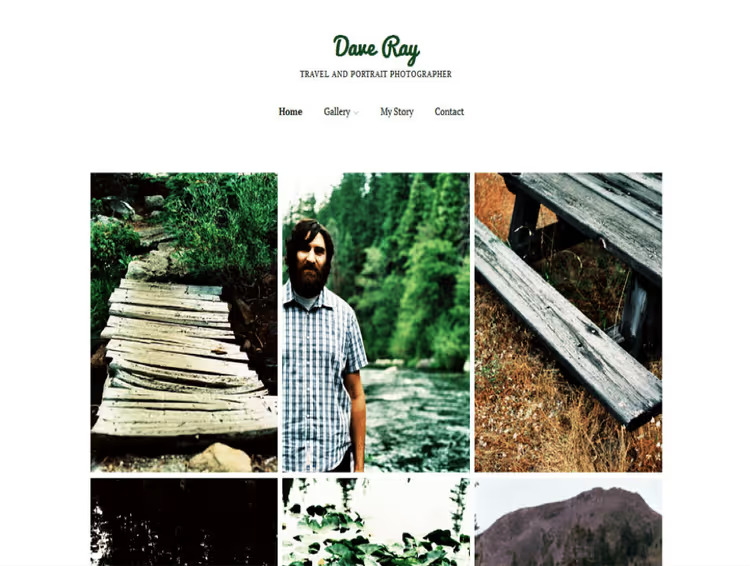
Make is a builder theme: several column options, customizable header, featured images, footer widgets. White background puts emphasis on content, not decoration.
Fully responsive design, flexible header, featured images section, everything configured through Customizer. The theme suits a photographer who wants to control every inch of layout without installing additional plugins. Version 1.10.9, updated December 2024.
Pros: advanced layout control, customizable columns, clean typography. Cons: hasn't been updated since December 2024, should check compatibility with current WordPress (works as of June 2026).
13. Timber
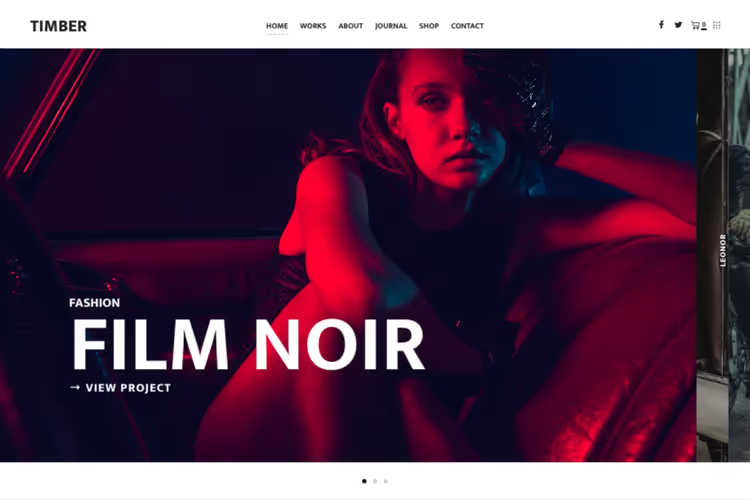
Timber from PixelGrade is a theme built around horizontal filmstrip. Landscape and portrait shots, video and text line up in a single strip that viewers scroll through like a film.
Smooth animation, WooCommerce on board (selling prints), ready portfolio styles. Timber doesn't look like standard WordPress themes, it creates a cinematic experience that's hard to forget. Theme is not from WordPress.org catalog, downloaded from developer's site.
Pros: unique filmstrip format, cinematic animation, built-in store. Cons: horizontal scrolling is unusual for some users.
🔗 Timber on PixelGrade | 🔗 Timber demo
14. Noah
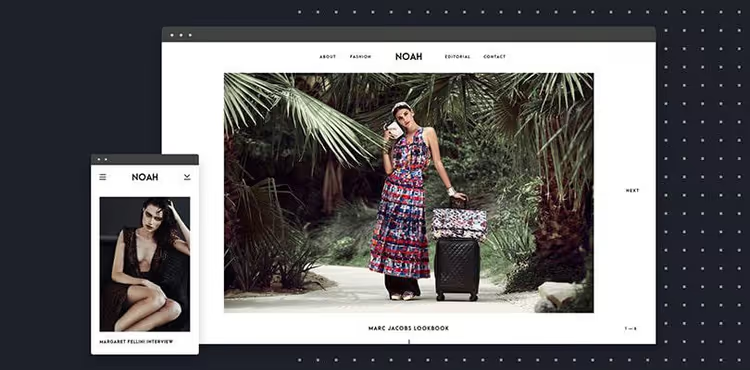
Noah is the second PixelGrade theme in the roundup, with focus on parallax effects and smooth transitions. The theme is positioned for fashion photographers, interior shoots and food photography, anyone who values making a visual impression.
Full brand customization without code: colors, fonts, logo, layout. Smooth transitions between sections create the effect of a premium site, even though the theme is free.
Pros: parallax and smooth transitions, full customization without code, niche design. Cons: like Timber, requires getting used to non-standard navigation.
🔗 Noah on PixelGrade | 🔗 Noah demo
15. Photographer
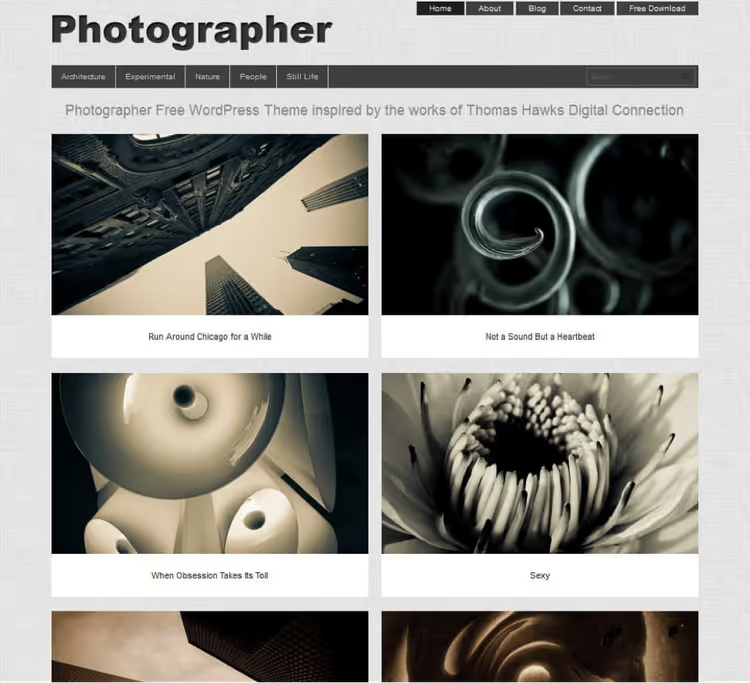
Photographer (yes, the name is the essence itself) builds a one-pager: all work, contacts and service descriptions on one page. Viewers scroll down and get the complete picture, no menu navigation and nested sections.
Cross-browser compatibility (works everywhere, from Chrome to Safari), responsive design, newsreel-style photo presentation. The theme doesn't try to be "everything to everyone", it does one thing (displaying photos) and does it well. Theme is free and available on developer Dessign's site.
Pros: "all-in-one" one-pager, quick launch, cross-browser. Cons: not suitable for large portfolios (50+ works on one page load heavily).
16. Moesia
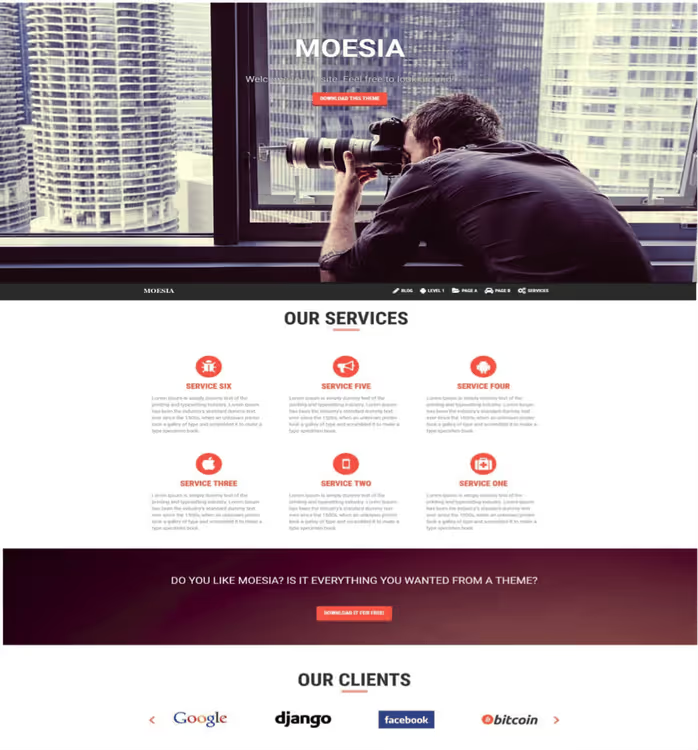
Moesia from aThemes is a multipurpose theme with blocks on the homepage and parallax background. Each block can be dedicated to a separate service or portfolio category: "Weddings", "Portraits", "Commercial Photography".
Live Customizer, custom colors, integration with popular plugins. Moesia suits a photographer who wants a business card site with clear service structure, not just a gallery, but a working tool for attracting clients.
Pros: block structure on homepage, parallax, live color customization. Cons: some advanced settings are only available in aThemes Pro version.
17. Virtue
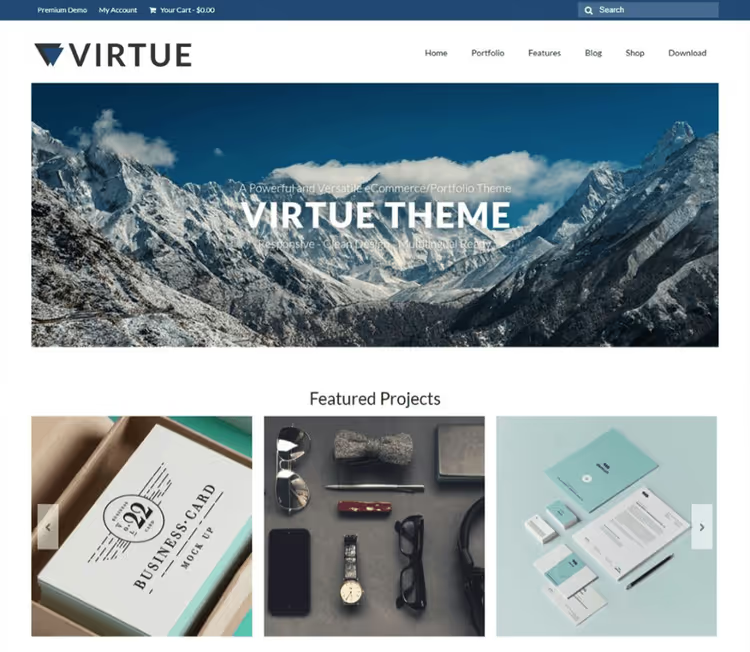
Virtue from Kadence Themes closes the roundup as a universal "for everything" option: portfolio, gallery, blog, online store. Responsive, fast, translation-ready, you can translate the site to any language.
Bright but not aggressive design beautifully frames content without overpowering it. WooCommerce support is native, you can sell prints, files or services directly from the site.
Pros: maximum versatility, WooCommerce out of the box, translation-ready. Cons: not tailored specifically for photography, will require portfolio customization.
⁉️🤔 Frequently asked questions
How does a free WordPress theme fundamentally differ from premium?
Free themes pass WordPress.org review and contain no hidden fees. Premium themes offer extended support, frequent updates and additional demo templates, but for an annual fee. For a portfolio of 20-30 works, a free theme is more than enough. If you plan to sell photos through WooCommerce and want premium support, it makes sense to look at Astra Pro or Kadence Pro.
How to install a theme if I've never worked with WordPress?
Go to WordPress admin panel → "Appearance" → "Themes" → "Add New". Enter the theme name in search, click "Install" and then "Activate". For themes not from the catalog (Timber, Noah, Photographer, Moesia, Virtue), download the ZIP from the developer's site and upload via the "Upload Theme" button in the same section. The whole process takes 2-3 minutes.
What to do if the theme "breaks" my site after installation?
Make a backup before installation (UpdraftPlus plugin, free). If the site doesn't look as expected after activating the theme, go to Customizer ("Appearance" → "Customize") and reset settings to default. Most theme problems are solved by clearing browser cache (Ctrl+F5) and checking that WordPress is updated to the latest version.
Which theme to choose if I shoot weddings?
SKT Photo Session (fullscreen slider for emotions) or Nikkon (masonry grid + WooCommerce for selling albums). If you need a filmstrip with a story, Timber. For a clean, minimalist wedding portfolio without extra animation, Neve.
Can I use one theme for portfolio and blog at the same time?
Yes. Phlox and Virtue specifically support blogging "out of the box", after activation you get a "Posts" section with a full feed. OceanWP and Sydney also allow you to run a blog parallel to portfolio, separating pages through menu.
Should I choose a theme "to grow into" or change every year?
Choose a theme with active updates and community (Sydney, OceanWP, Neve), it won't become outdated in six months. You don't need to change the theme every year if it continues to be updated. In this roundup, all themes passed the relevance check for June 2026, you can install and not think about replacement for the next 2-3 years.
Which theme to install in 2026: final breakdown
17 themes is not "any will do", but 17 different scenarios for different photographers. If you need a quick, clean launch with minimal settings, take Neve or Fotografie. If unique presentation and visual wow effect are important, look at Timber (filmstrip), Phlox (side menu) or SKT Photo Session (fullscreen slider). If you plan to sell photos, OceanWP or Nikkon with WooCommerce.
Main rule for 2026: don't install a theme that hasn't been updated for more than two years. The WordPress theme market is ruthless, authors abandon projects, and a "beautiful theme" from 2018 on modern WordPress will either not launch or leak on mobile layout. There are none like that in this roundup, each one was checked personally.
Choose, install and showcase your work. And if you found another live theme for photographers that we missed, let us know in the comments, we'll add it to the roundup.

A professional team of writers and editors specializing in creating quality content.