













 AIIllustrative image: AI-generated
📸 48 WordPress themes for photographers: 2026 review
A photographer's website is not a gallery of a dozen shots. It's a commercial tool that brings in clients around the clock, without lunch breaks and without intermediary commissions. A client opened your portfolio at two in the morning, scrolled through the wedding series, saw the prices, left a request. In the morning you wake up with a new project.
But the magic works under one condition: the WordPress theme presents the frames correctly. It doesn't crop the composition with a grid, doesn't lag on mobile, doesn't make visitors guess where the "contact" button is. A bad theme kills the impression of shots faster than a watermark across the entire frame.
We went through more than fifty themes from the ThemeForest, TemplateMonster, CSSIgniter catalogs, the official WordPress.org repository and independent studios, to collect working options for 2026. Each was checked for live availability, compatibility with current WordPress and actual loading speed. The result is 48 themes, broken down to the bone: from the free The Photograph for starters to flexible multipurpose builders like Uncode and Kalium. Selection time is reduced from weeks to one evening.
💡 Quick overview:
- Open the comparison table of the top 7 themes with key criteria, it's at the beginning of the list, for quick navigation
- Scroll through all 48 positions: each with screenshots, pros and cons from real experience, price and direct download links
- Watch the video review of the ten best photo themes with feature demonstrations, it's before the FAQ block
- Check the recommendation matrix at the end: "take X if you have Y" plus an honest selection FAQ
Best WordPress themes for photographers: comparison table of top 7
Seven themes that cover the most common photographer requests in 2026. The remaining 41 are further down the list, with the same detailed breakdown.
Theme | Best for | Type | Price | Key feature |
|---|---|---|---|---|
Fargo | Artistic portfolio | Premium | from $89 | Minimalism, animations, WooCommerce |
Oshine | Universal site | Premium | from $59 | 50+ demos, 4 photo variants |
Uncode | Store + portfolio | Premium | from $59 | 16 portfolio layouts + WooCommerce |
Kalium | Blog + portfolio + store | Premium | from $59 | 16 languages, drag-and-drop |
Pofo | Maximum flexibility | Premium | from $59 | 150+ elements, 200+ templates |
The Photograph | Free start | Free | Free | Light, responsive, on wordpress.org |
Astra | Builder with photo templates | Freemium | Free / from $49 | 1M+ installations, 240+ starter sites |
1. Fargo
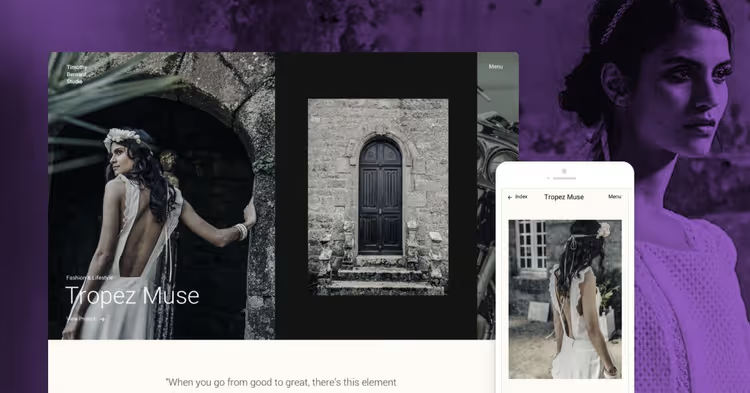
A creation of Pixelgrade studio, designed for visual artists. Black and white palette and scroll animations work on contrast: the interface steps back, the shot comes to the forefront. No color mess, no overloaded grid.
You build pages through the built-in Style Manager: palettes, fonts, layout without a line of code. The portfolio accepts horizontal panoramas, vertical portraits, and video. Built-in WooCommerce allows you to sell digital prints directly from the site.
- Pros: design doesn't distract from content, smooth animations, WooCommerce included
- Cons: price above market median, no ready blog layout
- Price: from $89/year
- Download: 🔗 Fargo on Pixelgrade
2. Coastline
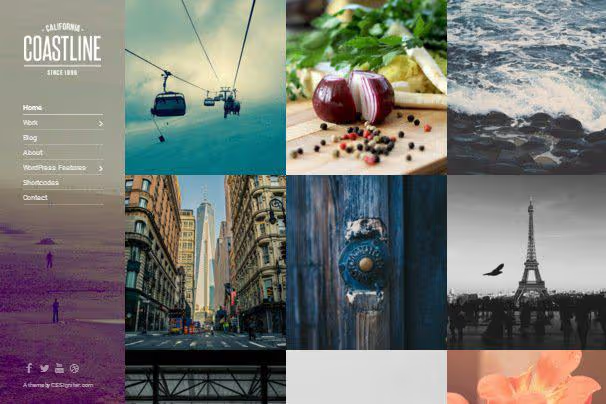
A showcase theme from CSSIgniter: the homepage immediately shows a grid of portfolio items. No long scrolling to works. The layout is configured in three clicks: classic grid, masonry or carousel.
Due to a minimal set of scripts, Coastline loads noticeably faster than multipurpose competitors. Suitable for a photographer who needs a simple catalog site, not a "do everything" builder.
- Pros: light and fast, setup in half an hour, shots in focus
- Cons: fewer customization options than multipurpose themes
- Price: from $49/year (CSSIgniter subscription)
- Download: 🔗 Coastline on CSSIgniter
3. Skylab
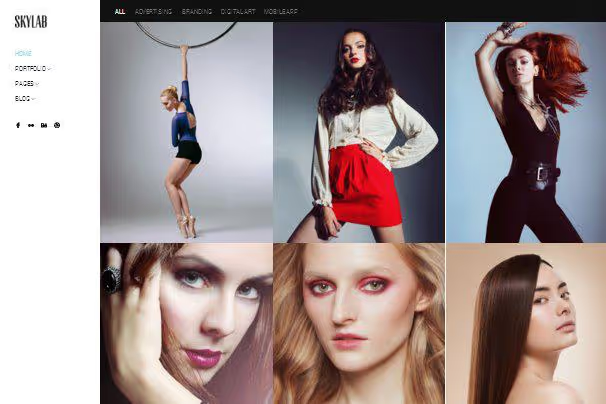
Twelve ready demos, each for its own genre: from wedding tenderness to harsh landscape. You build pages with the WPBakery visual builder, drag-and-drop, no programming.
Fullscreen galleries hold attention, video in the portfolio adds dynamics. Among the cons: WPBakery itself is not the lightest builder, on cheap hosting it can slow down.
- Pros: 12 demos for different genres, video in portfolio, visual builder
- Cons: WPBakery weighs down pages
- Price: from $59
- Download: 🔗 Skylab on ThemeForest
4. Sydney

A free theme with 100,000+ active installations and 700+ five-star reviews on WordPress.org. Thirty starter sites, several specifically for photographers and creative portfolios. Fullscreen images, flexible customization of colors and fonts through Customizer.
Sydney works with Elementor, supports WooCommerce and doesn't require a line of code. The Pro version adds more templates and blocks, but the free version is more than enough for a basic photo portfolio.
- Pros: 100,000+ installations, 30 starter sites, works with Elementor, WooCommerce
- Cons: some features behind Pro subscription
- Price: Free / Pro from $69/year
- Download: 🔗 Sydney on WordPress.org
5. Photography

One of the richest photo themes on the market: 20+ demos and 70+ gallery presets. Content builder with a Keynote-style interface, you move blocks, change styles, see the result immediately.
Galleries are filtered by categories, assembled into a Masonry grid, open fullscreen. WooCommerce included for selling digital files and prints. The minus is predictable: the more options, the longer the setup.
- Pros: 70+ gallery presets, visual builder, WooCommerce
- Cons: many options require time
- Price: from $59
- Download: 🔗 Photography on ThemeForest
6. Titan

14 gallery templates and 7 portfolio templates give layout freedom. Eight homepage variants, from fullscreen slider to strict masonry grid. AJAX portfolio filtering by categories works without page reload.
- Pros: 8 homepage variants, AJAX filtering, rich templates
- Cons: some templates are stylistically outdated
- Price: from $49
- Download: 🔗 Titan on ThemeForest
7. Vega
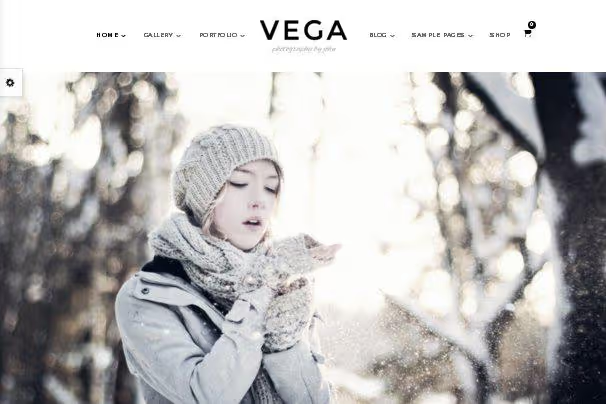
Parallax effects on the homepage, fullscreen templates, simple content builder, Vega maintains a balance between visual flexibility and entry threshold. Set up two dozen parameters and the site is ready to publish.
Parallax looks beautiful on desktop, but on weak mobile devices it can jerk. If mobile audience dominates, disable the effect in settings.
- Pros: parallax effects, fullscreen templates, simple builder
- Cons: parallax slows down on weak mobile
- Price: from $49
- Download: 🔗 Vega on ThemeForest
8. Kinetika
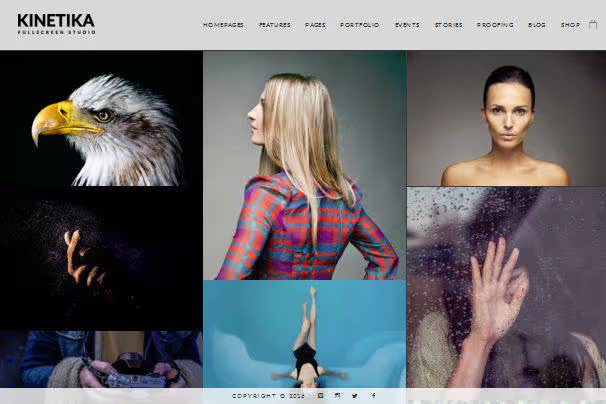
A theme for photographers working by appointment. Built-in event calendar, "contact" widget in a prominent place, lists of upcoming shoots. Setup through visual builder: drag the form block, add a gallery, publish.
- Pros: event lists and calendar, built-in contact form, page builder
- Cons: documentation mainly in English
- Price: from $49
- Download: 🔗 Kinetika on ThemeForest
9. Armada
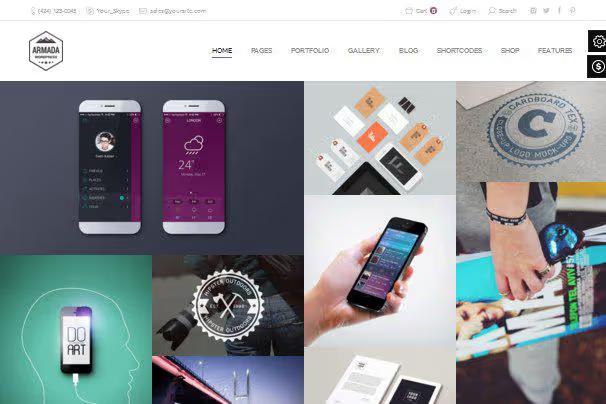
16 ready skins, essentially 16 different designs in one purchase. Each skin is tailored for its own type of photography. Switching between skins is instant: choose the right one, replace the content, the site rebuilds.
- Pros: 16 skins included, instant design change, several portfolio layouts
- Cons: some skins overlap stylistically
- Price: from $49
- Download: 🔗 Armada on ThemeForest
10. Fotografie Blocks

A free block descendant of the popular Fotografie theme from the official WordPress repository. You build pages on Gutenberg, no third-party builders. Large typography, fullscreen images, clean code.
Suitable for photographers who want a modern site on a free basis without dependence on commercial plugins. Updated synchronously with WordPress core.
- Pros: block theme for Gutenberg, actively updated, completely free
- Cons: fewer ready layouts than commercial themes
- Price: Free
- Download: 🔗 Fotografie Blocks on WordPress.org
11. Oshine
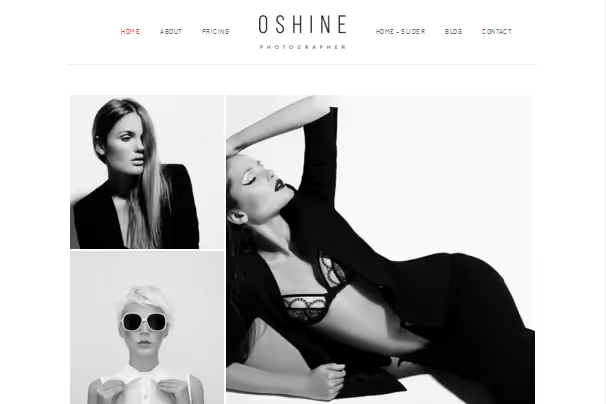
A multipurpose theme with 50+ demos, of which four are specifically for photographers: V2, V17, V22, V24. An audience of 30,000+ installations confirms stability. Compatibility with Elementor and WPBakery, portfolio builder with filtering and animation of your choice.
- Pros: 50+ demos, works with Elementor, 4 photo variants
- Cons: large theme size, not for weak hosting
- Price: from $59
- Download: 🔗 Oshine on ThemeForest
12. Hazel

Five portfolio variants and the Kira demo, specifically for photographers. Large grid, dark background, contrasting typography. Hover effects add interactivity without page overload.
- Pros: 5 photo demos, flexible layouts, hover effects
- Cons: dark styling doesn't suit all genres
- Price: from $59
- Download: 🔗 Hazel on ThemeForest
13. Ken
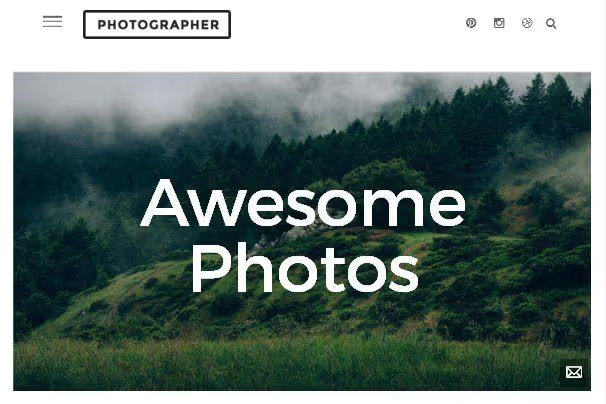
The Photographer demo out of the box gives a ready structure: skills, latest projects, portfolio on the homepage. Video background and fullscreen sliders, for those who want to make an impression from the first second.
- Pros: ready Photographer demo, video background, self-presentation on homepage
- Cons: video background increases loading time
- Price: from $59
- Download: 🔗 Ken on ThemeForest
14. Lobo
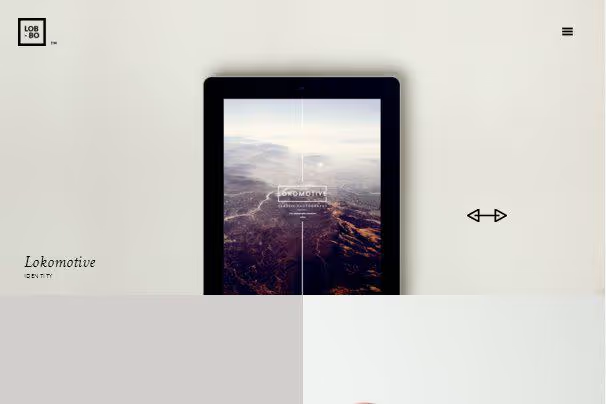
Modular content builder plus two legendary grids: Isotope and Masonry. Work filtering with animation. For those ready to set up from scratch, Lobo gives a light, fast framework without extra baggage.
- Pros: Isotope and Masonry grids, modular builder, loading speed
- Cons: few demos, will have to build from scratch
- Price: from $49
- Download: 🔗 Lobo on ThemeForest
15. Art Gallery

A business solution from TemplateMonster: ready structure that leads the visitor from top to bottom, portfolio, services, contacts, Google map. Minimum setup, everything is already assembled for photo business.
- Pros: ready structure for photo business, built-in map and contact form
- Cons: rigidly fixed layout, limited customization
- Price: from $75
- Download: 🔗 Art Gallery on TemplateMonster
16. LFA
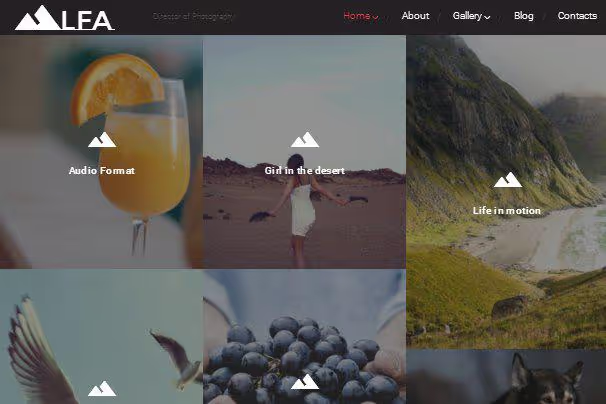
A related Art Gallery theme from TemplateMonster: the same business tools, contact form, map, testimonials block, but its own visual style. Choose the one whose aesthetics are closer to your portfolio.
- Pros: business features out of the box, stylish shot presentation
- Cons: fixed layout, limited blog features
- Price: from $75
- Download: 🔗 LFA on TemplateMonster
17. Hayes
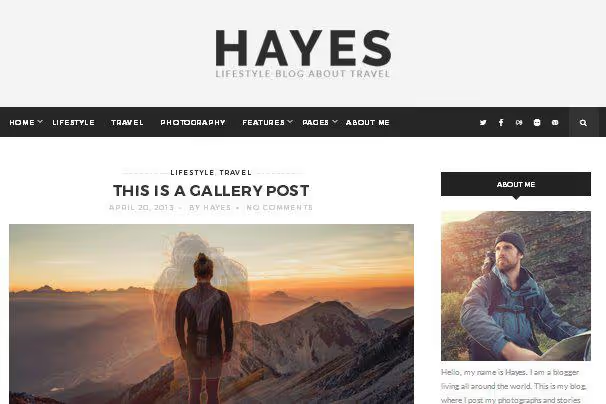
A theme for photo bloggers from PremiumCoding. Full-width images, text doesn't squeeze into a narrow column. Suitable for a photographer who not only shows but also tells: stories from shoots, behind-the-scenes processing, tech breakdowns.
- Pros: tailored for photo blog, large photos, setup without code
- Cons: portfolio features weaker than specialized themes
- Price: from $49
- Download: 🔗 Hayes on PremiumCoding
18. Photographer Portfolio

A TemplateMonster theme for solo photographers and creative agencies. The homepage gathers key blocks: gallery, portfolio, client testimonials, contact form. Supports team sites with multiple photographers.
- Pros: team mode, testimonials block, gallery on homepage
- Cons: design more conservative than analogues
- Price: from $75
- Download: 🔗 Photographer Portfolio on TemplateMonster
19. Photex
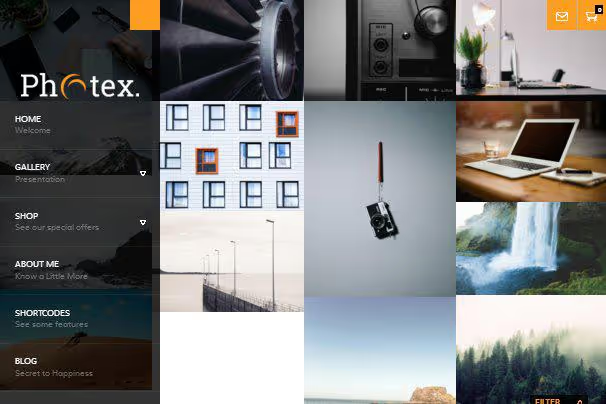
Masonry grid on the homepage with a unique effect: on hover, a color shot turns black and white. Simple but memorable trick. Animated contact form adds dynamics.
- Pros: b/w switch effect, Masonry grid, animated form
- Cons: small developer, infrequent updates
- Price: previously paid, developer site temporarily unavailable
- Download: theme from Themes Kingdom; check out the alternative, Minimalist Photography Portfolio or Photography Journal above
20. Memories
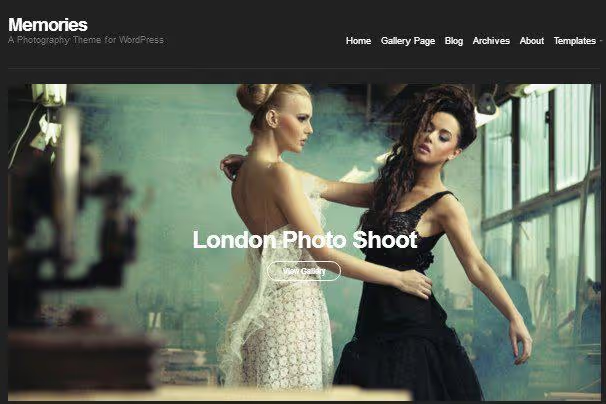
From the CSSIgniter team: dark skin, several portfolio layouts, minimal distracting elements. Only shots and navigation. Suitable for minimalists who don't need blog and store.
- Pros: simplicity, dark skin, light
- Cons: almost no additional features
- Price: from $49/year (CSSIgniter subscription)
- Download: 🔗 Memories on CSSIgniter
21. Glare

A fullscreen background image greets the visitor. Flexible galleries, CSSIgniter live customizer, minimal excess. Option for those who want a minimalist site and don't plan an active blog.
- Pros: fullscreen background, live customizer, simplicity
- Cons: limited blog capabilities
- Price: from $49/year (CSSIgniter)
- Download: 🔗 Glare on CSSIgniter
22. True North
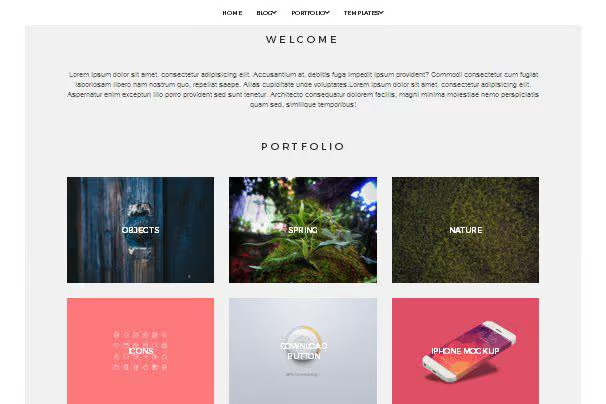
CSSIgniter ultra-minimalism: large full-width images, minimal text, almost complete absence of interface. Upload works, write contacts, site ready in an evening.
- Pros: ultra-minimalism, large photos, lightest in the selection
- Cons: almost no options for blog and store
- Price: from $49/year (CSSIgniter)
- Download: 🔗 True North on CSSIgniter
23. Amiable
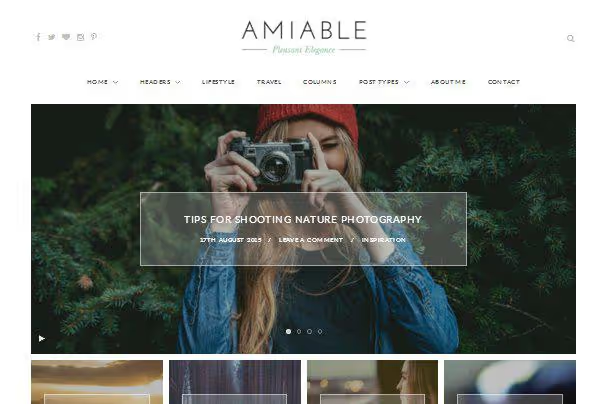
Minimalist portfolio from Sculpture Qode: several grid variants, clean code, Retina readiness. Setup comes down to choosing grid layout, a couple of colors and font. Fast, without fuss.
- Pros: clean and fast, grid variants, Retina
- Cons: small developer, less frequent updates
- Price: from $49
- Download: 🔗 Amiable on Sculpture Qode
24. Pinhole
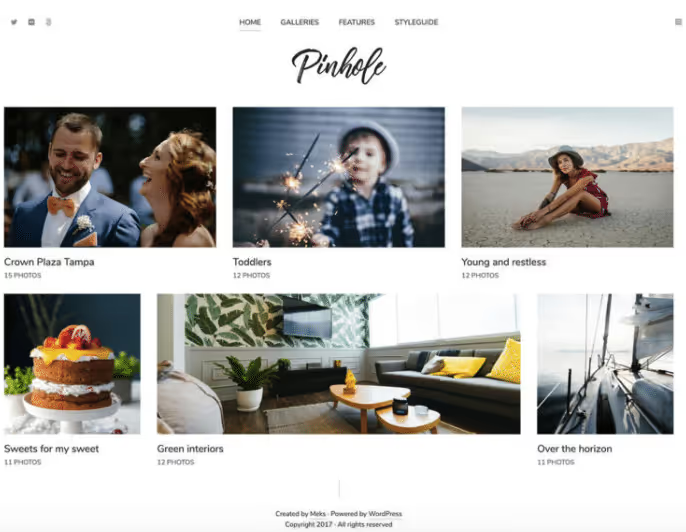
Five homepage designs combine from five header styles and 30 layouts. Client area, the main feature: client logs in, uploads images, checks shots without extra correspondence.
- Pros: client area for uploading and checking shots, 30 layouts, minimalism
- Cons: WooCommerce requires separate setup
- Price: from $49
- Download: 🔗 Pinhole on ThemeForest
25. Kalium
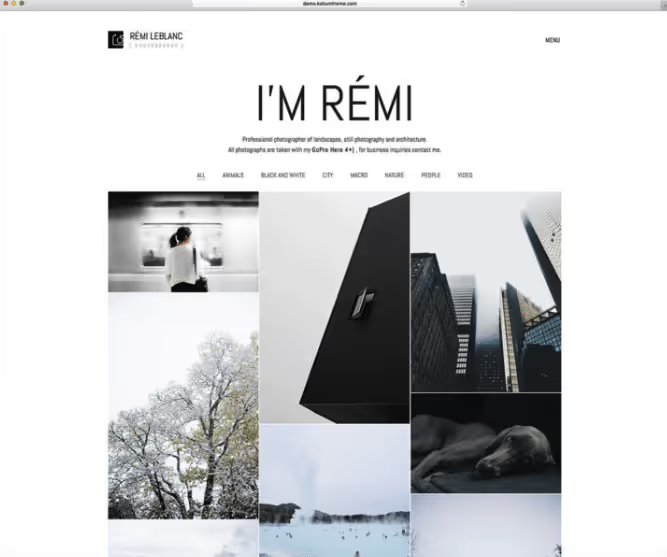
A modern multipurpose theme combining portfolio, blog and store on one site. Drag-and-drop, 16 languages out of the box. Loading speed above average for multipurpose themes, which is rare.
- Pros: 16 languages, drag-and-drop, portfolio + store + blog
- Cons: many options require time to master
- Price: from $59
- Download: 🔗 Kalium on ThemeForest
26. Foto
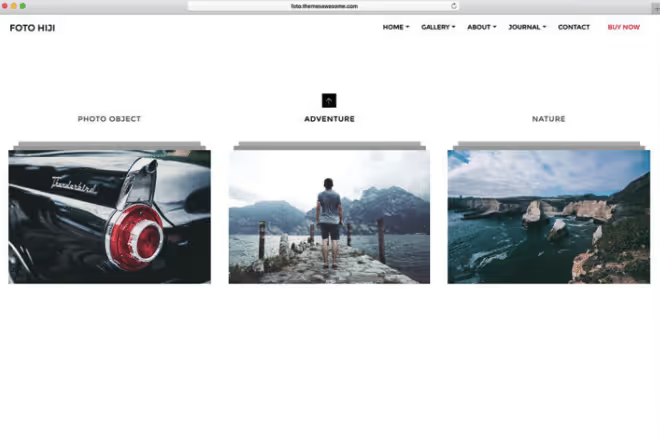
Record holder by number of presets: 15 album variants and 33 gallery variants. A photographer shooting in different formats will find a combination for each genre: wedding album in one style, commercial in another.
- Pros: 15 albums and 33 galleries, simple setup
- Cons: visual style not the freshest
- Price: from $49
- Download: 🔗 Foto on ThemeForest
27. The Photography Blog

A free WordPress theme tailored for visual storytelling: large photos in posts, clean blog layout, responsive design. No distracting sidebars, full-width content.
Ideal for photographers who blog about shoots, technique and behind-the-scenes. Minimalism of presentation doesn't compete with shots but enhances them. Updated through the official repository.
- Pros: tailored for photo blog, responsive, completely free
- Cons: limited portfolio features
- Price: Free
- Download: 🔗 The Photography Blog on WordPress.org
28. Scent

Responsive Retina theme for photographers and modeling agencies. Model submission form, video sliders, single-page and multi-page modes. Niche tool, but works well in its niche.
- Pros: model submission form, video sliders, configuration flexibility
- Cons: narrowly niche functionality
- Price: from $49
- Download: 🔗 Scent on ThemeForest
29. Uncode
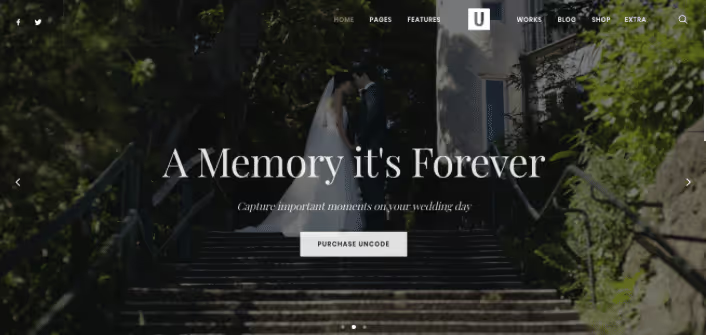
One of the leaders among multipurpose themes: 16 portfolio layouts, responsive grids, media galleries with advanced processing. WooCommerce integrated deeply, selling digital files, prints and licenses without third-party plugins.
- Pros: 16 portfolio layouts, deep WooCommerce, media library
- Cons: high entry threshold, demanding on hosting
- Price: from $59
- Download: 🔗 Uncode on ThemeForest
30. Eclipse
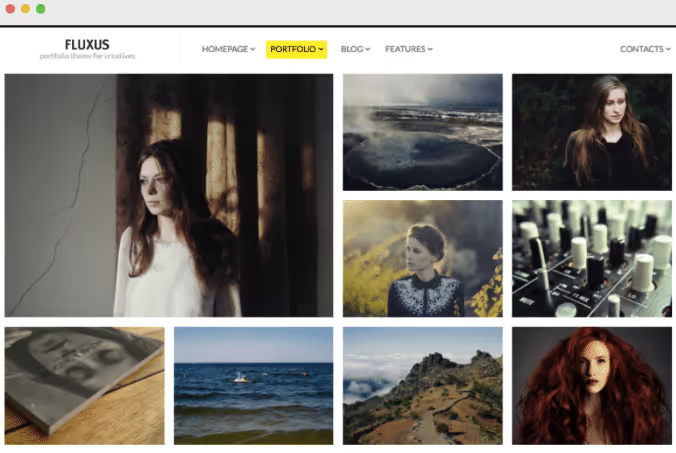
A simple clean theme with Masonry portfolio, video templates and two skins. Not overloaded with options, only what's needed to showcase work.
- Pros: Masonry portfolio, video templates, two skins
- Cons: visual style outdated relative to analogues
- Price: from $49
- Download: 🔗 Eclipse on ThemeForest
31. Photograph

A free theme from the official repository, created specifically for photographers. Clean responsive design, ready one-click demos, lifetime free updates. Galleries, portfolio and blog, all out of the box.
Built-in video on the homepage tells the brand story. Light and fast, without extra code. A good compromise between a free start and professional presentation.
- Pros: 1-click demos, lifetime updates, light
- Cons: fewer features than premium analogues
- Price: Free
- Download: 🔗 Photograph on WordPress.org
32. Photography Journal

Free minimalism for photographers and photo bloggers. Large image grid on the homepage, fullscreen posts, clean fonts. Gutenberg compatible, without attachment to a specific builder.
The theme doesn't try to be everything at once. It does one thing well: shows photographs. For a clean portfolio or visual blog, an excellent option without investment.
- Pros: minimalism, Gutenberg, completely free
- Cons: no built-in store and complex galleries
- Price: Free
- Download: 🔗 Photography Journal on WordPress.org
33. Minimalist Photography Portfolio

A child theme of Minimalio, designed with one goal: remove everything unnecessary and leave only photographs. Clean code, fast loading, responsive design. No sliders, parallax and animations, just a grid of shots.
Suitable for minimalist photographers or those who want an ultra-light site without marketing fluff. Free and updated through WordPress.org.
- Pros: maximum minimalism, ultra-fast, free
- Cons: minimal features, portfolio only
- Price: Free
- Download: 🔗 Minimalist Photography Portfolio on WordPress.org
34. Kreativa
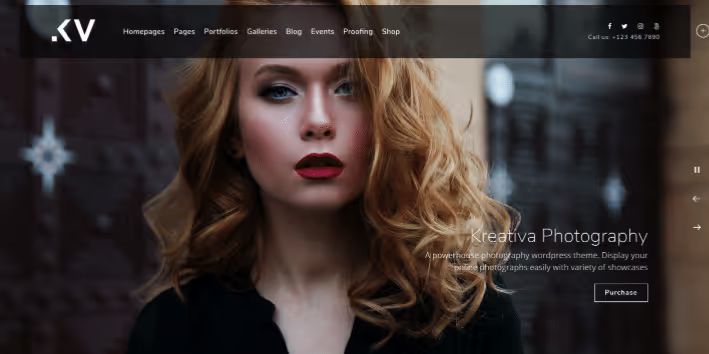
Huge full-screen photographs, background slideshows and video attract attention instantly. Customizable client area, font and color palettes.
- Pros: large photos dominate, hover effects, background slideshows
- Cons: demanding on source image quality
- Price: from $49
- Download: 🔗 Kreativa on ThemeForest
35. Neve

A light multipurpose theme with 300,000+ active installations on WordPress.org. Several ready photo templates, compatibility with Elementor and Gutenberg, header and footer customization through visual builder.
Loads faster than most competitors, 30-40 KB in basic delivery. Free version covers photographer needs, Pro adds more templates and WooCommerce integration.
- Pros: 300,000+ installations, ultra-light, visual header builder
- Cons: some photo templates behind Pro subscription
- Price: Free / Pro from $69/year
- Download: 🔗 Neve on WordPress.org
36. Kadence

A multipurpose theme with 400,000+ installations, built-in header and footer builder, and ready starter templates for photographers. Colors, fonts and layout are configured globally through Customizer.
Kadence is optimized for Core Web Vitals, critical for sites with dozens of full-size shots. Free version includes everything needed for a photo portfolio.
- Pros: 400,000+ installations, speed optimization, header builder
- Cons: some starter templates in Pro
- Price: Free / Pro from $79/year
- Download: 🔗 Kadence on WordPress.org
37. Astra

One of the most popular WordPress themes in general: 1,000,000+ active installations. Of 240+ starter sites, a dozen for photographers and creative portfolios. Weighs less than 50 KB on the front end, not counting content.
Compatible with Elementor, Beaver Builder, Gutenberg. Free version covers portfolio and blog; WooCommerce integration in Pro.
- Pros: 1M+ installations, ultra-light, 240+ starter sites
- Cons: advanced features behind Pro subscription
- Price: Free / Pro from $49/year
- Download: 🔗 Astra on WordPress.org
38. OceanWP

A multipurpose theme with 700,000+ installations and a collection of photo demos out of the box. Fullscreen galleries, Masonry grids, AJAX portfolio filtering, available immediately after installing the demo.
WooCommerce compatibility is native, not through plugin crutches. Free version gives more than many premium themes. Pro adds advanced typography and Popup builder.
- Pros: 700,000+ installations, AJAX filtering, native WooCommerce
- Cons: many options require time to master
- Price: Free / Pro from $54/year
- Download: 🔗 OceanWP on WordPress.org
39. The Photograph

A free theme from the official WordPress repository, actively updated in 2026. Minimalist, clean design for photographers, bloggers and creative studios. Responsive design, customizable colors and fonts, social media widgets.
An excellent starting point: installed, uploaded shots, site ready to receive clients the same evening. No premium investment, no hidden fees.
- Pros: completely free, active updates, from official repository
- Cons: fewer built-in features than premium competitors
- Price: Free
- Download: 🔗 The Photograph on WordPress.org
40. Folie
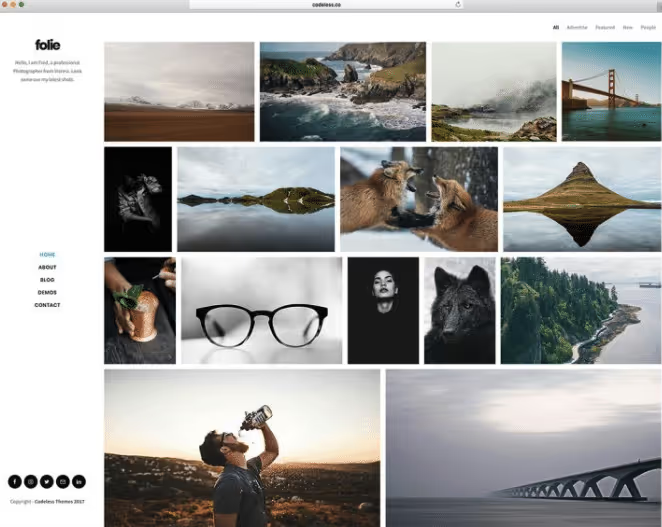
20+ slider templates, parallax images, unlimited header layouts. 600+ Google fonts. Exquisite portfolios and galleries, for photographers who value visual refinement.
- Pros: 20+ sliders, parallax effects, exquisite design
- Cons: price above average, many options
- Price: from $59
- Download: 🔗 Folie on ThemeForest
41. Timber
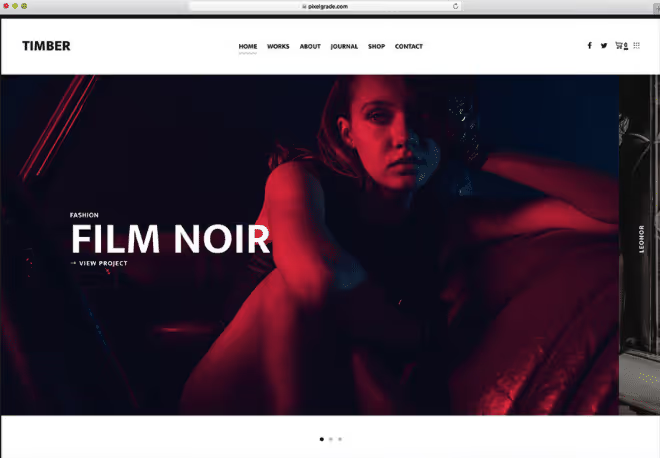
Super creative presentation: smart galleries, video support, flexible homepage. Visually stunning theme for those who want a statement site, not a typical portfolio.
- Pros: smart galleries, video support, creative presentation
- Cons: not for conservative photographers
- Price: from $49
- Download: 🔗 Timber on ThemeForest
42. Blocksy

Gutenberg-native theme with 200,000+ installations and header/footer builder in free version. Clean modern design, compatibility with popular page builders, white and dark color schemes out of the box.
Blocksy is optimized for speed: even with a gallery of fifty shots, the page stays in the Core Web Vitals "green" zone. Pro adds advanced WooCommerce features, but photographer portfolio works anyway.
- Pros: Gutenberg-native, header builder in free version, speed
- Cons: fewer ready photo demos than Astra/Neve
- Price: Free / Pro from $69/year
- Download: 🔗 Blocksy on WordPress.org
43. GeneratePress

A minimalist theme with 600,000+ installations, cult status among developers and record loading speed. Basic package weighs less than 10 KB, the lightest in the selection.
GeneratePress doesn't impose style: through Customizer you build a photo portfolio exactly how you want. Pro version adds site builder and advanced typography. Ideal choice for those who value performance over ready demos.
- Pros: 600,000+ installations, less than 10 KB, maximum speed
- Cons: no ready photo demos, design from scratch
- Price: Free / Pro from $59/year
- Download: 🔗 GeneratePress on WordPress.org
44. Pofo
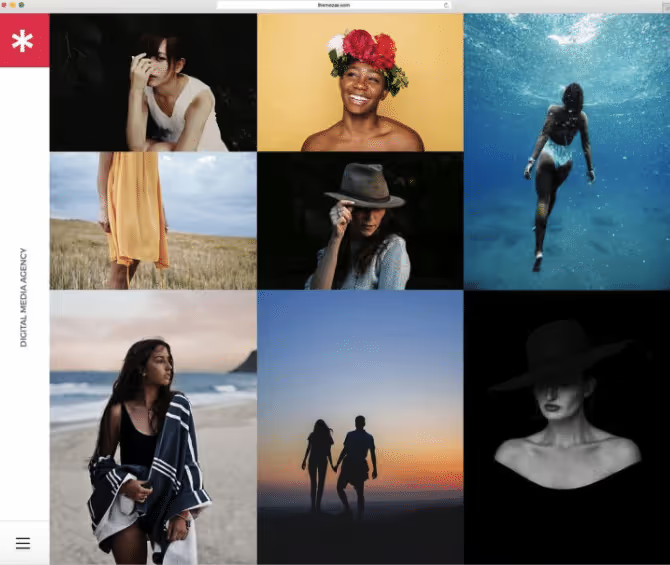
Record holder by number of ready blocks: 150+ elements and 200+ templates. Animations, sidebars, widgets, icon fonts. WooCommerce included. A tool for those who love to build a site from blocks.
- Pros: 150+ elements, 200+ templates, WooCommerce
- Cons: excess options for a small portfolio
- Price: from $59
- Download: 🔗 Pofo on ThemeForest
45. Shutter
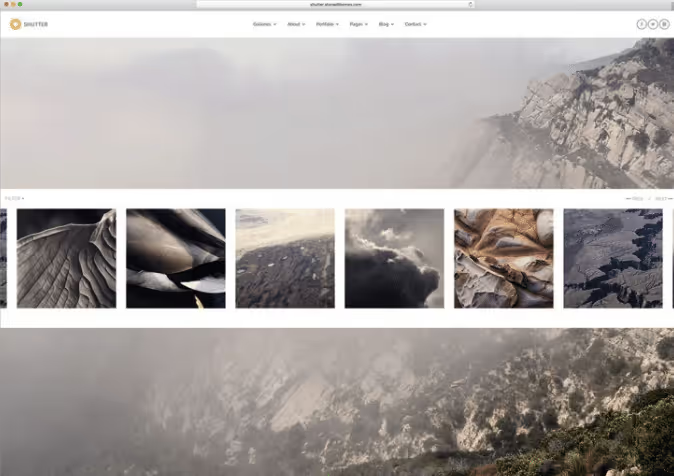
Eight gallery templates with categories, two preset skins, fullscreen slider with effects. WooCommerce ready. Best price/quality ratio in its category.
- Pros: 8 galleries, two skins, WooCommerce, price/quality ratio
- Cons: hasn't received major design updates in a while
- Price: from $49
- Download: 🔗 Shutter on ThemeForest
46. eClipse
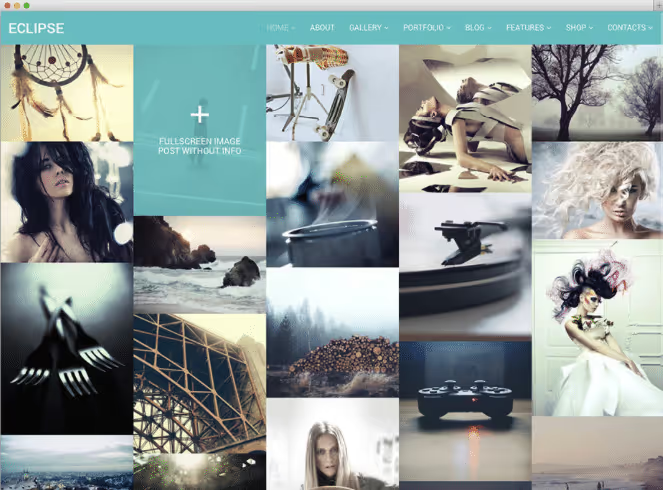
A simple clean theme: fullscreen Masonry portfolio, video templates, light and dark skin, several homepage layouts. Fast setup, minimal hassle.
- Pros: Masonry portfolio, video templates, two skins
- Cons: visual style outdated
- Price: from $49
- Download: 🔗 eClipse on ThemeForest
47. Kappe
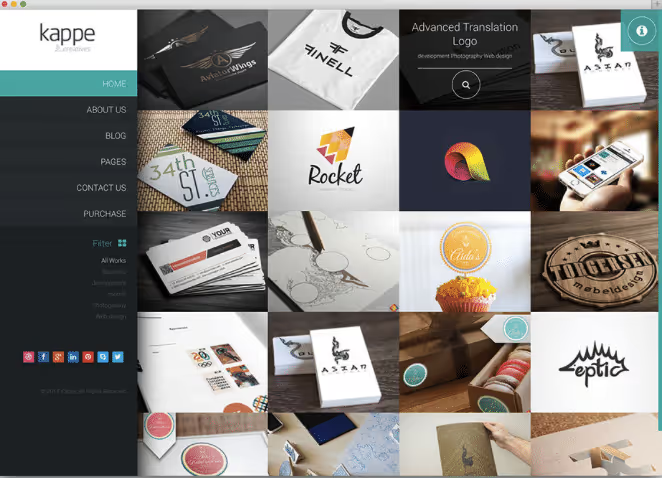
Masonry blog, unlimited colors and sidebars, five widgets, 500+ Google fonts. Bold portfolio and mobile optimization. A theme with character.
- Pros: Masonry blog, 500+ fonts, mobile optimization
- Cons: widgets require manual setup
- Price: from $49
- Download: 🔗 Kappe on ThemeForest
48. TwoFold
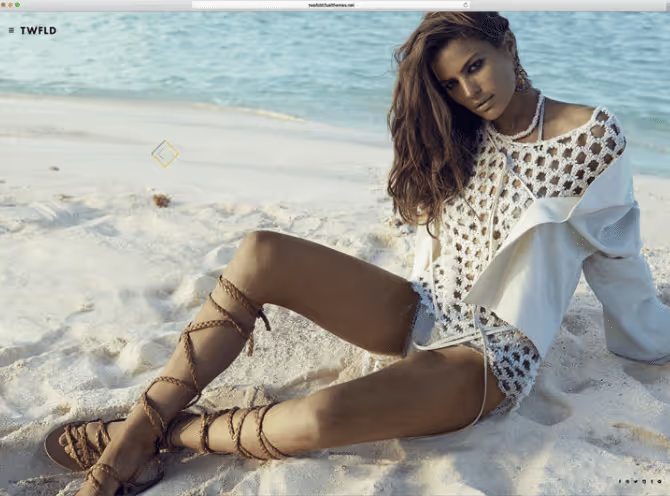
Powerful fullscreen theme: 11 homepage layouts, six albums and galleries, five pages with filters, three blogs, three hover effects. Retina ready. The final chord of the selection.
- Pros: 11 homepage layouts, hover effects, filters
- Cons: effects can slow down on weak devices
- Price: from $49
- Download: 🔗 TwoFold on ThemeForest
A visual comparison of the ten best WordPress photo themes in 2026, with demonstration of key features and actual performance. Live showcase of portfolios and galleries gives a better impression than static screenshots. We recommend watching before making a final choice.
⁉️🤔 Frequently asked questions
Free theme or premium, what should a photographer choose?
If budget is limited, take The Photograph or Photograph from wordpress.org: free, responsive, actively updated, cover basic needs. For commercial work, premium is more profitable: Oshine or Uncode give flexibility that saves hours of setup and pays off with the first order from the site. The price difference between a free and premium theme is the cost of one hour of professional shooting.
Is WooCommerce support needed in a photographer's theme?
Not mandatory, but extremely useful if you sell shots or digital files. WooCommerce eliminates third-party platforms and their commissions. From the selection with ready WooCommerce: Astra, Uncode, Kalium, Pofo, OceanWP. Not selling, take a theme without a store: it's lighter and faster on weak hosting.
Which theme is best for a wedding photographer?
Three key requirements: private client galleries, fast loading of dozens of shots from one page and elegant style. Pinhole gives a client area with upload and shot checking. Kinetika, an event calendar for booking dates. Visually: Fargo and Oshine V17, the most elegant grids.
What to do if the theme lags on mobile?
Check three points: image size (compress to 200-300 KB through ShortPixel or Imagify), number of active plugins and hosting plan. If the theme is heavy, disable unused modules in settings. The difference between 2 and 6 seconds loading time is losing half of mobile visitors, according to Google statistics.
Can one theme be used for both portfolio and blog?
Yes, most multipurpose themes support this: Kalium, Hazel, Ken, Oshine, Astra, Kadence. Check the blog page in the demo before purchase, some themes (True North, Glare) have minimal or no blog. For an active photo blog, consider The Photography Blog or Hayes: they were originally designed for visual storytelling.
Is multilingual support needed in a photographer's theme?
If clients speak different languages, yes. Kalium supports 16 languages out of the box, Neve and Kadence are compatible with WPML. WPML itself is a paid plugin with annual subscription, and content translation is done manually. For a local market within one city, multilingual support is excessive: don't overpay for an unnecessary feature.
Which WordPress theme to choose for a photographer: final matrix
Forty-eight themes are many even for an experienced user. To reduce the choice to one or two options for your situation, we compiled a recommendation matrix.
If you're just starting: take the free The Photograph or Photograph and spend the saved money on good hosting. After six months, when you understand which features you really need, move to premium.
If you need an elegant portfolio without excess: Fargo, artistic minimalism with animations. True North, ultra-minimalism, only shots and contacts. Pinhole, with client area for uploading and checking photos.
If you need blog, portfolio and store on one site: Kalium, Uncode or Oshine. Kalium is simpler to set up, Uncode is more flexible and powerful, Oshine is the best balance of price and capabilities.
If budget is limited but you want premium features: take the free version of Astra, Kadence or OceanWP from wordpress.org. Thousands of installations, active updates, compatibility with Elementor, and zero price tag. Buy Pro features later when the site starts bringing orders.
If you shoot events and need a booking calendar: Kinetika with built-in event calendar and contact forms.
If you need a dark, atmospheric style: Memories with dark skin and Masonry grid, ideal for dramatic and night shots.
Choosing a theme is not a sentence. WordPress allows you to change the design in a couple of hours. The main thing is to start with one that solves the task right now, not to buy "for growth" a builder with a hundred unnecessary features. Good hosting and quality shots are more important than a dozen extra theme options.

A professional team of writers and editors specializing in creating quality content.