














🔥 8 best one-page WordPress themes (2026)
You need a landing page for a new service. Fast, no coding, and you want leads coming in right after launch. You go to the WordPress theme catalog, and you get stuck. Hundreds of multipurpose options, but not every one can build a convenient one-page site without hacks and extra plugins.
Here's the problem. "One-page" comes in different flavors: somewhere it's primitive scrolling with anchors, and somewhere else, a well-thought-out landing page with sections, forms, portfolio and smooth transitions. The difference between "thrown together" and "clients are biting," is choosing the right theme.
We tested 20+ current themes and selected the 8 best, the ones that are truly built for one-page sites in 2026. From lightweight free options to premium frameworks with builders: choose for your task.
💡 Quick overview:
- Comparison table of all 8 themes: prices, installations and builders
- Detailed breakdown of each theme with screenshot and direct links
- Answers to common questions and recommendation for your task
Comparison table
Theme | Price (from) | Active installations | Builder | One-page mode | WooCommerce |
|---|---|---|---|---|---|
Total | $59/year | 55,000+ | WPBakery + Elementor + Gutenberg | Anchor sections | ✅ |
Neve | Free / $69/year | 200,000+ | Gutenberg / Elementor / Bricks | Sectional landing | ✅ |
Astra | Free / $49/year | 1,000,000+ | Spectra / Elementor / Beaver | Landing templates | ✅ |
Parallax | $59 | - | Themify Builder | Native one-page | ✅ |
OceanWP | Free / $39/year | 700,000+ | Elementor / Gutenberg | Sections + anchors | ✅ |
Kadence | Free / $149/year | 400,000+ | Kadence Blocks / Gutenberg | Starter templates | ✅ |
GeneratePress | Free / $59/year | 600,000+ | GenerateBlocks / Gutenberg | Sections with anchors | ✅ |
Hestia | Free / $69/year | 100,000+ | Gutenberg / Elementor | Native one-page | ✅ |
1. Total
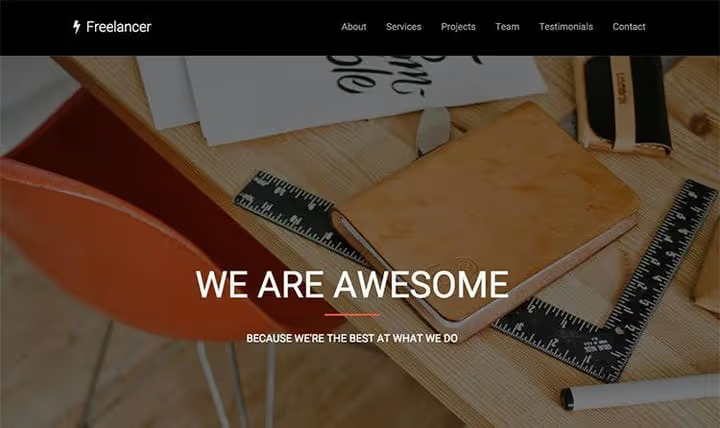
Total, not just a theme, but a full framework from WPExplorer, built for WPBakery (formerly Visual Composer). For a one-page site here you don't need magic: add sections through the builder, set up anchor links in the menu, and the landing page is ready.
The theme has more than 90 ready patterns for WPBakery, 50+ demo imports and an exclusive Slim Mode function: it disables unused builder elements, reducing page weight. Worth mentioning separately are dynamic templates, you can build a custom header, footer or post card without PHP.
Pros: deep integration with WPBakery without conflicts, 80+ custom elements, CSS-stretched rows without JavaScript, RTL support, auto-disable WPBakery promo banners. Cons: WPBakery is tied to the theme, when switching themes the layout will partially break. No native block one-page mode "out of the box."
Price: from $59/year (license for unlimited number of sites).
🔗 Total on WPExplorer | 🔗 One-page site demo
2. Neve

Neve from Themeisle, an ultra-lightweight theme with a core less than 28 KB, which in 2026 updates every 2-3 weeks. For a one-page site Neve offers a sectional landing: assemble a page from blocks, set up anchor scrolling, and get a clean, fast result.
The theme went from a niche product to 200,000+ active installations. In version 4.2.5, full compatibility with Gutenberg, Elementor, Bricks and Oxygen. Under the hood: Core Web Vitals support out of the box, Lighthouse scores above 95 even on cheap hosting.
Pros: record lightweight code base, seamless work with any block builder, 4.7 stars on wordpress.org, demo import in one click, AMP compatibility. Cons: free version doesn't include custom header/footer builder, it's in Pro. Fewer landing templates than Astra.
Price: free on WordPress.org; Pro, from $69/year.
🔗 Neve on WordPress.org | 🔗 Theme site
3. Astra

Astra from Brainstorm Force, the most popular non-default WordPress theme: one million active installations and rating 4.9. For one-page sites Astra has a trump card: starter template library through the Starter Templates plugin. Choose a landing template, import, replace content, and the site is ready.
In combination with Spectra (native block plugin) Astra gives custom blocks for landings: hero sections, countdown timers, subscription forms. The theme isn't tied to a specific builder: Elementor, Beaver Builder and Gutenberg work equally well.
Pros: 6,000+ five-star reviews, weekly updates, version 4.13.4 current as of June 2026, live support for free users. Cons: Starter Templates requires registration (email). Some premium templates are only available in Astra Pro.
Price: free on WordPress.org; Pro, from $49/year.
🔗 Astra on WordPress.org | 🔗 Theme site
4. Parallax

Parallax from Themify, a veteran among one-page themes, which is still sold and updated. The theme is built on the proprietary Themify Builder with drag-and-drop: 60+ pre-designed sections, fly-in animations, full-screen sliders and, of course, parallax scrolling in every section.
Parallax feature, native one-page mode: no need to invent anchors and manually build the menu. The theme itself builds a one-page structure with smooth scrolling. Separate plus: 11 header styles, including slide-out and overlay, and "no header" mode for a clean landing.
Pros: native one-page out of the box, 60+ ready layouts, filterable portfolio, infinite scroll, RTL support, 30 days money-back. Cons: Themify Builder is not as popular as Elementor, entry barrier is slightly higher. Design of some demos looks outdated compared to Neve and Astra.
Price: $59 (standard license, 1 year support and updates).
5. OceanWP

OceanWP, a multipurpose theme with 700,000+ installations, which grew from the WooCommerce solutions niche. For one-page sites OceanWP offers a sectional structure: configure sections through the customizer, add anchors, and get a clean landing.
OceanWP's strong side, header and footer setup without plugins: custom logo, sticky menu, transparent background for the first screen. The theme loads only necessary scripts (Vanilla JS, without jQuery), which gives good speed indicators.
Pros: free header/footer builder, conditional script loading, 7 demo extensions in free version, compatibility with Elementor without conflicts. Cons: customizer interface is overloaded with options, beginners will need time. Part of demo imports are paid.
Price: free on WordPress.org; Pro, from $39/year.
🔗 OceanWP on WordPress.org | 🔗 Theme site
6. Kadence

Kadence from KadenceWP (the same team that made the popular Kadence Blocks), a lightweight theme with a full header builder and starter template library. For a one-page site Kadence offers landing template import in one click.
Main advantage, the ecosystem: Kadence Blocks (free) gives custom blocks for Gutenberg, counters, icons, tabs, forms, and Kadence Theme is ideally integrated with them. As a result you get a landing on pure Gutenberg without dependence on Elementor.
Pros: perfect combination with Kadence Blocks, lightweight header builder, 400,000+ installations, conditional headers (different headers for different pages). Cons: premium features cost more than competitors. Fewer ready one-page templates than Astra.
Price: free on WordPress.org; Kadence Bundle, from $149/year.
🔗 Kadence on WordPress.org | 🔗 Theme site
7. GeneratePress

GeneratePress, a minimalist theme, which is often recommended for code cleanliness and performance. With 600,000+ installations and an update from June 2026 it remains one of the best options for those who want to build a landing on pure Gutenberg.
The GeneratePress + GenerateBlocks combination (free block plugin from the same author) gives container, grid, headline and button, exactly the four blocks that the standard editor lacks for landing layout. For a one-page site add sections with ID, set up anchor menu, and done.
Pros: minimal weight (less than 10 KB CSS), clean semantic code, free GenerateBlocks, excellent documentation, active community. Cons: no built-in one-page mode, sections and anchors are configured manually. Fewer ready templates than competitors.
Price: free on WordPress.org; Premium, from $59/year.
🔗 GeneratePress on WordPress.org | 🔗 Theme site
8. Hestia

Hestia, another theme from Themeisle, built on Material Design. Unlike minimalist Neve, Hestia wins with style: full-screen hero block with background image, colored sections with smooth scrolling, service and team cards right on the landing.
The theme natively supports one-page mode: all sections are displayed on the main page with anchor navigation. Built-in compatibility with WooCommerce allows adding a product showcase right in the landing section, convenient for selling digital products or merch.
Pros: Material Design out of the box, live customizer, 100,000+ installations, WooCommerce integration right in landing sections. Cons: heavier than Neve (Material Design requires more styles). Free version is limited in section customization.
Price: free on WordPress.org; Pro, from $69/year.
🔗 Hestia on WordPress.org | 🔗 Theme site
⁉️🤔 Common questions
How does a one-page theme differ from a regular one?
A one-page theme outputs all content on the main page in sections with anchor scrolling. A regular theme assumes separate pages for "About us," "Services," "Contacts." Technically any theme can be made one-page through anchors and shortcodes, but specialized themes give this "out of the box": built-in scroll, smooth transitions, ready section structure.
Can I use the free version of the theme for a business site?
Yes. All themes in this list have a working free version on WordPress.org. For a simple landing with a request form, free versions of Neve, Astra or GeneratePress are enough. Premium features (custom header builder, White Label, additional templates) are needed when you do sites in production or want fine customization without code.
Which theme is best for a portfolio?
For a portfolio we recommend Parallax: native one-page with filterable gallery and fly-in animations. If budget is limited, Kadence with Kadence Blocks: on Gutenberg an impressive gallery is built without a line of code.
Which theme is the fastest?
According to WebPageTest tests, GeneratePress gives the smallest page weight, less than 10 KB CSS. Neve is right behind, around 28 KB. Both themes don't load jQuery and use vanilla JavaScript. For a landing, where every millisecond counts for conversion, choose from these two.
Is a page builder needed for a one-page site?
Not required, but desirable. Without a builder you are limited to standard Gutenberg blocks and manual section layout. With a builder (Spectra for Astra, Kadence Blocks for Kadence, Themify Builder for Parallax) you get ready landing blocks: hero, timers, forms, galleries, and assemble the page drag-and-drop.
What to install for your task?
If you need a framework on WPBakery with maximum control over each section, get Total. Want an ultra-lightweight theme that doesn't interfere with the builder, Neve or GeneratePress. Need maximum popularity and 6,000+ reviews in your favor, Astra. For native one-page with parallax without extra plugins, Parallax. And if you're building a landing on pure Gutenberg, the Kadence + Kadence Blocks combination will close most tasks.
All eight themes are active, updated and work with WordPress 6 in June 2026. Choose for your task, and launch the landing today.

A professional team of writers and editors specializing in creating quality content.