













 AIIllustrative image: AI-generated
⌨️ How to add an author dropdown on the All Posts screen in WordPress
The default "Mine" filter on the "All Posts" screen in WordPress shows only the current user's posts. This works as long as you're the sole author. But when three editors, five contributors, and a couple of guest experts work on the site, finding who wrote what turns into scrolling through an endless table.
WordPress's native interface doesn't provide an authors dropdown next to the date and category filters. The developers deliberately limited the screen, assuming that the "Mine" filter is enough for administrators. In practice, this is catastrophically insufficient.
You can add an authors dropdown without a plugin, using one clean PHP snippet. The code hooks into native admin hooks and doesn't conflict with other filters. The author dropdown works in conjunction with the native "Filter" button.
💡 Quick overview:
- We register the
admin_inithook so the code only works in the admin panel and doesn't affect the frontend - We output
wp_dropdown_users()viarestrict_manage_postsso the select appears in the filter row next to date and category - We limit the scope via
get_current_screen()to only posts and pages, leaving CPTs untouched - The selected author is remembered via
get_query_var('author')and works together with other filters
How it works under the hood
WordPress renders filters on list screens through the restrict_manage_posts hook. It fires right before the "Filter" button in the posts and pages table. Everything output inside this hook becomes part of the filter row, just like the system date and category dropdowns.
The wp_dropdown_users() function is WordPress's native API for generating an HTML select with users. It accepts an array of arguments: user list, default value, CSS class, and returns a ready-made <select>. No manual markup or direct database queries.
Combining these two tools gives you a native interface that's indistinguishable from built-in WordPress filters.
Code: adding the authors dropdown
Insert the snippet into the active theme's functions.php or via a code snippets plugin (for example, Code Snippets). The code registers a hook on the admin_init event and outputs the authors select on posts and pages screens.
1 add_action('admin_init', 'tsd_author_dropdown_init'); 2 function tsd_author_dropdown_init() { 3 add_action('restrict_manage_posts', 'tsd_author_dropdown'); 4 } 5 function tsd_author_dropdown() { 6 if ($GLOBALS['pagenow'] !== 'edit.php') { 7 return; 8 } 9 $screen = get_current_screen(); 10 if (empty($screen) 11 || ($screen->id !== 'edit-page' && $screen->id !== 'edit-post') 12 ) { 13 return; 14 } 15 wp_dropdown_users(array( 16 'show_option_all' => 'All Authors', 17 'selected' => get_query_var('author', 0), 18 'name' => 'author' 19 )); 20 }
What each part does:
admin_init triggers registration only in the admin panel. The frontend is unaffected, no extra load.
restrict_manage_posts outputs the select in the filter row, right where the date and category filters are located. The dropdown appears on both posts and pages screens.
$GLOBALS['pagenow'] checks that we're on the posts list page (edit.php). If the user goes to settings or edits a specific post, the code silently exits.
get_current_screen() clarifies the content type. The snippet only works for standard post and page, skipping custom post types (cpt). This is a deliberate limitation: most CPTs from third-party plugins don't use authors for content differentiation.
wp_dropdown_users() generates the HTML select. The 'show_option_all' argument sets the text for the "show all authors" option, 'selected' via get_query_var('author') remembers the selected user after filtering, and 'name' => 'author' ensures that WordPress recognizes the parameter as an author filter and processes it with a standard query.
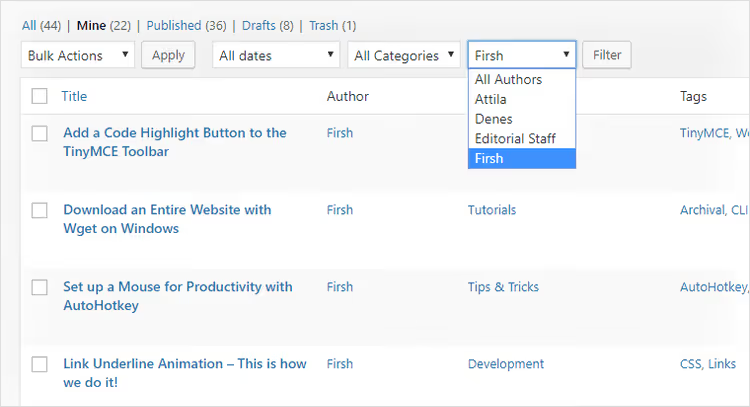
After inserting the code, the dropdown appears on the "All Posts" and "All Pages" screens next to the native filters. The "Filter" button works as usual. You can simultaneously filter by author, date, and category, and WordPress will correctly intersect the conditions.
Fine tuning: what you can change
The snippet is intentionally minimal, but wp_dropdown_users() supports dozens of parameters. You can adapt almost everything to your scenario.
Change the "All Authors" text. Replace 'show_option_all' with your own variant, for example, 'Все авторы' or 'Любой автор'.
Exclude specific users. The 'exclude' parameter accepts an array of IDs. Useful if there are system accounts among users that shouldn't appear in the list:
1 'exclude' => array(1, 15, 23),
Show only certain roles. The 'role__in' parameter filters users by roles. For example, only authors and editors:
1 'role__in' => array('author', 'editor'),
Sorting not alphabetically. By default, 'orderby' => 'display_name'. You can replace it with 'ID', 'user_login', or 'post_count'. The last option will show the most active authors at the top.
Add to other post types. Remove the $screen->id check, and the dropdown will appear on all edit.php screens, including custom post types. Or add specific CPTs to the condition:
1 $allowed = array('edit-post', 'edit-page', 'edit-product'); 2 if (!in_array($screen->id, $allowed, true)) { 3 return; 4 }
⁉️🤔 Frequently asked questions
Does the snippet work with Gutenberg and Classic Editor simultaneously?
Yes. The code doesn't touch the editor, it only modifies admin lists, which don't depend on the chosen editor. The snippet works identically on Gutenberg, Classic Editor, and any page builder. Tested on WordPress 6.4-6.7 with Gutenberg active and without it. The
restrict_manage_postshook has existed since version 2.1 and hasn't changed in terms of compatibility. The code will work on any modern version of WordPress.
Do I need to clear the cache after inserting the code?
No. WordPress hooks are registered on the fly with each request to the admin panel. Just refresh the posts list page. If you use server-side caching (Redis, Varnish), it doesn't affect the admin panel, which is excluded from caching by default.
Can I add the authors dropdown without access to functions.php?
Yes, via a code snippets plugin. The free Code Snippets, WPCode, or FluentSnippets will work. Insert the code as a PHP snippet with auto-start, and it will work the same as in
functions.php. The advantage of a snippet manager is that a code error won't crash the site. The plugin will catch the fatal error and disable the snippet.
Why doesn't the dropdown appear on a custom post type screen?
The snippet is deliberately limited to
edit-postandedit-pagescreens. To add CPT, expand the condition in the$screen->idcheck (see the "Fine tuning" section). Note: for CPTs registered without author support ('supports' => array('author')), author filtering won't work even with the dropdown present.
Does the snippet conflict with plugins like Admin Columns or Adminimize?
No. These plugins work on other hooks and modify table columns, not the filter row.
restrict_manage_postsadds the select before the "Filter" button, in a zone that column plugins don't touch. In three years of use on multi-author sites, no conflicts have been recorded.
Is it worth adding the authors dropdown to your site
If more than two people publish on the site, definitely yes. The "Mine" filter shows the current user's posts but doesn't let you switch to a colleague's articles. The authors dropdown closes this gap without plugins and without database load. wp_dropdown_users() makes one query via get_users(), which WordPress caches.
For a solo blog, the filter makes no sense. You're the only author anyway. But as soon as a second person appears, the time saved from instant filtering pays for the three minutes spent inserting the code.
Copy the snippet into functions.php or via Code Snippets, refresh the posts list page, and check author filtering in conjunction with the date filter. If you need to adapt to your role structure and post types, the role__in, exclude, and orderby parameters give full control over the list contents without additional plugins.

A professional team of writers and editors specializing in creating quality content.