













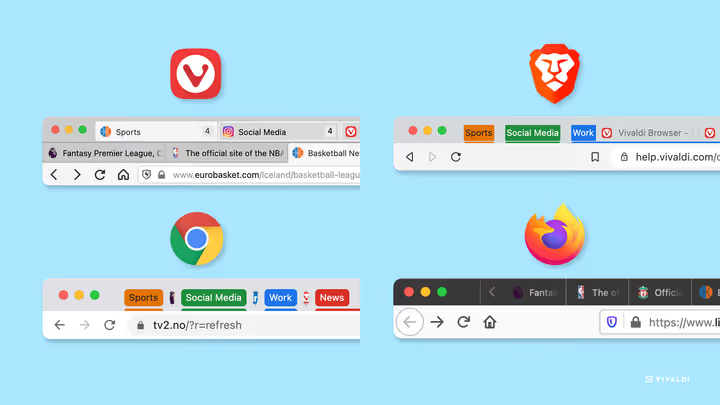
🗂 How to manage dozens of tabs in Chrome, Firefox, Brave and Vivaldi
Thirty tabs, and one of them is playing music. Who hasn't been in a situation where the tab bar becomes a junkyard: work documents mixed with YouTube, email, news, and that recipe you opened a week ago?
The problem isn't the number of tabs. The problem is that most browsers are designed as if you open five or six sites per session. Reality is different: according to a Vivaldi poll, a significant portion of users keep 20 or more tabs open, while a minority (which, I admit, includes me) keep 40 or more.
Below is a breakdown of how Chrome, Firefox, Brave, and Vivaldi handle this reality: built-in tools, extensions, and techniques that bring control back to your tab bar without unnecessary hassle.
💡 Quick overview:
- Group tabs: Chrome, Brave, and Firefox do this without extensions.
- Switch to vertical tabs if you have more than 15 open.
- Enable hibernation for background tabs: memory usage drops 2-3 times.
- Try workspaces instead of one window with 50 tabs.
What browsers can do with tabs: comparison table
Feature | Chrome | Firefox | Brave | Vivaldi |
|---|---|---|---|---|
Tab grouping | ✅ since May 2020 | ✅ since version 141 (July 2025) | ✅ same as Chrome | ✅ via stacks |
Saving groups | ✅ up to 25 groups | ✅ | ❌ | ✅ sessions |
Vertical tabs | ❌ (extensions) | ✅ built-in | ✅ built-in | ✅ built-in |
Tab hibernation | ❌ (extensions) | ❌ (extensions) | ❌ | ✅ built-in |
Workspaces | ❌ | ✅ | ❌ | ✅ |
Two-level stacks | ❌ | ❌ | ❌ | ✅ |
Chrome: grouping that works, but with limitations
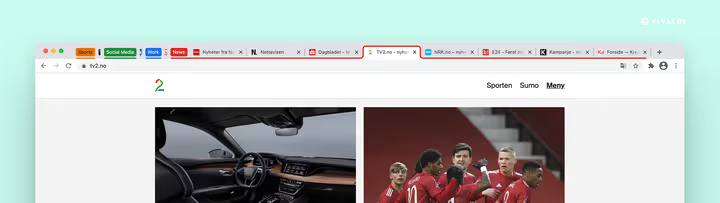
Chrome introduced tab grouping in May 2020, and since then it has become the main built-in tool for organizing your tabs. The mechanics are simple: right-click on a tab → "Add tab to new group" → set a name and color. You can collapse the group to a single labeled tag and expand it when needed.
In 2024-2025, Google added synchronization of saved groups across devices. Now groups from work are visible on your home laptop. But there's a catch: as users note, Chrome keeps no more than 25 saved groups in memory. The twenty-sixth silently replaces the oldest one. For those with many projects, this means manual list management.
The main drawback of Chrome for working with dozens of tabs is the horizontal bar. When a group contains more than 7-8 tabs, labels shrink to icons without text. Finding the right one becomes a guessing game. Google hasn't added vertical tabs, and based on the Chromium feature tracker, has no plans to. Extensions like Workona or vertical tab managers from the Chrome Web Store remain your options.
Regarding performance: Chrome still keeps background tabs active unless a site is explicitly "put to sleep." Extensions for suspending tabs (The Great Suspender was popular but was removed from the store for security reasons; alternative extensions exist but require caution) partially solve the problem.
Brave: Chromium under the hood, privacy on top
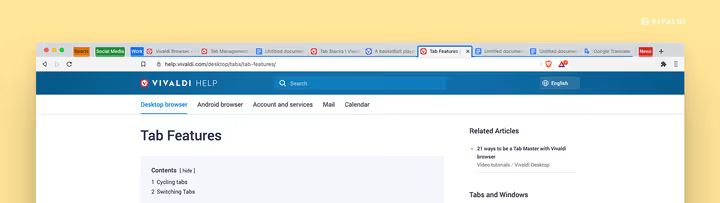
Brave is built on the same Chromium engine as Chrome, so tab grouping works identically here. The same right-click → group → color, the same horizontal bar limitations. In 2025, Brave added vertical tabs: a sidebar that can be enabled in settings. This is a significant step forward: tab names are fully readable, and scrolling through the list is more intuitive than a horizontal strip.
Brave's strength is not tab management per se, but privacy. The ad and tracker blocker is built in out of the box, and extensions from the Chrome Web Store have access to the same capabilities. But every extension you add for tab management potentially sees the titles and URLs of all open pages. Brave doesn't prevent this; it only blocks third-party trackers on the sites themselves.
In June 2026, Brave introduced Brave Origin, a lightweight version of the browser with a one-time purchase. It's unclear how this will affect the development of core features, but for those who value privacy without extra functionality, this is an interesting signal.
Firefox: from extensions to built-in groups

Firefox long relied on extensions for tab management. Tree Style Tab, a vertical panel with a tree structure, was the de facto standard among users with many tabs. But in July 2025, with the release of Firefox 141, Mozilla built tab grouping directly into the browser.
Now Firefox can create groups, assign labels and colors to them, without installing add-ons. Additionally, automatic AI-powered grouping is built in: the browser analyzes open tabs and suggests grouping them by topic. It doesn't work perfectly, but for a first pass it saves time.
Vertical tabs in Firefox are also built-in: a sidebar with full titles, adjustable width, and one-click hiding. Combined with containers (Multi-Account Containers), a Firefox feature that isolates cookies and sessions between tab groups, you get a powerful tool. For example, you can keep a work Google account and a personal one in the same window without mixing data.
Among the drawbacks: hibernation of background tabs is still not built in. Extensions for "sleeping" tabs exist, but each one adds a potential leak vector since it sees tab titles.
Vivaldi: no matter how many tabs you open, it handles them
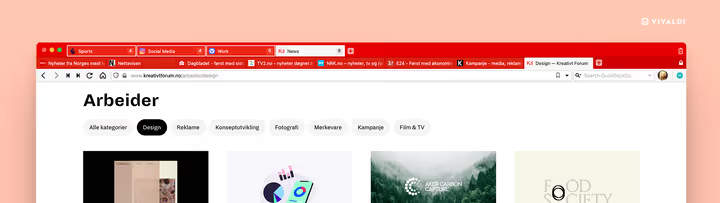
While other browsers are catching up to basic scenarios, Vivaldi was designed from the start for users who open dozens of tabs and don't close them for weeks.
Key Vivaldi tools:
- Two-level tab stacks. A feature introduced in 2021 and refined since: you group tabs into a stack, and they display in two levels. The top level is the stack header, the bottom level shows a preview of each tab. On a horizontal bar this saves space; on a vertical bar it provides a tree structure without extensions.
- Workspaces. Separate sets of tabs that you can switch between like virtual desktops. A workspace for a project, a personal one, a news one: each has its own set of tabs that doesn't overlap with others.
- Tab hibernation. Built-in and configurable: you can "sleep" one tab, a group, or all background tabs. Memory is freed immediately.
- Web panels. A sliding sidebar where you can add any site, messenger, notes, or translator. This removes them from the tab bar but keeps them one click away.
- Session management. Save your current set of tabs as a session, close them all, and open them later, down to scroll position.
Tab selection via Ctrl/Shift is another feature: you select multiple tabs and apply one command to them (close, move to stack, add to bookmarks). In Chrome, selection only works for dragging.
The only noticeable drawback of Vivaldi is the learning curve. There are many settings, and a newcomer might spend an hour before building a system that works for them. But for those who work with 30+ tabs daily, these settings pay off.
Watch the video above for a visual demonstration of tab grouping and navigation techniques in Chrome that also work in Brave.
⁉️🤔 Frequently asked questions
Tabs are slowing down my browser. What should I do first?
Open the browser's task manager (Shift+Esc in Chrome/Brave/Vivaldi) and see which tabs consume the most memory and CPU. Close or "sleep" them. If your browser doesn't support hibernation, install an extension for suspending background tabs. And check your total number of extensions: each one adds a background process.
Which browser is best for 50+ tabs on a low-end laptop?
Vivaldi with background tab hibernation enabled and a vertical panel. Hibernation reduces memory usage significantly, while the vertical panel makes navigation readable. In second place is Firefox with the same vertical tabs, but you'll need to add hibernation via an extension.
Can I sync tab groups between devices?
Chrome syncs saved groups between desktops and Android (up to 25 groups). Firefox currently syncs open tabs but not groups. Vivaldi syncs sessions through its account. Brave syncs only bookmarks and individual tabs; it doesn't support groups.
Should I install extensions for tab management?
If your browser doesn't provide the functionality you need out of the box, yes, but with caution. An extension sees the titles and URLs of all open tabs. Install only trusted ones with open source code and minimal requested permissions. Workona (for Chrome and Firefox) and Tree Style Tab (for Firefox) are examples with transparent reputations.
How does Brave differ from Chrome in tab management?
Built-in vertical tabs and an ad blocker that reduces background site activity. Otherwise, it's the same Chromium with the same grouping capabilities. Brave suits those who need privacy but don't want to lose compatibility with Chrome extensions.
What to use in 2026: the final breakdown
The choice comes down not to "which browser is best" but to how many tabs you keep open and how much you value privacy.
- If you have 10-15 tabs and live in the Google ecosystem, Chrome. Grouping, syncing, saving: there's enough of everything.
- If you value privacy and have a moderate number of tabs, Brave. Vertical tabs are already here, trackers are blocked out of the box.
- If you need containers and session isolation (work + personal in one window), Firefox. Grouping and vertical tabs since July 2025, built-in.
- If you open 30+ tabs daily and don't want to depend on extensions, Vivaldi. Two-level stacks, hibernation, workspaces, and sessions solve the task comprehensively.
Try hibernation on your current browser: an extension or built-in. You'll likely see a speed boost immediately. And what tab management technique saves you? Share in the comments.

A professional team of writers and editors specializing in creating quality content.