














📧 MailTrack review: tracking email opens in Gmail
You sent an important email and now you're wondering whether it arrived. The client has been silent for three days, the partner isn't responding, and you have no idea if the email got lost in spam or was simply ignored.
MailTrack solves this problem in 2 minutes. The extension integrates into Gmail and shows when and how many times the recipient opened your email. With 3 million users, 11,700 reviews, and a 4.4 rating on the Chrome Web Store, this is not an experiment but a proven working tool.
Below is an honest breakdown: how MailTrack works, what the free version offers, what limitations exist, and whether upgrading to a paid plan is worthwhile.
💡 Quick overview:
- Install the MailTrack extension from the Chrome Web Store in a minute, and it immediately appears in Gmail.
- Send an email as usual and check your "Sent" folder: one checkmark means "unread," two green checkmarks mean "read."
- The free version includes unlimited tracking, reports, and notifications, more than enough for personal correspondence.
- The paid version adds individual tracking in group emails, repeated open notifications, and Zapier integrations.
What is MailTrack and how does tracking work
MailTrack is a Gmail extension that adds familiar checkmarks from messengers to the interface. One gray checkmark means the email hasn't been opened. Two green checkmarks mean it has. No complicated dashboards: the result is visible right in the "Sent" folder.
Technically, it works simply: the extension embeds an invisible tracking pixel into outgoing emails. When the recipient opens the email, their mail client loads this image, and the MailTrack server records the open event. The same mechanism is described in the MailTrack documentation and works in any email tracker, from Yesware to Streak.
Important note: if the recipient has disabled automatic image loading in their email client, the open won't be recorded. In practice, this rarely happens since most email clients load images by default. However, for cold outreach, keep this factor in mind.
Beyond the open event, MailTrack shows the time and device used to read the email. Notice that your client opened a proposal from an iPhone at 11:30 PM? Perhaps a follow-up reminder tomorrow morning would be worthwhile. These details transform tracking from "interesting" into "useful for business."
How to install MailTrack in 2 minutes
Installation takes less time than reading this section. Here are step-by-step instructions:
- Open Chrome, Firefox, or Opera browser and sign into Gmail.
- Go to the extension page on the Chrome Web Store and click "Install."
- After installation, Gmail will automatically reload, and tracking checkmarks will appear in the interface.
- If checkmarks don't appear, close and reopen the browser. This works in 99% of cases.
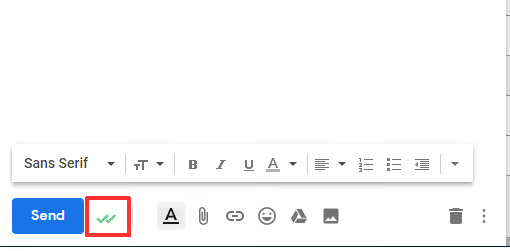
The extension doesn't require registration: install it, and it works immediately. When composing a new email, a tracking indicator appears in the bottom panel. If it's active, the email will be tracked automatically.
For mobile devices, there's a separate Mailsuite app for Android and iOS, as well as an Outlook add-in. Check the official Mailsuite website for current installation links. This is useful if you handle some correspondence outside the Gmail web interface.
How to read tracking statuses
The logic is simple and can be memorized in a minute:
- One gray checkmark: the email was sent but hasn't been opened yet.
- Two green checkmarks: the email was read by the recipient.
- Two green checkmarks with a number: the email was opened multiple times.
Hovering over the checkmarks displays a popup with details: exactly when it was opened, how many times, from which device, and from which city (if data is available). This information updates in real time: send an email and immediately see the status in the "Sent" folder.
Tracking group emails: what works and what doesn't
When you send one email to multiple recipients, things get more complicated. In the free version, MailTrack shows that the email was opened but doesn't tell you which of the three recipients opened it.
This isn't a bug but a deliberate architectural decision. Reliable individual tracking in group emails requires bypassing Gmail's infrastructure, which increases the risk of landing in spam. MailTrack's developers chose deliverability over functionality, and this is the right compromise.
What to do if you need to track individual opens in a group email: either send separate emails to each recipient (yes, it takes longer, but open rates for personal emails are higher), or upgrade to a paid plan where group tracking is included in the Advanced package.
Within a company, the problem is solved more easily: ask colleagues to install MailTrack as well. When both sender and recipient use the extension, tracking works both ways without technical workarounds.
Free and paid versions: what you get
MailTrack has an honest free model. You get unlimited email tracking forever, with no trial period and no ads in the interface. This is sufficient for personal use and freelancing.
The paid Advanced subscription adds features important for active sales and client work:
- Individual tracking in group emails, showing exactly who opened.
- Click tracking for links in emails.
- Repeated open notifications (when a client rereads the email, you receive a notification).
- Weekly and monthly productivity reports for correspondence.
- CRM integration and 4000+ apps through Zapier (available in Advanced).
The exact Advanced pricing depends on your region and current promotions; check current figures on the MailTrack plans page. For comparison, similar plans from Yesware and Mixmax start at $12-15 per month.
How secure is MailTrack
In short: as secure as banking apps. The company undergoes annual Google audits, is ISO/IEC 27001 certified, and uses AES-256 encryption for all transmitted data. Full GDPR compliance with the European data protection regulation.
Important fact: MailTrack does not store the content of your emails. The extension only sees sending metadata and open events. The company does not sell or share data with third parties, as explicitly stated in their privacy policy.
The extension is verified by Google and has Featured status in the Chrome Web Store. As of June 2026, the extension has no recorded data breach incidents.
The video above is the official MailTrack installation guide from the Mailsuite developers. Half a million views and not a single negative comment about security.
⁉️🤔 Frequently asked questions
Does MailTrack show if an email was deleted without being read?
No, tracking deletion before opening is technically impossible. If the recipient deleted the email without opening it, you'll see one gray checkmark and the status won't change. This is exactly why two green checkmarks are the only reliable signal.
Does MailTrack work with corporate Gmail (Google Workspace)?
Yes, the extension works with Gmail accounts of any type: personal, Google Workspace, and G Suite. For corporate teams, there's a special Teams plan with centralized management and unified billing.
Can the recipient see that the email is being tracked?
In the email itself, no. There are no "this email is being tracked" banners or visible labels. However, a technically savvy recipient can discover the tracking pixel by viewing the email's source code. Blocker extensions like PixelBlock also detect the tracker and can block it.
Can I track emails from my phone?
Yes, through the Mailsuite mobile app for Android and iOS. It integrates with Gmail on your phone and displays tracking statuses in the mobile interface. The app is free for basic tracking; installation links are available on the official website.
What should I do if checkmarks don't appear after installation?
Reload your browser. If that doesn't help, check whether MailTrack conflicts with other Gmail extensions (such as Streak, Yesware, or Boomerang). Disable them one by one and test. In most cases, reloading solves the problem.
Is MailTrack worth installing in 2026
Six years after launch, MailTrack remains the best free email tracker for Gmail. The free version isn't artificially limited: you get exactly what you installed the extension for, knowing whether your email was read or not.
If you're a freelancer, sales manager, or simply send important emails and wait for responses, install it. Two minutes of installation saves hours of uncertainty. If you need to track group mailings and link clicks, consider Advanced, but try the free version first. A month of active use will show whether you need the paid features for your specific scenario.

A professional team of writers and editors specializing in creating quality content.