














🧮 Matomo Analytics: self-hosted WordPress analytics without Google
Your website brings traffic, but you cannot understand that traffic. Google Analytics hides keywords, data goes to third-party servers, and the interface changes faster than you can learn it.
Matomo Analytics solves this problem differently. You install a plugin on your WordPress site, and analytics stays on your server. Nobody sells your visitors' data, nobody cuts down reports. This is not just a "free alternative to Google Analytics," it is a shift in approach to who owns information about your website.
Below is a complete breakdown: how Matomo works in 2026, which features are free, what is worth paying for, and how it differs from cloud alternatives.
What is Matomo Analytics and why it matters
💡 Quick overview:
- Download and activate Matomo Analytics from the WordPress.org directory; the basic plugin is free forever.
- Enable tracking with one click in the Matomo Analytics → Get Started submenu, no code or configuration required.
- Explore the dashboards: real-time visits, geolocation, traffic sources, page behavior.
- If you need more, connect premium add-ons through the Matomo Marketplace (heatmaps, funnels, form analytics).
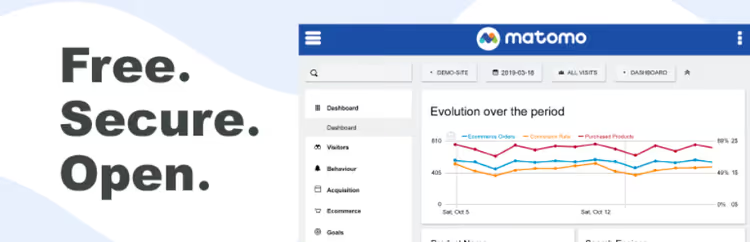
🔗 Matomo Analytics on WordPress.org
Matomo Analytics is a WordPress plugin that deploys a full-featured web analytics system directly inside your website. The engine is the same as the standalone Matomo On-Premise version, but installation comes down to a couple of clicks in the admin panel.
The main difference from Google Analytics: all data is stored in your MySQL database. No third-party server gains access to visitor information, not Matomo, not ad networks, not anyone else. This is critically important if you work with a European audience and GDPR, or simply do not want Google using your analytics in its advertising models.
The Matomo engine itself is used by more than 1 million websites in 190+ countries. The plugin supports 50+ languages and works out of the box with WooCommerce, Easy Digital Downloads, and MemberPress; e-commerce data is captured automatically.

In practice, the full cycle looks like this: you install the plugin, enable tracking, and within an hour you see your first visitors on the map, know where they came from, and which pages they are viewing. The free version is enough for the vast majority of portfolio sites, corporate websites, and content blogs.
Features of the free version
Matomo Analytics covers almost everything a website owner needs even without premium add-ons. The developers do not intentionally cut functionality; paid add-ons address narrow advanced scenarios.
Dashboard and real-time reports
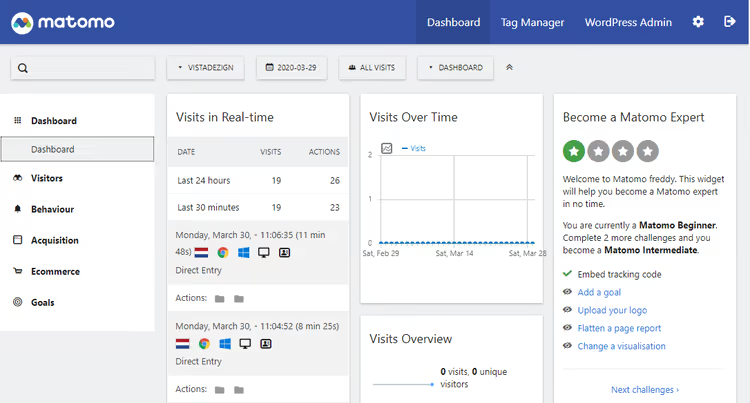
The interface is built around customizable widget panels. You add to the dashboard what you specifically need: today's visits, top pages, geolocation map, traffic sources. Reports update in real time; you publish a new post and immediately see people visiting it.
Geolocation is built on the DB-IP database (Creative Commons license, loaded automatically upon activation). You see countries, cities, regions, providers, and browser language, all on one map.
E-commerce
For online stores on WooCommerce, EDD, and MemberPress, analytics connects without additional setup. Reports include: total revenue, number of orders, conversion rate, abandoned carts, popular products, and channel effectiveness by revenue. This is not a "basic sales counter"; data is segmented by device, location, and source.
Campaign tracking and UTM tags
The built-in URL Builder helps create tagged links for ad campaigns, newsletters, and social media posts. Matomo automatically picks up UTM parameters and shows which channel delivers the most conversions: Google Ads, Facebook, email campaigns, or organic search.
Visitor profiles
The "Visitors" tab shows each user's journey: where they came from, which pages they opened, how much time they spent, at which step they left. For stores, order history and cart behavior are added. This is not about "surveillance"; it is a way to find bottlenecks in the funnel. For example, users are leaving en masse on the checkout page.
Tag manager

Matomo Tag Manager is a centralized platform for all tracking codes on the site. You add Facebook Pixel, Google Ads, Hotjar, or any other tags without editing theme code. Triggers are configured by events: page load, click, form submission, scroll to a certain depth.
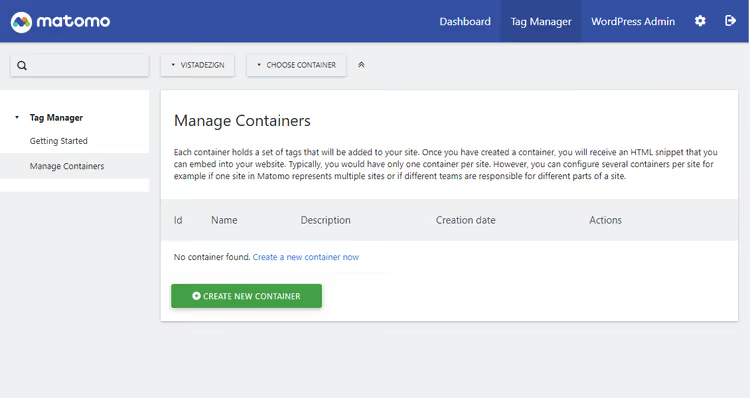
The tag manager can be disabled with one line in wp-config.php: define('MATOMO_ENABLE_TAG_MANAGER', false). This is useful if you already use Google Tag Manager and do not want duplication. In multisite mode, the tag manager does not work; this is a documented limitation.
Import and export
Matomo can import historical data from Google Analytics and WP Statistics; you do not lose accumulated statistics when switching. Report export is one click to CSV/JSON.
Other features
- Audience segmentation by dozens of parameters (device, location, source, behavior)
- Comparison of reports across different periods
- WP REST API for integration with external tools and custom dashboards
- Access control: give colleagues report viewing without administrator rights
- Exclusion settings: do not track certain roles, pages, or IP ranges
- WordPress Multisite support (except for the tag manager)
- GDPR compliance out of the box: IP anonymization,
[matomo_opt_out]shortcode for opt-out, data retention settings, personal data export and deletion
Installation and first steps
Installing Matomo Analytics takes a couple of minutes. It is more complex than "enable and forget," but significantly simpler than setting up Google Analytics with GTM.
System requirements are modest: PHP 7.2 or higher, minimum 128 MB of memory (256 MB recommended). Each page view generates an additional database query to record the event; on high-traffic sites this is worth considering. If traffic is large or you manage a network of sites on multisite, developers recommend moving Matomo to a separate server (Matomo On-Premise) or cloud (Matomo Cloud) and connecting via Connect Matomo.
Step-by-step installation:
Install the plugin via "Plugins → Add New," search for "Matomo Analytics," click "Install" and "Activate."
Enable tracking. After activation, a Matomo Analytics item appears in the sidebar menu. Go to it and click Enable tracking now:

The "Get Started" page contains basic information about the plugin and links to documentation. The tracking enable button is right here:

- Check the reports. Wait a few minutes and open Matomo Analytics → Reporting:

- Customize for your needs. In the Matomo Analytics → Settings section, you can exclude user roles from tracking, configure IP anonymization, set data retention periods, and add the
[matomo_opt_out]shortcode to your privacy policy page.

That is it. The plugin is working and collecting data. Next, optionally: the marketplace with add-ons.
Premium add-ons from Matomo Marketplace
Matomo Marketplace is an ecosystem of 66+ free and nine paid add-ons covering scenarios from SEO to video analytics.

To make the Marketplace work in the WordPress admin, you need to activate it separately:
Go to Matomo Analytics → Marketplace and download the Matomo Marketplace plugin for WordPress.
Install it as a regular plugin via "Plugins → Add New → Upload Plugin."
Activate it; after that the "Install Plugins" and "Subscriptions" tabs become available.

Free add-ons install in one click; click "Install" next to the desired plugin and you are done.
Activating a license for premium add-ons
Premium add-ons require a paid license. First, purchase the desired package at shop.matomo.org, then copy the license key:

Scroll down to the licenses section and click "Click to show" to see the key:

In the WordPress admin, go to Matomo Analytics → Marketplace → Subscriptions, paste the key, and save:

After activation, a tab opens with all available premium add-ons:
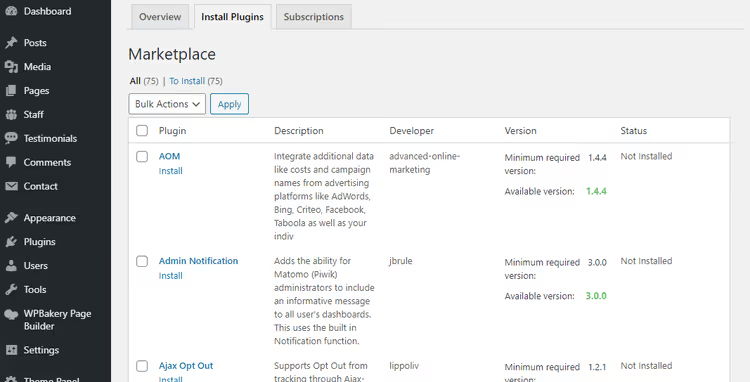
Heatmaps and session recording
Click, mouse movement, and scroll depth overlays directly on your pages. Shows what visitors actually look at, not what you think is important. Session recording replays the user's path: mouse movements, clicks, form filling. Cheaper than eye-tracking and requires no separate installation.
Form analytics
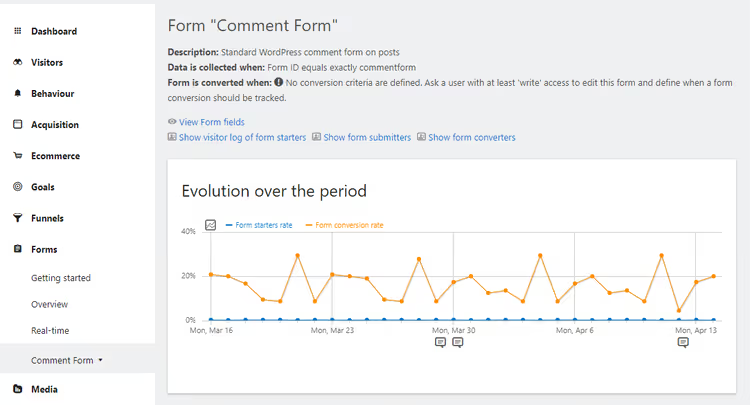
Shows which field users abandon, how much time they spend on each field, which forms convert better. Works with any HTML forms on the site: contact, order, subscription, hiring. This is not a "submission counter"; it is full-fledged analysis of form interaction.
Funnels
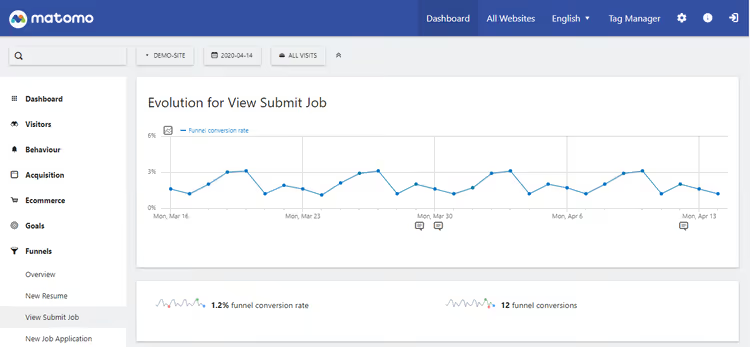
Each user action on the path to a goal is a funnel step. Matomo lets you define a sequence: "home → category → product → cart → order" and shows which step loses the most visitors. Learn more about how funnels work in a short video from the Matomo team:
Here is what funnel setup looks like in the Matomo interface:
Cohorts
Tracks visitor behavior over time: how many days users return, after which visit engagement drops, why regular visitors do not buy. Especially useful for content projects and SaaS where audience retention over weeks and months matters.
SEO keyword reporting
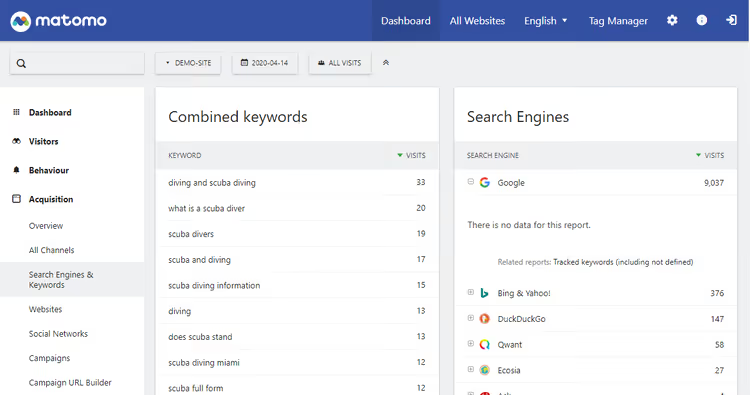
The add-on shows which search queries bring visitors from Google, Bing, Yahoo, and other search engines. Unlike Google Analytics, Matomo does not hide "not provided"; you see actual keywords.
Custom reports
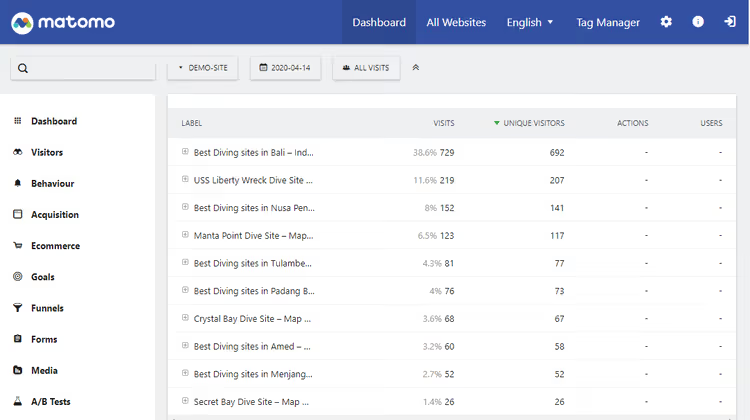
More than 200 metrics for building custom reports. Combine data, add visualizations and filters, and get a slice tailored specifically to your business task. Standard Matomo reports cover most scenarios; this add-on handles remaining niche requests.
Media analytics
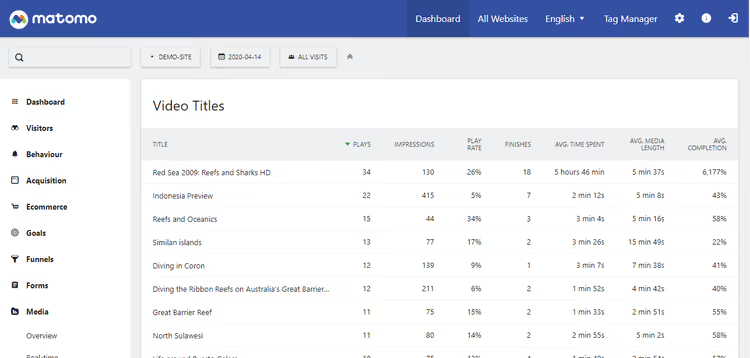
Tracks video views and audio plays: how many viewers watch to the end, at what second they close, which formats work better. Supports YouTube, Vimeo, and HTML5 video.
Multi-channel conversion attribution
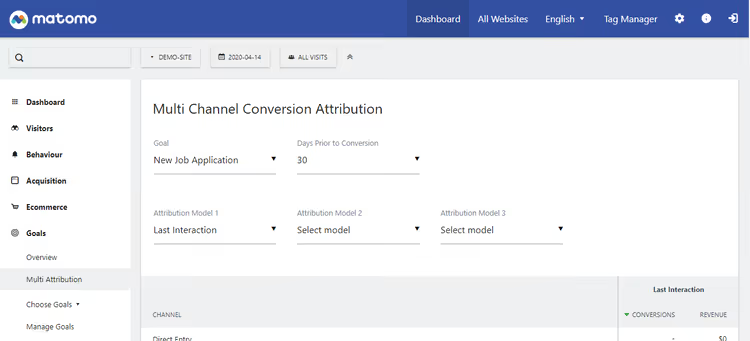
Shows which traffic channel actually leads to sales, accounting for the fact that a user might come from search, leave, return through advertising, and buy. Attribution distributes conversion value across all touchpoints, not just the last click.
Matomo vs Google Analytics: what to choose in 2026
Criterion | Matomo Analytics | Google Analytics 4 |
|---|---|---|
Data | On your server, 100% ownership | On Google's servers |
Price | Free (base), paid add-ons | Free (limit 10M hits/month), GA360 $50K+/year |
GDPR | Full control, opt-out shortcode, anonymization | Configuration via Consent Mode, data in USA |
Keyword hiding | No, all keywords visible | Yes, "not provided" for most queries |
Interface | Familiar, no surprises | Changes every six months |
Tag manager | Built-in | Separate product (GTM) |
E-commerce | WooCommerce/EDD/MemberPress out of the box | Requires dataLayer setup |
Data sampling | No | Yes, at large volumes |
Server load | Additional query per page view | None (tracking on Google's side) |
Heatmaps | Yes (premium add-on) | No |
⁉️🤔 Frequently asked questions
Does Matomo slow down the site?
Each page view creates an additional database query to record the event. On cheap hosting with minimal resources, this can be noticeable with heavy traffic. The solution is either to increase PHP limits (minimum 256 MB memory) or move Matomo to a separate server via Matomo On-Premise. On a decent VPS with 2 GB of memory, the plugin runs unnoticed.
How is Matomo different from WP Statistics and other WordPress analytics?
WP Statistics and similar tools are counters at the level of "how many visitors and where from." Matomo is a full-fledged analytics platform: behavioral reports, funnels, segmentation, attribution, session recording. This is comparable to Google Analytics, not to counter plugins. If you just need to know visitor numbers, Matomo is overkill.
Can I import old data from Google Analytics?
Yes. The built-in import function transfers historical reports from GA to Matomo. Statistics are not lost during migration.
Does Matomo work with caching plugins?
Yes, tracking runs through a JavaScript tracker that executes on the browser side. Server-side page caching (WP Rocket, W3 Total Cache, LiteSpeed) does not affect data collection.
Do I need Matomo if I use Google Search Console?
Search Console shows search queries and clicks from Google. Matomo provides the complete picture across all traffic channels, on-site behavior, conversions, and e-commerce. Both tools work together but do not replace each other.
How much do premium add-ons cost?
Prices depend on the number of tracked page views per month and the set of add-ons. Specific rates are on the Matomo pricing page. The free version is enough for the vast majority of sites; premium is needed for online stores, SaaS, and projects with deep behavioral analytics.
Is Matomo Analytics worth installing on your site
In short: if you need analytics that you fully own and you are ready for it to live on your server, install it. The free version covers all basic scenarios: visits, sources, geolocation, page behavior. Premium add-ons handle advanced cases.
Matomo is not for everyone. If you have cheap hosting with strict limits, additional load from every page view can have an impact. If you just need "how many people visited," get WP Statistics; it is lighter. If traffic runs into hundreds of thousands per day, move Matomo to a separate server.
But if you run a business on WordPress and do not want a foreign corporation to know more about your visitors than you do, there is no alternative to Matomo in the WordPress analytics market when it comes to price-to-feature ratio.
Start with the free version: 10 minutes to install, an hour to study the reports, and you will see your traffic in a way no cloud service can show.

A professional team of writers and editors specializing in creating quality content.