














🚀 Beginner's guide and recommended Easy Digital Downloads extensions
Launch an online store for digital products without drowning in shipping settings, inventory management, and variable SKUs. Sounds like exactly what WordPress was invented for.
Easy Digital Downloads does exactly that. The plugin is built specifically for selling files: software licenses, eBooks, stock photos, audio, video, courses. Not a single unnecessary field, no "product weight." Just digital distribution.
In practice, the combination of EDD + free theme + PayPal Standard gives you a working store for $0 per month. When the store grows, you add a Pro plan for $159-350 per year and get Stripe, subscriptions, license keys, and marketplace without separate purchases. Below is the complete path from installation to a storefront with payment processing.
💡 Quick overview:
- Install Easy Digital Downloads through the WordPress admin panel and activate the plugin
- Configure currency, payment gateway, taxes, and email notifications in the "Downloads → Settings" section
- Add your first digital product: name, price, file for download
- Create a storefront page using the
[downloads]shortcode and choose a compatible theme - If needed, extend functionality with a Pro plan: subscriptions, Software Licensing, marketplace, content restriction
What Easy Digital Downloads is and who it's for

Easy Digital Downloads (abbreviated as EDD) was created as an alternative to WooCommerce for digital distribution. If WooCommerce is a universal combine, then EDD is a tool for one task, without compromises on physical goods.
Free and regularly updated. The plugin core is free, security patches are released consistently, compatibility with current WordPress versions is maintained. The free version covers the complete cycle: file upload, shopping cart, payment through PayPal Standard, email receipts.
Simple launch. The interface is minimalist. The "Downloads" section appears immediately after activation, checkout and purchase history pages are created automatically. You don't get lost in a hundred tabs.
Extensibility. Developers value EDD for its clean architecture: fewer built-in styles, fewer CSS conflicts, more freedom through hooks and filters. Regular users get ready-made extensions through Pro plans.
Who EDD is not suitable for: if you're selling physical goods with shipping and inventory management, take WooCommerce. EDD = files, license keys, content subscriptions. The boundary is strict.
Step by step setup of a store on Easy Digital Downloads
Before starting: self-hosted WordPress installation (not WordPress.com) on your own domain with an SSL certificate. SSL is mandatory when you accept payment data. Let's Encrypt provides a free certificate, most hosts support automatic installation. More about the differences between WordPress.com and WordPress.org in our breakdown.
Step 1: Plugin installation
In the WordPress admin panel, go to Plugins → Add New.

Enter "easy digital downloads" in the search. The first result is the plugin by Pippin Williamson. Click "Install Now", then "Activate".
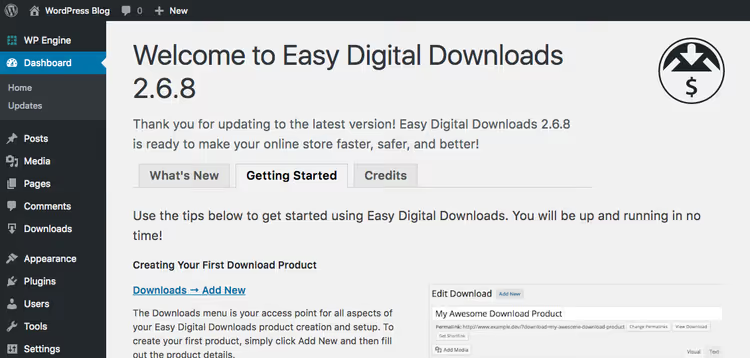
Done. The "Downloads" section has appeared in the admin panel, the store's control center.
Step 2: Basic settings
Open Downloads → Settings. The system has already created pages for checkout, successful and failed transactions, purchase history. You just need to set the store parameters.

Country and region. First, specify the store's country and region, this affects taxes and default currency. Then follow the "Currency Settings" link.

The default currency is US dollar. If you work with another, change the symbol, sign position, thousands and decimal separators. Save.

Payments. The tab where payment methods are enabled. The free version supports PayPal Standard. Stripe, Apple Pay, Authorize.net and other gateways are available in Pro plans. On initial setup, enable test mode to protect against accidental charges to real cards.
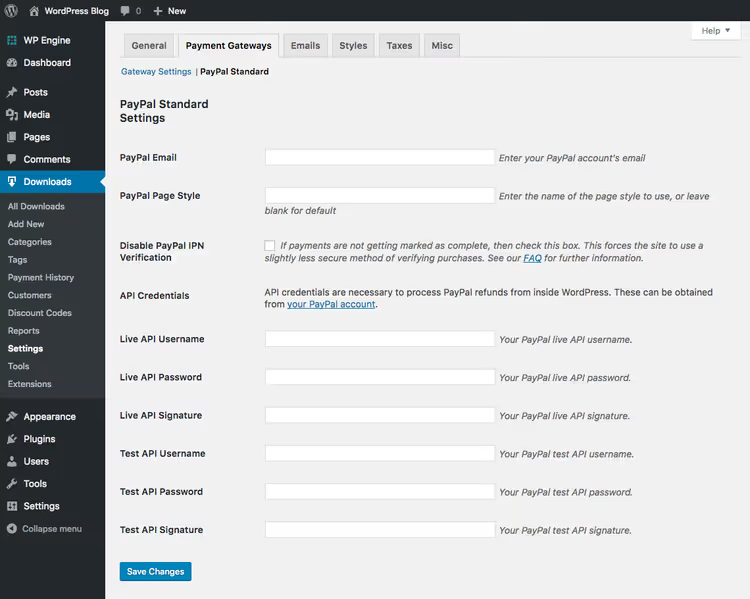
For PayPal Standard, enter your PayPal account email and API signature credentials. Save.
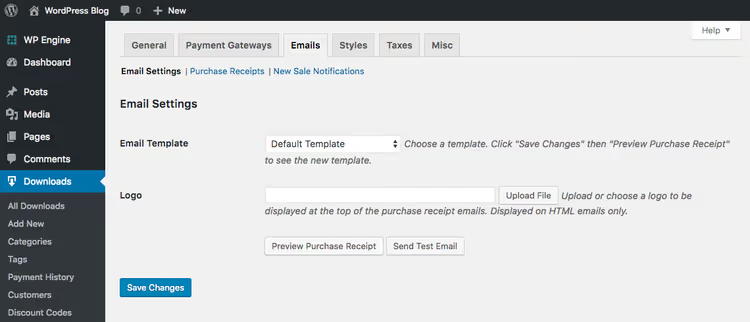
Email. EDD includes a ready-made email receipt template for buyers. Upload your logo, this is the minimum for brand recognition. For finer customization, the Email Templates addon is available in Pro.
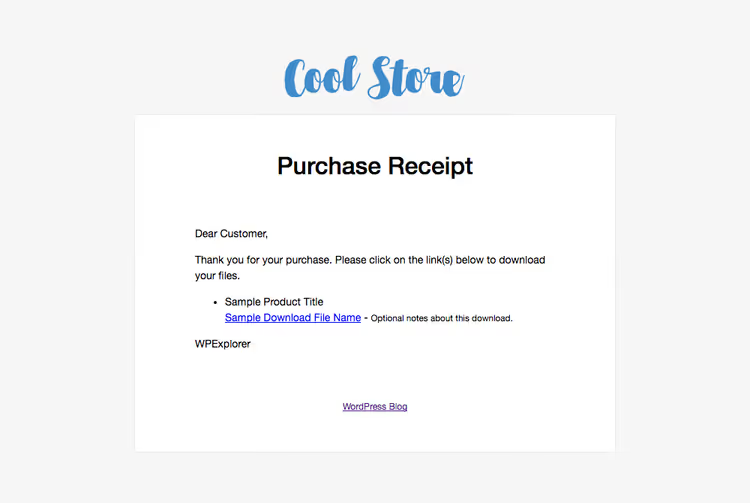
Click "Preview Receipt" to see the email through the customer's eyes. If necessary, adjust the text in the settings below.

Styles. Choose the default button color. If the theme doesn't control EDD styles, this parameter helps align the button with the brand's color scheme. For deep customization, disable built-in styles and work with the plugin's CSS through EDD documentation.

Taxes. Critical tab for legal compliance. Configuration depends on your jurisdiction. Study the EDD tax documentation and consult with an accountant, there's no universal recipe here.

In the "Miscellaneous" → "Checkout Settings" section, enable the "Enforce SSL on checkout" option. It encrypts data between the client's browser and the server.

File downloads. Set the download limit: one-time, two-time, or unlimited downloads. For courses and licensed content, limits protect against uncontrolled distribution.

In "Accounting Settings", enable sequential order numbers. Without this option, WordPress generates numbers mixed with other post types. Your accountant will thank you.

In the "Terms of Agreement" section, create text that the client agrees to before payment. For digital goods, return policies and licensing restrictions are especially important. TermsFeed has prepared a guide to legal agreements for digital products.
Settings are ready. Moving on to adding products.
Step 3: Adding the first digital product
In the Downloads → Add New section, the new product page opens.

Fill in from top to bottom:
- Product name and description, choose categories and tags.
- Prices: specify the cost or enable variable pricing (for example, a license for one site and for unlimited sites).
- Product type: "Default" for a single product or "Bundle" for a file package.
- File uploads: attach a ZIP archive, PDF, or other file.
- Download image: featured product image for the storefront.
Done, publish. Repeat for remaining products.
Step 4: Creating a storefront
EDD uses shortcodes to display products on any page.
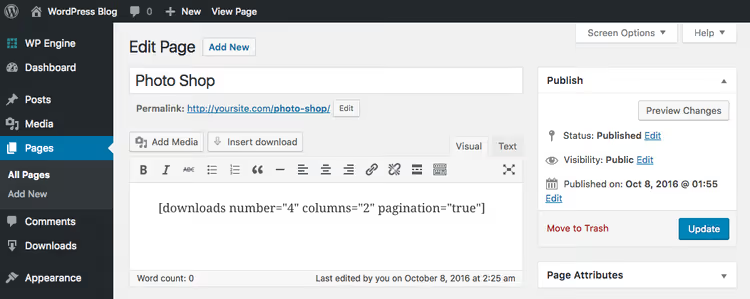
Create a new page and insert [downloads]. Available shortcode parameters (number of products per page, number of columns, pagination, hiding the buy button, displaying full description) are described in the EDD documentation.
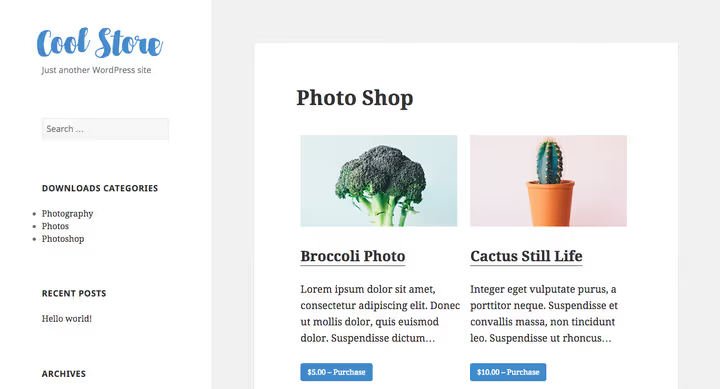
In the screenshot, a storefront with the default WordPress theme. The only changes: custom logo and adjusted thumbnail size in Settings → Media. Four steps are complete, the store works. But the standard theme doesn't make it visually convincing.
Watch the video from Adam at WPCrafter: the complete EDD setup process step by step. We recommend enabling it alongside our guide and tracking key moments.
Themes for an Easy Digital Downloads store
A good theme solves two tasks: visually distinguishes the store and guarantees correct display of EDD elements, cart, buttons, price tables. Theme developers style the plugin's CSS classes manually, saving you from code edits.
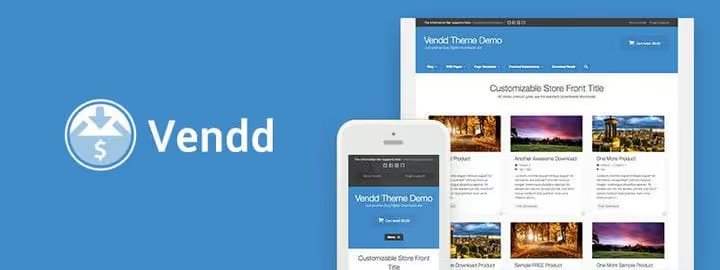
Vendd, a free theme from the EDD team, available on GitHub. The safest choice: compatibility with all plugin functions is 100% guaranteed. Color settings, background, three page layouts, built-in shortcode support. If you're launching your first store and don't want to take risks, choose Vendd.

Astra, one of the most popular WordPress themes, with built-in EDD integration. The free version covers basic needs, the Pro version adds flexible layout, header and footer settings without code. A good compromise between design and zero budget at launch.

Olam by webNesters, available on ThemeForest for $59. Specialized theme for marketplace: supports EDD and WooCommerce, includes the Unyson (Brizy) page builder, responsive layout, full compatibility with marketplace addons. The choice for a multi-vendor platform.
Easy Digital Downloads Pro plans
Previously, EDD sold extensions individually. Since 2024, the model changed to subscription: all key functions are included in the plan price, not purchased separately. Here's what you get on the current Pro plans as of 2026:
Plan | Price | Sites | Key functions |
|---|---|---|---|
Extended | $159.60/year | 1 | Payment gateways, subscriptions, discounts, EU VAT, email templates, AI recommendations, cart and checkout |
Professional | $209.65/year | 2 | Everything from Extended + Software Licensing, Marketplace, commissions and payouts, Zapier, abandoned cart recovery |
All Access | $349.65/year | 3 | Everything from Professional + fraud protection, wishlists, product comparison, loyalty, premium support |

Customer reviews. Buyers leave ratings and text reviews. EDD can send a discount coupon to the reviewer, activity is stimulated automatically, without manual work.

Payment gateways. Stripe, PayPal, Apple Pay, Authorize.net, 2Checkout, all included in any Pro plan. Card payment directly on the site, without redirect to PayPal.

Subscriptions and recurring payments. Configure daily, weekly, monthly, or annual billing. Paired with Content Restriction, allows you to lock content by subscription, ideal for courses and membership areas.
Previously, extensions were purchased one by one, discounts applied when buying 5 or more. Now the ecosystem is simpler: choose a Pro plan and get the full set of functions without extra transactions.

The extension management interface is the same for all plans. Documentation and support are included in the subscription.

Cloud storage. Product files are stored on external CDN (Amazon S3, Dropbox) and delivered faster than from your hosting. Especially relevant for large files, courses, video, audio.

For a multi-vendor platform, take Professional or All Access: marketplace, vendor commissions and payouts, product moderation, all in one plan.
What should a beginner choose? Extended for $159.60/year covers the needs of a single store with a complete sales cycle. Professional is needed when license keys or marketplace appear. All Access is justified for agencies and developers with multiple projects, the savings versus three separate licenses is about $130/year. See current numbers on the EDD pricing page.
⁉️🤔 Frequently asked questions
How is EDD different from WooCommerce?
EDD is designed exclusively for digital goods. It has no fields for physical shipping, stock management, and inventory tracking. The interface is simpler: fewer tabs, fewer conflicts with themes. If you're selling files, EDD does it cleaner and faster. WooCommerce is chosen when the store has at least one physical product.
Is it mandatory to buy Pro or is the free version enough?
The free version covers the complete cycle: file upload, cart, payment through PayPal Standard, email receipts. Pro is needed when you need Stripe or Apple Pay, recurring payments, license keys, marketplace, or content restriction. Start with the free version, expand as the store grows.
What theme works best for EDD?
Vendd, the free native theme from EDD developers, maximum compatibility without surprises. Astra gives more design out of the box with zero budget. Olam ($59 on ThemeForest) is the choice for marketplace with multi-vendor functionality. Mayosis is for when you need a modern digital store with a builder and 10+ ready layouts.
Is an SSL certificate required for an EDD store?
Yes, mandatory. You accept customer payment data, encryption is critical. Let's Encrypt provides free SSL, most hosts (SiteGround, WP Engine, Cloudways) support automatic installation. Detailed instructions in our SSL setup guide.
Does EDD work with themes not designed for it?
Yes, but the appearance of the cart, buttons, and tables may require manual CSS. EDD-compatible themes (Vendd, Astra, Olam, Mayosis) already contain ready-made styles for all plugin elements, saving hours of layout work.
Can I sell software licenses through EDD?
Yes, through the Professional plan ($209.65/year) or All Access. Software Licensing generates unique license keys, manages activations and expiration. API for integration with your software is included. This is the standard for selling plugins and themes on WordPress.
Is it worth launching a store on Easy Digital Downloads in 2026
If your product is a file, the answer is unequivocal: yes. EDD remains the best specialized solution for digital distribution on WordPress. Over the years of development, the plugin hasn't bloated, hasn't turned into a combine, and hasn't lost focus.
The Pro subscription model made pricing predictable: according to EDD pricing, you pay $159-350 per year and get the full set of functions. No headache choosing from dozens of separate addons. At launch, the free version with PayPal Standard is enough.
The combination of EDD + Vendd or Astra + PayPal Standard gives a working store for $0 per month. Stripe and deeper customization add $159-210 per year according to Pro plans. This is one of the lowest barriers to entry in e-commerce on WordPress. Try the free version today, setup takes less than an hour.

A professional team of writers and editors specializing in creating quality content.