













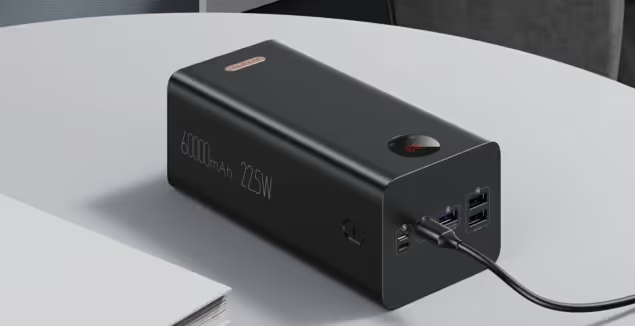
⚡ Power delivery and quick charge in power banks: what's the difference and which to choose
Heading out on the road with your laptop and phone already at zero? One charged power bank, and all your gadgets are back in action. But which one exactly: with Power Delivery or Quick Charge? The difference between these technologies is not a marketing gimmick, it is real watts and minutes to a full battery.
According to USB-IF, the Power Delivery standard is now supported by virtually all flagship smartphones, tablets, and laptops with USB-C. And Qualcomm with its Quick Charge 5 promises 50% charge in five minutes. The numbers are impressive, but behind them lie two fundamentally different approaches to fast charging.
By the end of this article, you will know exactly which power bank to get for an iPhone, which one for a Snapdragon-based Samsung, and which one can handle both. No compromises and no overpaying for unnecessary protocols.
💡 Quick overview:
- Power Delivery (PD): a universal USB-IF standard, works with iPhone, iPad, Android, laptops, Nintendo Switch. Version 3.1 delivers up to 240 W via USB-C.
- Quick Charge (QC): Qualcomm technology for Snapdragon devices. QC 5 delivers 100+ W, is compatible with PD, but does not work on iPhone.
- If you have an iPhone and a MacBook, get a PD power bank. For Snapdragon Android, both will work, but QC will provide finer voltage regulation tailored to the chipset.
- The PPS (Programmable Power Supply) protocol in PD 3.0/3.1 dynamically adjusts voltage, reducing heat and extending battery life.
Power Delivery: the universal fast charging standard
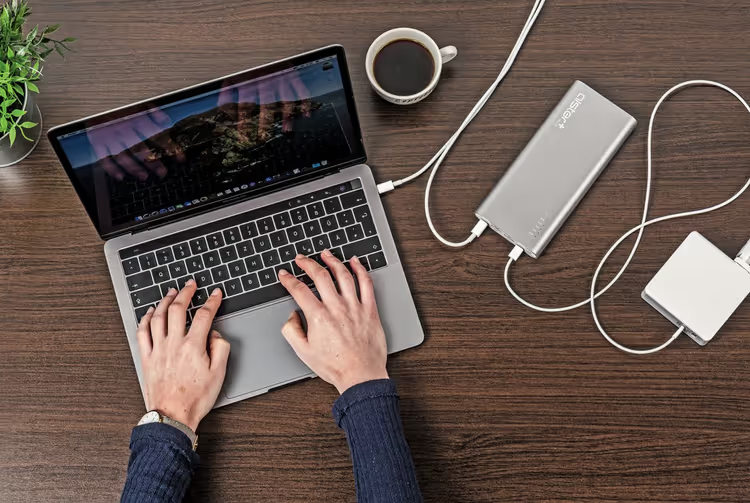
Power Delivery (PD) is an open standard developed by the USB-IF consortium. Unlike proprietary single-vendor solutions, the PD specification is implemented by all major manufacturers: Apple, Google, Samsung, Dell, Lenovo, and dozens of others. According to USB-IF itself, as of 2026, PD is the baseline protocol for virtually all devices with a USB-C port, from smartphones to gaming consoles.
How it works in practice. The charger and gadget controllers exchange data and negotiate the optimal combination of voltage and current: 5 V, 9 V, 15 V, or 20 V. No fixed steps, only what the receiving side is ready to safely absorb. As a result, a laptop battery gains most of its capacity in 20-30 minutes, and the risk of overheating is minimal.
PD 3.0 brought support for PPS (Programmable Power Supply), the ability to change voltage in 20 mV steps. For comparison: QC 3.0 does this in 200 mV steps. More precise regulation means less heat and a longer battery life. And in 2021, PD 3.1 was released with EPR (Extended Power Range) mode: the ceiling was raised to 240 W. Such adapters already power gaming laptops, monitors, and even soldering stations.
The main advantage of PD for an ordinary user: one USB-C cable, one adapter, all devices. From Apple iPhone 15/16 and MacBook to Steam Deck and headphones.
Quick Charge: speed from Qualcomm for Snapdragon devices
Quick Charge (QC) is Qualcomm's proprietary development. If PD is the "English language" of fast charging, universal for everyone, then QC is the "native dialect" exclusively for Snapdragon chipsets. The first version came out in 2013 and has since gone through several generations, each significantly boosting speed.
QC went through several generations, and each significantly boosted speed. They started in 2014 with QC 2.0: three voltage options (5, 9, 12 volts) and an 18-watt ceiling. Next came QC 3.0 with INOV technology, voltage dynamically adjusted from 3.6 to 20 volts in small steps, and a typical smartphone gained most of its battery in a little over half an hour. In 2017, Qualcomm took a fundamental step: QC 4.0 got built-in PD support. And the fifth generation in 2020 reached the "50 percent in 5 minutes" mark at over a hundred watts. Specific specifications are on the Qualcomm website.
In practice, maximum QC 5 speeds are found in gaming smartphones like Xiaomi Black Shark and flagships on top-tier Snapdragon. An important point: Quick Charge requires support on both sides, from the adapter and from the phone's chipset. iPhone and iPad do not work with QC at all. Samsung Galaxy and Google Pixel, however, technically use PD as their primary protocol, so owners of these devices only need QC if they have the Snapdragon version specifically and want to squeeze out maximum speed.
Power delivery vs quick charge: direct comparison
If you strip away the marketing, the difference comes down to a few parameters. Here is a direct comparison:
Characteristic | Power Delivery (PD 3.1) | Quick Charge (QC 5) |
|---|---|---|
Developer | USB-IF (open standard) | Qualcomm (proprietary) |
Maximum power | 240 W | 100+ W |
Connector | USB-C | USB-C (USB-A possible on older versions) |
Supported devices | iPhone, iPad, MacBook, Android, laptops, Nintendo Switch, headphones | Snapdragon smartphones and tablets |
Dynamic regulation | PPS (20 mV step) | INOV (200 mV step) |
Backward compatibility | Yes, with USB 2.0/3.0 | Yes, within the QC ecosystem |
Safety | USB-IF certification mandatory | Qualcomm certification |
Conclusion from the table: PD wins on universality and device coverage. QC wins on fine-tuned optimization for Snapdragon, but only if your smartphone is on that chipset.
It is worth mentioning PPS vs INOV separately. Both protocols solve the same task, dynamically changing voltage so the battery does not overheat. But PD 3.0/3.1 does this with a 20 mV step (10 times more precise), which results in slightly less heat and a slightly longer battery life over a 2-3 year span.
How to choose a power bank: practical scenarios
Here are three typical situations and a clear choice for each.
Scenario A: you live in the Apple ecosystem. iPhone, iPad, MacBook, AirPods, all these devices charge via PD. Quick Charge is irrelevant to them. Your choice is a power bank with Power Delivery support, ideally 30-65 W (for a laptop) and with PPS for gentle iPhone charging. Battery capacity: from 20,000 mAh to charge a MacBook Air twice. Note: Apple certifies accessories under the MFi program, but for PD power banks, certification is not mandatory; compliance with the USB-IF specification is sufficient.
Scenario B: Snapdragon Android. Samsung Galaxy S-series, OnePlus, Xiaomi, ASUS ROG Phone, both standards work here. But if the smartphone implements QC 4+ or QC 5, a power bank with Quick Charge support will give maximum speed. Practical advice: look for a model marked "PD + QC"; it will cover your phone, laptop, and headphones.
Scenario C: mixed device fleet. iPhone for calls + Windows laptop + work Android. Get a PD power bank marked "PPS"; it will cover everything. Quick Charge as a separate function is not necessary in this scenario: modern Snapdragon Android smartphones charge from PD just as well, just without the pure-Qualcomm optimizations.
For those looking for a specific model, Powerbank at ALLO with a filter by charging features. Check "Power Delivery (PD)", and if your phone is Snapdragon, add "Quick Charge". The range of prices and capacities lets you find an option for any scenario.
A brief explanation from the channel authors: the video visually demonstrates how PD and QC behave with different devices, from an iPhone to a gaming laptop, and why a universal PD adapter often turns out to be the only one you need.
⁉️🤔 Frequent questions
Does Quick Charge work with iPhone?
No. iPhone and iPad do not use the Qualcomm protocol. They charge only via Power Delivery (starting with iPhone 8, optimally with an 18 W or higher adapter). If you connect an iPhone to a QC charger, it will take the standard 5 V, charging will be slow but safe.
How does PD 3.1 differ from PD 3.0 in practice?
PD 3.0 delivers up to 100 W, which is enough for laptops like the MacBook Pro 14". PD 3.1 raises the bar to 240 W, and that is the territory of gaming laptops and monitors. For phones and tablets, there is no difference; both standards provide the same speed.
Are QC and PD compatible with each other?
Starting with QC 4.0, yes. Qualcomm built Power Delivery support into its protocol. This means a charger marked "QC 4+" understands PD commands. But a PD charger is not required to support QC, and usually does not (unless it is a dual-protocol model).
What cable is needed for fast charging?
For PD at power levels above 60 W, a cable marked 5A and with an E-Marker chip is required. For 100-240 W, a cable with EPR support (usually marked as "240W"). An ordinary thin USB-C cable is limited to 3A (60 W), even if the adapter is more powerful.
Can I charge a laptop from a power bank with Quick Charge?
Only if the power bank also supports PD. QC without PD delivers a maximum of 27-36 W on older versions, which is not enough for a laptop. Look for a model marked "PD 45W / 65W / 100W"; this guarantees laptop charging.
What to put in your backpack: the final verdict
Fast charging technologies have stopped competing; they have merged. A modern, high-quality power bank supports both PD and QC simultaneously: PD ensures compatibility with the entire device fleet, and QC adds optimization for Snapdragon smartphones.
If you are buying one charging ecosystem for everyone, get PD with PPS. This is a universal standard that will not become obsolete. iPhone, MacBook, Pixel, Switch, everything runs off one adapter. And if your smartphone is on a top-tier Snapdragon and charging speed is critical (streams, games, constant travel), look for a model with explicit QC 5 support.
In any case, open your phone's specifications right now and see which protocols are listed there. Two minutes of checking will save you hours of waiting by an outlet.

A professional team of writers and editors specializing in creating quality content.