













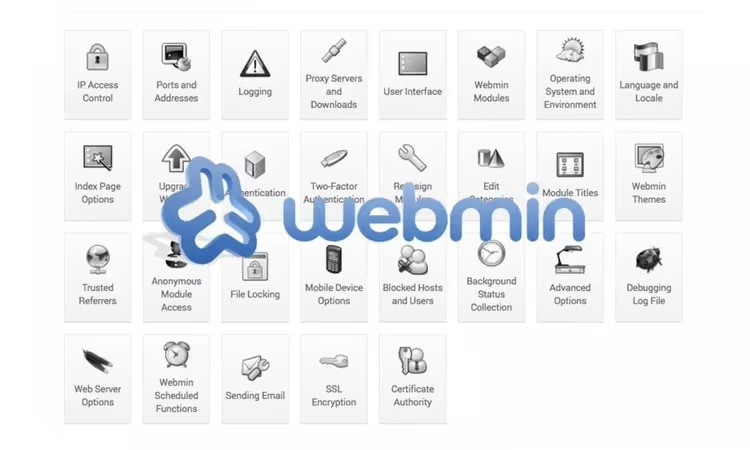
💻 Webmin and Virtualmin: a free alternative to paid server control panels
What is Webmin and why you should know about it
Paid server management panels, a line that recurs every month in the expense report. ISPmanager, Plesk, cPanel: a basic license starts at a few dollars and can reach fifty on extended plans. One server, one project, tolerable. But three VPS instances, a dozen client machines and a test environment quickly turn "pennies" into hundreds of dollars per year. For non-commercial and pet projects, such expenses look entirely unnecessary.
Webmin flips this picture. It is a web tool for administering Linux servers that gets installed nearly a million times a year. It works through a browser, deploys in a couple of minutes and asks for no money. Under the hood: user management, disk quotas, services, configuration files, Apache, Nginx, PHP, MySQL, BIND DNS and dozens of other components. Essentially, a full replacement for paid panels for those who are not afraid of the terminal but prefer a convenient GUI.
And with the Virtualmin add-on, the free bundle turns into a web hosting platform: domains, mailboxes, SSL certificates, databases and reseller accounts. Below we break down both parts in detail and show how they work in practice.
💡 Quick overview:
- Install Webmin with a single command on CentOS, Ubuntu or Debian
- Master the interface, navigation and key modules of the panel
- Configure Virtualmin for managing domains, mail and SSL
- Compare the bundle with paid alternatives by features and price
Installing Webmin
Installation comes down to a single package. For CentOS, RHEL, Fedora and derivatives, RPM:
1 wget https://www.webmin.com/download/rpm/webmin-current.rpm 2 sudo rpm -Uvh webmin-2.641-1.noarch.rpm
For Debian, Ubuntu and derivatives, DEB:
1 wget https://www.webmin.com/download/deb/webmin-current.deb 2 sudo dpkg -i webmin_2.641_all.deb
If the system reports unmet dependencies, install them:
1 sudo apt-get install -f
The Perl dependency is mandatory. In modern distributions Perl is preinstalled, but the Encode::Detect module may additionally be required:
1 sudo yum install perl-Encode-Detect # CentOS / RHEL 2 sudo apt-get install libencode-detect-perl # Debian / Ubuntu
After installation the script outputs the address: https://your-server:10000. The default port is 10000, the login is root with the system password. Immediately after logging in, change the port and set up two-factor authentication in the Webmin Configuration section. The panel provides root access to the entire server, so skimping on security is not an option here.
Interface and navigation
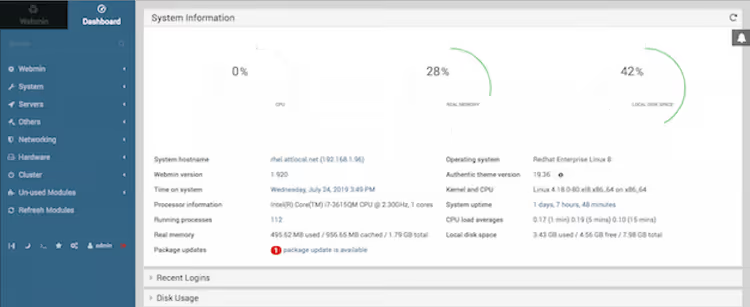
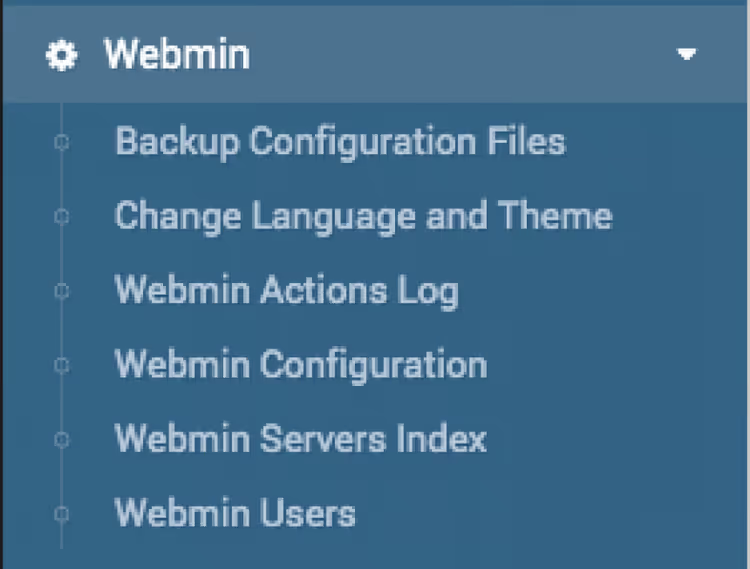
By default Webmin greets you with the Authentic theme, a modern design with a navigation sidebar on the left. The menu is logically grouped: Webmin (panel settings), System (users, disks, processes, scheduler), Servers (Apache, MySQL, Nginx, BIND DNS, Postfix), Tools (file manager, terminal, upload and download), Networking and Hardware.
For those who prefer the classic look, the old "Old Webmin Theme" is available. But in the current version, switching to it may cause display bugs. We recommend staying on Authentic, it is stable and regularly updated.
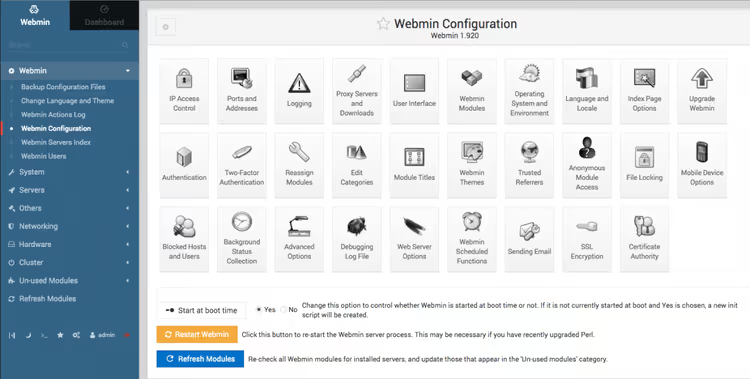
The Webmin Configuration section provides access to dozens of editable options. Here you can configure: backup of the panel's own configuration, access rights for Webmin users, the SSL certificate for the web interface, two-factor authentication, IP address limits, proxy server and notifications. The Webmin Configuration Webmin subsection opens the full matrix of behavioral settings:
Key modules that make Webmin worth installing
The Others module group is a true Swiss army knife. Volunteer developers have collected utilities here that cover most everyday administrator tasks:
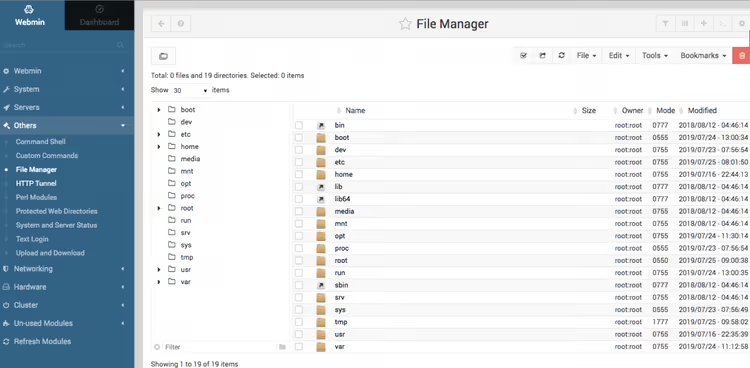
File Manager, a full-fledged filesystem explorer for the server right in the browser. It supports uploading, downloading, editing text files, changing permissions and ownership. You uploaded a file to the server via SFTP but have no SSH client at hand, the file manager solves this.
Command Shell (Text Login), an interactive terminal in the browser window based on Xterm.js. It requires Python to be installed. On some systems Webmin looks for the python executable while python3 is installed. This is fixed with a symbolic link:
1 sudo ln -s /usr/bin/python3 /usr/bin/python
Perl Modules, installation of modules from CPAN directly through the interface: from the repository, a local file, a URL or an uploaded archive. You can view the list of installed modules and deploy the recommended set with one click.
System and Server Status, a dashboard for monitoring service health. A dropdown list by service, resource consumption graphs, failure notifications. In recent updates the graphs were rewritten from heavy SVG to fast canvas rendering, so the statistics page flies.
Upload and Download, remote uploading and downloading of files without a separate SFTP client. Downloaded a file by URL directly to the server, done. Uploaded an archive from the server locally, no problem.
If the server is accessible from the internet, be sure to enable SSL in Webmin Configuration and two-factor authentication. The panel provides root access, so protection must be at the appropriate level.
Webmin in real work
The best test of a tool is practice. In the early 2000s my colleague was configuring Sendmail on two dozen Linux machines for a client. Sendmail is a complex beast: configuration files hundreds of lines long, non-obvious syntax, and the price of a mistake is broken email. He called me for help.
Instead of dictating settings over the phone, I walked him through installing Webmin on the first server and directed him to the Sendmail applet. A long pause hung in the receiver. I already thought the connection had dropped. But he spoke: "Dude, this is amazing. Thanks." All the Sendmail configuration parameters were in front of him in a clear web interface. In an hour he had deployed email on all machines.
Over more than 20 years Webmin has saved administrators countless hours and a considerable amount of nerves. It is not a silver bullet, but as a universal tool for routine operations it covers needs excellently.
Virtualmin, a hosting add-on that turns Webmin into a platform
Webmin is a server administration panel. Virtualmin turns it into a web hosting platform. It is an add-on for managing virtual servers: domains, subdomains, mailboxes, databases, FTP accounts and SSL certificates. It supports Apache and Nginx with HTTP/2, MySQL and PostgreSQL, multiple PHP versions with on-the-fly switching, Amazon Route 53, S3 and Rackspace for cloud storage.

Virtualmin comes in two editions: free GPL and paid Professional. Both run on top of Webmin and are accessible through the same port 10000, adding a Virtualmin section to the sidebar menu.
Virtualmin pricing
Plan | Price (monthly) | Price (yearly) | Domains |
|---|---|---|---|
GPL | $0 | $0 | Unlimited |
Professional 10 | $7.50 | $75 | 10 |
Professional 50 | from $9 | from $90 | 50 |
Professional 100 | from $12 | from $120 | 100 |
Professional 250 | from $15 | from $150 | 250 |
Professional Unlimited | from $20 | from $200 | ∞ |
The GPL version includes Apache and Nginx with HTTP/2, MySQL and PostgreSQL, multiple PHP versions, mail management, Amazon Route 53 and S3, backups, file manager, two-factor authentication, Let's Encrypt, CLI and HTTP API, 5 install scripts and community forum support.
Professional adds: priority ticket support, 60+ install scripts (WordPress, Moodle, Kanboard, Blesta and dozens of others), reseller accounts, the WP Workbench plugin, multi-provider SSL with auto-renewal (Cloudflare, Google, Namecheap, Bunny DNS), remote DNS management, cloud backup storage on Google Storage, Backblaze and Dropbox, GPG encryption of backups, mail delivery via Amazon SES, proxy paths, disk quota monitoring, automatic mailbox cleanup and extended system statistics.
Virtualmin capabilities
Domain and mail management. Creating virtual servers in a couple of clicks: domain, PHP version, database, mailboxes are generated automatically according to a template. Support for subdomains and aliases. An advanced mail system: mailboxes, aliases, autoresponders, filters, DKIM signing.
Backups and restore. Scheduled backups with flexible rotation. Storage locally, via SFTP, in Amazon S3, Google Storage, Backblaze or Dropbox. GPG encryption for Professional users. Restore in one click.
SSL certificates. Automatic Let's Encrypt issuance for all server domains. Professional adds multi-provider support and auto-renewal through Cloudflare, Google Trust Services and other providers.
CLI and API. A full command-line interface for script automation. For example, listing all domains on the server:
1 virtualmin list-domains --name-only
The HTTP API allows integrating hosting management into your own panels and billing systems. More details are in the official Virtualmin CLI documentation.
Webmin + Virtualmin versus paid panels
To assess the value, let us compare the bundle's functionality with popular paid alternatives:
Feature | Webmin + Virtualmin | ISPmanager | Plesk |
|---|---|---|---|
Price (basic, monthly) | $0 (GPL) | from $10 | from $12 |
Domain management | ✅ | ✅ | ✅ |
Mail management | ✅ | ✅ | ✅ |
Multiple PHP versions | ✅ | ✅ | ✅ |
Let's Encrypt (free) | ✅ | ✅ | ✅ |
File manager | ✅ | ✅ | ✅ |
Reseller accounts | ✅ (Pro $7.50+) | ✅ (Business) | ✅ (Hosting) |
Cloud backups | ✅ (Pro) | ✅ | ✅ |
Nginx + Apache | ✅ | ✅ | ✅ |
CLI / API | ✅ | ✅ | ✅ |
Support | Forum (GPL) / Tickets (Pro) | Tickets | Tickets |
Number of distributions | 80+ | 6 | 10+ |
OS management (users, disks, processes) | ✅ | ❌ | ❌ |
The Webmin + Virtualmin bundle matches paid panels in hosting features while offering something nobody else has: direct access to operating system management (users, disk quotas, task scheduler, hardware monitoring, firewall). It is a self-contained powerhouse, not just a console overlay.
The price gap with ISPmanager and Plesk on a single server is over a hundred dollars a year. On three servers, over three hundred. For a freelancer, small studio or startup, that is a budget better invested in hardware upgrades or backup solutions.
Useful commands for daily work
Restarting web services:
1 service mysql restart
Installing PHP extensions (adapt the PHP version to your own: 8.2, 8.3, 8.4):
1 sudo apt-get install php8.3-zip php8.3-sqlite php8.3-mbstring 2 sudo service apache2 restart
Installing Memcached on Ubuntu:
1 sudo apt-get update 2 sudo apt-get install memcached 3 sudo add-apt-repository ppa:ondrej/php 4 sudo apt-get update 5 sudo apt-get install -y php php-dev php-pear libapache2-mod-php 6 sudo apt-get install -y php-memcached 7 sudo service apache2 restart
If after changing the PHP version files are being downloaded instead of executed, comment out the SetHandler directives in the PHP module configuration file (for example, /etc/apache2/mods-enabled/php8.3.conf):
1 nano /etc/apache2/mods-enabled/php8.3.conf
Find and comment out the two lines with SetHandler by placing a # symbol at the beginning of each. After editing, the file should look approximately like this (the key point: commented SetHandler and active Require all denied for raw PHP source files):
1 <FilesMatch ".+\.ph(?:ar|p|tml)$"> 2 Require all denied 3 </FilesMatch> 4 5 <FilesMatch ".+\.phps$"> 6 Require all denied 7 </FilesMatch> 8 9 <IfModule mod_userdir.c> 10 <Directory /home/*/public_html> 11 php_admin_flag engine Off 12 </Directory> 13 </IfModule>
Restart Apache:
1 sudo service apache2 restart
If you administer the server through Virtualmin and need to quickly get a list of all virtual hosts:
1 virtualmin list-domains --name-only
More details are in the CLI section of the Virtualmin documentation.
⁉️🤔 Frequently asked questions
How does Virtualmin ensure data security?
All Virtualmin products are delivered through standard system repositories (yum/dnf on CentOS/RHEL or apt on Debian/Ubuntu), which eliminates the risk of modified builds. Two-factor authentication, certificate-based login, brute-force protection (fail2ban), the nftables firewall configuration module and automatic system updates are supported. SSL is mandatory for the web interface.
Can I manage a server without the command line?
Webmin covers most typical tasks through the GUI: managing users, disks, services, files, databases, configuring DNS and the firewall. But for non-standard scenarios the terminal will still come in handy, and fortunately it is built right into the panel. Plus Virtualmin provides CLI access to hosting operations for script automation.
How does the GPL version of Virtualmin differ from Professional?
GPL is a fully functional hosting manager with no domain limits. Professional (from $7.50/month for 10 domains) adds priority support, 60+ install scripts (WordPress, Moodle and others), reseller accounts, multi-provider SSL with auto-renewal, cloud backup storage and extended statistics. For most personal and small commercial projects GPL is more than enough.
Is Webmin suitable for beginners?
Yes, but with a caveat. The interface is logical and well-organized, installation takes minutes and the documentation is detailed. However, Webmin operates with Linux system administration concepts: users, permissions, daemons, ports. If you have never worked with a server, you will need to learn Linux basics in parallel. But for those who already administer a server through the console, Webmin radically speeds up routine work.
Which is better, Webmin+Virtualmin or ISPmanager/Plesk?
It depends on your tasks. If you manage a single server with a dozen sites and value official support, paid panels are justified. If you have multiple servers, some projects are non-commercial and you are willing to figure out settings on your own, Webmin+Virtualmin will save hundreds of dollars a year without losing functionality. And the ability to manage the OS itself through a GUI is entirely unique.
What to install on a server in 2026
Paid panels will not disappear. They provide predictable support and a familiar interface that businesses are willing to pay for. But Webmin with Virtualmin covers the same functionality in the vast majority of scenarios. And they do it for free.
The bundle is alive and actively developing: Webmin received a major update in May 2026, Virtualmin in March. New modules (nftables, Nginx), an updated Authentic interface, support for fresh versions of Ubuntu, MariaDB and PHP: the project is not standing still. Nearly a million installs per year speaks for itself.
The main advantage is control. You are not tied to a license key, not limited by the number of domains (GPL), you can fine-tune any aspect of the system and automate routine tasks through the CLI. For a freelancer, startup or small studio, this is an argument that outweighs the rest.

A professional team of writers and editors specializing in creating quality content.