













🚀 Why nginx is the best choice for WordPress hosting in 2026
Your WordPress site is crawling with just 50 visitors, even though the server isn't under load? A familiar situation for anyone who rented cheap hosting on Apache without looking into the stack. The reason is almost always the same: the web server can't handle concurrent connections.
Switching hosts solves the problem. But more importantly, you need to understand which web server powers your plan. That determines whether your site survives a traffic spike or crashes after someone shares it on Telegram.
Below, no fluff: how Apache and nginx work, the practical differences, and why nginx became the standard for WordPress hosting in 2026.
💡 Quick overview:
- A web server accepts HTTP requests from the browser and returns a response: it serves static files directly and processes dynamic content through a PHP integration.
- Apache creates a process for each connection. Flexible, but under load memory runs out. Nginx uses an event-driven architecture and handles thousands of connections in a single process.
- For WordPress, concurrent connections, cache handling, and memory usage are critical. Nginx wins on all three fronts.
- Hosting on nginx gives you a faster site at the same price tier. Want to check yours? Ask support about the web server stack.
What is a web server and why WordPress needs one
A web server is a program that accepts HTTP requests and returns a response. When a visitor opens a site, the browser contacts the server, which sends back an HTML page. For WordPress the process is slightly more complex: a PHP processor assembles the page from a template and database, and the web server delivers the result to the user.
Two open-source web servers dominate the market: Apache and nginx. According to W3Techs data from June 2026, nginx serves 31.9% of sites with a known web server, while Apache serves 23.9%. Together they cover more than half of the internet. Microsoft's IIS comes third with a notable gap.
The difference between them isn't cosmetic. It directly affects how many visitors your site can handle simultaneously and how quickly pages load.
Apache: proven but heavy
Apache HTTP Server appeared in 1995 and was the standard for decades. It's the foundation of cPanel, the most common hosting control panel. Most shared hosts still run Apache simply because "that's how it's always been."
Apache's strength is modularity. You can dynamically load modules and adjust server behavior through .htaccess directly in the site folder without a restart. For developers this is convenient: enable a redirect, block access to a file, configure caching, all with rules in a text file.
But this flexibility comes at a cost. Apache creates a separate thread or process for each connection. With 100 concurrent visitors, 100 processes. With 500, memory runs out, the server responds with delays or drops some connections. This is called the C10K problem (10,000 concurrent connections), which Apache in its standard mode can't handle.
In practice, a site on Apache without additional caching starts noticeably slowing down with just a few dozen concurrent users. WordPress with its dynamic nature only makes things worse: each request runs PHP, which queries the database, and the process hangs until fully complete.
Nginx: the event-driven approach and why it's faster
Igor Sysoev wrote nginx in 2002 specifically to solve the C10K problem. The first public release came out in 2004. Unlike Apache, nginx is built on an event-driven architecture: a single worker process serves thousands of connections without creating a separate thread for each one.
How it works. Nginx listens for events on sockets and reacts only when there's data to process. New request arrives, processed. Client is slow to receive the response, no blocking, switch to another. This asynchronous approach is exactly what allows nginx to handle more connections with less memory.
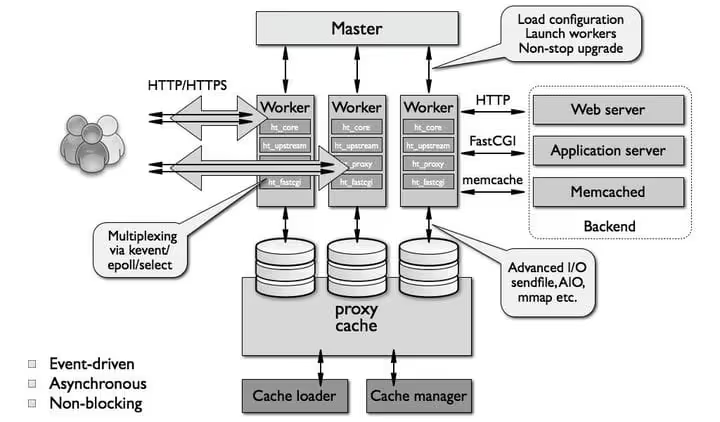
Nginx has a limitation: it can't process dynamic content on its own. It needs an external handler: PHP-FPM, FastCGI, or a proxy to Apache. But in practice this isn't a drawback, it's an advantage: dynamic processing is isolated, doesn't interfere with static file delivery, and each component can be configured independently.
Historically, the main problem with nginx was documentation. Sysoev wrote it in Russian, and early versions suffered from sparse descriptions. Now the documentation is translated, the community is huge, and there are ready-made configurations for WordPress covering any scenario. DigitalOcean, for instance, maintains detailed guides for the nginx + WordPress combination.
Another difference: nginx can't dynamically load modules and doesn't support .htaccess. All settings go in server configuration files, and applying them requires a reload. This is less convenient for daily tweaks, but provides predictability: the server doesn't scan directories on the fly looking for rules and doesn't spend CPU time on that.
Six reasons to choose nginx for WordPress
Specific arguments for why nginx beats Apache for a WordPress site.
Simple installation
Nginx installs with a single command on any Linux distribution:
1 apt install nginx
Or for RHEL/CentOS:
1 yum install nginx
After installation nginx immediately works as a service. For WordPress you'll need to add PHP-FPM and minimal configuration: a typical config of 20 lines that doesn't change from project to project.
Proxy mode for Apache
If your site already runs on Apache and migration feels risky, you can put nginx in front of it as a reverse proxy. All static content goes through nginx, while it proxies PHP requests to Apache. You see performance gains immediately, and .htaccess along with the familiar modular structure keeps working.
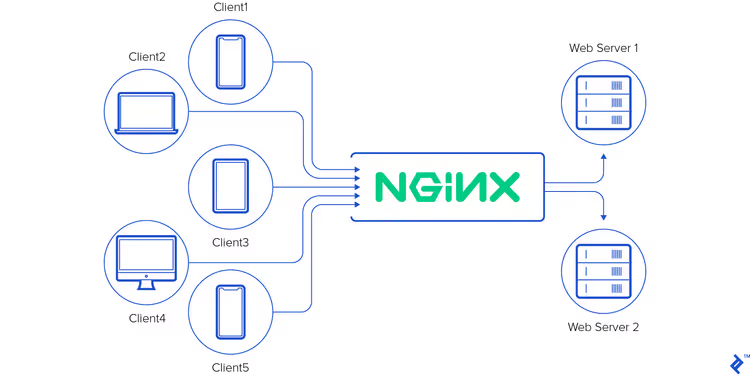
The diagram looks like this: browser → nginx (static + cache) → Apache (PHP only). According to benchmarks, even this setup delivers a twofold increase in requests processed per second.
Built-in cache
Nginx has fastcgi_cache, which caches PHP-FPM responses and serves them as static files. For WordPress this is transformative: a page assembled once flies from cache to all subsequent visitors without launching PHP or querying the database.
In practice, a well-configured fastcgi_cache reduces server response time from 600-800 ms down to 20-40 ms. No external caching plugin for WordPress can match that effect at the server level.
Faster static file delivery
Images, CSS, JavaScript, fonts: everything that doesn't require PHP, nginx serves directly with no extra layers. A single try_files directive replaces a dozen Apache rules. The result: static files are served in milliseconds, and PHP workers aren't tied up with busywork.
More connections with less consumption
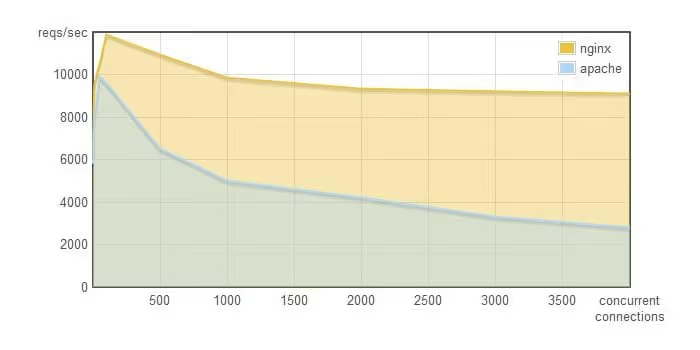
Nginx handles roughly four times more concurrent connections than Apache at comparable memory usage. This isn't an abstract figure: W3Techs data shows that among high-traffic sites nginx holds a share above 60%.
Two practical benefits for a WordPress site owner:
- When traffic grows, you don't need to immediately upgrade to a more expensive plan.
- The server uses less CPU and RAM, so the hosting provider can keep prices lower or give more resources for the same money.
Lightweight design
Nginx is designed to consume minimal resources. The worker process listens for events and activates only when needed. The on demand configuration option can even unload unused workers from memory.
Apache tried to implement an event-driven mode through mpm_event, but it's an overlay on top of a process-based architecture, not a redesign. The performance of mpm_event doesn't reach nginx precisely because Apache was originally built differently.
Load balancing
Nginx can distribute requests among multiple backend servers. For a high-traffic WordPress project this means: you can run two or three application servers, put nginx in front as a load balancer, and your site will handle tens of thousands of concurrent visitors. Major WordPress hosts like WP Engine and Kinsta use exactly this architecture.
⁉️🤔 Frequently asked questions
Do I have to switch to nginx if my site on Apache is running fine?
If your site is stable at current traffic levels, there's no urgent need to replace it. But if you're planning for growth, launching ads, or expecting seasonal spikes, put nginx as a proxy in front of Apache. This gives you a performance buffer without full migration.
Is it true that nginx is harder to configure for WordPress?
Basic setup consists of one configuration file and a standard set of rules for pretty permalinks. DigitalOcean and WordPress.org publish tested configs. The difference from Apache: instead of editing
.htaccessyou editnginx.confand runnginx -s reload. It feels slightly unfamiliar at first, but the config is easier to read.
Which hosting should I choose: nginx out of the box or any host with nginx as a proxy?
If you're getting managed WordPress, make sure nginx is in the stack as the primary web server. WP Engine, Kinsta, and Rocket.net work exactly this way. If you're using a VPS, set up nginx + PHP-FPM: that's the standard for WordPress in 2026. Shared hosting with nginx as a proxy in front of Apache is a compromise, but still a winning option.
Do I lose anything important when switching from Apache to nginx?
You lose
.htaccess. Everything you adjusted through it (redirects, access restrictions, caching) gets moved to nginx configuration once and centrally. WordPress plugins that rely on.htaccess(such as some security plugins) may require manual rule adaptation. But major plugins have included nginx configs for a long time now.
Does Apache have a future with WordPress?
Apache isn't going anywhere: too much hosting infrastructure is built on it. But the trend is clear: Apache's share is declining, nginx's share is growing. New WordPress projects and hosts launch on nginx by default. If you're starting from scratch, start with nginx.
Nginx or Apache: what to use in 2026
In short: for WordPress, choose nginx. Not because Apache is bad, but because nginx solves a specific pain point, handles many visitors on modest hardware, and delivers content faster.
Action plan for three typical situations:
- Launching a new site. Get hosting with nginx in the stack or set up a VPS with nginx + PHP-FPM. There are dozens of template configs for WordPress, no configuration difficulties.
- Site already on Apache and it's slow. Put nginx in front as a reverse proxy. This takes about an hour of sysadmin work and delivers immediate performance gains.
- Site on Apache, everything is fast. Carry on. But keep in mind that as traffic grows, nginx will give you more headroom than trying to squeeze more out of Apache.
Check your current stack: go to your hosting dashboard or ask support. If you hear "nginx," good. If "Apache," now you know what to do about it.

A professional team of writers and editors specializing in creating quality content.