













 AIIllustrative image: AI-generated
🔧 WordPress: how to display a widget with a shortcode anywhere on your site
You need a subscription form not in the sidebar but right in the middle of a post. Or a WooCommerce catalog widget on a page that has no sidebar at all. You go to the admin panel, look for a block, and WordPress says: widgets live only in registered theme areas. That's it.
The limitation is architectural: the widget system is tied to sidebar-1, footer-widgets, and other zones defined in the theme. Post content is foreign territory for it. You can work around this, but there's no standard "insert widget here" option in the core.
A shortcode for widgets solves the problem with a single line. No need to create a separate area, no child theme, no template editing. Below is how it works in 2026: a ready-made plugin, all parameters, and a native PHP alternative for developers.
💡 Quick overview:
- Install WP Anywhere Widgets, the plugin generates a shortcode for any registered widget.
- Insert the shortcode into a post, page, sidebar, or theme PHP template.
- Configure the title, HTML wrapper, and CSS classes through shortcode parameters.
- For projects without third-party plugins, use the native
the_widget()function.
Why you need a shortcode for widgets
WordPress doesn't let you display a widget inside post content using standard tools. The widget system works only within registered theme areas, and everything outside those boundaries doesn't exist for it.
In practice, the need arises in three scenarios:
Subscription form in a long guide. The sidebar scrolled up out of view, the reader doesn't see the form. A shortcode keeps the CTA right in the post body, in front of their eyes.
WooCommerce widget on a custom page. The page is built without a sidebar, but product filters or search (
[woocommerce_product_search]) need to be right there.Dynamic "Related Posts" block in the single.php template. The theme didn't provide an area before comments. A shortcode called from
functions.phpplaces the widget anywhere without touching templates.
Previously, the Widget Shortcode plugin handled this task: a simple tool that generated [widget id="text-1"] for any registered widget. In January 2023, it was closed due to an unresolved vulnerability. The direct successor is WP Anywhere Widgets.
WP Anywhere Widgets: shortcode generator for any widget
WP Anywhere Widgets adopted the same idea but went further. It not only provides shortcodes for existing widgets but also lets you create your own right in the admin panel, without tying them to a sidebar. It supports both the classic widget editor and Gutenberg blocks.

Installation is standard: Plugins → Add New → search "WP Anywhere Widgets" → Install → Activate. After activation, a Widget Shortcodes item appears in the Appearance menu: a summary table of all created widgets and their shortcodes. A "Copy" button next to each one.
The plugin works with WordPress 3.3 and above, tested up to version 6.8.5. As of June 2026, 700+ active installations and a 4.8 out of 5 rating on WordPress.org. The latest update (v4.0) added full Gutenberg block support and a separate admin page for managing shortcodes.
🔗 WP Anywhere Widgets on WordPress.org
How to generate a widget shortcode
Any widget registered in the system gets a unique ID: text-1, calendar-3, or block-7. WP Anywhere Widgets displays this ID in the interface and immediately provides a ready shortcode:
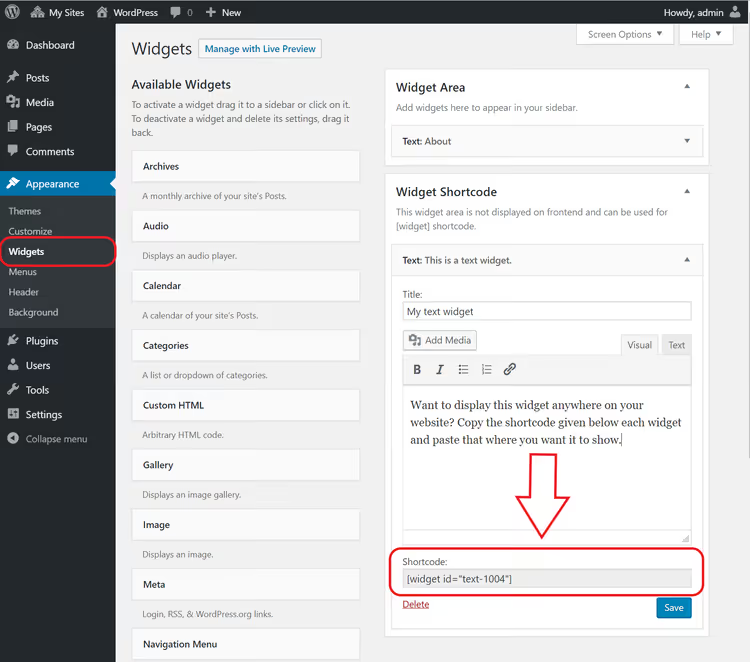
Basic syntax:
1 [widget id="text-1"]
Insert it into any post, page, or text block. The plugin will substitute the complete widget HTML: title, body, wrapper with theme CSS classes. No additional configuration required.
Inserting a shortcode into a post and in the Gutenberg editor
In the classic editor, the shortcode is inserted directly into the text, just like [gallery] or [contact-form-7]:
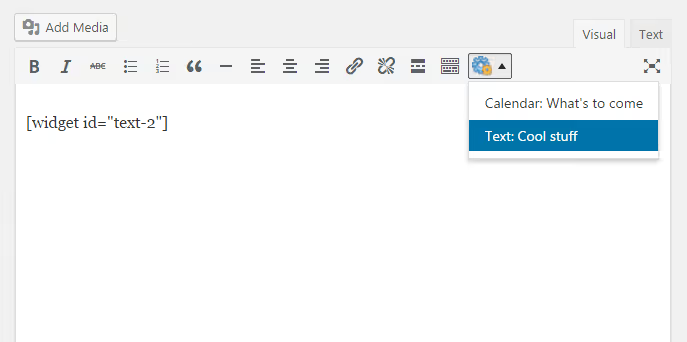
In the block editor, use the Shortcode block. Add the block, paste [widget id="text-1"], and WordPress renders the widget in the visual editor:
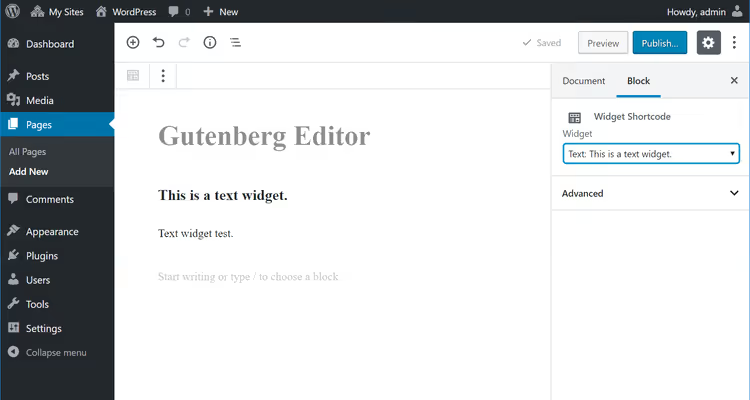
If the widget contains JavaScript (for example, a map or form), it won't execute in the editor. This is a Gutenberg security limitation. On the frontend, everything works normally.
Shortcode parameters: title, wrapper, and CSS classes
The shortcode accepts several optional parameters that change the HTML output without a single line of code:

title, title override. By default, the widget shows the title set in its settings. The title parameter replaces it on the fly:
1 [widget id="text-1" title="New title"]
To completely hide the title, pass title="0". The widget will render without an <h2> or <h3> above the body.
container_tag, wrapper HTML tag. By default, the widget is wrapped in a <div>. Replace it with <section>, <aside>, or any other semantic tag:
1 [widget id="text-1" container_tag="aside"]
container_class, additional CSS class. Your class is added to the standard widget class. Useful for custom styling of a specific instance:
1 [widget id="text-1" container_class="my-custom-widget"]
container_id, HTML id attribute. By default, WordPress generates the ID automatically. This parameter fixes the value for anchor links and JavaScript targeting:
1 [widget id="text-1" container_id="subscribe-widget"]
title_tag** and title_class, title control.** Change the title tag from <h2> (default) to <h3>, <h4>, and add a custom class:
1 [widget id="text-1" title_tag="h3" title_class="widget-title-large"]
All parameters can be combined in one shortcode. Order doesn't matter, syntax is standard: param="value".
PHP method: the_widget() function for developers
When you don't need a plugin, WordPress provides the native the_widget() function. It outputs any registered widget directly from PHP: in a theme, child theme, or Code Snippets snippet.
Basic call:
1 the_widget( 'WP_Widget_Text', array( 2 'title' => 'Subscription form', 3 'text' => '[mailpoet_form id="1"]', 4 'filter' => true, 5 ) );
The first argument is the widget's PHP class. The second is an array of settings that matches what the widget saves in wp_options. The third is an array of wrapper arguments:
1 the_widget( 'WP_Widget_Text', 2 array( 'title' => 'Subscribe', 'text' => '[shortcode]' ), 3 array( 4 'before_widget' => '<section class="widget %2$s">', 5 'after_widget' => '</section>', 6 'before_title' => '<h3 class="widget-title">', 7 'after_title' => '</h3>', 8 ) 9 );
This approach doesn't depend on third-party plugins and won't break with WordPress updates. The downside: you need to know each widget's PHP class. Standard core classes:
WP_Widget_TextWP_Widget_CalendarWP_Widget_SearchWP_Widget_Categories
Find a plugin's class in its source code or via var_dump( $wp_widget_factory->widgets ).
The code goes into functions.php of the active theme (preferably a child theme) or via the Code Snippets plugin. Before editing functions.php, back up the file: a PHP syntax error will take down the entire site.
⁉️🤔 Frequently asked questions
Does the widget shortcode work with caching plugins?
Yes, the shortcode is processed by the server during page rendering, before the HTML enters the cache. WP Rocket, W3 Total Cache, and LiteSpeed Cache save the already assembled page with the finished widget. For dynamic data (WooCommerce cart, currency rates), use ESI blocks to exclude a specific fragment from the cache. The
the_widget()function combined withDOING_AJAXgives you full control over what gets cached and what doesn't.
Does the widget need to be in an active sidebar?
No, the widget doesn't need to be in an active sidebar. It just needs to be registered in WordPress and added to any sidebar, including an inactive one (Inactive Widgets). WP Anywhere Widgets creates widgets in its own internal registry, which isn't tied to theme areas at all.
How many widgets can you display via shortcode on a single page?
There are no quantity limits. Each
[widget]orthe_widget()call creates an independent instance. Performance depends only on the complexity of the widgets themselves: ten text blocks or subscription forms will execute instantly, while ten widgets with external API requests will add 200-300 ms each. For API-heavy widgets, cache results via transient insidethe_widget().
What happens if the widget plugin is removed but its shortcode remains in posts?
A shortcode without an active handler outputs as plain text: visitors will see
[widget id="text-1"]right on the page. Before removing the source plugin, check all posts via admin search: Tools → Better Search Replace, or WP-CLI:wp search-replace '[widget id="text-1"]' '' --dry-run. After mass replacement, clean up empty paragraphs in the database separately.
Can you use a widget shortcode in a navigation menu?
WordPress menus don't process shortcodes by default. To insert a widget into navigation, use the
wp_nav_menu_itemsfilter infunctions.phpwith ado_shortcode('[widget id="..."]')call: this adds the shortcode before, after, or between specific menu items. Alternative: a custom Walker class that parses a{widget}placeholder in the menu item name and replaces it with a live widget.
What to choose: plugin or custom code
In most cases, WP Anywhere Widgets handles the task completely. Install it, copy the shortcode, paste it where needed. The parameters are enough for wrapper customization without a single line of CSS.
The PHP method via the_widget() is justified in two situations: you're a developer aiming for zero third-party plugins in the project, or you need special logic (for example, different widgets for logged-in users versus guests). Otherwise, use the plugin and don't overcomplicate things.
If your goal is specifically to embed a subscription form in the middle of a post, consider email plugins with native shortcode support: MailPoet, Newsletter, Brevo. Each provides a ready [form] shortcode with positioning control, while WP Anywhere Widgets serves as a universal layer for everything else.
A visual demonstration from the WebTutorials channel: the full cycle from plugin installation to a working shortcode on a page, quick and to the point.

A professional team of writers and editors specializing in creating quality content.