













 AIIllustrative image: AI-generated
🔌 10 best WordPress pagination plugins in 2026
Content keeps growing, pages multiply, and standard "Previous" and "Next" links no longer cut it. Readers don't want to scroll an endless feed, they need clear navigation: page numbers, quick jumps, visual cues. And if your theme doesn't offer flexible pagination out of the box, plugins enter the scene.
The WordPress repository contains dozens of pagination solutions: from minimalist numbered bars to animated slide shows and floating blocks. We've selected the 10 most notable, those that have stood the test of time, receive updates, and solve specific problems. No fluff, only proven tools with real screenshots, pros/cons, and direct installation links.
💡 Quick overview:
- Understand why you need custom pagination at all and when standard WordPress navigation falls short
- Compare 7 main and 3 additional plugins by key criteria in a summary table
- Choose the right plugin for your task: classic numbering, splitting long posts, WooCommerce, or non-standard fly navigation
Comparison table of plugins
Plugin | Pagination type | Free? | Active installations | Last update year | Custom CSS | Ajax |
|---|---|---|---|---|---|---|
WP-PageNavi | Numbered | Yes | 1M+ | 2026 | Yes | - |
WP-Paginate | Numbered + comments | Yes / Pro from $29 | 60K+ | 2026 | Yes | - |
Pagination by BestWebSoft | Numbered (posts, categories, search) | Yes / Pro from $29 | 50K+ | 2026 | Yes | - |
Advanced Content Pagination | Split long posts | Yes / Pro | 10K+ | 2023 | Yes | Yes |
Storefront Product Pagination | Product (WooCommerce) | Yes | 30K+ | 2025 | - | - |
Next Post Fly Box | Floating block | $19 (CodeCanyon) | - | 2025 | - | - |
Easy Pagination | Slide show | Yes | 10K+ | 2024 | Yes | - |
1. WP-PageNavi

🔗 WP-PageNavi on WordPress.org
With a million active installations, WP-PageNavi is the de facto standard among WordPress pagination plugins. It replaces standard navigation with the wp_pagenavi() template tag embedded in your theme. Minimal code, predictable results.
After activation, the plugin adds a tab to the Settings section. There you set the number of displayed pages, text for the current, first, and last pages, as well as "Next" and "Previous" indicators. A dropdown list offers ready-made styling options, you can skip CSS altogether.
For blogs with hundreds of pages, it provides number display with steps: 5, 10, 15, 20, not dozens of digits in a row, but a neat selection. Want to match the appearance to your theme, copy the plugin's CSS files to your theme folder and edit them there. Plugin updates won't overwrite your changes.
Pros: minimal entry barrier, million installations, built-in styles, configurable number steps.
Cons: requires theme file editing to install the tag, no Ajax mode, no visual builder.
2. WP-Paginate

🔗 WP-Paginate on WordPress.org
WP-Paginate bets on flexibility. Besides numbered post pagination, the plugin can paginate comments, a find for sites with active discussions. You set the number of links before and after the current page and configure labels through the admin panel.
A separate CSS tab lets you customize link appearance without editing theme files. To replace standard navigation, however, you'll need to make template changes, just like with WP-PageNavi.
The $29 Pro version adds multisite support, 11 ready-made layouts, and a visual button customizer. If you need comment pagination and you're ready for minimal template work, take it.
Pros: comment pagination, CSS tab in admin, Pro with 11 layouts, active updates (v2.2.6, May 2026).
Cons: basic version without visual builder, requires theme code replacement, Pro is paid.
3. Pagination by BestWebSoft

Pagination by BestWebSoft stands out in coverage: it adds numbering not only to posts but also to tags, categories, search results, and author pages. The plugin is compatible with BestWebSoft portfolios and galleries, pagination will appear there too.
Two display modes: long (all numbers in sequence) and short (with steps). Navigation position is configurable, top or bottom of content, with left, right, or center alignment. "Next" and "Previous" arrows are customizable. Individual pages can be excluded from pagination.
The $29 Pro version adds a "Load More" button and infinite scroll. For blogs with diverse content (tags, categories, search), one of the most universal options.
Pros: coverage of all page types (posts, tags, categories, search, authors), two display modes, exclude individual pages.
Cons: tied to BestWebSoft ecosystem for galleries, Pro for extra fee, basic design without frills.
4. Advanced Content Pagination
🔗 Advanced Content Pagination on WordPress.org
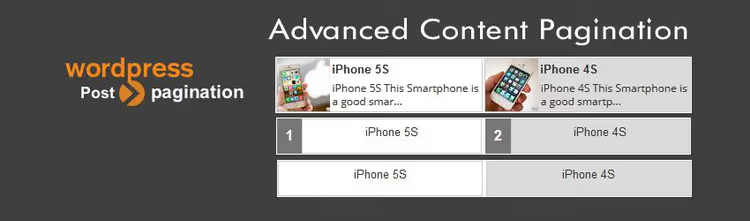
This plugin solves a different task: not numbering blog pages, but splitting one long post into several short pages. Five button layouts, different content loading types, button placement at top, bottom, or both sides.
The plugin adds a button to the TinyMCE editor for inserting page dividers via shortcodes. It supports both simple pagination with page reload and Ajax mode, the page doesn't reload, content loads dynamically. Integrates with WPBakery (formerly Visual Composer).
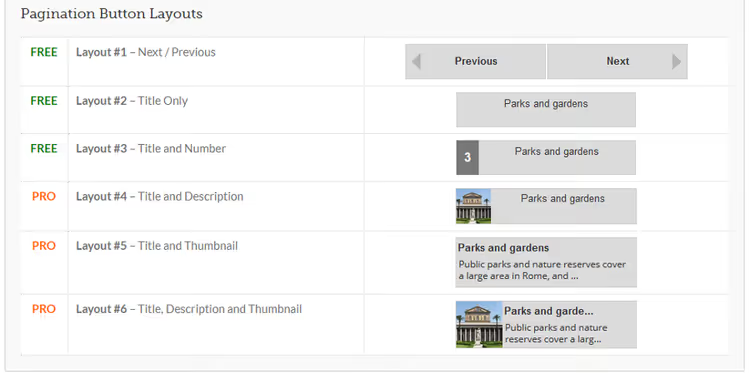
The Pro version includes automatic conversion of the standard "Next Page" button to a custom one, as well as inserting title and description into pagination buttons.
Pros: split long posts, Ajax mode, 5 button layouts, integration with WPBakery.
Cons: last update in 2023 (may lag behind fresh WP versions), Pro for extra fee, not for numbering blog pages.
5. Storefront Product Pagination

🔗 Storefront Product Pagination on WordPress.org
A niche but precise tool: adds "Next" and "Previous" links to individual WooCommerce product pages. Required conditions: Storefront theme and installed WooCommerce.
Links display with product thumbnails, title appears when hovering over the thumbnail. A built-in customizer lets you change the display to match your store style. With 30,000 active installations, the plugin is popular among WooCommerce store owners on Storefront.
Pros: specialized for WooCommerce, product thumbnails in navigation, simple customizer.
Cons: Storefront theme only, requires WooCommerce, not for regular blog posts.
6. Next Post Fly Box

🔗 Next Post Fly Box on CodeCanyon
A non-standard approach to navigation: instead of a numbered bar, a floating block that appears on scroll and offers to move to the next or previous post. The block remains visible even when the reader goes down the page.
jQuery-based plugin, supports custom post types and categories. Block position (left or right), sizes, and appearance conditions are configurable in the options panel. Publication sorting is also flexible. The only fully premium plugin in the collection, $19 on CodeCanyon.
Pros: original fly-block mechanics, draws attention, customizable sizes and position.
Cons: paid only ($19), non-standard UX, not suitable for all sites, no classic numbered pagination.
7. Easy Pagination

🔗 Easy Pagination on WordPress.org
Easy Pagination turns pages and posts into a slide show. You insert a separator tag in content, choose parameters, and get animated navigation. Three animation styles: vertical, horizontal, and smooth. The first two combine with 32 jQuery easing effects.
Six navigation templates with full customization options, four arrow styles, thumbnails at top or bottom. The plugin automatically picks up the first heading and first image from each section to create slides. Viewport height and width calculate automatically, slides don't overflow screen boundaries.
Pros: impressive animation, 3 styles + 32 easing effects, auto-size detection, suitable for portfolios.
Cons: excessive for simple numbering, last update in 2024, requires SEO caution (slide show can hide content).
Additional plugins for specific tasks
Three niche solutions that didn't make the main list but deserve mention:
Alphabetic Pagination filters pages, posts, WooCommerce products, media files, and authors by alphabet. Instead of numbers, letters. Works well for music sites, bookstores, member directories. Plugin page
Ajax Pagination and Infinite Scroll offers three modes: classic pagination, infinite scroll, and "Load More" button (all via Ajax). Works with posts, pages, search, custom post types, and WooCommerce. Plugin page
Page-Links Plus adds a "Show on one page" button, letting readers combine a multi-part post into a single view. The Pro version uses Ajax for smooth loading. Plugin page
⁉️🤔 Frequently asked questions
Do I need a pagination plugin if my theme already includes pagination?
If your theme's standard pagination works for you, no plugin needed. But themes often provide minimal settings: you can't change number steps, arrow style, or alignment. A plugin solves these limitations without code editing.
Does pagination affect SEO?
Yes, in two ways. Proper numbered pagination helps search engines index more pages and distributes link weight. But excessive fragmentation creates "thin" pages with duplicate content, Google may consider it spam. Keep reasonable volume per page (no less than 300-400 words of text) and don't chase page count for views.
Can I add pagination without a plugin?
Yes, through code in your theme's
functions.phpusingpaginate_links()orthe_posts_pagination(). This is a flexible path for developers but requires confident command of PHP and WordPress API. For most users, a plugin is more reliable: less chance of breaking the site on updates.
Which plugin should I choose for WooCommerce?
If you're on Storefront theme, take Storefront Product Pagination, it's tailored exactly for this combination. For other themes with WooCommerce, Ajax Pagination and Infinite Scroll (infinite product scroll) or classic WP-PageNavi (numbered pagination for store pages) will work.
Why doesn't the plugin show all pages?
Almost certainly the "Number of displayed pages" or "Number steps" setting in the plugin panel. Go to plugin settings and increase the limit. Another possible cause is caching: clear cache after changing settings.
Should I use Ajax pagination?
Ajax provides smooth user experience without page reload but complicates view tracking in Google Analytics (requires additional event setup). For SEO, it's critical that each Ajax pagination "step" has a unique URL, otherwise the search engine sees one page. If the plugin provides this, take it confidently.
Video: setting up pagination in 5 minutes
If you prefer visual explanation, watch this tutorial. It shows installation and setup of one of the plugins from the collection from scratch to working numbered bar.
Which pagination plugin to choose
Pagination is not a feature to skimp on. Good navigation retains readers, reduces bounce rate, and helps search engines understand site structure. The ten plugins from this collection cover virtually any scenario.
If you need classic numbered pagination without extra hassle, take WP-PageNavi. Need comment pagination, WP-Paginate. Want to cover all page types at once, Pagination by BestWebSoft. Splitting long articles, Advanced Content Pagination. Working with WooCommerce on Storefront, Storefront Product Pagination. Want to surprise readers with non-standard navigation, Next Post Fly Box or Easy Pagination. And for infinite scroll and Ajax, Ajax Pagination and Infinite Scroll.
Choose for your task, don't chase page count for ad impressions, and keep balance between UX and SEO. Good pagination is the kind readers don't notice.

A professional team of writers and editors specializing in creating quality content.