














🔌 10 best plugins for managing WordPress multisite in 2026
When you have more than two sites, routine work starts consuming your entire workday. Log into each admin panel, check users, update plugins, synchronize content, and repeat. What if you have ten sites? Twenty? Without automation, a network administrator drowns in minutiae.
WordPress multisite solves some problems: one installation, one database, a unified network management panel. But the standard functionality leaves gaps, there's no proper account switching, no shared media file storage, no flexible user synchronization. These gaps are filled by plugins.
We've collected 10 tools without which managing a WordPress network becomes endless manual labor. Each has been tested for multisite compatibility, each has a current free version in the repository (or a one-time purchase for premium solutions).
💡 Quick overview:
- Five minutes on the comparison table, you'll see how plugins differ by key parameters: price, functionality, setup complexity.
- Detailed breakdown of each of the 10 tools with admin panel screenshots: what it does, who needs it, what pitfalls exist.
- The FAQ block answers five recurring questions that multisite administrators ask when choosing plugins.
- In the summary, an "if you need X, take Y" matrix: three scenarios, three plugin sets, not a single unnecessary one.
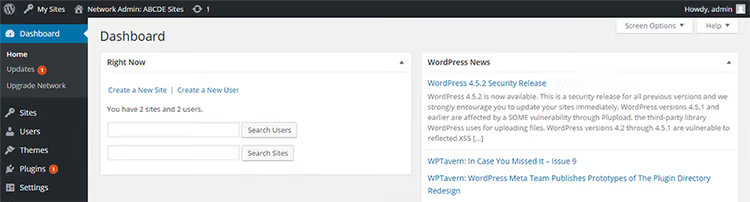
Plugin comparison table
Plugin | Free version | Pro / Premium | Setup complexity | Key function |
|---|---|---|---|---|
User Role Editor | Yes (wordpress.org) | From $29 | Low | Creating and editing user roles |
User Switching | Yes (wordpress.org) | No | Minimal | Instant switching between accounts |
Multisite Language Switcher | Yes (wordpress.org) | No | Medium | Multilingual support without external services |
Multisite Enhancements | Yes (wordpress.org) | No | Minimal | Network management panel extension |
WordPress Multisite Shared Media | Yes (third-party) | No | Low | Shared media library for all network sites |
Multisite Toolbar Additions | Yes (wordpress.org) | No | Low | Custom quick links menu in toolbar |
Beyond Multisite | No | $39 (CodeCanyon) | Medium | 10 modules: plugin hiding, global HTML, spam protection |
WP Multisite User Sync | Yes (wordpress.org) | From $49 | Low | User synchronization between sites |
MultilingualPress 3 | Yes (wordpress.org) | From $199/year | Medium | Translation via separate network sites (174 languages) |
WordPress Multi Site Sync | No (Redux Framework, free) | $29 (CodeCanyon) | Medium | Auto-syncing content between sites via cron |
1. User Role Editor

🔗 User Role Editor on WordPress.org🔗 Live demo
When a dozen authors with different access levels write to the network, WordPress standard roles stop being enough. Someone needs access only to their drafts, someone to a category, and someone the right to moderate comments but not touch settings.
User Role Editor solves this in a couple of clicks. You create a custom role, check permissions, and the role is ready. You can edit an existing one: for example, remove the Editor's right to delete published posts. The "Apply To All Sites" checkbox spreads the change across the entire network at once, no need to enter each child site separately.
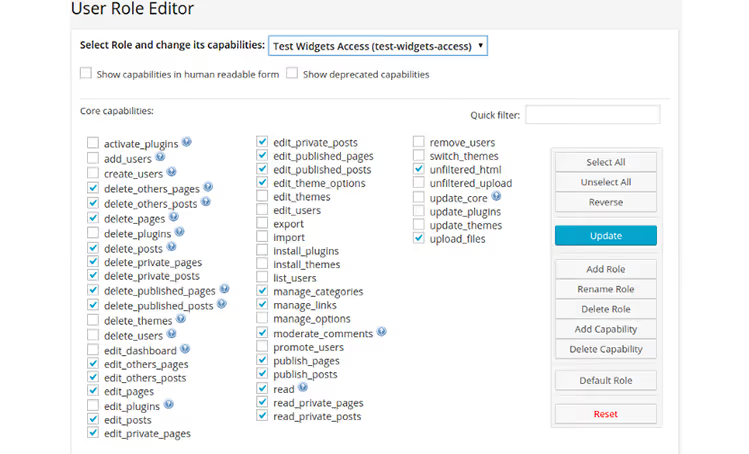
The free version covers most tasks. The Pro version for $29 adds synchronization via Network Admin in one click, role import/export between sites, and viewing restrictions for posts and pages for selected users. The latter is useful if part of the content should be hidden from junior editors.
Downsides: the free version interface contains ads. For a network of 5+ sites, the Pro version pays for itself in time savings within the first month.
2. User Switching

🔗 User Switching on WordPress.org🔗 Live demo
A developer checks whether an Editor sees the needed button. An administrator wants to understand why an author complains about inaccessible functionality. Both scenarios require logging in under someone else's account, but no one will give the password.
User Switching adds a "Switch To" link next to each user on the "All Users" page. Click, and you move through the site with the selected account's rights. This isn't a full login: the session remains yours, the password isn't reset. Finished, click "Switch back" returns you to your original role.
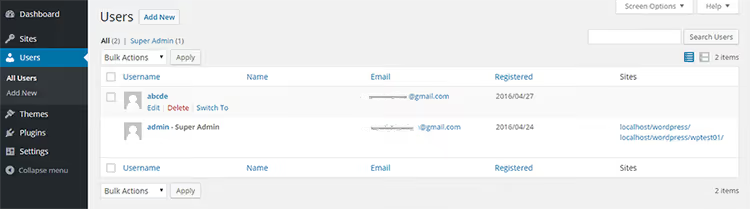
The plugin is free, without Pro versions or ads. The author, John Blackbourn, is one of the key WordPress core developers. This guarantees compatibility with core and minimal risk of abandonment. On multisite, only users with the edit_users capability can switch between accounts, usually network and site administrators.
But: the plugin is useless for frontend debugging. It only works in the admin panel. If you need to check how the site looks for a non-logged-in visitor, open incognito.
3. Multisite Language Switcher

🔗 Multisite Language Switcher on WordPress.org🔗 Live demo
Multilingual site on multisite, classic scheme: one network site equals one language. But how do you link the Russian version of a post with English, and English with German? Without a plugin, only manually, with links in the text. With Multisite Language Switcher, automatically.
The plugin adds a metabox to each post, page, category, and tag: you specify which post on another network site is a translation of the current one. After that, a language switcher appears on the frontend, visitors jump between versions without losing context.
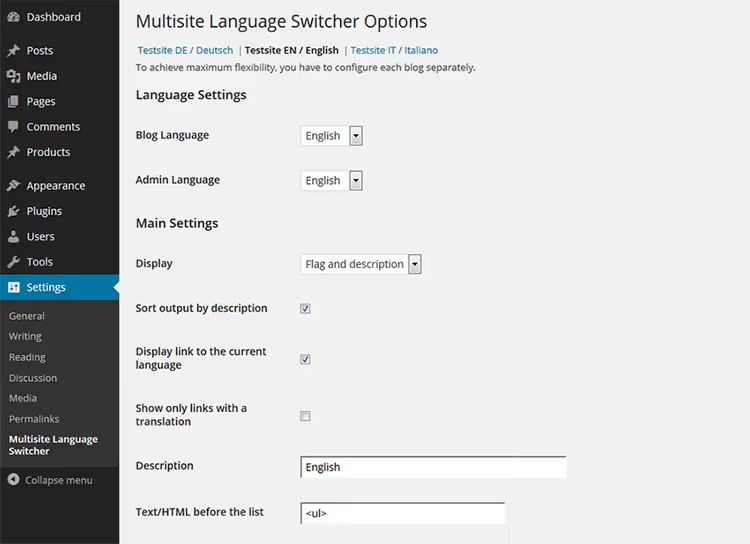
Setup is site-independent. The network administrator can activate the plugin globally, but parameters for each site are set separately. This isn't plug-and-play: it will take an hour or two to configure all language pairs.
Important nuance: the plugin doesn't translate content, it only links already translated versions. Translation will have to be done manually or through external means. But no external APIs or monthly payments, unlike WPML.
4. Multisite Enhancements

🔗 Multisite Enhancements on WordPress.org🔗 Live demo
The standard WordPress network management panel is frankly poor. You see a list of sites, users, and plugins, but without details. Which plugins are active on a specific site? Which theme is used? The answer requires entering each site separately.
Multisite Enhancements displays this information right on the network administration screens. The plugins page gets an "Active on" column with a list of sites where the plugin is enabled. The themes page, similarly. No more guessing whether a site will break when disabling a plugin.
Plus, the plugin adds a favicon to each site in the admin bar (to visually distinguish platforms), displays indexing status and external site URL, and in the footer shows RAM usage and SQL query count. No settings, install, activate, use.
Free, without ads. Compatible with Multisite Toolbar Additions, they complement each other rather than conflict.
5. WordPress Multisite Shared Media
🔗 Shared Media Library on the developer's site
In standard multisite, each child site has its own media library. Uploaded a company logo to site-a.example.com, on site-b.example.com you'll have to upload it again. Ten sites, ten copies of the same file in different wp-content/uploads/sites/N/ directories. Disk space is wasted.
WordPress Multisite Shared Media solves this via a shared media library: a file is uploaded once and becomes available to all network sites through the standard media manager. The plugin works with images, documents, videos, any file entering the media library is picked up.
The developer, Misha Rudrastyh, is the author of well-known WordPress guides. The plugin is free and supports WooCommerce, ACF, and Elementor, meaning it works not only with native fields but also with meta fields from popular plugins.
Limitation: the plugin doesn't synchronize attachment metadata (alt, title) between sites. If you wrote an alt for an image on one site, it won't be on another, you'll have to fill it in again.
6. Multisite Toolbar Additions

🔗 Multisite Toolbar Additions on WordPress.org🔗 Live demo
The WordPress admin bar, the most visible part of the interface, but by default it only has links to the site, customizer, and new posts. Multisite Toolbar Additions turns it into a personal network management center.
The constructor works like the standard WordPress menu: you add links to needed sections, network site list, active themes and plugins (with update information), users, a specific child site. Everything is assembled into a dropdown menu, accessible from any point in the admin panel.
The plugin is compatible with WPML and a dozen popular multisite plugins: WP Super Cache, Hide My WP, Blog Copier, Relevanssi, and others. Free, configures in 5 minutes.
Nuance: don't overload the toolbar with a dozen links. Three to five key ones is enough. Otherwise, the menu turns into a dump that's harder to navigate than the standard admin panel.
7. Beyond Multisite
🔗 Beyond Multisite on CodeCanyon
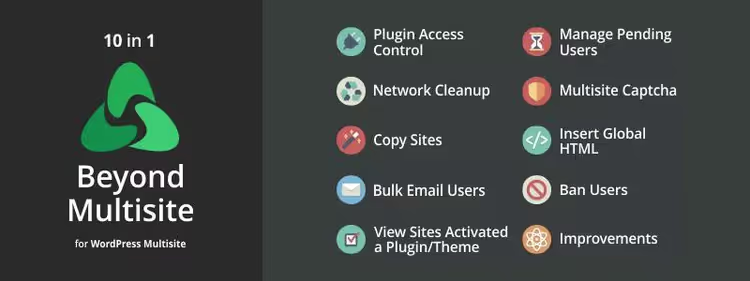
Beyond Multisite, a premium combine harvester for the network administrator. Ten modules under one roof, each can be enabled and disabled independently. No need to install five different plugins when one closes five tasks.
Key modules: plugin access control (hide unnecessary ones from site administrators), global HTML insertion on all or selected sites, customizable captcha for all forms, IP bans, mass spam comment deletion with links. A separate module shows which sites have a specific plugin or theme activated, if you plan to delete a plugin, you immediately see the consequences.
The plugin works correctly in networks with hundreds of sites: the authors use an intelligent processing algorithm, not a dumb foreach loop. Documentation is included in the package and available online.
Downside: network activation only, can't install on a single site. And price, one-time purchase for $39 on CodeCanyon. For a commercial network of 20+ sites, this pays off just from mass spam deletion alone. For a network of three sites, it's excessive.
8. WP Multisite User Sync

🔗 WP Multisite User Sync on WordPress.org🔗 Live demo
A user registered on the main network site and can't log into a child site. Familiar situation? By default, multisite doesn't synchronize users between sites. Each site maintains its own list.
WP Multisite User Sync fixes this with literally one checkbox. You can synchronize a specific user, one site, a group of sites, or the entire network at once. A role filter allows excluding from synchronization, for example, administrators, so each site keeps its own manager.
The free version does exactly what it promises: synchronizes and unsynchronizes. The Pro version for $49 adds auto-synchronization (user is added to the site upon registration), mass synchronization, and WooCommerce compatibility. For an online store on multisite, Pro is a must-have, for a blog network the free version is enough.
9. MultilingualPress 3
🔗 MultilingualPress on WordPress.org🔗 Live demo
MultilingualPress, a more powerful alternative to Multisite Language Switcher from point 3. If MLS simply links translations, MultilingualPress builds a full-fledged multilingual architecture: assigns a language to each site, defines relationships between them, and adds a switcher to the navigation menu.
Support for 174 languages, full Gutenberg compatibility, ability to duplicate sites together with content, convenient when launching a new language version. In the post editor, you see linked translations and can switch between them in one click.
The free version covers basic needs. Pro for $199 per year adds improved taxonomy translation, WooCommerce support, and priority technical support. The price bites, but for a commercial multilingual project this is the standard price tag (WPML costs comparably, and Polylang Pro, $99/year, but without multisite architecture).
Important: like MLS, the plugin doesn't translate content automatically. It manages links between already translated materials. The translation itself, manual or through external services.
10. WordPress Multi Site Sync

🔗 WordPress Multi Site Sync on CodeCanyon
A content manager publishes news on the main network site, and it should appear on five child sites. Manual copying via "Duplicate Post" takes 10 minutes per publication. With three publications per day, that's half an hour of pure time.
WordPress Multi Site Sync automates the process. You configure the source (source site), receiver (destination), content type (posts, pages, custom types), and accompanying data (taxonomies, meta fields, images, tags). Then, the trigger: on post publication or post update on the source. The plugin creates or updates the post on the receiver.
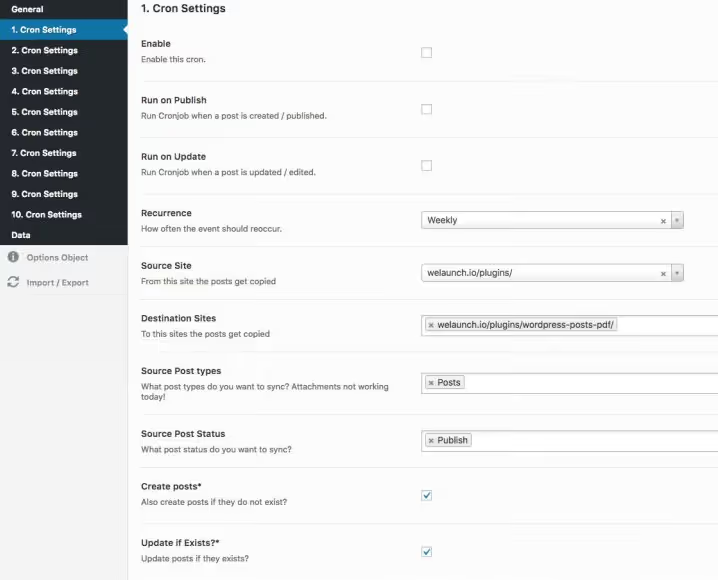
You can create up to 10 cron tasks with schedules and receive execution reports via email. The only dependency, the free Redux Framework, which needs to be installed separately for the settings panel to work.
The plugin is paid ($29 on CodeCanyon), but a one-time purchase. For a network of news sites or an affiliate network where the same content spreads across multiple platforms, this is an indispensable tool.
Popular plugins with confirmed multisite compatibility
Not all plugins work correctly in a multisite environment. Here are five verified ones that activate network-wide without conflicts:
- BackWPup, backup solution. Free, activates for the entire network, saves backups to external storage: Amazon S3, Dropbox, Google Drive. One-click restoration is absent, you'll have to deploy the backup manually, but for a free solution this is standard.
- W3 Total Cache, caching. Reduces server load with a large number of sites. Can be activated for the entire network or selectively, for content-heavy sites this is critical.
- WP Security Audit Log, user activity log. In a multisite environment, tracks suspicious activity: password changes, role changes, login attempts. Helps localize a hack before it spreads across the network.
- Yoast SEO, search optimization. Supports multisite, allows copying settings between sites via Network Settings. For an SEO specialist managing a dozen platforms, this saves hours.
- Disable Comments, comment disabling. If the network is used as a corporate portal or knowledge base, comments aren't needed. The plugin removes everything related, fields, links, widgets, across the entire network at once.
If you prefer video format, here's a 12-minute breakdown of multisite network management from the official WordPress Training Team channel. Covers differences from a single installation and working with users in practice.
⁉️🤔 Frequently asked questions
Do I need multisite if I only have three sites?
If the sites use identical themes, plugins, and server settings, yes, multisite is justified even for three platforms. The benefit isn't so much in the number of sites as in the uniformity of maintenance: one core update, one set of plugins, one database. If the sites are heterogeneous (one is an online store, the second a blog, the third a forum on bbPress), multisite will create more problems than it solves. In this case, three separate WordPress installations are preferable.
Which plugin should I choose for multilingual on multisite?
Depends on scale. For two or three languages, take Multisite Language Switcher, free, without external dependencies, configures in an hour. For a serious multilingual project (5+ languages, hundreds of posts), look toward MultilingualPress 3: 174 languages, Gutenberg integration, site duplication. WPML also works with multisite, but requires a subscription from $39 per year and adds load to the database.
Why is Beyond Multisite paid when there are free alternatives?
Free ones close one or two functions each. Beyond Multisite is 10 modules in one plugin: plugin hiding, global HTML, captcha, IP bans, mass spam deletion, monitoring plugin and theme usage across sites. If you install free alternatives, you'll need at least 4-5 different plugins that can conflict. $39 for a one-time license for one site ($195 for unlimited network), the price for avoiding a plugin zoo.
Is it safe to synchronize users between sites?
Yes, if synchronization is controlled. WP Multisite User Sync allows setting a role filter: for example, synchronize only subscribers and authors, but not administrators. This preserves the isolation principle: an administrator of site A doesn't automatically get access to site B. For critical networks, configure synchronization manually, not auto, so you know exactly who is added where.
What to do if a plugin hasn't been updated for a year or more?
Check two things: first, compatibility with the current WordPress version (the plugin page on wordpress.org shows "Tested with"). If the plugin is tested with version 6.7, it will likely work even if not updated. Second, evaluate the plugin's complexity: a simple utility plugin like User Switching may not require updates for years, while a complex one like MultilingualPress without updates is a red flag. Golden rule: before installing a long-unupdated plugin, test it on staging.
Which plugins to choose for network management
Plugins aren't the goal. The goal is spending less time on administration and more on content. Here are three scenarios and the optimal toolset for each:
You manage a blog network of 5-10 sites with several authors. Your set: User Role Editor + User Switching + Multisite Enhancements. Three plugins, all free, cover roles, account switching, and network overview.
You manage a multilingual project. Basic level: Multisite Language Switcher (free). Professional: MultilingualPress 3 (free version to start, Pro as you grow). Add WP Multisite User Sync so users don't register again on each language.
You administer a commercial network of 20+ sites. Your set: Beyond Multisite (closes spam, plugin hiding, and global insertions) + WordPress Multi Site Sync (content synchronization) + BackWPup (backup of entire network). An investment of approximately $68 saves hours of manual labor weekly.
Don't install plugins just in case. Each added plugin is a potential attack vector and additional database load. Choose for a specific task and delete what you don't use.

A professional team of writers and editors specializing in creating quality content.