













📰 10 best WordPress themes for a news magazine in 2026
Launching a news site without going broke on a developer is realistic. But if you pick the wrong theme at the start, you will have to redo the entire structure: the grid, fonts, content presentation. That means lost hours and tanking rankings.
We have compiled 10 WordPress themes for a news magazine that handle load, require no manual layout work, and look decent on mobile. Below you will find no copy-pasted marketing blurbs, just an honest breakdown: what actually works, where the pitfalls are, and which theme fits your needs.
Before diving into the list, here is the quick summary.
💡 Quick overview:
- First, pick a theme that matches your niche: the universal Newspaper or the niche-focused Digezine for a tech blog.
- Install the theme via "Appearance → Themes → Add New," then activate the demo import.
- Set up the homepage using widgets and the customizer with no code, just dragging blocks around.
- Connect social media, email newsletters, and an SEO plugin; traffic will not appear on its own.
Comparison table: top 5 themes for a news magazine
Theme | Best for | Price | Key feature |
|---|---|---|---|
Newspaper | Traffic-driven media and blogs | from $59 | tagDiv Composer, the best grid builder |
KingNews | News aggregators | from $75 | Widget grid for high-volume publishing |
Globera | Corporate publications | from $75 | Clean typography and a strict media style |
Digezine | Tech blogs and geek media | from $75 | Futuristic design without clutter |
Kustrix | Lifestyle and glossy magazines | from $75 | Adaptive tile grid, Retina ready |
1. KingNews: a homepage with a dense news grid
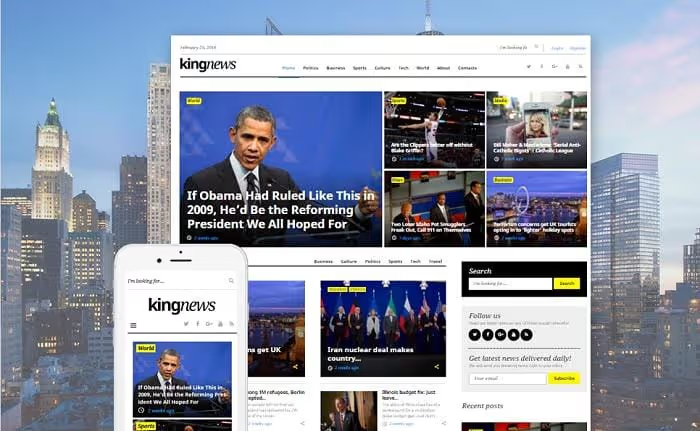
KingNews is a theme built for publications with a high posting frequency. If you publish 10 to 15 articles a day, its widget grid prevents stories from getting buried: you can arrange blocks in 4 to 5 rows, each with its own category filter.
The theme is distributed under the GPL license, so you can modify the code and reuse it across multiple projects. It is built on Bootstrap 3, meaning mobile responsiveness works without surprises. Out of the box, you get a contact form, newsletter signup, and a commenting system.
- Pros: flexible grid for high-frequency publishing, GPL license, built-in SEO optimization
- Cons: Bootstrap 3 is outdated, the design does not stand out from competitors
- Price: from $75 (one-time, single-site license)
- Download: 🔗 KingNews on TemplateMonster | 🔗 Live demo
2. Newspaper: infinite scroll and record-breaking page depth
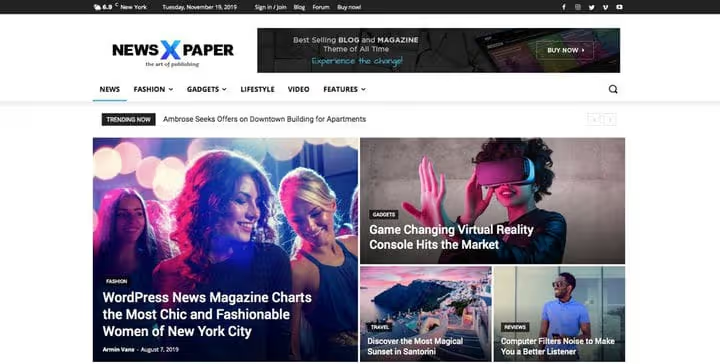
Newspaper by tagDiv is a ThemeForest bestseller with tens of thousands of sales. Its main advantage is the proprietary tagDiv Composer: you build the homepage by dragging blocks instead of poking around PHP files. For a news site monetized through ads, page depth is critical, and Newspaper solves this with infinite post loading on scroll.
The theme ships with ready-made templates for different niches: general news, tech, sports, lifestyle. Each template can be fine-tuned for your brand through the customizer. In practice, an hour of setup is enough to launch a fully functional site.
- Pros: tagDiv Composer (the best visual builder in the niche), native WooCommerce integration, 80+ prebuilt layouts
- Cons: price is above the market average, updates require an active license
- Price: from $59 (ThemeForest, regular license)
- Download: 🔗 Newspaper on ThemeForest | 🔗 Official tagDiv site
3. Globera: logo and typography with no compromises
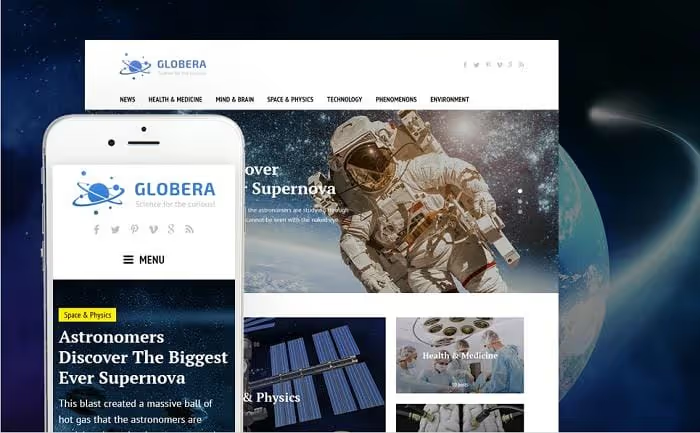
Globera is a theme for those who care about visual brand consistency. Typography here is not an afterthought but deliberate: a readable font stack, high-contrast headlines, a clean white background. If your news magazine aims for authority, the visuals must back that up, and Globera delivers exactly that look.
The built-in WP Live Customizer lets you change colors, fonts, and block layouts in real time. It comes with a GPLv3 license, multimedia format support, and a set of shortcodes for quick page layout.
- Pros: strict typography, GPLv3 license, live customizer
- Cons: fewer ready-made demo layouts than competitors, setup requires a sense of design
- Price: from $75 (TemplateMonster, one-time)
- Download: 🔗 Globera on TemplateMonster | 🔗 Live demo
4. Bazinga: social integrations and virality
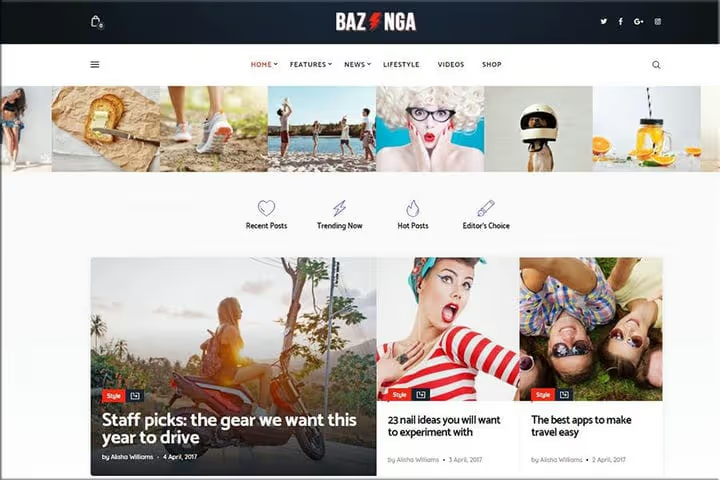
A quarter of internet users interact with brands directly through social media. Bazinga makes this functionality built-in: share buttons, an Instagram feed, Twitter widgets, and newsletter signup come out of the box. These are not just icons in the footer; every element is designed to convert into a click.
The theme has a lightweight codebase and full WooCommerce integration if you decide to sell subscriptions or merch. The theme form customizer provides flexibility without touching the code.
- Pros: deep social integration right in the grid, WooCommerce support, lightweight code
- Cons: a generic design that requires branding for your niche
- Price: from $75 (TemplateMonster, one-time)
- Download: 🔗 Bazinga on TemplateMonster | 🔗 Live demo
5. Kustrix: adaptive tile layout for lifestyle publications
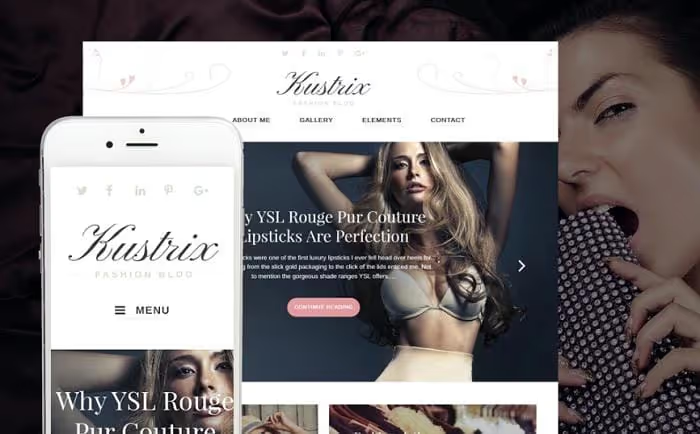
If your audience reads on their phone during the commute, responsiveness is not optional but mandatory. Kustrix solves this with a tile grid that reflows on any screen without losing readability. The theme was originally designed for lifestyle publications, but its structure is universal: it works for a city news portal or a niche magazine alike.
Built-in SEO optimization, multilingual support, cross-browser compatibility, and native integration with Ecwid are included for those planning to sell products or subscriptions directly from the news feed.
- Pros: tile grid optimized for mobile, multilingual-ready, Ecwid integration
- Cons: not the best choice for text-heavy media without visual content
- Price: from $75 (TemplateMonster, one-time)
- Download: 🔗 Kustrix on TemplateMonster | 🔗 Live demo
6. BitNews: categories and tags as navigation tools
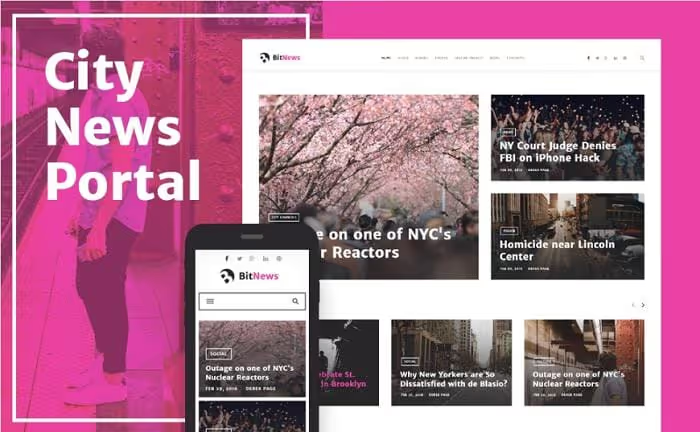
Content without structure is a dump. BitNews is built on a card-based presentation system: each post is styled as a self-contained block with an image, headline, and category. This guides the reader: instead of "just a feed," it becomes navigation for "what else to read on this topic."
The theme's semantic code makes search engine indexing easier; properly labeled categories and tags function as internal linking without extra plugins. Use categories for main sections and tags for cross-cutting topics.
- Pros: card-based content presentation, semantic markup, easy reader navigation
- Cons: requires discipline in managing categories, otherwise the card layout loses its effect
- Price: from $75 (TemplateMonster, one-time)
- Download: 🔗 BitNews on TemplateMonster | 🔗 Live demo
7. Powered: white space and content priority
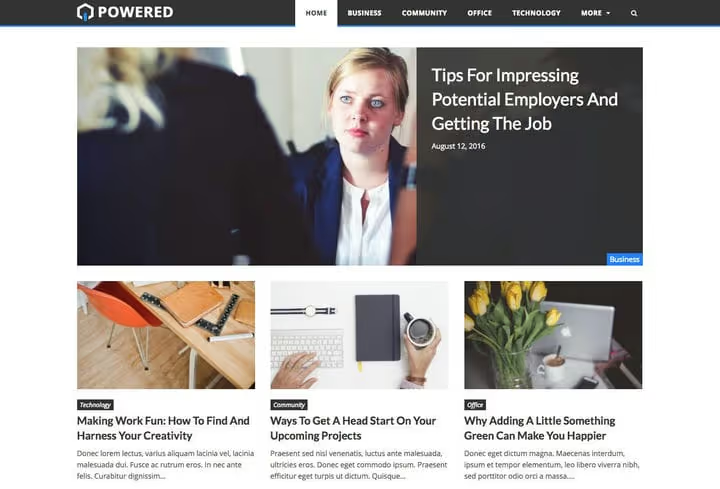
White space is not "unfilled screen" but a tool for prioritization. Powered bets on breathing room: minimal visual noise, maximum readability. For a news site where text is the primary product, this is a deliberate choice.
The theme integrates with video, social media, and email newsletters but does not overload the interface. A solid option for niche publications that want to look premium without hiring a designer.
- Pros: clean minimalist design, fast loading, video integration
- Cons: not suitable for sites with aggressive banner-based ad monetization
- Price: from $75 (TemplateMonster, one-time)
- Download: 🔗 Powered on TemplateMonster | 🔗 Live demo
8. News Magazine: a weekly journal with a built-in calendar
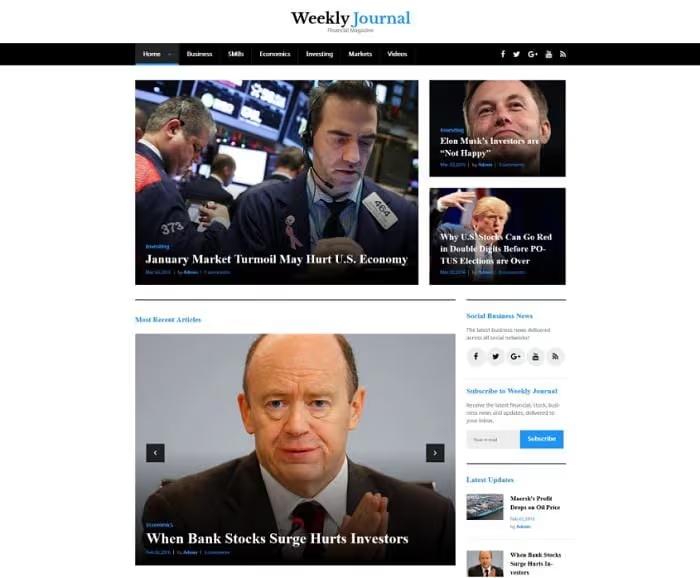
Content updated once a week requires a different presentation than a feed of 20 posts a day. News Magazine is tailored for the weekly rhythm: a built-in publication calendar, an event widget, and a grid that keeps articles visible for several days.
Retina-ready, responsive layout, dropdown menu, and video integration make up the standard feature set. But the calendar truly sets this theme apart from the rest.
- Pros: built-in publication and event calendar, Retina-ready, video integration
- Cons: unsuitable for daily news feeds with high publishing frequency
- Price: from $75 (TemplateMonster, one-time)
- Download: 🔗 News Magazine on TemplateMonster | 🔗 News Magazine demo
9. Digezine: futuristic design for tech publications
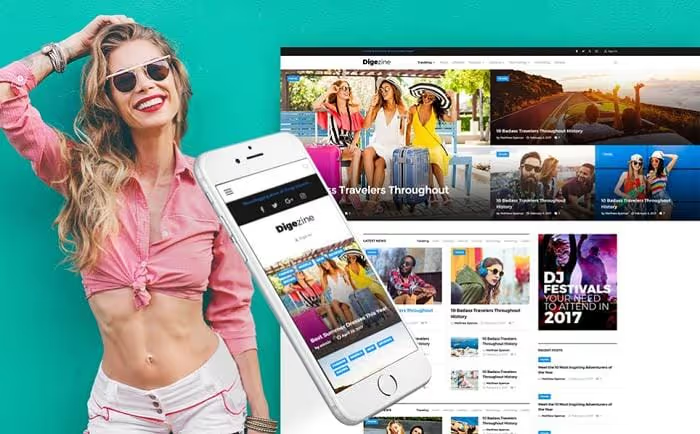
Digezine is a theme with character. Its visual style is futuristic, emphasizing geometry and motion. It suits tech blogs, esports outlets, and any project where a "boring" design is off the table.
But there is a flip side: do not overload the site with extra animations and graphics. Digezine already makes a visual statement; adding third-party effects on top of it will ruin the impression. A set of customizable widgets lets you dial in the dynamics to match your needs.
- Pros: unique futuristic design, customizable widgets, stands out from generic themes
- Cons: not suitable for conservative publications, requires restraint in additional customization
- Price: from $75 (TemplateMonster, one-time)
- Download: 🔗 Digezine on TemplateMonster | 🔗 Live demo
10. Viral News: viral reach and engaging design

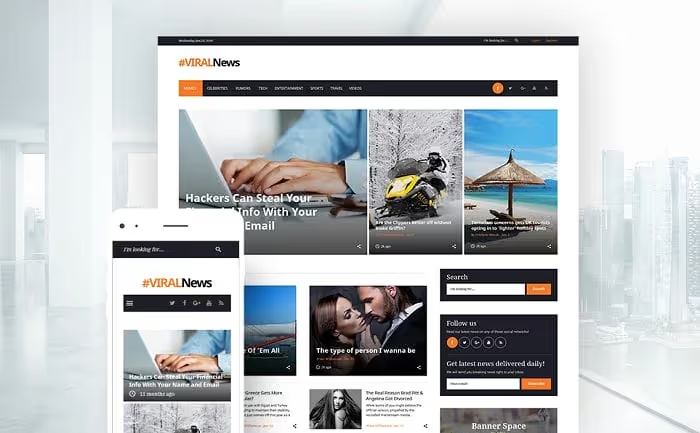
A beautiful site without traffic is just a window display. Viral News tackles this with built-in virality mechanics: a newsletter signup form, share buttons at the article level, user registration, and search. This is not just a theme but a framework for building a reader community.
The theme includes a contact form, login form, and social features that increase time on site and audience return rate. For monetization through ads or affiliate links, this is critical: the longer a reader stays, the higher the revenue per impression.
- Pros: built-in virality and audience retention mechanics, user registration, newsletter out of the box
- Cons: requires active content marketing; without traffic, viral mechanics will not kick in
- Price: from $75 (TemplateMonster, one-time)
- Download: 🔗 Viral News on TemplateMonster | 🔗 Live demo
How to launch a theme without breaking your site: video guide
If this is your first time installing a theme for a news magazine, watch this video. It covers the full cycle: from installing Newspaper through the admin panel to fine-tuning SEO settings. The approach applies to any theme in this roundup since the demo import and customization mechanics are the same.
⁉️🤔 Frequently asked questions
Is a free theme or a paid theme better for a news magazine?
Free themes cover the basics: grid, responsiveness, speed. But for a news site, three things are critical: support for high publishing frequency, built-in ad placements, and compatibility with caching plugins. Paid themes include these out of the box; free ones almost always require tweaking. If the site is meant to be a business rather than a hobby, go paid.
How long does it take to launch a news site on WordPress with these themes?
With content ready, 2 to 6 hours. One hour for installing WordPress and hosting, one hour for importing the theme demo, and the rest for configuring widgets, colors, fonts, and connecting an SEO plugin. If you are doing this for the first time, set aside a weekend and take it slow.
Do I need dedicated hosting for a WordPress news site?
Yes, and do not skimp on it. A news site with 20 to 30 posts a day and several thousand visitors creates load that cheap shared hosting will not handle. The minimum threshold is a VPS or managed WordPress hosting with server-level caching. Make sure the host supports modern versions of PHP and MariaDB; half of news site slowdowns come down to an outdated stack.
Can I switch themes on a live site without losing rankings?
You can, but with preparation. Before switching, create a full backup, enable maintenance mode, and test the new theme on a staging copy. After the switch, verify redirects, URL structure, meta tags, and schema.org markup. Search engines will notice the template change; a temporary dip for 1 to 2 weeks is normal as long as the content structure remains intact.
Which theme from this list has the fastest load time?
In terms of raw speed, Powered and BitNews. Both have lightweight codebases without bloated animations or heavy frameworks. But final speed depends on more than just the theme: hosting, caching plugins, and image optimization contribute more to performance gains than swapping themes alone.
Final verdict: which theme to choose in 2026
If you are launching a traffic-driven media outlet focused on ad monetization, go with Newspaper. tagDiv Composer saves hours every time you rework the homepage, and infinite scroll maintains page depth.
If you need a strict corporate style without visual noise, choose Globera. Its typography and white grid build trust in your brand.
If your niche is tech, esports, or geek culture, Digezine gives you visuals that set you apart from generic news templates.
For high publishing frequency (10+ posts a day), KingNews with its flexible widget grid. For a weekly journal with long-form articles, News Magazine with its built-in calendar.
The remaining themes cover specific use cases: virality (Bazinga and Viral News), mobile traffic (Kustrix), structured navigation (BitNews), minimalism (Powered). Choose based on your monetization model and content type, not the "pretty picture" on the demo site.

A professional team of writers and editors specializing in creating quality content.