














🔧 Redux Framework: creating a settings panel for a WordPress theme (2026)
Building a custom settings panel for a WordPress theme is a task that can stretch on for weeks. The WordPress Settings API requires writing a ton of boilerplate code: registration, field rendering, validation, saving. And when the project is on fire, writing all of this from scratch is an unjustifiable luxury.
Redux Framework solves this problem radically: instead of manual hassle with the Settings API you describe the needed fields in one configuration file, and the framework takes care of everything else, rendering, validation, escaping, import/export and even dynamic CSS. On WordPress.org the plugin has more than 32 million downloads and over a million active installations, and this is not marketing inflation, but a direct consequence of the fact that Redux really saves weeks of development.
In this guide, step-by-step setup of Redux Framework from scratch to a working theme options panel, including live demonstration in the customizer and safe use of saved values on the frontend.
💡 Quick overview:
- Installing Redux Framework: three ways to integrate into a WordPress project
- Connecting the framework and creating a configuration file
- Setting up panel arguments: position in menu, customizer, Google Fonts
- Adding sections and input fields through the unified Redux API
- Extracting saved values in theme templates with error protection
What is Redux Framework and why you need it
Redux Framework is a free open-source options framework for WordPress themes and plugins. Built on top of the standard WordPress Settings API, but completely abstracts its complexity. Instead of dozens of calls to register_setting, add_settings_field and settings_fields you write a declarative array in PHP, and get a fully working, responsive settings panel with 49 field types to choose from.
Important not to confuse with the JavaScript library Redux for state management, these are completely different products with the same name. The WordPress framework appeared before the JS library.
Key capabilities you get "out of the box":
- 49 field types: from plain text and checkbox to ACE editor, repeater, Google Maps, block sorter and image slider;
- Automatic CSS output: for typography, color, gradient, spacing fields, just specify a CSS selector and Redux itself will generate a stylesheet with Google Fonts;
- Customizer integration: the same argument
customizer => true, and the entire panel is duplicated in WordPress Customizer with live preview; - Import/export settings: built-in tool for transferring configuration between sites;
- Compiler: a hook that fires when a field with the
compile => trueflag changes, you can, for example, rebuild SCSS; - Validation and escaping: every value goes through sanitization corresponding to the field type, a text field won't accept an array, a numeric one will filter out strings.
Since 2024 the framework has been developing under the wing of Team Updraft (David Anderson, creator of UpdraftPlus). Current version, 4.5.11 (March 2026), full compatibility with WordPress 7.0 and PHP 8.5. The project lives at redux.io, documentation at Redux documentation site.
Installing Redux Framework
There are three ways to add Redux to a project. The choice depends on your theme architecture and how you plan to distribute it.
As a separate plugin
Install Redux Framework from the WordPress.org directory as a regular plugin. After activation the options panel won't appear, the plugin only provides the API. You describe all settings in a configuration file inside your theme.
Pros: theme remains lightweight (framework core doesn't bloat the archive); framework updates independently through standard WordPress mechanism.
Cons: your theme requires the presence of a third-party plugin, the user needs to install and activate it separately; without the plugin the settings panel disappears, and you need to provide graceful fallback in theme code.
In theme core
Copy the ReduxCore folder inside your theme and connect it in functions.php. The framework becomes an integral part of the theme, the user doesn't need to install an additional plugin.
Pros: settings panel looks like a native part of the theme, user doesn't install anything additional.
Cons: theme archive size grows by about 2 MB; each framework update requires a theme update on your part; Theme Check plugin may issue warnings.
In a dependent theme plugin
Recommended approach for premium themes. Create a separate companion plugin for your theme (it's also convenient to keep custom post types, shortcodes, widgets in it) and embed Redux in it. In theme functions.php add a check for the presence of this plugin through TGMPA or a similar mechanism.
Pros: clean architecture (theme functionality is separated from presentation); framework doesn't bloat theme archive; framework updates don't directly affect theme code.
Cons: requires writing and maintaining a separate plugin; slightly higher entry threshold for other developers who will be figuring out the project.
Redux configuration doesn't depend on installation method, further steps are identical for any variant.
General configuration: connecting the framework
Inside the Redux Framework plugin (or downloaded from the official Redux site archive) find the ReduxCore folder, it contains the entire core.
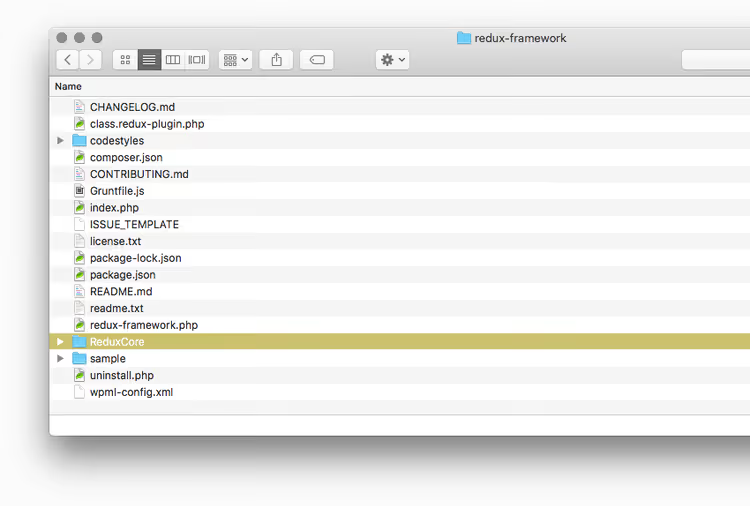
Create a folder in your plugin (or theme), for example optionpanel, and copy the contents of ReduxCore into it. Put an empty config.php file next to it, we will describe all sections and panel fields in it.
Now connect the framework. In the main plugin file (or theme functions.php) add:
1 <?php 2 if ( ! class_exists( 'Redux' ) ) { 3 require_once plugin_dir_path( __FILE__ ) . 'optionpanel/ReduxCore/framework.php'; 4 }
The class_exists check prevents a fatal error if another part of the site has already loaded Redux (for example, through a separate plugin). If the framework is absent, the settings panel simply won't load, and the site will continue to work.
After this you can proceed to creating sections and fields.
Creating the options panel
Framework arguments
First, set a global variable to store all settings, it will be needed to extract values in theme templates:
1 $opt_name = 'mytheme_options';
The prefix is mandatory, it prevents name conflicts with other plugins using Redux. Good practice: brandname_themename.
Now let's assemble the arguments array. Here's a minimal working configuration:
1 $args = array( 2 'opt_name' => $opt_name, 3 'display_name' => 'Theme Settings', 4 'display_version' => '1.0.0', 5 'menu_type' => 'submenu', 6 'allow_sub_menu' => true, 7 'menu_title' => 'Theme Settings', 8 'page_title' => 'Theme Settings Panel', 9 'page_parent' => 'themes.php', 10 'page_permissions' => 'manage_options', 11 'page_slug' => 'theme_options', 12 'dev_mode' => false, 13 'update_notice' => false, 14 'customizer' => true, 15 'save_defaults' => true, 16 'show_import_export' => true, 17 'async_typography' => true, 18 'admin_bar' => true, 19 'global_variable' => $opt_name, 20 ); 21 22 Redux::set_args( $opt_name, $args );
Key arguments breakdown:
menu_type:submenu, panel will appear inside the "Appearance" menu item;menu, separate top-level item in admin;customizer:trueenables duplication of all fields in WordPress Customizer with live preview, user sees changes before saving;dev_mode: enable during development (extended debugging, demo import), but definitely turn off before release;update_notice: alwaysfalsefor themes and plugins with embedded Redux, your users shouldn't receive notifications about framework updates separately from your product;show_import_export: adds a tool to transfer all settings between sites with one click.
Full list of more than 40 arguments see in arguments guide.
Adding sections and fields
A section is a logical group of fields (tab on the settings screen). Minimal section:
1 Redux::set_section( $opt_name, array( 2 'title' => 'Site Header', 3 'id' => 'header_section', 4 'icon' => 'dashicons-heading', 5 'fields' => array( 6 array( 7 'id' => 'header_logo', 8 'type' => 'media', 9 'title' => 'Logo', 10 'subtitle' => 'Upload logo image', 11 'default' => array( 'url' => get_template_directory_uri() . '/images/logo.png' ), 12 ), 13 array( 14 'id' => 'sticky_header', 15 'type' => 'switch', 16 'title' => 'Sticky Header', 17 'default' => true, 18 ), 19 ), 20 ) );
Section icons: Redux 4.x supports built-in WordPress Dashicons (full list at developer.wordpress.org). For custom icons use CSS classes from your icon set (for example, Font Awesome).
Each field is an associative array with mandatory keys id, type and title. Examples of commonly used types:
1 // Select with search 2 array( 3 'id' => 'sidebar_layout', 4 'type' => 'select', 5 'title' => 'Sidebar Layout', 6 'options' => array( 7 'right' => 'Sidebar Right', 8 'left' => 'Sidebar Left', 9 'none' => 'No Sidebar', 10 ), 11 'default' => 'right', 12 ), 13 14 // RGBA color picker 15 array( 16 'id' => 'accent_color', 17 'type' => 'color_rgba', 18 'title' => 'Accent Color', 19 'default' => array( 20 'color' => '#2271b1', 21 'alpha' => 1, 22 ), 23 ), 24 25 // Typography with Google Fonts 26 array( 27 'id' => 'body_typography', 28 'type' => 'typography', 29 'title' => 'Text Font', 30 'google' => true, 31 'font-backup' => true, 32 'line-height' => true, 33 'font-size' => true, 34 'default' => array( 35 'font-family' => 'Inter', 36 'font-size' => '16px', 37 ), 38 ),
To create a subsection add the argument 'subsection' => true, the field will appear as a nested tab inside the parent section.
List of all 49 types with configuration examples in the field types section of Redux documentation.
Using options in the theme
Redux stores all values in one global variable, the same one you specified in $opt_name. To get a value in a template, first declare it global. But direct global declaration outside a function or action is bad practice. The correct approach:
1 function mytheme_get_option( $option_id, $default = '' ) { 2 global $mytheme_options; 3 return isset( $mytheme_options[ $option_id ] ) ? $mytheme_options[ $option_id ] : $default; 4 }
The wrapper function does two things: prevents PHP Notice "undefined index" when accessing a non-existent key and provides a fallback value. In the template usage looks like this:
1 $logo = mytheme_get_option( 'header_logo' ); 2 if ( ! empty( $logo['url'] ) ) { 3 echo '<img src="' . esc_url( $logo['url'] ) . '" alt="' . esc_attr( get_bloginfo( 'name' ) ) . '">'; 4 }
If the settings panel is not yet configured (for example, the user activated the theme but didn't install the dependent plugin), $mytheme_options will be an empty array, and mytheme_get_option() will silently return $default, without a heap of warnings in debug.log.
For dynamic CSS use Redux's built-in capability, specify the output argument in field configuration:
1 array( 2 'id' => 'body_bg_color', 3 'type' => 'color', 4 'title' => 'Background Color', 5 'output' => array( 'background-color' => 'body' ), 6 ),
Redux will automatically generate and embed the CSS rule <style>body{background-color:#fff;}</style>, without a single line of manual code.
The installation and field setup process is clearly shown in this video tutorial: from connecting the framework to creating the first section with selects and switches:
⁉️🤔 Frequently asked questions
How does Redux Framework differ from Carbon Fields, ACF Options Pages and other solutions?
Redux offers 49 field types "out of the box" (versus ~25 for Carbon Fields and ~30 for ACF Pro) and focuses specifically on theme settings panels, not on post meta fields. ACF Options Pages is an add-on over the meta field engine, while Redux was originally designed for options panels: built-in import/export, compiler, live preview in customizer, dynamic CSS with Google Fonts. Carbon Fields is closer in spirit, but requires Composer and namespaces, in a number of hosting environments this is a barrier. Conclusion: if you already use ACF for meta fields, take ACF Options Pages to avoid multiplying entities; if building a theme from scratch and need a powerful options panel, Redux will give more features for free.
Does Redux Framework work with block themes (Full Site Editing)?
Yes, but with caveats. Redux outputs the settings panel through the classic admin interface (Settings API), not through the site editor. For a hybrid approach, block theme plus Redux panel for global settings (colors, typography, analytics scripts), the combination works. As of version 4.5.11 direct integration with
theme.jsonis not implemented: values need to be extracted in templates throughmytheme_get_option()and inlined as CSS variables. For a pure FSE environment where all settings should live in the site editor, Redux is redundant; for classic and hybrid themes, one of the best options.
What to do if Redux conflicts with another plugin using this same library?
This is a known "double inclusion" problem. The check
if ( ! class_exists( 'Redux' ) )beforerequire_onceguarantees that the framework will load exactly once: WordPress executes PHP sequentially, and the very firstrequire_oncemakes subsequent calls harmless. If your theme and a third-party plugin both pull Redux, the copy that initialized first will load, and panels of both products will continue to work. With a significant difference in major versions incompatibility at the API level is possible, fixed by updating the lagging side to the current release.
Is a license needed to use Redux Framework in a commercial theme?
No. Redux is distributed under GPLv2, the same license as WordPress. You can freely include the framework in commercial themes and plugins, sell them on ThemeForest, distribute through your own site. The only GPLv2 restriction, derivative works must also be under GPLv2, but this requirement applies to source code, not to the end user's site content. Redux Pro (additional fields, extended customizer, priority support) is a separate paid product, not required for framework operation.
What to do if after WordPress update the Redux panel stopped opening?
Scenario: after a major WP update white screen on theme settings page. Order of actions: first, check that you have Redux version not lower than 4.5.11 (compatibility with WP 7.0). Second, for a minute enable
'dev_mode' => trueand look at PHP error output on the settings screen, Redux in dev mode shows detailed log. Third, if error is pouring from a specific field, check whether you use a deprecated type (searchremoved in Redux 3.x,dividerenamed). Current list of fields always in Redux documentation.
Is it worth using Redux Framework in 2026
Redux Framework is a mature, actively supported product, behind which are 32 million downloads and a community of more than 270 contributors on GitHub. If you are building a classic or hybrid WordPress theme and need a settings panel with a rich set of fields, live preview in customizer and dynamic CSS, Redux will save you weeks of development and give a result that meets WordPress security standards (PHPCS, escaping, validation).
Architecturally the best way to integrate is to take the framework out into a dependent theme plugin through require_once with class_exists check. This gives both a clean code base, and protection from double inclusion conflicts, and a transparent update path.
When Redux is not needed: you are making a lightweight theme without settings panel; working in a pure FSE environment (block theme with theme.json); you already have ACF deployed with Options Pages for meta fields. In these cases pulling Redux for the sake of one on/off button is like shooting sparrows with a cannon: the framework will add ~2 MB to theme size without proportional benefit.
Before starting work look at the official documentation at Redux developers site and repository on GitHub, there you can also report a bug or propose a feature. If you need help with a specific field type or argument, write in comments, we'll figure it out together.

A professional team of writers and editors specializing in creating quality content.