













⚙️ 11 WordPress plugins for image optimization in 2026
Images drag a site down harder than any script. One unoptimized photo from a phone weighs 3-5 MB, and a gallery of ten such shots adds 30-50 megabytes to the load. Core Web Vitals turn red, Google drops the page in search results, visitors close the tab.
The problem isn't images themselves, they're needed. The problem is that WordPress out of the box doesn't compress uploaded files and doesn't convert them to modern formats. All of this falls on the site owner: choose a tool, configure compression, avoid crushing to mush, and avoid breaking the layout.
We selected eleven solutions: from fully local all-in-one tools to niche utilities for a single task. Five of them are actively developed and maintain the bar. Six are frozen or dead, and for each we explain what to replace it with.
💡 Quick overview:
- Four things worth doing with images before installing any plugin: file names, physical size, metadata cleanup, and alt text
- Comparison table of eleven plugins: compression type, WebP/AVIF support, active installations, price, status in 2026
- Breakdown of each plugin: interface screenshot, strengths and weaknesses, direct installation link
- Which tools are outdated and what to replace them with without losing functionality
- Video breakdown of typical optimization techniques and a block of answers to common questions
What to do before installing a plugin
A plugin isn't a magic button. Even the smartest optimizer won't fix a crooked file name and won't guess that you're planning to show a multi-megapixel snapshot in a 300-pixel-wide block. Four steps done manually:
File names. IMG_4829.jpg is nameless garbage for a search engine. kak-optimizirovat-izobrazheniya-wordpress.jpg ranks in Google Images and brings targeted traffic. The rule is simple: name in Latin characters, hyphen-separated, with a keyword from the page context. File name doesn't affect loading speed, this is purely SEO.
Physical size. Uploading a full-size snapshot and shrinking the display through HTML/CSS is a double hit: the browser still downloads the entire file. Need a 600×400 image, crop to 600×400 before uploading. Free Squoosh from Google closes the task in seconds, as does the built-in macOS or Windows editor.
Metadata cleanup. From JPEG and PNG you can clean out GPS coordinates, camera model, shooting date, EXIF, and color profiles. Removing this debris cuts a noticeable portion of the file size without visible quality loss. ImageOptim on macOS, FileOptimizer on Windows, or any plugin from the list below, all of this is done automatically on upload.
The alt attribute. Robots don't see the image, they read the alternative text. Without alt the image doesn't rank in Google Images, and when loading errors occur the user sees emptiness. Good alt is a description of what's in the image, 4-8 words long, with one relevant keyword. One keyword, don't spam.
11 image optimization plugins: comparison table
Plugin | Compression | WebP / AVIF | Active installations | Free version | Status |
|---|---|---|---|---|---|
EWWW Image Optimizer | lossless + lossy | ✅ both | 1M+ | ✅ | Active (v8.5, April 2026) |
Smush | lossless + lossy | ✅ WebP | 1M+ | ✅ (50 pcs/day limit) | Active |
ShortPixel | lossy + lossless | ✅ both | 300K+ | ✅ (100 credits/month) | Active (urgent update to 6.4.3+) |
Imsanity | resize-only | ❌ | 200K+ | ✅ | Active |
Media File Renamer | no compression | ❌ | 80K+ | ✅ (basic) | Active |
SEO Friendly Images | no compression | ❌ | 1M+ | ✅ | Frozen (8 years without updates) |
Lazy Load | no compression | ❌ | 80K+ | ✅ | Outdated (native |
PB Responsive Images | no compression | ❌ | 10K+ | ✅ | Frozen |
CW Image Optimizer | lossless | ❌ | 20K+ | ✅ | Outdated (requires littleutils on server) |
Hammy | no compression | ❌ | ~17K | ✅ | Dead (10 years without updates) |
Prizm Image | lossy + lossless | ❌ | ~4K | ✅ (through registration) | Dead (API not responding) |
1. EWWW Image Optimizer

The most powerful tool in the category. EWWW compresses images right on your server through a set of utilities: jpegtran, optipng, pngout, pngquant, gifsicle, and cwebp. Files don't go to a third-party API, a rare case where "all your own" doesn't mean a quality compromise.
Two modes of operation: automatic compression on upload and batch optimization of existing media library. On-the-fly conversion to WebP and AVIF, with generation of JPEG/PNG fallback copies for older browsers through <picture>. Separate plus, integration with WP Offload Media for sites on Amazon S3 or DigitalOcean Spaces.
In practice EWWW shows the best "control / result" balance among all local solutions. But prepare for the interface: there are many settings, a beginner may get lost.
Pros:
- Fully local operation, no external APIs and limits
- WebP and AVIF support with auto-replacement through
<picture> - Batch optimization via WP-CLI:
wp ewwwio optimize - 1M+ active installations, 4.8/5 rating on wordpress.org
Cons:
- Free version doesn't include CDN and adaptive images
- On weak hosting CLI optimization runs into timeouts
- Interface is overloaded, entry threshold above average
Price: basic version free; EWWW IO Premium, from $7/month (unlimited optimization + CDN).
🔗 EWWW Image Optimizer on WordPress.org
2. Smush

A veteran of the niche from the WPMU DEV team. Over the years from a simple client for the Smush.it API the plugin grew into a standalone product: lossless compression, lazy loading, WebP conversion, and auto-resize, all in one interface.
The main advantage of Smush is predictability. Configure once: enable auto-compression on upload, set maximum size for the template, activate WebP conversion, and forget. The plugin itself cleans EXIF, resizes giant canvases, and delivers an optimized copy to the browser. Batch processing of existing media library launches with one button.
In our experience, Smush is the best choice for those who don't want to dig into settings. Interface is intuitive, without technical jargon, 4.9/5 rating with a million active installations speaks for itself.
Pros:
- Impeccable reputation: 1M+ installations, 4.9/5 rating
- Lossless compression without losing a pixel of quality
- Automatic resize and WebP out of the box
- Clear interface, minimum entry threshold
Cons:
- Free version: 50 images limit on batch optimization
- AVIF not supported in free version
- Some features (CDN, auto-WebP for Nginx) only in Pro
Price: free (with limits); Smush Pro, from $3/month as part of WPMU DEV.
3. ShortPixel

Cloud optimizer: you upload an image, algorithms on ShortPixel servers compress it and return it back to the media library. All the heavy lifting is on the service side, your hosting processor isn't loaded.
Three compression levels: lossless (zero loss), lossy (optimal balance), and glossy (for photos with high detail). WebP and AVIF conversion is built-in, with auto-replacement through <picture>. Separate feature is PDF compression: uploaded a product catalog, ShortPixel will compress it too.
Since February 2026 it's critically important for all users to update to version 6.4.3 or higher: vulnerability CVE-2026-1246 (path traversal in the loadFile parameter) was closed in this release. Versions 6.4.2 and below allow reading arbitrary server files, don't delay the update.
Pros:
- Cloud processing, doesn't load hosting processor
- PDF compression along with images
- WebP and AVIF with correct
<picture>replacement - 300K+ active installations, 4.5/5 rating
Cons:
- Only 100 credits per month free (about 100 images)
- Files go to a third-party server, critical for some
- Some settings are buried deep in tabs
Price: free (100 credits/month); from $4.99/month for 7K credits.
4. Imsanity

Imsanity solves exactly one task: prevents editors from uploading photos the size of wallpaper to the media library. You set maximum width and height (for example, to match content width), the plugin automatically reduces everything that exceeds the threshold, right on upload. The original is replaced with a reduced copy.
No compression, WebP, AVIF, or lazy loading. Just a limiter that saves from situations when an author uploads a ten-megabyte snapshot straight from the camera. There's mass resize of previously uploaded images, useful on first installation on an old site.
In practice Imsanity is indispensable in combination with a full-fledged optimizer: it cuts off giant originals before compression takes over.
Pros:
- Extremely simple: two input fields, save, works
- Zero server load on resize (pure GD/Imagick)
- 200K+ installations, 4.9/5 rating
- Free without any limits
Cons:
- Only resize: no WebP, no compression, no lazy loading
- Original is deleted irreversibly, the only way back is through backup
- One rule for all images, no choice for individual files
Price: completely free.
5. Media File Renamer

Not all image problems are solved by compression. If the media library is full of photo-1.jpg and screenshot-2024.png, no optimizer will pull them into Google Images.
Media File Renamer renames files based on media entry title or alt attribute and automatically updates all links in posts, pages, and meta fields. You can rename one file, or you can run through the entire media library in bulk. For sites with hundreds of posts where images were uploaded for years without regard for SEO, it's a first necessity tool.
In our experience, it's best to pair Media File Renamer with EWWW or ShortPixel: one brings file names into order, the second compresses content. Tasks don't overlap, no conflicts.
Pros:
- Auto-update of all occurrences of renamed file in content
- Mass renaming: in a minute, entire media library
- Custom Post Types support
- Pro version can rename by template with variables
Cons:
- Doesn't compress images, purely cosmetic tool
- Pro version from $29/year needed for alt sync and templates
- Mass renaming without database backup is risky (always make a dump)
Price: basic version free; Pro is paid.
🔗 Media File Renamer on WordPress.org
6. SEO Friendly Images

Plugin by Vladimir Prelovac, a living classic of the WordPress ecosystem, author of Smart YouTube Pro and Theme Test Drive. The idea is simple: assign alt and title attributes to all images at once by a given template. For example, alt="%name %title" will substitute file name and post title.
At its peak the plugin had a million active installations. But the last release came out about eight years ago, and since then, silence. On current versions of WordPress the plugin, according to reviews on the support forum, still works, but relying on it as a long-term solution isn't worth it.
For automatic alt text in 2026 look toward AI tools (Alt Text AI) or built-in features of SEO plugins like Rank Math.
Pros:
- 1M+ historical installations, author is a proven developer
- Batch assignment of
altandtitleby template - Free and lightweight
Cons:
- 8 years without updates
- Doesn't compress, doesn't convert, doesn't resize
- Risk of incompatibility with future WordPress versions
Price: free.
7. Lazy Load

Once Lazy Load was revolutionary: a plugin from Automattic, 10up, and TechCrunch used jQuery.sonar to load images only when entering the viewport. Radically reduced first render time.
With the release of WordPress 5.5 in August 2020 the core received native loading="lazy" for all <img> with width and height attributes. The browser itself decides when to load the image, without JavaScript and extra requests. Chrome, Firefox, and Safari have supported this since 2020.
Installing a separate plugin for lazy loading in 2026 makes sense only in two cases: you need loading of background images (CSS background-image), native loading="lazy" doesn't handle this, or you want fine control over trigger threshold and appearance animation. For such tasks there are Optimole or Flying Images.
Pros:
- Created by legendary team (Automattic + 10up + TechCrunch)
- 80K+ historical installations, 4.5/5 rating
- Works out of the box without configuration
Cons:
- Completely replaced by native
loading="lazy"since WordPress 5.5 - jQuery dependency, extra request
- Doesn't support background images and appearance animation
Price: free.
8. PB Responsive Images

Showing the same image on desktop and mobile is wasteful. PB Responsive Images reformats pictures for standard CSS media queries: mobile user gets a lightened version, desktop gets full-size.
The plugin hasn't been updated for several years, installation base is modest, about ten thousand. Modern alternatives (adaptive images in themes on srcset, the same ShortPixel with adaptive replacement) give the same result with less risk. WordPress generates srcset automatically since version 4.4.
Pros:
- Honest mobile traffic savings without quality loss on desktop
- Flexible media query configuration
- 4.5/5 rating
Cons:
- Not updating, small user base
- Doesn't compress and doesn't convert to WebP/AVIF
- Requires manual configuration for each project
Price: free.
9. CW Image Optimizer
CW Image Optimizer uses the server utility littleutils for compression without sending files to third-party servers, a conceptual predecessor to EWWW. The idea is sound: your images never leave the server.
The problem is in implementation. littleutils is a Linux package that needs to be installed through terminal with root access. On shared hosting you physically can't do this. Even on VPS installation and debugging takes time that's more reasonably spent on setting up EWWW or ShortPixel.
The plugin hasn't been updated for several years and is practically not mentioned in reviews. Good idea, outdated implementation.
Pros:
- Local compression, without external APIs
- Free
Cons:
- Requires littleutils on server (root access, package manager)
- Not updating, not tested with new WP versions
- No WebP/AVIF support
Price: free.
10. Hammy
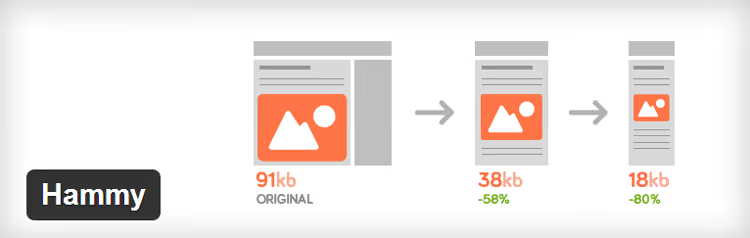
Hammy tried to solve an important task: adaptive image replacement for mobile devices. When loading a post the plugin generated several reduced copies and showed the one matching screen width.
But Hammy is dead. The last update was more than ten years ago, the plugin hasn't been tested with current WordPress versions and is guaranteed to break in a non-standard scenario. Custom Post Types support is absent, jQuery dependency is critical for modern themes without jQuery.
For adaptive images in 2026 use native srcset (WordPress generates it automatically) or modern solutions like Adaptive Images.
Pros:
- Once was a good solution for mobile adaptation
- Preserves alt and title from source image
Cons:
- Dead: 10+ years without a single update
- Doesn't support Custom Post Types
- Guaranteed conflicts with modern themes and current PHP versions
Price: free (but don't install).
11. Prizm Image

Prizm Image from Accusoft promised substantial compression without loss of resolution and visual quality. On paper it sounded great. In practice the plugin requires registration on an external service, and the API at api.prizmimage.com hasn't resolved for many years.
Four thousand installations, 3.5/5 rating. Support on the wordpress.org forum last responded ten years ago, solving the problem "Couldn't resolve host api.prizmimage.com". The irony is that the problem was never solved.
If you have Prizm Image installed, remove and replace with ShortPixel or EWWW. The plugin doesn't perform its stated function.
Pros:
- (Historically) gave a good compression percentage
Cons:
- External API is dead, plugin doesn't work
- ~4K installations, 3.5/5 rating
- Registration required on a non-existent service
Price: conditionally free (through registration, which doesn't work).
Video: image optimization techniques in practice
Understanding compression nuances "by finger" is easier than by text instruction. In this 12-minute video the full cycle is shown: from format selection and compression degree to lazy loading configuration and result verification through Google PageSpeed Insights.
⁉️🤔 Frequently asked questions
Which plugin is best for image optimization in 2026?
If you need a fully local tool without limits and external services, EWWW Image Optimizer. Prefer cloud processing without hosting load, ShortPixel. Want the simplest interface and are willing to live with a 50-image batch limit, Smush. All three are actively updated, support WebP/AVIF, and have an audience from 300 thousand active installations.
What's the difference between lossy and lossless compression?
Lossless reduces file size by removing metadata and optimizing internal structure, pixels are untouched, quality 1:1. Lossy slightly changes color data, removing details least noticeable to the eye: size is reduced 2-5 times, but with aggressive settings artifacts appear. For blog photos moderate lossy is optimal, for interface screenshots with small numbers, only lossless.
Do I need to install a separate plugin for lazy loading in 2026?
For most sites, no. WordPress since version 5.5 automatically adds
loading="lazy"to all<img>with width and height. Browsers have supported native lazy loading since 2020. A separate plugin is needed only for background images through CSS (background-image), Optimole or Flying Images handle this task.
WebP or AVIF, what to choose?
Both formats give significant gains compared to JPEG and PNG. WebP is supported by all modern browsers and compresses noticeably better than JPEG at the same quality. AVIF compresses even more, but encoding is slower and browser support is slightly narrower. Practical advice for 2026: WebP as the main format, AVIF as an option for advanced configurations through
<picture>with fallback to WebP.
Can I use two optimization plugins at the same time?
Technically yes, but you shouldn't. Two optimizers conflict: one compresses on upload, the second tries to re-optimize already compressed, double work with risk of quality degradation. Choose one plugin for your tasks and configure it correctly. Exception: combination "optimizer + Media File Renamer", tasks don't overlap, no conflicts.
What to do with old images after installing a plugin?
EWWW, Smush, ShortPixel, and Imsanity support mass optimization of existing media library. Go to plugin settings, launch bulk processing and wait, depending on media library size the process takes from a couple of minutes to half an hour. Before launching always make a backup: if the plugin over-compresses with aggressive settings, you can only roll back from a backup copy.
What to install on a site in 2026
After analyzing a dozen and a half solutions the picture is clear. The top five plugins, EWWW, Smush, ShortPixel, Imsanity, and Media File Renamer, cover the needs of any WordPress site. They're actively updated, support modern formats, and won't leave you one-on-one with a problem after the next WordPress update.
The breakdown by scenarios is this: site on shared hosting, ShortPixel (cloud processing doesn't load processor). VPS or dedicated server, EWWW (everything local, unlimited, fine tuning). Online store on WooCommerce with thousands of products, Smush Pro or ShortPixel with commercial license.
The lower half of the list should not get on a production site. Hammy, Prizm Image, and CW Image Optimizer, delete and forget. Lazy Load and PB Responsive Images, replace with native WordPress mechanisms or modern alternatives. SEO Friendly Images still works on current WP versions, but prepare exit routes.
Right now go to your site's plugin list and check what's installed for image optimization. If there's Prizm Image or Hammy, don't delay replacement. If there's nothing at all, start with EWWW or ShortPixel today. You'll feel the speed increase immediately.

A professional team of writers and editors specializing in creating quality content.