













 AIIllustrative image: AI-generated
🖼 Image optimization in WordPress: a complete guide
Uploaded a dozen photos from your phone and the site started crawling. The page takes six seconds to open, Google drops your rankings, and your host sends disk warnings. Sound familiar? According to HTTP Archive data, as of 2026 images account for roughly 45% of the average web page's weight. For a site with a media library spanning several gigabytes, this means direct losses: bounces, tanked SEO, bloated backups. You can fix it in an evening.
💡 Quick overview:
- Convert JPEG and PNG to WebP or AVIF: file size drops by a quarter or more at the same visual quality.
- Set up auto-resize via Imsanity or Smush: giant phone uploads become a thing of the past.
- Enable lazy loading: WordPress does this out of the box since version 5.5 with a single checkbox.
- Install a compression plugin (Smush, ShortPixel, or EWWW): it will bulk-compress your media library and clean up old files.
- Fill in alt text for every image: search engines see images only through it.
Preparing images before upload

Uploading a 4000-pixel-wide photo to a blog with a 750-pixel content area is pointless. WordPress will create smaller copies, but the original remains dead weight. Before uploading, resize the image to 1200-1600 pixels wide to leave room for retina displays. Tools: built-in Paint, online Easy Resize, or any editor.
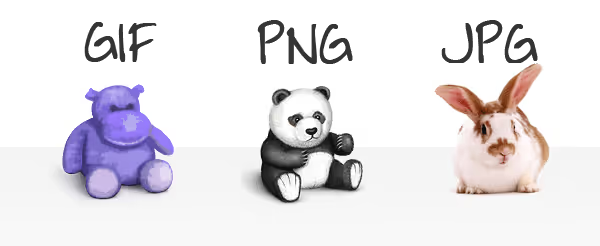
Format rule: photographs get JPEG, logos and screenshots with text get PNG. Since the 2020s, WebP (25-34% lighter than JPEG, according to Google data) and AVIF (up to 50% lighter) have become web standards. You can convert via Squoosh or let a plugin handle it; almost every plugin listed below can generate WebP copies automatically.
Quality: dropping JPEG from 12 to 8 (Photoshop scale) cuts file size in half with no visible difference. The web standard is 80-85%. The free TinyPNG does the same by dragging a file into your browser.
File names: not IMG_4827.jpg, but how-to-compress-wordpress-images.jpg. No spaces, no special characters, include a keyword. Search engines factor file names into image indexing.
Metadata after upload
The file is uploaded, but your work is not done. Alt text: 4-8 words, descriptive, with a keyword. Not "photo1", but "comparing WebP and JPEG formats in WordPress". Title and description help in the media library and contribute to SEO. The built-in WordPress editor lets you rotate, crop, and scale right after upload.
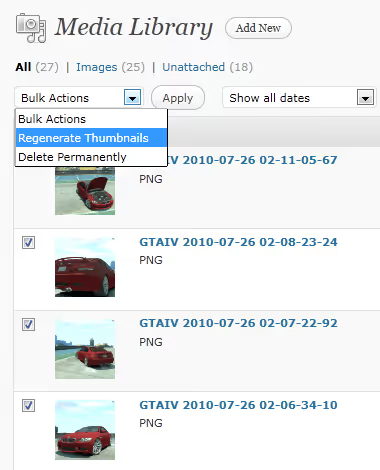
If you changed themes or registered new sizes via add_image_size(), the Regenerate Thumbnails plugin (one million installs) recreates all sizes with one click.
Compression plugins: comparison
Manual preparation works great for new uploads. But gigabytes of already uploaded files require plugins: they compress, convert to WebP/AVIF, and bulk-process your media library.
Plugin | Free | WebP/AVIF | Lazy loading | CDN | Installs |
|---|---|---|---|---|---|
Smush | Yes, unlimited | WebP+AVIF in Pro | Yes | Yes (Pro) | 1M+ |
ShortPixel | 100 credits/month | Yes | Yes | Yes | 300K+ |
EWWW | Yes, unlimited | WebP free, AVIF in Pro | Yes | Yes (Pro) | Active |
TinyPNG | 500 credits/month | Yes | No | No | Active |
Imsanity | Yes | No (resize only) | No | No | 200K+ |
Optimus | 100 KB per file | WebP in HQ | No | No | 30K+ |
Smush
One million installs, 4.8 rating. Free version: compression with no visible quality loss, auto-resize, lazy loading, Directory Smush for folders outside the media library. Pro ($6/month): WebP, AVIF, CDN across 119 servers, automatic width/height fix to eliminate CLS. Downside: files over 5 MB are skipped in the free version. 🔗 Smush on WP.org
ShortPixel
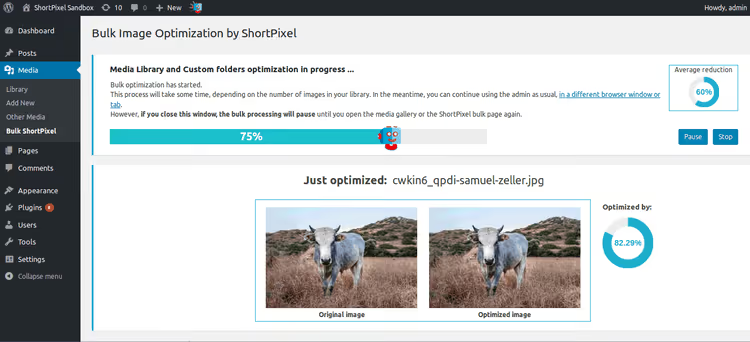
300K+ installs. Three compression modes (lossless, lossy, glossy), AI-generated alt text in 100+ languages, background mode without keeping a browser tab open. Compresses JPEG, PNG, GIF, WebP, AVIF, and PDF. 100 credits/month free, Unlimited at $9.99/month. 🔗 ShortPixel on WP.org
EWWW Image Optimizer
The only plugin with fully local compression (jpegtran, optipng, cwebp, your server's tools). Free: unlimited compression, WebP, lazy loading with auto-scaling, WP-CLI. Pro: AVIF, CDN, watermarks, PDF. Downside: setup is more complex than competitors. 🔗 EWWW on WP.org
TinyPNG
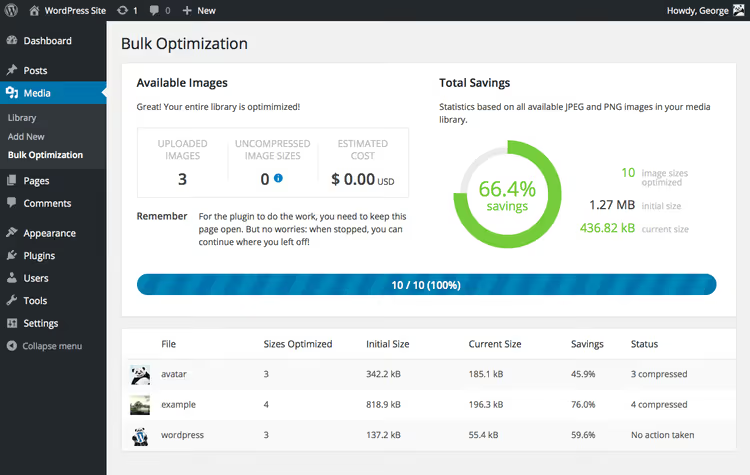
That same panda from tinypng.com as a plugin. Compresses JPEG, PNG, WebP, converts to AVIF. 500 credits/month free, roughly 50-100 photos accounting for WordPress sizes. The interface is dead simple, compression with no visible loss. Downside: no CDN or lazy loading. 🔗 TinyPNG on WP.org
Imsanity
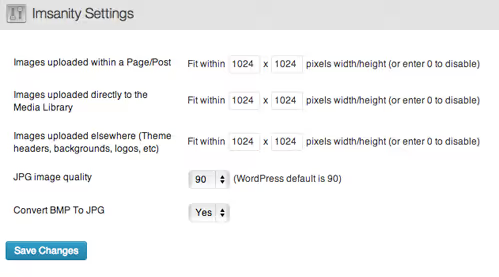
200K+ installs, 4.9 rating. Does not compress, just resizes. Set a maximum width and height, and every uploaded file is automatically scaled. Author: Shane Bishop (same developer behind EWWW). Perfect pair: Imsanity for auto-resize + EWWW for compression. Completely free. 🔗 Imsanity on WP.org
Optimus
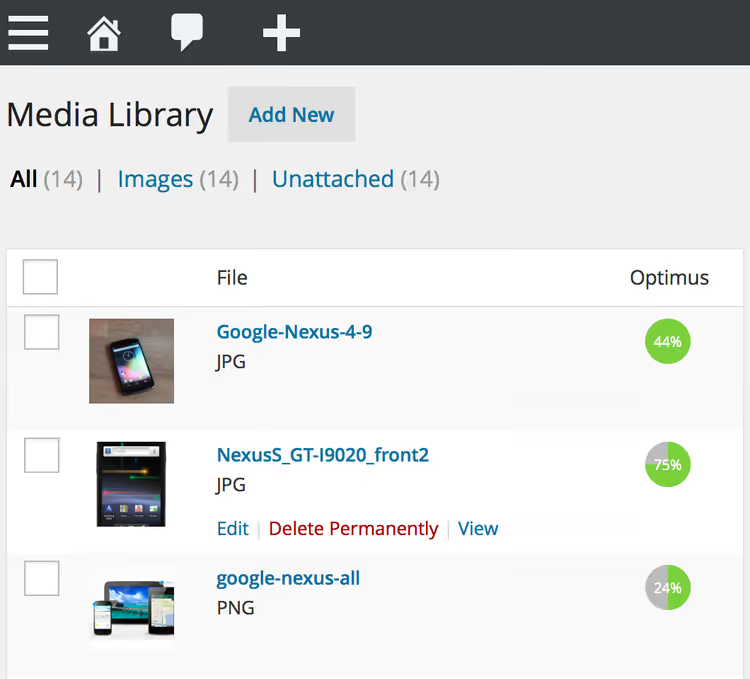
30K+ installs from the KeyCDN team. Minimal plugin weight (0.19 MB), servers in Germany with immediate file deletion after processing. The free version is limited to 100 KB per file (essentially a demo). HQ removes limits and adds WebP. 🔗 Optimus on WP.org
Lazy loading
Since version 5.5, WordPress adds native loading="lazy" to all images with width and height. For most sites, this is enough. If you need more, here are some plugins:

Lazy Load for Videos replaces YouTube and Vimeo players with a clickable thumbnail. The video loads only after a click, so JavaScript does not slow down the page.

BJ Lazy Load is a lightweight plugin for images, thumbnails, gravatars, and iframes with a transparent placeholder.
a3 Lazy Load is mobile-oriented, with appearance effects (fade, slide) and WooCommerce support.

Rocket Lazy Load from WP Media (the team behind WP Rocket) replaces images and iframes with a placeholder. Does not support video, only images and frames.
In practice, "native lazy load + a compression plugin with built-in lazy loading (Smush or EWWW)" is enough. Install a separate plugin only if standard tools fall short.
Advanced tools

Twenty Twenty is a free before/after slider plugin. It overlays two images and gives readers a slider to compare them via the [twentytwenty] shortcode. Perfect for optimization case studies. 🔗 Twenty Twenty on WP.org
Draw Attention creates interactive hotspots over any image.
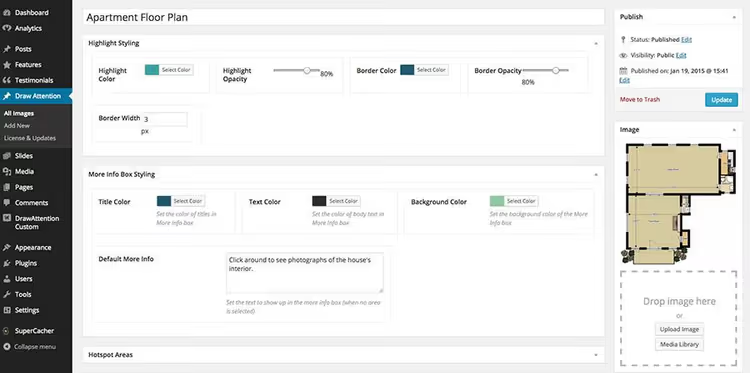
Hover and see a tooltip, click and follow a link. Free version: one interactive image. Pro (pricing on the developer's website): unlimited images, lightboxes, 20 color palettes.

Use cases: interactive maps, diagrams, floor plans, infographics. 🔗 Draw Attention on WP.org
Custom image sizes via code
To register custom sizes, add the following to functions.php:
1 function custom_image_sizes() { 2 add_image_size( 'custom-medium', 480, 360, true ); 3 add_image_size( 'custom-large', 1200, 900, true ); 4 } 5 add_action( 'after_setup_theme', 'custom_image_sizes' ); 6 7 function show_custom_sizes( $sizes ) { 8 return array_merge( $sizes, array( 9 'custom-medium' => __( 'Средний (кастомный)', 'textdomain' ), 10 'custom-large' => __( 'Большой (кастомный)', 'textdomain' ), 11 )); 12 } 13 add_filter( 'image_size_names_choose', 'show_custom_sizes' );
After inserting the code, new sizes will appear in the dropdown when inserting an image. For existing files, run Regenerate Thumbnails.
⁉️🤔 Frequently asked questions
What is the best compression plugin for beginners?
Smush: install, activate, forget. The free version automatically compresses on upload and offers one-click bulk optimization. WebP and AVIF are in Pro, but the basic features are enough to get started.
What is the difference between WebP and AVIF, and which should I choose?
WebP: savings relative to JPEG (see Google data in the formats section), supported in all browsers. AVIF: up to 50% lighter than JPEG, Safari support since 2023. Advice: WebP as a safe default, AVIF for maximum bandwidth savings.
WordPress already compresses JPEGs on upload, why use a plugin?
WordPress's built-in compression uses a basic algorithm at a fixed quality level. Plugins (Smush, ShortPixel, EWWW) use advanced algorithms and squeeze out additional savings at the same visual quality. Plus conversion to WebP/AVIF, something the core does not do.
Do I need lazy loading if my site is on fast hosting?
Lazy loading saves not server time, but visitor bandwidth and first-screen render speed. Native
loading="lazy"in WordPress 5.5+ is already enabled and requires no setup.
How do I check how much images are slowing down my site?
GTmetrix shows specific files with compression recommendations. PageSpeed Insights from Google provides a breakdown: "Serve images in next-gen formats", "Properly size images", "Efficiently encode images". Both are free.
Summary: which plugin to choose
Keeping images in order is not a one-time cleanup but a setup that works for years. Spend an evening on installation, and the plugin does everything automatically from then on.
- New blog, minimal hassle: Smush Free. Compression on upload, bulk optimization, lazy loading in one plugin.
- WooCommerce store: ShortPixel. AI generates alt text for hundreds of products, background mode without keeping a tab open.
- Self-hosted, full control: EWWW. Local compression without external APIs, unlimited volume.
- Maximum savings: TinyPNG + Imsanity. This combo handles both giant uploads and bloated JPEGs.
- Photographer/portfolio: EWWW or ShortPixel in lossless mode. Quality is preserved, metadata is cleaned.
Start with free Smush: it will show you how much space you are already wasting. Which plugin did you choose? Share in the comments.

A professional team of writers and editors specializing in creating quality content.