














🚀 13 best WooCommerce payment gateway plugins (2026)
A customer reaches checkout, sees three confusing payment methods, nervously hits "back," and goes to a competitor. Sound familiar? According to Baymard Institute data from 2025, 17% of abandoned carts aren't about price or shipping, it's the inconvenient or unfamiliar payment method.
Out of the box, WooCommerce provides only basic methods: direct bank transfer, check, cash on delivery, and PayPal Standard. That's enough for a local kiosk. But if you sell beyond your city limits, welcome to reality. A customer in Germany wants to pay via Sofort. In the Netherlands, via iDEAL. In the US, one in three buyers won't complete an order without Apple Pay or Google Pay, and in Kenya without M-Pesa they simply won't buy from you.
We've compiled 13 payment gateway plugins for WooCommerce that cover these scenarios, and checked each one in June 2026: removed dead and abandoned solutions, left only active extensions with real versions and direct links to WordPress.org or official sites.
💡 Quick overview:
- Match your gateway to customer geography: Stripe covers US and Europe, Mollie covers EU with 23+ local methods, Pesapal covers East Africa.
- Selling offline too? Square syncs your online catalog with POS terminals at physical locations.
- Need cryptocurrency or subscriptions? Cryptoniq accepts BTC/ETH/LTC/Doge without intermediaries, while Braintree and Authorize.net handle recurring charges for WooCommerce Subscriptions.
- Don't overload your checkout: 2-3 gateways for your target market cover 95% of scenarios. Every extra method complicates the payment page and cuts conversion.
Comparison table
Plugin | Model | Transaction fee | Key feature |
|---|---|---|---|
Stripe | Free plugin | 2.9% + $0.30 (US standard) | 26+ payment methods, Apple/Google Pay |
PayPal Payments | Free plugin | 3.49% + $0.49 (US) | Venmo, Pay Later, Apple/Google Pay |
Square | Free plugin | 2.9% + $0.30 (online) | Syncs with Square POS |
Mollie | Free plugin | Depends on method (EU) | 23+ local EU methods |
Braintree | Free plugin | 2.59% + $0.49 (cards) | PayPal + cards + Google/Apple Pay |
WP SmartPay | Premium (from $99/year) | 5% + $0.50 (Paddle) | Taxes and invoices automated |
WorldPay | Premium ($79/year) | By contract | Hosted payment page, no SSL required |
Klarna | Free plugin | Depends on market (EU) | Pay Later + Pay Now + Slice It |
Authorize.net | Free plugin | 2.9% + $0.30 (cards) | eCheck acceptance, recurring charges |
Amazon Pay | Free plugin | 2.9% + $0.30 (US) | Login via Amazon account |
USAePay | Premium | By contract | Multi-currency real-time gateway |
Cryptoniq | Premium ($49) | 0% (except network fees) | Direct crypto payments without third-party |
Pesapal | Premium ($39) | By contract | M-Pesa, Airtel Money, mVisa for Africa |
1. Stripe, WooCommerce Stripe Payment Gateway
🔗 Stripe on WordPress.org | 🔗 Live demo
If you're looking for one plugin that covers maximum scenarios, Stripe is your choice. The official WooCommerce Stripe extension (v10.7.0, May 2026) serves customers from 46+ countries and accepts over two dozen payment methods: Visa, Mastercard, American Express, Discover, JCB, Diners Club, SEPA, Sofort, iDEAL, Giropay, Alipay, Bancontact, EPS, Multibanco, Przelewy24, Afterpay/Clearpay, Klarna, and others.
In practice, Stripe's main advantage isn't the number of methods, it's how they're presented. The payment form is embedded directly on the checkout page: no redirects to a third-party domain. Apple Pay and Google Pay appear as a button above the form, customers don't even need to enter card details. Plus Stripe automatically offers local methods based on country: a visitor from the Netherlands sees iDEAL, from Germany sees Giropay.
Downsides: Stripe isn't available in all countries, check the list at stripe.com. And fees for non-US merchants can be higher than local gateways. But for a store with an international audience, this is the number one plugin.
Transaction fee: 2.9% + $0.30 for US and European cards. Regional methods follow Stripe's rates for that specific market.
2. WooCommerce PayPal Payments

🔗 PayPal Payments on WordPress.org | 🔗 Live demo
The official PayPal plugin from WooCommerce itself (v4.0.4, May 2026) is the replacement for two dead extensions from old roundups: PayPal Checkout and PayPal for WooCommerce. Both are closed and removed from the repository, and WooCommerce PayPal Payments is their current successor.
The plugin provides the full stack: PayPal, Venmo (US), Pay Later (installments with no interest for the buyer), card acceptance via Advanced Card Processing (card fields right on the page, no redirect to PayPal), Apple Pay and Google Pay. Smart buttons automatically select the relevant method: a customer from Germany sees PayPal, from the US sees Venmo and Pay Later.
The key argument for PayPal Payments: PayPal has 430+ million active accounts worldwide. For many buyers, this is "their" default method. A store without PayPal loses a noticeable share of conversion, we see this on every project where we connect payment gateways.
Fee: 3.49% + $0.49 for US transactions, higher for international (depends on market). Pay Later costs the merchant the standard PayPal fee, for the buyer it's 0% with timely repayment.
3. Square, WooCommerce Square
🔗 Square on WordPress.org | 🔗 Live demo
Square (v5.4.0, May 2026) solves a problem other gateways don't touch: syncing your online catalog with a physical location. If you sell through both a website and an offline store with Square POS, this plugin keeps inventory unified. Sold an item in-store, WooCommerce sees the deduction. Accepted an order online, POS updates.
From the buyer's perspective, Square works like a regular card gateway: Visa, Mastercard, American Express, Discover. No redirects, the form is embedded in checkout. The interface is clean, setup boils down to connecting your Square account and mapping products. The plugin is free, the fee is standard Square (2.9% + $0.30 for online payments in the US).
Downside: Square is available in a limited list of countries, US, Canada, Australia, Japan, UK, Ireland, France, Spain. For a store outside these markets, the plugin isn't relevant.
4. Mollie, Mollie Payments for WooCommerce

🔗 Mollie on WordPress.org | 🔗 Live demo
Mollie (v8.1.6, April 2026) is the European heavy-lifter. If Stripe covers the world, then Mollie covers Europe: 23+ local methods, including iDEAL (Netherlands), Bancontact (Belgium), Sofort (Germany), Giropay (Germany), EPS (Austria), Multibanco (Portugal), Przelewy24 (Poland), Belfius and KBC (Belgium), plus Visa, Mastercard, Amex cards, Apple Pay, and a "pay after delivery" option (Klarna Pay Later via Mollie).
The plugin is free, you only pay transaction fees per Mollie's rates (depend on method and market). No monthly fee. Mollie is compatible with WPML and multisites, localized store versions automatically pick up local methods.
As of June 2026, Mollie supports SEPA Direct Debit and bank transfers for B2B orders. For a store whose audience is 70%+ in the EU, Mollie is often more cost-effective than Stripe: fees are lower on local methods.
5. Braintree, Payment Gateway for PayPal, Braintree, Google Pay and Apple Pay
🔗 Braintree on WordPress.org | 🔗 Live demo
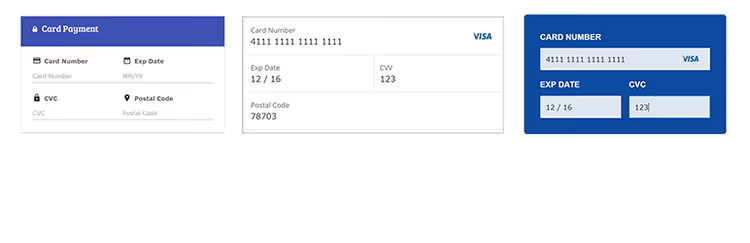
Braintree is a PayPal subsidiary, and their official WP plugin (v3.2.83, April 2026) combines three payment channels in one: credit and debit cards, PayPal, and digital wallets (Google Pay, Apple Pay, Venmo for US). The form is embedded directly in checkout, no redirects.
Braintree's difference from regular PayPal Payments: Braintree is tailored for developers and complex scenarios. It supports recurring billing (repeat charges for subscriptions), marketplace payments (split payments between platform sellers), payment form customization, and PCI SAQ A compliance (minimal security burden). If WooCommerce Subscriptions is part of your business model, Braintree supports them natively.
Fee: 2.59% + $0.49 for cards (US), standard PayPal rates. Available in 45+ countries.
6. WP SmartPay, Paddle Integration for WooCommerce

WP SmartPay connects Paddle as a payment gateway to WooCommerce. Paddle isn't just a processor, it's a merchant of record: it handles sales tax and VAT collection and remittance for you. For a store owner, this means you don't need to figure out tax rates in 50 US states or 27 EU countries, Paddle does it itself and issues invoices to buyers on its behalf.
The plugin supports one-time and recurring payments, 20+ currencies and 11+ checkout interface languages, custom coupons, and checkout popups. Optimized for mobile devices. The plugin is premium, license cost from $99/year. Paddle fee: 5% + $0.50 per transaction, higher than Stripe/PayPal but includes all tax calculations.
WP SmartPay is justified if you sell digital products and subscriptions globally and don't want to hire a tax consultant for each market. For a local store with one market, overpaying for Paddle doesn't pay off.
7. WorldPay, Worldpay for WooCommerce
WorldPay is a hosted gateway: the payment form is hosted on WorldPay's secure servers, not on your site. This means an SSL certificate for your store is technically not mandatory (although you still need it for SEO and trust). After payment, the customer is redirected back to the store to the order confirmation page.
The plugin accepts all major cards: Visa, Mastercard, American Express, JCB, Diners, Maestro, debit cards. The payment process fits in one tab, smooth user journey. The extension is premium, license cost $79/year (via WooCommerce.com). Additionally, you need a WorldPay account with a separate contract and fee (individual rates).
WorldPay is good for large retailers and B2B sellers who need a separate merchant account with direct bank settlement, not an aggregator like Stripe or PayPal. Downsides: the onboarding process is longer, first a contract with WorldPay, then plugin setup.
8. Klarna, Klarna Payments for WooCommerce

🔗 Klarna on WordPress.org | 🔗 Live demo
Klarna (v4.10.7, May 2026) grew from a Swedish fintech into one of Europe and the US's largest payment providers. For WooCommerce, the official plugin provides three scenarios that directly impact conversion: Pay Now (instant card payment), Pay Later (30-day deferral with no interest for the buyer), and Slice It (installments over several payments).
In practice, Klarna shows a 20-40% increase in average order value in retail, such data is reported by Klarna itself for 2025. The reason is simple: buyers are more willing to take a more expensive item if they can "try" it for 30 days before paying. The plugin is free, the fee follows Klarna's rates for your market (usually 2.5-3.5% plus a fixed rate, depends on country and volumes).
Klarna is available in the US, UK, Australia, and most EU countries. For fashion retail and products with a high return probability, this is a must-have: the customer pays after trying, returns decrease, and average order value increases.
9. Authorize.net, WooCommerce Authorize.net Gateway (AIM)

🔗 Authorize.net on WordPress.org | 🔗 Live demo
Authorize.net is a veteran US payment gateway, operating since 1996 (a Visa subsidiary). This plugin from Pledged Plugins (v6.1.26, April 2026) is a live alternative to two dead extensions: ELEX Authorize.net and the official WooCommerce Authorize.net. Both are removed from the repository as unsupported.
What the plugin provides: acceptance of Visa, Mastercard, American Express, Discover, JCB, Diners Club, plus eCheck (ACH payments from a US bank account). There's support for Authorize.net CIM (Customer Information Manager) for secure storage of recurring customer card data. Subscription payments via WooCommerce Subscriptions work out of the box. Authorize and Capture option: funds are blocked on the customer's card but charged only when you confirm shipment.
Authorize.net fee: 2.9% + $0.30 per transaction plus a monthly gateway fee ($25/month). This is more expensive than Stripe, but Authorize.net provides your own merchant account with direct payouts to your bank, for an established business that's a plus, not a minus.
10. Amazon Pay, WooCommerce Amazon Pay

🔗 Amazon Pay on WordPress.org | 🔗 Live demo
Amazon has 310+ million active shoppers worldwide, and each already has a card and shipping address attached. The official Amazon Pay for WooCommerce (v2.6.1, January 2026) allows a customer to pay for an order in two clicks: Amazon account login, then confirmation. No manual address entry, card details, or registration on your site.
The plugin replaces the standard WooCommerce checkout with Amazon Pay checkout. The customer doesn't leave your site, the interface is embedded in the checkout page. After payment, the buyer returns to the store confirmation page. Amazon Pay fee for the merchant: 2.9% + $0.30 for US transactions (rates vary by market). The plugin is free.
Amazon Pay is justified for any store whose audience actively uses Amazon (US, EU, Japan, India). The argument "no need to enter address and card" removes the main reason for abandoned carts.
11. USAePay, WooCommerce USA ePay Gateway
USAePay is a niche real-time gateway for the US market. ECI (Electronic Commerce Indicator) certified and processes transactions in real time, returning confirmation immediately. Supports major cards (Visa, Mastercard, Amex, Discover), multi-currency payments, subscriptions, refunds, and saved payment methods.
The plugin is premium, cost by contract with USAePay. Transaction fee also by contract. USAePay makes sense if you already work with this processor through another channel and want to connect WooCommerce to an existing merchant account. For new stores, Stripe or Authorize.net is usually simpler.
Details and connection: usaepay.com.
12. Cryptoniq, cryptocurrency payment gateway

Cryptoniq is a decentralized payment gateway that accepts cryptocurrency directly, without third-party services. No transaction fees beyond the blockchain network: you receive exactly the amount the buyer sent. Supports Bitcoin (BTC), Ethereum (ETH), Litecoin (LTC), and Dogecoin (DOGE).
The plugin is available in two versions: Cryptoniq Lite (free, on WordPress.com) and the full premium version for $49 on CodeCanyon. Integration with WooCommerce is complete, crypto payments appear as a regular payment method at checkout.
Who needs this: stores that accept large B2B amounts (bank transfer takes 3-5 days, BTC takes 10-60 minutes) and businesses in regions with unstable banking systems where cryptocurrency serves as a working fallback.
13. Pesapal, WooCommerce Pesapal Payment Gateway
Pesapal covers a niche that other gateways on this list ignore, East Africa. The plugin integrates WooCommerce with the region's mobile money ecosystem: M-Pesa (Kenya, Tanzania), Airtel Money (Uganda, Zambia, Rwanda, Malawi, Zimbabwe), and mVisa. Plus regular cards via the Pesapal gateway.
For the seller, Pesapal is a premium extension ($39 on CodeCanyon) plus a contract with Pesapal. Transaction fee follows Pesapal's rates for the specific market.
Important nuance: Pesapal is officially available in seven countries, Kenya, Uganda, Tanzania, Zambia, Zimbabwe, Rwanda, Malawi. If your market is East Africa, Pesapal is mandatory: M-Pesa covers over 90% of mobile payments in Kenya, and without it you simply won't take money from a local buyer. For stores outside this region, Pesapal isn't needed.
🔗 Pesapal developer documentation
Setting up a payment gateway seems like a technical detail, but in practice it's the main conversion lever for your checkout. Here's a 6-minute breakdown of the ten best gateways with screenshots and feature comparison:
⁉️🤔 Frequently asked questions
How many payment gateways should I connect to my store?
Two to three for your target market. One primary (like Stripe or Mollie) plus PayPal for coverage, plus a local method if your audience is concentrated in one country (iDEAL for the Netherlands, M-Pesa for Kenya). Each additional gateway complicates checkout and can reduce conversion, Baymard Institute research from 2025 shows that an overly long payment page adds 18% to cart abandonment.
How is Stripe better than PayPal and vice versa?
Stripe wins on customization and embedded form: the customer doesn't leave your site. PayPal wins on brand recognition and 430 million ready accounts, many buyers only pay through PayPal. In practice, 70%+ of stores install both: Stripe as the primary acquirer (lower fee, broader method coverage), PayPal as a fallback for those who trust it.
Do I need an SSL certificate to accept payments through WooCommerce?
Yes, even with hosted gateways like WorldPay. WooCommerce requires HTTPS for the checkout page, and Google Chrome marks HTTP pages with forms as unsafe. Plus since July 2025, Google uses HTTPS as a ranking signal for e-commerce pages. Let's Encrypt provides a free SSL, there's no reason not to install it.
Which gateway should I choose for subscriptions (WooCommerce Subscriptions)?
Stripe, Braintree, or Authorize.net. All three natively support recurring billing: automatic repeat charges, trial period management, plan changes, and failed payment recovery (dunning). PayPal Payments also works with subscriptions, but management via PayPal Reference Transactions is more complex to set up. For pure subscriptions, Braintree is more convenient, split payments and marketplace out of the box.
Can I bypass the plugin and embed a gateway with code?
Technically yes, but we don't recommend it. The WooCommerce Payment Gateway API allows you to write your own gateway in the theme's functions.php, and you take on PCI compliance, card data storage (even in transit), gateway API updates, and security. Each of the plugins above has passed WordPress.org or WooCommerce.com review, they handle compliance for you. A custom gateway is justified only for integration with a corporate banking system where a ready plugin doesn't exist.
Which payment plugin to choose: final breakdown by scenario

There's no universal answer, but there's a proven algorithm. Start with Stripe (46 country coverage, 26+ methods) and add WooCommerce PayPal Payments for buyers who only pay through PayPal. This is the base that will cover 90% of international sales.
If you have a physical store, add Square. If 70%+ of customers are in the EU, replace Stripe with Mollie. Selling subscriptions, look at Braintree. Need cryptocurrency, install Cryptoniq. And if your market is East Africa, just install Pesapal and don't read the rest of the list.
And most importantly: after connecting any gateway, go through a test transaction from cart to "thank you" page. Half of abandoned carts aren't about price or shipping, it's a payment form that glitches on mobile or shows an error without explanation. Five minutes of testing saves hours of support and lost orders.

A professional team of writers and editors specializing in creating quality content.