














🥇 6 best Stripe plugins for WordPress 2026 (Free & Pro)
Stripe has become the default online payment solution for small and medium-sized businesses. Visa, MasterCard, Amex and dozens of local methods in 135+ currencies, customers pay using their preferred method, wherever they are.
The wrong plugin brings slow checkout, lost transactions and pain with refunds. The right one works invisibly: money hits your account, you don't get distracted by technical details. In practice, the difference between them is one incorrect line in settings or a theme conflict that kills mobile conversion.
We tested 6 current Stripe plugins for WordPress in 2026. From the official WooCommerce gateway to a lightweight solution with a single shortcode. Each was checked for speed, checkout stability, refund convenience and real cost of ownership. No marketing noise, only what works when a customer enters their card details.
💡 Quick overview:
- Identify your payment type: one-time sales, subscriptions or donations. This determines whether you need WooCommerce and if recurring functionality is mandatory.
- Choose a plugin for your task: for WooCommerce take the official gateway or WebToffee, for standalone payment processing look at WP Simple Pay or Accept Stripe Payments, for maximum simplicity choose WP Stripe Checkout.
Comparison table
Plugin | WooCommerce | Free version | Subscriptions | Lightweight | Pro price |
|---|---|---|---|---|---|
WooCommerce Stripe Gateway | Yes | Yes | Via Woo Subs | ❌ | Free |
Accept Stripe Payments | No | Yes | ❌ | ✅ | Free |
WebToffee Stripe Gateway | Yes | Yes | ❌ | ❌ | $49/year |
WP Simple Pay | No | Yes | Yes | ✅ | $49.50/year |
GetPaid Stripe Payments | No | Yes | Yes | ❌ | Free |
WP Stripe Checkout | No | Yes | Yes (links) | ✅ | Free |
1. WooCommerce Stripe Payment Gateway

Official plugin from Automattic, the developer of WooCommerce. Accepts payments directly through the Stripe API, without redirects to third-party pages and extra checkout steps. In practice this means: the customer enters card details on your site, Stripe processes the transaction in the background, the order is created instantly.
Out of the box you get Apple Pay and Google Pay on mobile and desktop. After the first payment, card details are saved in Stripe, repeat purchases go through in one click. Plus Web Payments API for browser payments without entering card data at all. Supports Visa, MasterCard, American Express, Discover, JCB, Diners Club, SEPA, Sofort, iDEAL, Giropay and Alipay.
Pros:
- Official WooCommerce development with guaranteed compatibility
- Card saving for repeat purchases in one click
- Apple Pay, Google Pay and Microsoft Pay out of the box
Cons:
- Only for WooCommerce, doesn't work as a standalone solution
- Subscriptions require a separate WooCommerce plugin Subscriptions
- Heavy for simple landing pages and donations
Price: Free.
🔗 WooCommerce Stripe Gateway on WordPress.org
2. Accept Stripe Payments

Lightweight plugin for one-time payments through Stripe without WooCommerce dependency. Adds "Buy Now" buttons via shortcode or block, setup reduces to entering Stripe API keys and inserting the form on a page. Five minutes, and payment processing works.
After payment, the customer lands on a page with transaction details and a list of purchased items. The plugin can collect tax for products and configure a custom "Thank you" page for each product. Card data is saved in Stripe for future purchases.
Pros:
- Minimal footprint on site, doesn't load extras
- Setup in 5 minutes
- Card data saving in Stripe for repeat purchases
Cons:
- No recurring payments and subscriptions
- Doesn't integrate with WooCommerce
- Basic button design without advanced branding
Price: Free.
🔗 Accept Stripe Payments on WordPress.org
3. WebToffee Stripe Payment Gateway

Full-featured Stripe gateway for WooCommerce from the Indian team WebToffee, serving over 1.5 million sites. Accepts Visa, MasterCard, Amex, Discover, JCB, Diners Club cards, as well as Alipay, Apple Pay, Google Pay, Sofort, iDEAL and WeChat Pay.
The main difference from the official Stripe plugin, a unified admin panel for all Stripe transactions. View payments, make partial and full refunds, capture authorized payments later, all in one window, without jumping between WooCommerce and Stripe Dashboard. The customer pays on your site without redirect, this directly affects conversion.
Pros:
- Unified panel for refunds and captures right in WordPress admin
- Customer doesn't leave site when paying
- Support for BECS, Bacs, Boleto, FPX, GrabPay for international markets
Cons:
- Premium features are paid
- No built-in subscriptions
- Lite version is cut down compared to official plugin
Price: Free Lite version. Pro, from $49 per year on WebToffee.
🔗 WebToffee Stripe Gateway on WordPress.org🔗 Pro version on WebToffee site
4. WP Simple Pay
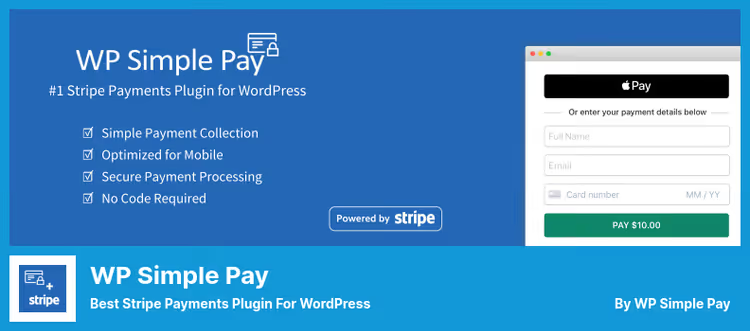
One of the most popular standalone Stripe plugins, 14,000+ active installations. Allows creating payment forms via drag-and-drop without a line of code. One-time payments, recurring subscriptions, trial periods and installment plans, all configured in the visual builder.
Stripe Checkout, a drop-in solution optimized for conversion on desktop, tablets and mobile. The plugin complies with PCI DSS and SCA without additional actions. Built-in anti-fraud protection, shipping and billing address collection, ready-made form templates. Klarna, Afterpay and Affirm for Buy Now Pay Later, in Pro versions.
Pros:
- Drag-and-drop form builder without code
- Subscriptions, installment plans and trials in Pro versions
- Klarna, Afterpay and Affirm for Buy Now Pay Later
Cons:
- Not for WooCommerce, this is a standalone solution
- Pro version from $49.50 per year per site
- Premium payment methods require Professional plan ($199.50 on pricing page)
Price: Free Lite version. Pro, from $49.50 per year for Personal (1 site).
🔗 WP Simple Pay on WordPress.org🔗 WP Simple Pay Pro pricing
5. GetPaid Stripe Payments

Stripe addon for the GetPaid plugin, an official Stripe Verified Partner. Accepts Visa, MasterCard, Amex, Discover, JCB and Diners Club. GetPaid payment form with almost no friction, conversion to payment is systematically above market average.
Out of the box: one-time and recurring payments, free trial period, customer subscription management on site, "name your price". Stripe account connects via OAuth, no need to enter API keys. No setup or monthly fees, only Stripe commission per transaction.
Pros:
- Stripe Verified Partner with auto-updating API
- OAuth Stripe connection without manual key entry
- Trials, subscriptions and "name your price" for free
Cons:
- Requires installation of main GetPaid plugin
- Only 3 reviews on WordPress.org, lower trust factor
- iDEAL added recently, stability in question
Price: Free.
🔗 GetPaid Stripe Payments on WordPress.org
6. WP Stripe Checkout

Extremely lightweight plugin that launches Stripe checkout through a single shortcode: [wp_stripe_checkout_session name="Product" price="2.99"]. SCA and 3D Secure 2 out of the box, PCI compliance, dynamic authentication, all on the Stripe side, the plugin only passes parameters.
Accepts Apple Pay, Google Pay, Alipay, WeChat Pay, Bancontact, EPS, Giropay, iDEAL, Przelewy24, Sofort, Afterpay/Clearpay, Boleto, OXXO, ACH, Bacs, BECS and SEPA Direct Debit, 18+ payment methods. Built-in support for recurring payments via Stripe Payment Links and VAT/tax ID collection at checkout.
Pros:
- One shortcode for accepting payments
- 18+ payment methods, including ACH and SEPA
- Automatic Stripe checks and email notifications
Cons:
- No form builder, only shortcodes
- Doesn't integrate with WooCommerce
- No CSV order export and product filtering
Price: Free.
🔗 WP Stripe Checkout on WordPress.org
⁉️🤔 Frequently asked questions
Do I need WooCommerce to accept payments through Stripe on WordPress?
No. Five of the six plugins in this collection work without WooCommerce. Just install the plugin, enter Stripe API keys and add a payment form to a page. WooCommerce is needed only if you're building a full-fledged online store with product catalog, cart and order management. If in doubt, start with a lightweight plugin, you can configure it in 10 minutes, remove it without a trace if functionality isn't enough.
Which plugin to choose for recurring payments and subscriptions?
WP Simple PayPro, the best choice. Drag-and-drop form builder, installment plans, setup fees, trials and custom email notifications. Personal plan ($49.50 on WP Simple Pay site) covers freelancer needs on one site. Free alternative,GetPaid Stripe Payments: also provides subscriptions, trials and "name your price", but requires installation of the main GetPaid plugin.WP Stripe Checkoutsupports recurring via Stripe Payment Links for simple scenarios without subscription management on site.
What's the difference between official WooCommerce Stripe and WebToffee Stripe?
Both integrate Stripe into WooCommerce and accept the same cards and payment methods. The difference is in administration:
WebToffee Stripe Payment Gatewayprovides a unified panel for partial and full refunds, authorized payment capture and viewing all transactions in one place. The official WooCommerce plugin doesn't have such a console, refunds are made through the standard order interface. Plus WebToffee supports more local methods for international markets: Boleto (Brazil), FPX (Malaysia), GrabPay (SEA).
Which plugin is the lightest and doesn't affect site speed?
WP Stripe CheckoutandAccept Stripe Payments, the two most lightweight options. Both load Stripe.js only on pages with payment form, don't add admin menus with dozens of items and don't touch database structure. If speed is critical,WP Stripe Checkoutwins: all functionality is wrapped in one shortcode, without jQuery dependencies in admin and extra scripts on frontend.
Can I use GetPaid Stripe Payments without the main GetPaid plugin?
No.
GetPaid Stripe Paymentsis an addon extending theGetPaidplugin. The main plugin provides the invoicing engine, invoice and customer management, and the Stripe addon adds a payment gateway. Install both, get a full-featured billing system for free.
Does Stripe work with Russian cards in 2026?
Russian MIR cards are not supported by Stripe since March 2022. Visa and MasterCard cards issued by Russian banks are also not accepted due to sanction restrictions. If your audience is in Russia, Stripe is not suitable: look toward CloudPayments or Robokassa. For international audiences, Stripe works without restrictions.
What to install on a production site in 2026

The choice comes down to three questions. First: WooCommerce or not. Second: one-time payments or subscriptions. Third: budget or maximum features.
If you have WooCommerce and don't need subscriptions, WooCommerce Stripe Payment Gateway closes the task completely and for free. Want a convenient refund console, WebToffee Stripe Gateway for $49 per year justifies the price at volumes from 50 transactions per month.
For standalone payment processing without a store: one-time sales and donations are covered by Accept Stripe Payments, setup in five minutes. Need subscriptions, trials and "name your price", WP Simple Pay Pro. Budget is limited but subscriptions are still needed, GetPaid Stripe Payments does the same thing for free, but requires two plugins.
Maximum simplicity and minimum movements, WP Stripe Checkout. One shortcode, 18+ payment methods, no magic.
Before installing any plugin on a production site, test it in Stripe Test Mode. Create test API keys in the Stripe panel, enable test mode in plugin settings and conduct several test transactions with test cards: 4242424242424242 for successful payment and 4000000000000002 for declined. This will take 15 minutes, but will save hours of debugging in case of conflict with theme or other extensions.
Choose a plugin for your business model, not for someone else's rating. Test a couple of options on Stripe sandbox and keep the one you're comfortable working with daily.

A professional team of writers and editors specializing in creating quality content.