














🧾 6 best plugins for sending PDF invoices in WooCommerce (2026)
A client paid for an order but didn't receive a proper invoice. Just a standard WooCommerce email with the total and a list of items. Sound familiar? For a small store this is tolerable, but once you reach meaningful volume, the lack of a proper PDF invoice becomes a problem. The client's accounting department demands documents, returns need documentation, and manually writing invoices in Excel eats up hours.
Standard WooCommerce can't generate PDF invoices. At all. This is a deliberate decision by the developers: WooCommerce is a storefront builder, not an accounting system. But the gap is filled by plugins. We tested 6 solutions that add automatic generation of invoices, packing slips, and shipping documents directly in the WordPress admin panel.
Under the hood, each has its own approach: some prioritize a drag-and-drop builder, some offer integration with Google Drive and Dropbox, some focus on compatibility with WPML and multi-currency stores. Let's figure out what to install in 2026.
The short video above shows basic PDF invoice setup in WooCommerce. Now let's move on to comparing plugins.
💡 Quick overview:
- Install the plugin from the WordPress panel: Plugins → Add New, search by name, install and activate. All 6 plugins install in the standard way, without FTP or wp-config.php edits.
- Configure the invoice template with your company details: logo, legal name, tax number and numbering prefix. In free versions this is done through the plugin settings menu in 5 minutes.
- Enable automatic PDF attachment to WooCommerce emails: Completed and Processing statuses, the main triggers. The client receives the invoice along with the order notification without any additional action on your part.
- If needed, configure bulk invoice export for monthly reporting and cloud backup to Google Drive or Dropbox. Not all plugins have these features, check the comparison table below.
Plugin | Free version | Premium | Drag-and-drop | Cloud backup | Bulk printing |
|---|---|---|---|---|---|
PDF Invoices & Packing Slips (WP Overnight) | ✅ | from €70/year | ❌ | ✅ (Dropbox) | ✅ |
Invoices for WooCommerce (Bas Elbers) | ✅ | from €49/year | ❌ | ✅ (4 services) | ✅ |
WebToffee PDF Invoices | ✅ | from $69/year | ❌ | ❌ | ✅ |
YITH PDF Invoices & Packing Slips | ❌ | from €79.99/year | ✅ (Gutenberg) | ✅ | ✅ |
Challan | ✅ | from $39/year | ❌ | ❌ | ✅ |
PDF Invoice Builder | ✅ | from $29/year | ✅ | ❌ | ❌ |
1. PDF Invoices & Packing Slips for WooCommerce (WP Overnight)
The most popular plugin for PDF invoices in the WordPress ecosystem: over 300,000 active installations, 5-star rating on wordpress.org. Developed by Dutch studio WP Overnight since 2014, meaning this isn't "yet another plugin for a couple months" but a mature product with a predictable update cycle.
The free version provides the basics: automatic PDF invoice generation when an order is completed, file attachment to emails, manual download from the admin panel. The template is configured through HTML/CSS, requiring minimal familiarity with code, but the result looks professional.
Advantages: the plugin can generate bulk invoices, attach to standard WooCommerce order statuses and pick up multi-currency prices. I'll specifically note the integration with WPML and Polylang, for multilingual stores this is critical, not every plugin handles template translation without hacks.
Downside of the free version: only one basic template. If you need credit notes, proforma invoices or custom design, you'll need to get Premium (from €70/year for one site, current prices on the developer's website). Premium adds Dropbox integration and the ability to create multiple templates for different product categories.
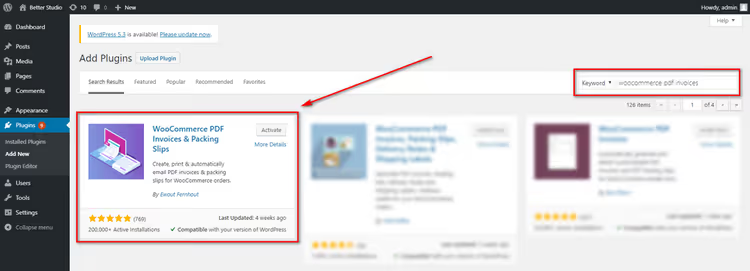
🔗 PDF Invoices & Packing Slips on WordPress.org
2. Invoices for WooCommerce (Bas Elbers)
If WP Overnight is a "Swiss Army knife," then the Bas Elbers plugin is a "sharply honed scalpel" for those who need to generate invoices and immediately store them in the cloud. Supports Google Drive, Dropbox, OneDrive and Egnyte, four services out of the box, which no one else in this roundup has.

Strong point: clean architecture. The plugin doesn't clutter the admin panel, picks up standard WooCommerce email notifications and provides several clean templates (Micro, Minimal). Clients can download the invoice directly from their account on the orders page, which is convenient and reduces support load.
Downsides: the plugin hasn't been updated for the last three major WordPress releases, which is honestly noted on the wordpress.org page. In our tests on WordPress 6.7 it worked stably, but for critical projects this is a risk factor. Premium (from €49/year) adds bulk export, credit notes, recurring invoices and the ability to attach additional PDFs to emails.
If cloud invoice backup is important to you, this is the best choice, provided you're willing to accept a slower update cycle.
🔗 Invoices for WooCommerce on WordPress.org
3. WebToffee PDF Invoices, Packing Slips, Delivery Notes & Shipping Labels
The most feature-rich free option. Besides invoices it generates packing slips, shipping labels, delivery notes and shipping labels, five document types in one plugin, without additional costs. The developer is Indian studio WebToffee, known for a series of 20+ plugins for WooCommerce.
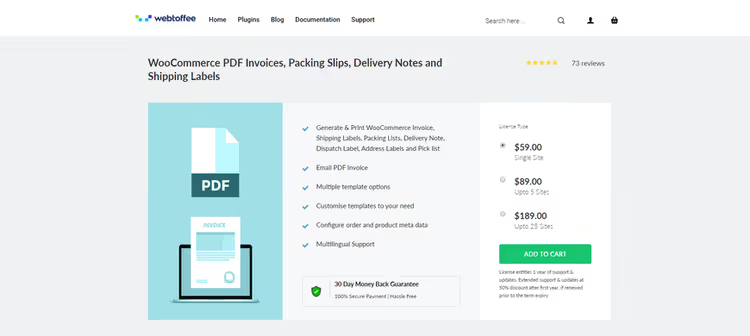
Setup is easier than WP Overnight: visual template selection (three options in the free version), fields for company name, logo, packing type. The invoice number is configured with prefix and suffix, for example, INV-2026-001. Generation happens automatically when the order status changes, plus there's a preview before printing.
The plugin is compatible with WPML and offers a 30-day money-back guarantee. Premium (from $69/year, details on the WebToffee website) unlocks dozens of additional templates, custom footer configuration and return policy for each document. Credit notes and "Pay Now" payment links are also in Premium.

🔗 WebToffee PDF Invoices on WordPress.org
4. YITH WooCommerce PDF Invoices & Packing Slips
The only fully premium plugin in the roundup. YITH is an Italian studio with 150+ plugins in the WooCommerce ecosystem, and this is their flagship product: 10,500+ customers, 4.5/5 rating based on 93 reviews. Price: from €79.99/year for one site, with a 30-day money-back guarantee.

Main advantage: Gutenberg template builder, introduced in version 3.0. You can assemble the invoice layout with blocks: text, images, tables, without a single line of code. For stores where branding matters (logo, colors, fonts in the company style), this is a strong differentiator from all competitors.
Out of the box: automatic backup to Google Drive and Dropbox, credit notes, proforma invoices, shipping slips. Full compatibility with Italian electronic invoicing (Sistema di fatturazione elettronica). Downsides: no free version at all, you can only test through live demo on the YITH website. And the price is above market average.
🔗 YITH PDF Invoices on developer's website
5. Challan, PDF Invoice & Packing Slip for WooCommerce
Previously the plugin was called "Woo Invoice" from WebAppick, but after rebranding it's released under the name Challan. The free version on wordpress.org is actively updated (latest release: May 2026), and that's a good sign.

Features: customizable invoice background, signature addition, stamp display and product images directly in the invoice. Multi-currency and multilingual support out of the box (compatible with WPML). The client receives a PDF attachment automatically in the email.
Premium (from $39/year or $99 lifetime, pricing on wordpress.org) adds multiple templates, attachment of additional documents to the invoice, product description and categories directly in the invoice. Price is lower than YITH and WP Overnight, a good option for small businesses that want more than the free base but aren't ready to overpay.
6. WooCommerce PDF Invoice Builder
The only plugin in the roundup with a drag-and-drop builder in the free version. The developer is a small Ukrainian author, but the plugin itself is stable and regularly updated.
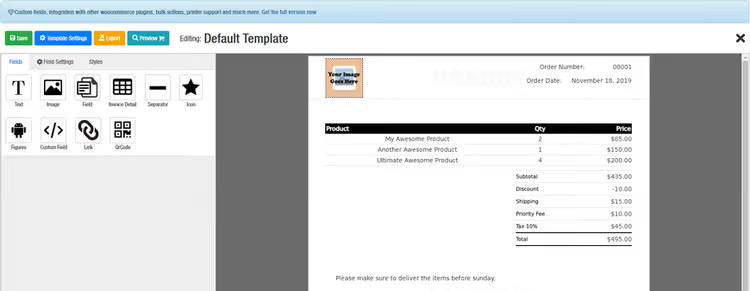
Builder with 500+ icons, you can assemble a unique template without any code at all. Multi-currency is built in: the plugin automatically inserts the needed currency from the order. The free version covers the basic scenario "built the invoice, attached to email, client downloaded."
Downside: no bulk printing or cloud backup even in Premium (from $29/year, more on wordpress.org). Premium adds custom fonts, more templates and priority support, but this is still a tool for manual invoice work, not document workflow automation. Good for small stores where each invoice is reviewed before sending.
🔗 PDF Invoice Builder on WordPress.org
⁉️🤔 Common questions
Is an online store required to issue a PDF invoice for every order?
Legislation depends on the country, but according to e-commerce standards in the EU and USA, an invoice is mandatory for B2B sales and recommended for B2C. In Russia and CIS countries an online receipt replaces the invoice for individuals, but for legal entities and sole proprietors a PDF invoice with details is mandatory. An automatic plugin completely removes this burden.
Which plugin works best with multilingual stores?
WP Overnight and WebToffee are best for compatibility with WPML and Polylang. Both automatically pick up the order language and generate the invoice in the needed language. YITH is also compatible with WPML, but setup is slightly more complex. Challan claims multilingual support, but in practice template translation requires manual editing for each language.
Can you get by without the Premium version?
For a store with turnover up to 50 orders per month, yes, the free versions of WP Overnight or WebToffee are sufficient. They cover automatic generation, email attachment and admin panel download. Premium is needed when you have: credit notes (returns), cloud backup, multiple templates for different categories, proforma invoices or bulk export for accounting.
How do I set up automatic invoice sending to the client right after payment?
In the settings of any plugin from the roundup, enable PDF attachment to "Completed" or "Processing" status. After that, whenever an order changes to this status WooCommerce will automatically attach the PDF invoice to the standard email notification. No additional code required.
What if I switched invoice plugins and old orders "lost" their documents?
Old PDF files physically reside on the server (usually in
/wp-content/uploads/), but the new plugin doesn't see them. Solution: before replacing, do a bulk export of old invoices through the old plugin to local disk or cloud. Then install the new one, it will start generating documents only for new orders.
Which PDF invoice plugin for WooCommerce should you install in 2026?
Honest picture after testing: there's no universal answer, but there's a clear selection matrix for your store.
If you're just starting and budget is minimal, take WP Overnight (free version). Most fault-tolerant, regularly updated, covers the vast majority of small store scenarios.
If you have B2B and clients critically need invoices delivered to the cloud, Invoices for WooCommerce (Bas Elbers). Four cloud services out of the box, clean templates. Risk: the plugin updates less frequently, check compatibility on staging.
If you need maximum documents for free (invoices + packing + labels + delivery notes), WebToffee. Five document types in one plugin without additional costs, best ROI for a warehouse with physical shipping.
If branding matters more than price, YITH Premium. Gutenberg template builder, Italian code quality, full document set. For stores with solid turnover the price is justified by extended customization capabilities.
If you need a visual builder without budget, PDF Invoice Builder. Drag-and-drop for free, multi-currency, simple start. But prepare for manual work: there's no bulk printing or cloud backup here.
Six plugins, six different approaches. Choose the one that fits your fulfillment process, not the other way around. And yes: they all install in 2 minutes from the WordPress admin panel.

A professional team of writers and editors specializing in creating quality content.