














📰 16+ best WordPress news plugins 2026: ticker, RSS, headlines and post types
News on a WordPress site isn't just a blog. It's a company event feed, an industry news digest, a ticker with quotes, or automatic headline imports from dozens of sources. Standard WordPress can output posts chronologically, but for everything else, from a scrolling ticker to RSS aggregation, you need plugins.
The problem is that "news plugin" can mean anything: a news section builder, an animated ticker, an RSS importer, or an Apple News connector. Searching blindly means sifting through dozens of plugins, half of which haven't been updated in years.
We've collected 16+ relevant WordPress news plugins for 2026, categorized them, checked compatibility with WordPress 6.x, and filtered out everything that hasn't been updated in over two years or has disappeared from the repository. Only live and working solutions.
💡 Quick overview:
- Define your task: displaying your own news, a scrolling ticker, RSS import, or integration with Apple News/Google News.
- For a news section from scratch, take WP Latest Posts or News & Blog Designer Pack.
- For a scrolling ticker, the best choice is Ditty: three modes, 30,000+ installs, works with Gutenberg.
- RSS aggregation is covered by WP RSS Aggregator: 60,000+ installs, unlimited sources.
- Every plugin in this collection includes a live URL, verified update date, and real screenshot.
Comparison table: all plugins at a glance
Category | Plugin | Free? | Active installs | WordPress 6.x |
|---|---|---|---|---|
Multi-functional | WP News Magazine | Yes | 1,000+ | ✅ |
Multi-functional | News & Blog Designer Pack | Yes (Pro paid) | 10,000+ | ✅ |
Multi-functional | WP Latest Posts | Yes (Pro paid) | 10,000+ | ✅ |
Ticker/scroller | Ditty | Yes (Pro paid) | 30,000+ | ✅ |
Ticker/scroller | Vertical News Scroller | Yes | 2,000+ | ✅ |
Ticker/scroller | PJ News Ticker | Yes | 3,000+ | ✅ |
Ticker/scroller | Advanced Live News Ticker | Paid | - | ✅ |
Ticker/scroller | News Ticker Benaceur | Yes | 3,000+ | ✅ |
Elementor | News Ticker for Elementor | Yes | 2,000+ | ✅ |
Elementor | Epic News Elements | Premium | - | ✅ |
Elementor | Magazinify | Premium | - | ✅ |
Elementor | News Layouts for Elementor | Premium | - | ✅ |
Headlines | Stock Market & Financial Headlines | Paid | - | ✅ |
RSS import | WP RSS Aggregator | Yes (Pro paid) | 60,000+ | ✅ |
Apple News | Publish to Apple News | Yes | 3,000+ | ✅ |
Google News | XML Sitemap & Google News | Yes | 100,000+ | ✅ |
1. Multi-functional news plugins
These three plugins create a full-featured news section on WordPress: custom post type for news, widgets, shortcodes, and built-in templates. Suitable if you're launching a news site or want to separate company news from the blog.
1. WP News, WordPress News / Magazine
WP News is a plugin for creating a professional news site. Comes with an addon for Elementor, news slider, grid, and news tab. Requires Elementor and Google Maps API installed for full functionality.
Pros:
- Slider, grid, and news tab in one plugin
- Deep Elementor integration
Cons:
- Mandatory Elementor dependency
- Small user base (1,000+ installs)
2. News & Blog Designer Pack
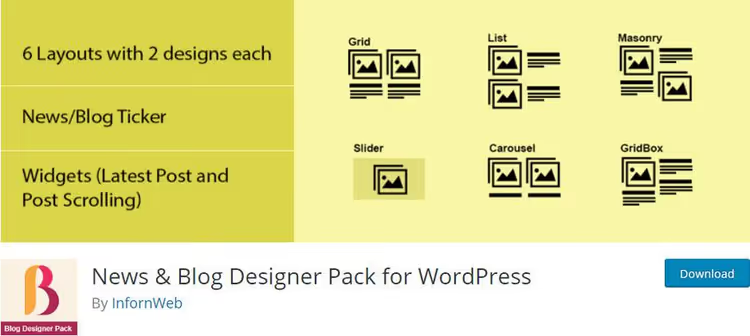
News & Blog Designer Pack is an all-in-one tool for blog and news design. Responsive templates, WPBakery (formerly Visual Composer) compatibility, custom CSS, and support for any custom post types. Available in free and paid Pro versions.
Pros:
- Ready-made templates, no designer needed
- Works with any custom post types
- Custom CSS for precise tuning
Cons:
- Some templates only in Pro
- Configuration interface could be more modern
🔗 News & Blog Designer Pack on WordPress.org
3. WP Latest Posts (JoomUnited)

WP Latest Posts from the JoomUnited team automatically formats posts, pages, and custom post types in one of 6 presets. Compatible with Gutenberg, WooCommerce, WordPress Multisite. Each news block is configured separately.

After configuring the plugin in the admin panel, you insert the WP Latest Posts block through the Gutenberg editor on any page. Works with most page builders.
Pros:
- 6 ready-made design themes
- Gutenberg block out of the box
- WooCommerce + Multisite
Cons:
- Paid Pro version for advanced themes and filtering
- 6 themes may not be enough for a unique design
🔗 WP Latest Posts on WordPress.org
2. Ticker and scroller plugins
A news ticker is a compact strip with headlines that scrolls horizontally or vertically. Ideal for the site header, footer, or sidebar. These 5 plugins add a ticker without a single line of code.
1. Ditty (formerly Ditty News Ticker)

Ditty is the most popular ticker plugin in the WordPress repository (30,000+ installs). Recently renamed from Ditty News Ticker to Ditty, but the ticker functionality remains intact. Three modes: scroll, rotate, and static list.
Pros:
- 30,000+ active installs
- Shortcode and widget, insert anywhere
- Paid Pro version adds Twitter, Facebook, Instagram, and RSS tickers
Cons:
- Free version: news added manually
- Pro subscription is significant for small projects
2. Vertical News Scroller

Vertical News Scroller does exactly what the name says: vertical news scrolling. Configurable number of news items and scroll speed. Supports post thumbnails. No code required.
Pros:
- Scroll speed configuration
- Thumbnail support
- Zero entry barrier
Cons:
- Vertical mode only
- Basic design
🔗 Vertical News Scroller on WordPress.org
3. PJ News Ticker
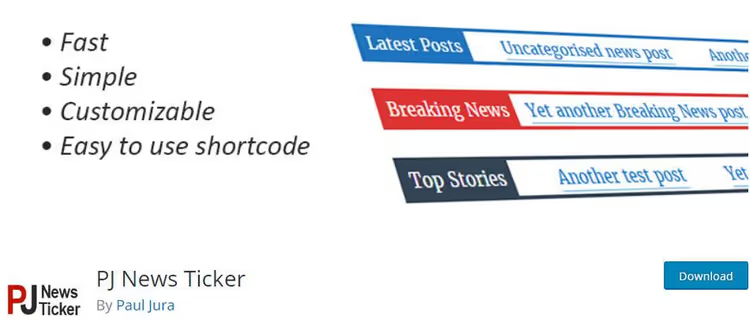
PJ News Ticker is a minimalist plugin that adds a horizontal scrolling ticker in teletype style to your site in 5 minutes. Insertion via shortcode only. No design settings, just speed and direction.
Pros:
- Extremely simple
- Lightweight, doesn't load unnecessary scripts
Cons:
- Minimal settings
- Shortcode only, no widget
🔗 PJ News Ticker on WordPress.org
4. Advanced Live News Ticker
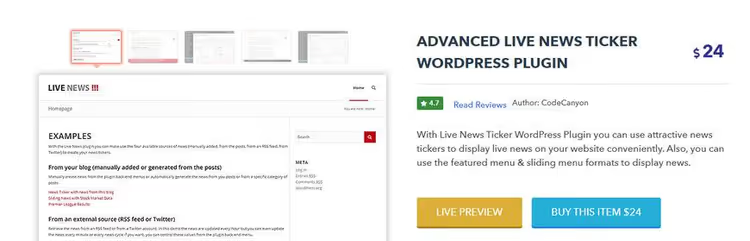
Advanced Live News Ticker is a premium plugin with over 70 settings. Works on AJAX: news updates without page reload. Supports RTL/LTR, Google Fonts, and WordPress Multisite.
Pros:
- 70+ design settings
- AJAX updates without reload
- RTL/LTR, Google Fonts
Cons:
- Paid only
- No free version for testing
🔗 Advanced Live News Ticker on InkThemes
5. News Ticker Benaceur

News Ticker Benaceur is a ticker with 25 news appearance animations. Displays latest posts or comments on a customizable panel. RTL/LTR, mobile-friendly.
Pros:
- 25 animation variants
- Show comments or posts by choice
- RTL compatibility
Cons:
- Panel only, no inline ticker
- Small community
🔗 News Ticker Benaceur on WordPress.org
3. News elements and addons for Elementor
Elementor is the most popular WordPress page builder. With the right addons, you add a news ticker, grid, or slider through drag-and-drop without touching code. These four additions cover news functionality inside Elementor.
1. News Ticker for Elementor

News Ticker for Elementor adds a scrolling ticker widget to the builder. You can use blog post titles or enter your own text. Unlimited number of tickers per page.
Pros:
- Post texts or custom, your choice
- Unlimited tickers per page
- Pause button
Cons:
- Horizontal mode only
- Minimal styles
🔗 News Ticker for Elementor on WordPress.org
2. Epic News Elements
Epic News Elements is a premium addon for Elementor with over 70 elements for building a news section, blog, or magazine theme. Compatible with most WordPress themes, supports custom post types.
Pros:
- 70+ design elements
- Unlimited layouts
- Retina-ready
Cons:
- Paid only
- May be excessive for a simple news block
3. Magazinify, news addon for Elementor

Magazinify is a premium extension for Elementor tailored for news and magazine sites. Creates attractive news blocks through a drag-and-drop interface. Compatible with Gutenberg and the latest WordPress version.
Pros:
- Magazine layouts out of the box
- Drag-and-drop without code
- Cross-browser compatibility
Cons:
- Paid only
- Fewer elements than Epic News Elements
4. News Layouts for Elementor
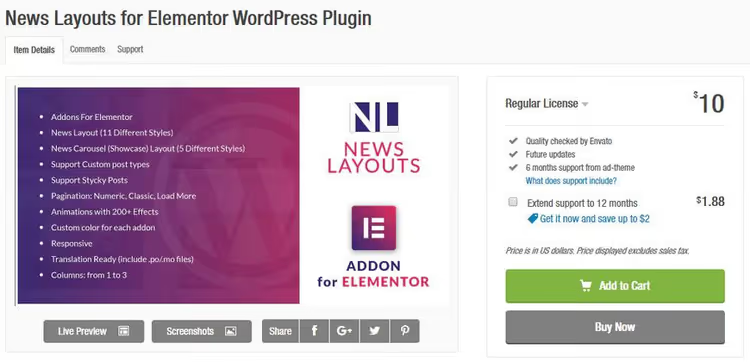
News Layouts for Elementor is a premium plugin with 11 preset news layouts. Two widgets (classic and carousel), over 200 animation effects, custom post type support.
Pros:
- 11 ready-made layouts
- News carousel
- 200+ animations
Cons:
- Paid only
- 11 layouts may not be enough for a unique style
4. Plugins for displaying headlines from external sources
You don't always need to write news yourself. Sometimes it's enough to display headlines from authoritative sources: financial summaries, world news, industry digests.
1. Stock Market & Financial News Headlines

Stock Market & Financial News Headlines is a premium plugin for financial sites. Pulls headlines for specific companies, forex, cryptocurrencies, and RSS feeds through Yahoo Finance, Seeking Alpha, and Financial Content. Six templates editable via HTML/CSS, and unlimited widgets.
Pros:
- Direct integration with Yahoo Finance and Seeking Alpha
- 6 customizable templates
- US, UK, Canada, Australia, Europe markets
Cons:
- English only
- Paid license
🔗 Stock Market & Financial News Headlines on CodeCanyon
5. Plugin for importing RSS feeds
RSS aggregation is when you collect news from dozens of sites into one WordPress feed. WP RSS Aggregator can import RSS/Atom, convert posts into WordPress posts, and display them on the site.
1. WP RSS Aggregator

WP RSS Aggregator is the undisputed niche leader: 60,000+ active installs. Imports and displays RSS and Atom feeds on the site. The free version doesn't limit the number of sources. The paid Pro version adds: content import into posts, keyword filtering, YouTube and Instagram embedding.
Pros:
- 60,000+ installs, regular updates
- Unlimited number of RSS sources
- Professional support
Cons:
- Full text import only in Pro
- Pro subscription is significant for small projects
🔗 WP RSS Aggregator on WordPress.org
6. Plugins for Apple News and Google News
A separate category for those who want to go beyond WordPress and publish content directly to Apple and Google ecosystems.
1. Publish to Apple News

Publish to Apple News is the official Apple plugin for WordPress. Automatically converts posts to Apple News format, supports single and batch publishing. Includes design customization for Apple News content.
Pros:
- Official Apple plugin
- Batch publishing
- Custom design for Apple News
Cons:
- Requires Apple News Publisher account
- Not all countries support Apple News
🔗 Publish to Apple News on WordPress.org
2. XML Sitemap & Google News

XML Sitemap & Google News creates an XML sitemap and Google News map. 100,000+ active installs. Compatible with Polylang, WPML, WordPress Multisite, and popular caching plugins (WP Super Cache, W3 Total Cache, Quick Cache). Adds rules to robots.txt.
Pros:
- 100,000+ installs
- Multilingual (Polylang, WPML)
- Works out of the box after activation
Cons:
- Sitemap only, not a news display plugin
- Fine-tuning requires reading documentation
🔗 XML Sitemap & Google News on WordPress.org
If you're more visual and prefer to see a news ticker in action before installing, here's a short video configuring Ditty:
⁉️🤔 Frequently asked questions
Can I display news without a plugin using WordPress features?
Yes, the standard WP_Query loop outputs posts in chronological order. But for a ticker with animation, RSS import from external sources, custom post type "News," and scrolling widgets, you can't do without a plugin. You'd have to write hundreds of lines of PHP, JS, and CSS code. Plugins from this collection cover these tasks without development.
Which plugin is best for importing dozens of RSS sources?
WP RSS Aggregator is the proven leader with 60,000+ installs and unlimited sources in the free version. The Pro version adds full text import, keyword filtering, and media embedding. If WP RSS Aggregator's functionality isn't enough, look at Feedzy RSS Feeds or RSS Import Pro.
Is it worth installing a plugin for just one ticker in the header?
Depends on the ticker. Ditty in the free version pulls about 200 KB of scripts and styles. For one ticker in the header, you can get by with pure CSS (marquee or animation). But if the ticker needs to show real post headlines, not static text, the plugin is justified: it saves hours of development.
Which plugin should I choose for a news site on Elementor?
WP News (WP News Magazine) creates both a custom post type and provides an addon for Elementor. If Elementor isn't essential, WP Latest Posts from JoomUnited: more installs, more actively supported, 6 ready-made themes. Among premium addons, Epic News Elements (70+ elements).
Plugins for Apple News and Google News, are they for display or publishing?
For publishing. Publish to Apple News sends your content from WordPress to the Apple News ecosystem. XML Sitemap & Google News creates a sitemap for Google News so your articles get into the Google news index. Neither displays news on your site.
Which WordPress news plugin to choose in 2026
The choice comes down to three questions. Displaying your own news? WP Latest Posts, a universal start with a Gutenberg block. Need a scrolling ticker? Ditty, an industry standard with 30,000+ installs. Importing other people's news via RSS? WP RSS Aggregator covers any scenario, from simple digest to multisite aggregation.
For specific tasks: Stock Market & Financial News Headlines for a financial site. Publish to Apple News for getting into Apple News. For Elementor users, it makes sense to look at WP News with a built-in addon, fewer plugins, fewer conflicts.
Test a combination of two or three plugins on staging: one for news structure, second for display (ticker/grid), third for import (if needed). Don't install 5 plugins for one task. Each extra plugin slows down the admin panel and multiplies incompatibility risks.

A professional team of writers and editors specializing in creating quality content.