














☕ 20 best WordPress themes for coffee shops 2026
A customer googles "latte nearby" while still approaching your neighborhood. If the site takes five seconds to load or the menu is unreadable on mobile, they walk to the competitor. Whose page opened instantly.
ThemeForest and independent studios offer hundreds of themes for coffee shops, cafes and restaurants. The problem is different: how to filter out those that will stop updating in six months, and find one where WooCommerce doesn't conflict with the builder, and support responds faster than an americano cools down.
We combed through the catalog, from installation to final live demo checks, and selected 20 themes. Below, an honest breakdown: screenshots, prices, strengths and pitfalls of each.
💡 Quick overview:
- Scan the table: 20 themes from budget to premium, builder, WooCommerce support, number of demo layouts
- Open live demos: the picture on ThemeForest and the real site can differ
- Choose a theme for your format: minimalist cafe, online bean shop or food blog with delivery
- Demo import in one click, content swap, and a ready site in a working day
Comparison table: 20 coffee shop themes in 2026
Theme | Price | Builder | WooCommerce | Demo | Rating |
|---|---|---|---|---|---|
Amaya | $69 | WPBakery | Yes | 1-Click | 5.0 |
Corretto | $69 | WPBakery | Yes | 1-Click | 4.5 |
Gaspard | $75 | Elementor | Yes | 1-Click | 4.3 |
Cafenod | $59 | Built-in | Yes | 1-Click | - |
CoffeeKing | $59 | WPBakery | Yes | 4 layouts | 4.9 |
Coffee Luck | $59 | WPBakery | Yes | 2 layouts | 4.5 |
Despina | $59 | WPBakery | Yes | 5 layouts | 3.8 |
Verdure | $69 | WPBakery | - | 4 layouts | - |
TheLeaf | $59 | WPBakery | Yes | 1-Click | - |
AruCafe | $59 | Elementor | Yes | 3 layouts | - |
Hot Coffee | $69 | Elementor | Yes | 1-Click | 4.6 |
TinySalt | $54 | Built-in | - | 12 layouts | - |
Restaurant Food | $54 | WPBakery | Yes | 1-Click | - |
EasyMeals | $75 | Built-in | Yes | 1-Click | - |
Barista | $69 | Elementor | Yes | 1-Click | - |
Kaffa | $69 | Built-in | - | 6 layouts | - |
Craft | $59 | Built-in | Yes | 9 layouts | - |
Caverta | $54 | Elementor | - | 30+ layouts | - |
Dina | $54 | Elementor | Yes | 7 layouts | - |
Vonaco | $49 | Elementor | Yes | 6 layouts | - |
1. Amaya
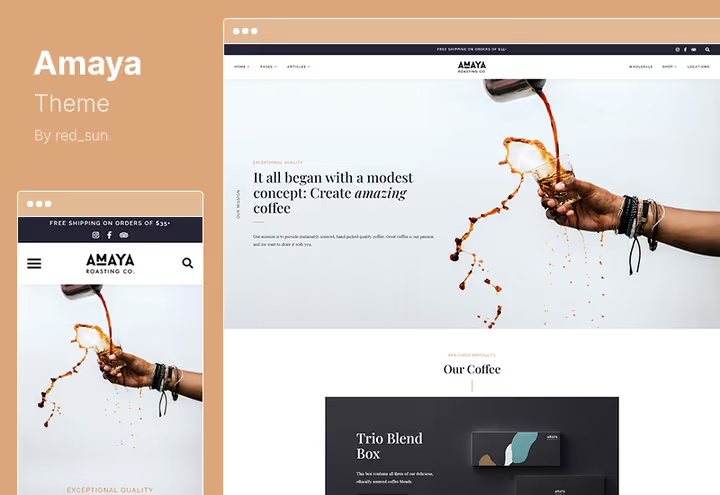
Amaya covers three scenarios with one theme: landing page, coffee blog and online store. The design is clean, guests look at the menu and beans, not animations. 20+ header variations and a footer widget area let you assemble a landing page without a line of code.
In practice, Amaya's strong side is deployment speed. One click on demo import gives you a ready structure: beverage menu, gallery, about page, reservation form. Built-in WooCommerce compatibility eliminates plugin dance for a coffee shop selling beans and accessories online.
Sticky sidebar keeps the order button or promotion in view while scrolling. RTL support, a rarity for this price category, works for an Arabic or Hebrew site.
- Pros: 20+ header variations, RTL support, sticky sidebar for promotions
- Cons: some demo layouts are visually similar to each other
- Price: $69 on ThemeForest, includes 6 months support and lifetime updates
🔗 Amaya on ThemeForest | 🔗 Live demo
2. Corretto
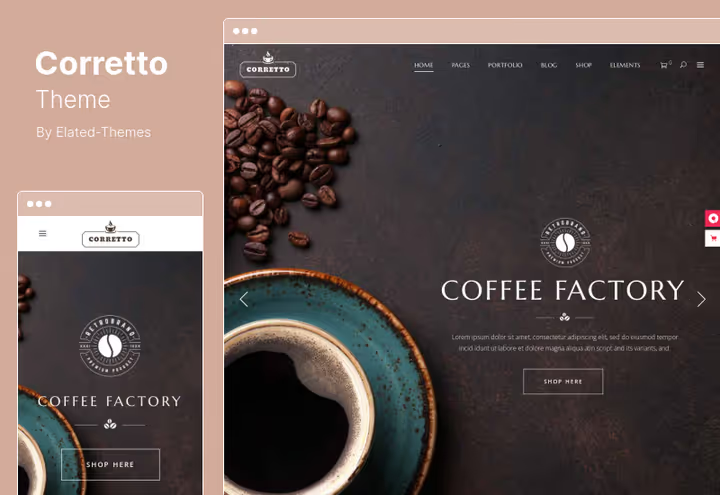
Corretto is one of the best-selling themes in the "coffee shops" category on ThemeForest: over 1000 sales with a 4.5 rating. The secret isn't in bells and whistles, but in typography and ready inner pages. Beverage menu, map, reviews, everything is laid out, just replace text and photos.
WPBakery Page Builder and Slider Revolution are included in the price. In our experience, this saves dozens of dollars on separate plugin purchases. The Portfolio List shortcode displays an interior gallery or signature drinks without third-party extensions.
Nuance: the developer doesn't push releases, the last update came out in 2024. For a basic coffee shop site this isn't critical, but if you plan integrations with new WooCommerce versions, test on the demo before purchase.
- Pros: over 1000 sales, WPBakery and Slider Revolution included, excellent typography
- Cons: infrequent updates, some settings require getting used to
- Price: $69 on ThemeForest, 6 months support
🔗 Corretto on ThemeForest | 🔗 Live demo
3. Gaspard
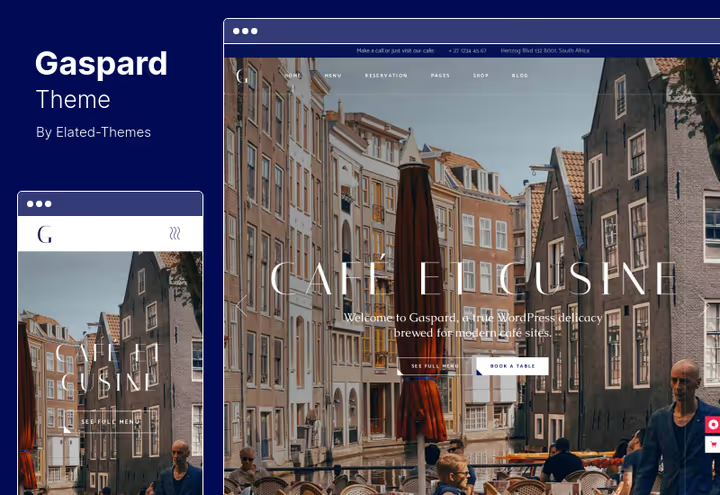
Gaspard stands out with design: dark scheme with contrasting accents. For a coffee shop open late, or a lounge format, this works for image. Elementor, WPML and WooCommerce play nice with the theme out of the box.
Included is a menu shortcode and price table. Pricing table saves time: no need to code columns manually, the shortcode assembles the grid itself. The admin panel is intuitive, a coffee shop owner without technical background updates the menu in 15 minutes.
- Pros: dark premium aesthetic, Elementor out of the box, WPML for multilingual
- Cons: dark scheme doesn't suit all venues, fewer light layouts
- Price: $75 on ThemeForest, 6 months updates
🔗 Gaspard on ThemeForest | 🔗 Live demo
4. Cafenod
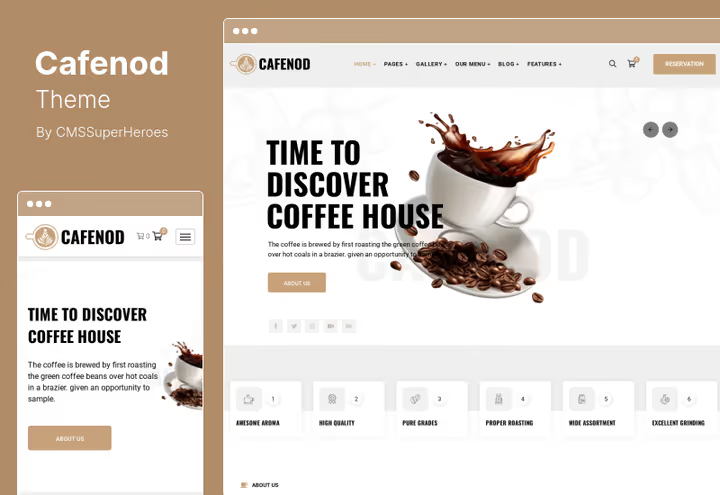
Cafenod is an option for wow-effect without custom coding. Parallax scrolling, video background in header, 700+ Google fonts. Visually pulls premium segment, and costs budget.
Three homepage layouts, boxed and fullwidth arrangement. Contact Form 7 and WPML out of the box cover basic needs: contact form and multilingual for a coffee shop in a tourist area.
What to pay attention to: modest sales count at the time of analysis. The community around the theme is smaller than Corretto or CoffeeKing. If you're used to searching for ready solutions on forums, consider this moment.
- Pros: video background and parallax out of the box, WPML for tourist locations
- Cons: small community, few reviews
- Price: $59 on ThemeForest, including 6 months support
5. CoffeeKing
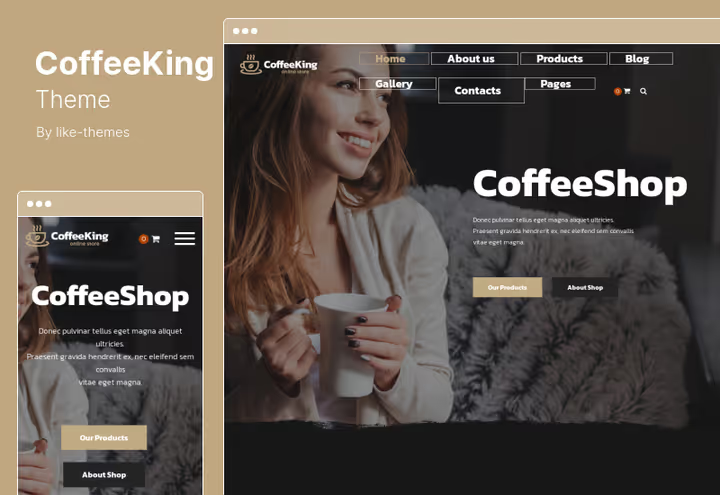
CoffeeKing is an almost ready online coffee store. 4 homepage variations, 30+ inner pages, 22 custom shortcodes. Team is exported as custom post type, the developer clearly understands coffee business needs.
In practice, the Team shortcode is useful: display baristas and roasters with photo and description, build trust in the establishment. Parallax effects add depth to the landing page, and 620+ Google fonts help hit branding precisely.
WooCommerce pages are already styled to match the theme design. No need to tweak product card and cart styling. For a coffee shop selling beans, drip bags and merch online, savings in hours.
- Pros: 30+ ready pages, 22 shortcodes, WooCommerce pages styled out of the box
- Cons: high price in the segment, excessive for a purely image site
- Price: $59 on ThemeForest
🔗 CoffeeKing on ThemeForest | 🔗 Live demo
6. Coffee Luck
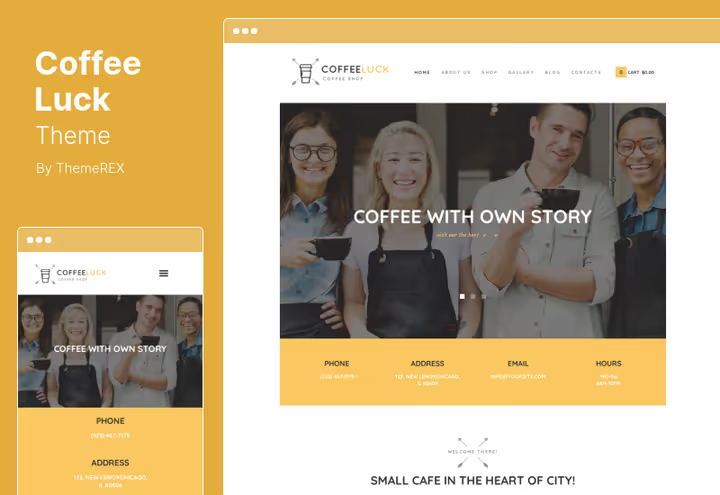
Coffee Luck is a workhorse without extra noise. Two homepage layouts, WPBakery for customization, WooCommerce for sales, Google Maps for location display. Everything needed is in place.
Important moment: the theme is tuned for Gutenberg. In 2026, the block editor is standard for new WordPress projects, and Coffee Luck doesn't let down. HTML5 and CSS3 under the hood, valid markup.
For a wine bar or coffee shop with cocktail menu also a working option: color scheme adapts to the venue mood without re-coding.
- Pros: native Gutenberg support, clean HTML5/CSS3 markup, flexible color scheme
- Cons: only 2 homepage layouts, less visual variety
- Price: $59 on ThemeForest, 6 months maintenance
🔗 Coffee Luck on ThemeForest | 🔗 Live demo
7. Despina
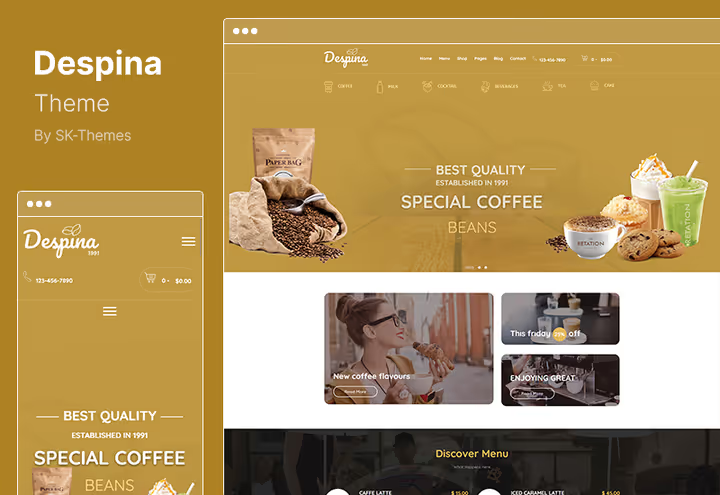
Despina is tuned for "coffee plus pastry" format: 5 homepage variations, WPBakery for layout, Slider Revolution for impressive slides of signature desserts.
A 3.8 rating isn't a reason to pass by. According to reviews, main complaints concerned early versions, and the developer responds to support tickets and releases fixes. For launching a site for a patisserie at a coffee shop or cake bar, solid mid-range.
- Pros: 5 homepage layouts, Slider Revolution included, lifetime updates
- Cons: rating below average for the selection, some bugs in early versions
- Price: $59 on ThemeForest, lifetime updates and 6 months support
🔗 Despina on ThemeForest | 🔗 Live demo
8. Verdure

Formally Verdure is positioned as a tea shop theme, but for a coffee shop selling beans and brewers, it fits organically. 4 homepage layouts, WPBakery with Slider Revolution included, working hours shortcode.
Page transition animation adds polish: the site feels more expensive. Portfolio layout lets you design a gallery of coffee or tea varieties without third-party plugins.
WooCommerce is not supported out of the box. If you plan an online store at the coffee shop, look at Amaya or CoffeeKing.
- Pros: transition animation, portfolio layout for variety gallery
- Cons: no WooCommerce, positioned as tea theme
- Price: $69 on ThemeForest, documentation and six-month support
🔗 Verdure on ThemeForest | 🔗 Live demo
9. TheLeaf
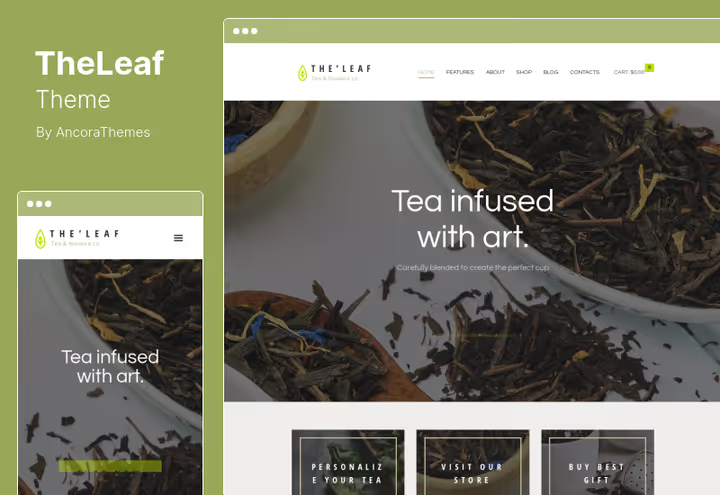
TheLeaf offers Essential Grid included, the gallery plugin comes as a bonus with the theme. For a coffee shop with emphasis on visuals (large interior photos, latte art, branded dishes) this solves the task of a beautiful image grid without additional expense.
The collection of ready inner pages covers typical requests: menu, reservations, blog. Installation scheme is standard: demo import, content replacement, publication.
- Pros: Essential Grid included, rich collection of inner pages
- Cons: design closer to tea aesthetic, requires adaptation for coffee
- Price: $59 on ThemeForest, including Essential Grid
10. AruCafe

AruCafe is a fresh 2024 theme, designed specifically for coffee shops and cafes, not broad-profile restaurants. Three premium homepage layouts, clean modern design and full Elementor integration: you assemble the page visually, without code.
In practice, the theme is strong on the eCommerce side: 6 product card styles, 8 product page layouts, smart wishlist, discount timer and mega menu. For a coffee shop with a line of beans, drip bags and merch, a ready store without refinement. WooCommerce, Contact Form 7 and WPML work out of the box.
The developer regularly releases updates, the theme is compatible with the current WordPress version. Parallax effects and fast loading add points to Core Web Vitals.
- Pros: tuned specifically for coffee shops, 6 product card styles, fresh updates
- Cons: fewer layouts than veterans, small community
- Price: $59 on ThemeForest
11. Hot Coffee

Hot Coffee by ThemeREX is a category veteran with a 4.6 rating and hundreds of sales. The theme covers the full food business spectrum: from coffee shop to sports bar, from bakery to pizzeria. But it's the coffee format that has the most developed demo layout.
Elementor for full customization, WooCommerce for online sales, built-in table reservation system, the three pillars that hold the functionality. A collection of menu, gallery and review shortcodes lets you build a landing page without third-party plugins.
The theme updates steadily (version 2.26.0), cross-browser, responsive. For a coffee shop that wants a proven solution with predictable support, not an experiment.
- Pros: built-in reservation system, hundreds of sales and 4.6 rating, stable updates
- Cons: universal food design, not exclusively coffee
- Price: $69 on ThemeForest
12. TinySalt
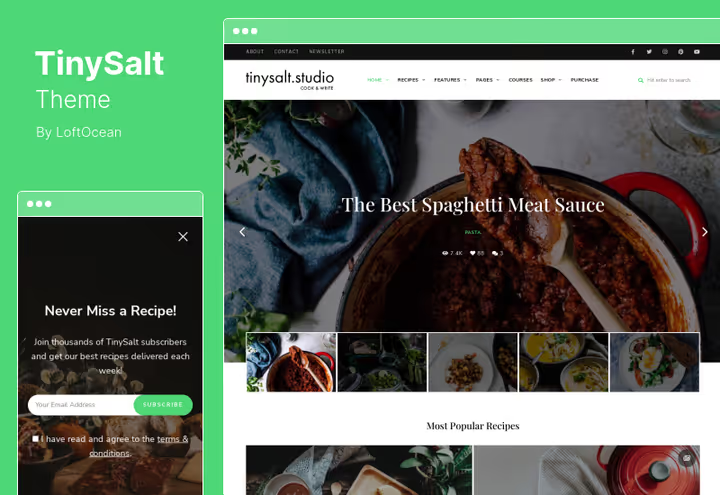
TinySalt is a theme for "coffee shop plus recipe blog" format. Built-in recipe system with rating, rich snippets for Google results, video support. 12 demo layouts, a record for this price category.
For a venue with a coffee lover community and signature recipe section, the theme gives more than a standard restaurant template. Ajax recipe search speeds up navigation.
WooCommerce is not supported, but for "content plus reservations" format this isn't needed.
- Pros: built-in recipe system with rich snippets, 12 layouts, Ajax search
- Cons: no WooCommerce, narrow specialization on recipes
- Price: $54 on ThemeForest, 6 months support
13. Restaurant Food
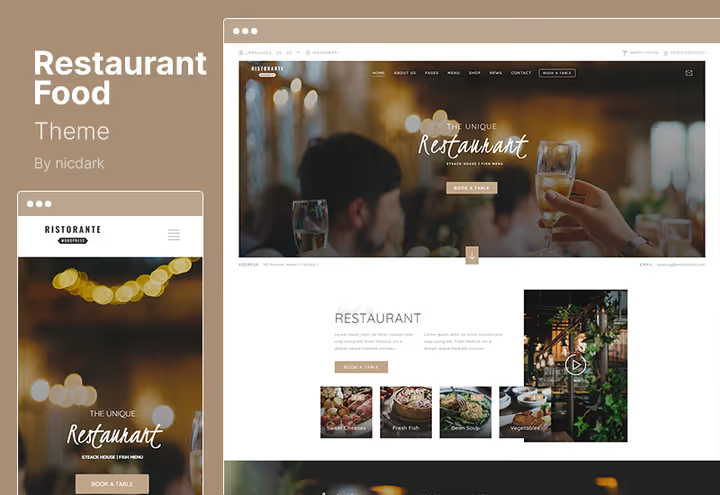
Restaurant Food (in the catalog, Ristorante) solves the main pain of seated venues: table reservations. The built-in reservation system accepts requests with deposit, the admin panel lets you configure opening hours and number of seats.
Demo for pizzeria, Asian cuisine, Italian restaurant adapt to a coffee shop in an evening. WPML, WooCommerce, Contact Form 7, full set without extra payments.
- Pros: built-in reservation system with deposit, WPML and WooCommerce out of the box
- Cons: restaurant, not coffee design by default
- Price: $54 on ThemeForest, with detailed documentation
🔗 Restaurant Food on ThemeForest
14. EasyMeals
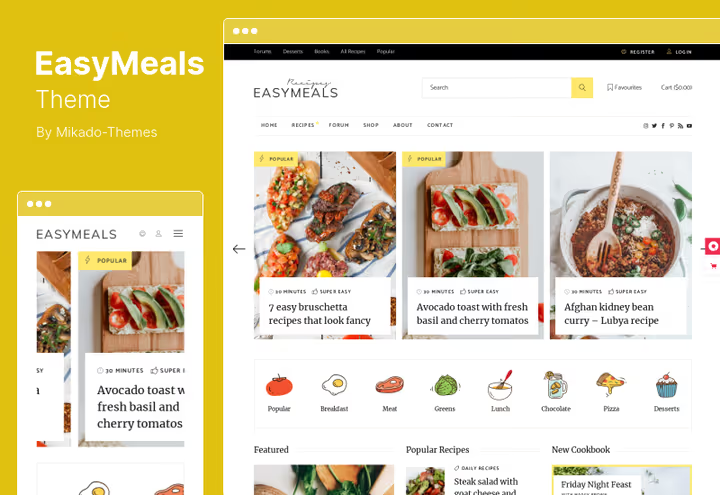
EasyMeals surprises with a feature no other theme in the selection has: automatic ingredient recalculation for number of servings. Enter the number of guests, the theme recalculates quantities. For a coffee shop with recipe section or catering, this is priceless.
Built-in recipe editor with fields for notes, photos and nutritional value, print version, compatibility with bbPress for coffee lover forum. Functionality goes beyond typical theme.
- Pros: automatic ingredient recalculation, recipe editor, print version
- Cons: overloaded with features for a simple coffee shop, price above average
- Price: $75 on ThemeForest, license with updates
🔗 EasyMeals on ThemeForest | 🔗 Live demo
15. Barista
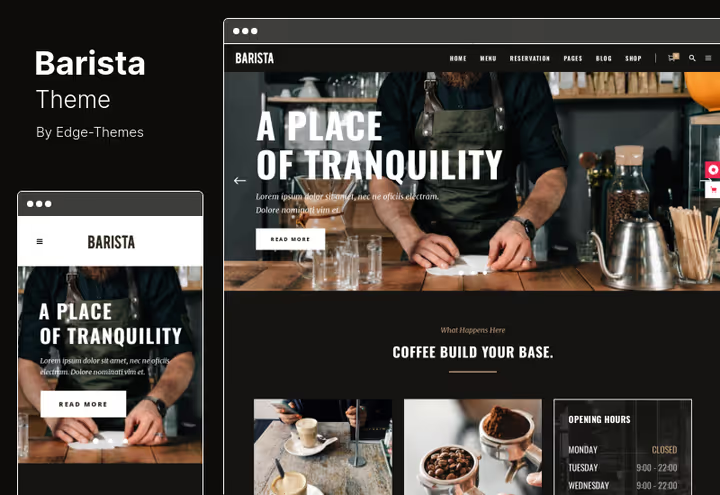
Barista combines three pillars: online sales of beans and merch through WooCommerce, table reservations through reservation system and professional coffee shop design. Elementor for customization, Slider Revolution for interior and beverage presentation.
Shortcodes for menus, galleries and banners let you build a landing page without plugins. In our experience, the Working Hours shortcode is especially convenient: change hours in one place, the whole site updates.
- Pros: reservations and WooCommerce in one theme, Working Hours shortcode
- Cons: price slightly above budget segment
- Price: $69 on ThemeForest, documentation included
🔗 Barista on ThemeForest | 🔗 Live demo
16. Kaffa
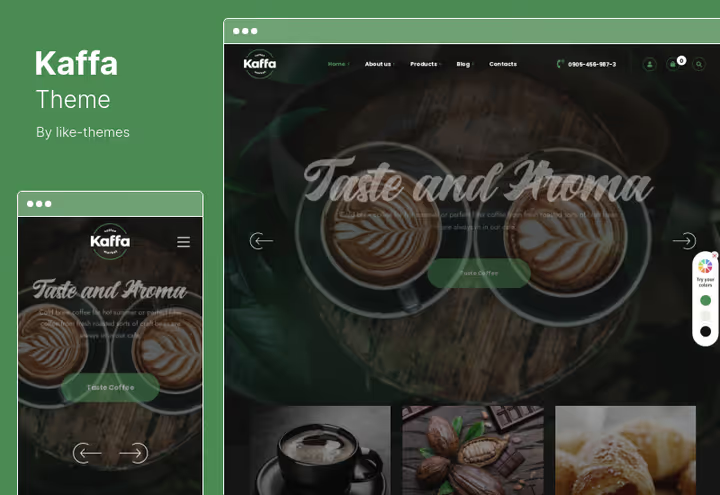
Kaffa bets on speed and conversion: lightweight code, optimization for Core Web Vitals, built-in MailChimp subscription form for email list building. 6 demos, cross-browser, Contact Form 7.
Parallax effects add depth to the landing page, and flexible content layouts reassemble the page in half an hour without a programmer. No WooCommerce, but for an image coffee shop site this isn't critical.
- Pros: optimization for Core Web Vitals, MailChimp form, 6 demos
- Cons: no WooCommerce, image format only
- Price: $69 on ThemeForest
🔗 Kaffa on ThemeForest | 🔗 Live demo
17. Craft
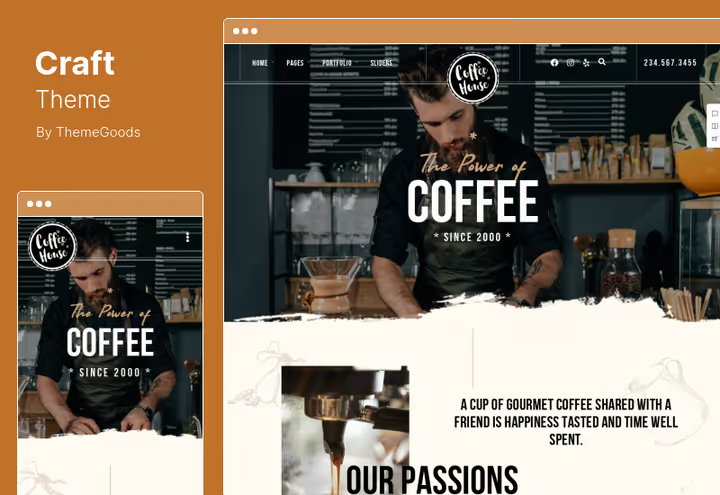
Craft is tuned for "coffee plus delivery" format: 9 demos, 50+ page templates, 5 menu layouts, drag-and-drop builder. Mega menu displays coffee menu sections with icons and photos.
Gallery image protection from copying, a rare but useful feature for a coffee shop with original beverage and interior photos. WooCommerce on board: coffee and merch delivery configures without additional plugins.
- Pros: 9 demos and 50+ templates, mega menu with icons, gallery protection
- Cons: builder interface requires getting used to
- Price: $59 on ThemeForest, 6 months support
🔗 Craft on ThemeForest | 🔗 Live demo
18. Caverta
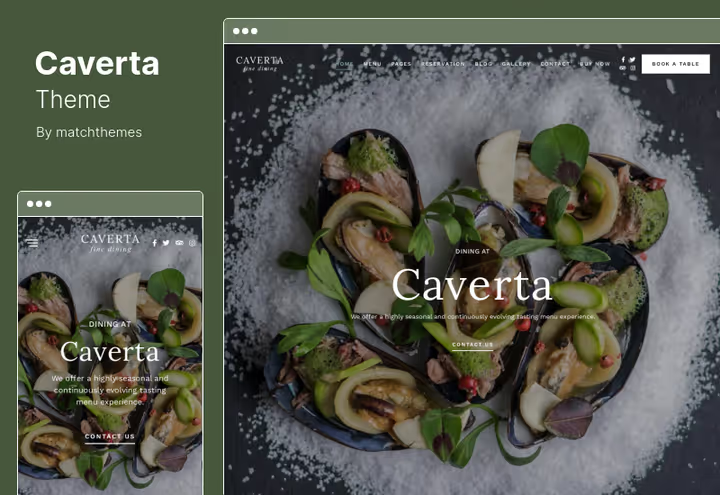
Caverta offers a record number of layouts in the selection: 30 homepage variations plus 12 menu templates. Parallax scrolling, live customizer, Elementor, you assemble the site with visual control of every change.
Multiple blog layouts, 4-column footer widget area, interior gallery. For a coffee shop planning expansion to restaurant or gastro-bar, the layout reserve eliminates repeated migration.
- Pros: 30+ homepage layouts, live customizer, 12 menu templates
- Cons: no WooCommerce, some layouts visually dated
- Price: $54 on ThemeForest, six-month support and auto-updates
🔗 Caverta on ThemeForest | 🔗 Live demo
19. Dina
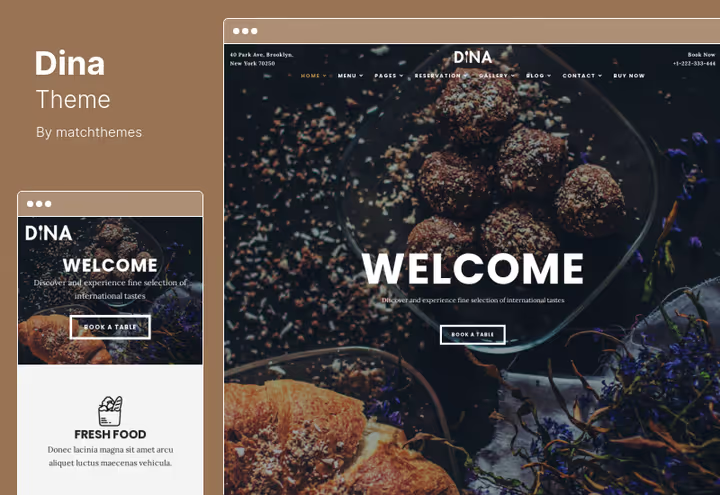
Dina is a solid all-rounder: 7 homepage demos, 9 menu layouts, 4 reservation options, video background for an atmospheric first screen. Elementor for customization, 6 header layouts, lightbox gallery with copy protection.
Launch speed is impressive: demo choice, one-click import, content replacement, site ready. For a coffee shop opening in a week and needing a landing page "yesterday", one of the best options.
- Pros: 7 demos and 9 menu layouts, video background, fast launch
- Cons: some layouts are restaurant, not coffee
- Price: $54 on ThemeForest, 6 months free support
🔗 Dina on ThemeForest | 🔗 Live demo
20. Vonaco
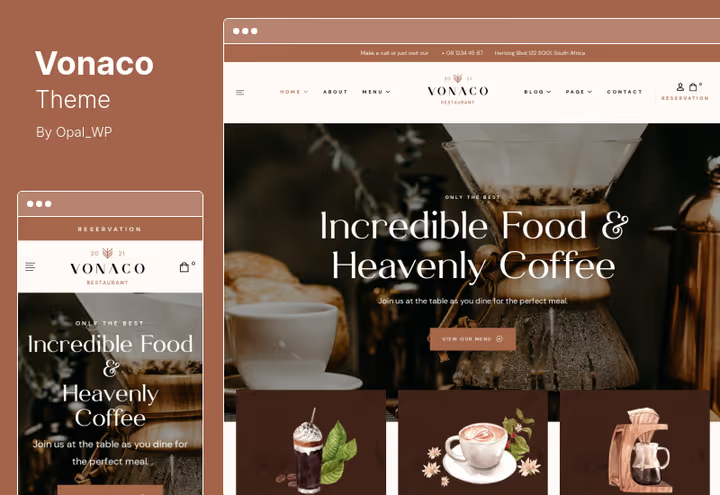
Vonaco closes the selection as the best budget solution: a theme with 6 demos, WPML and RTL out of the box, WooCommerce shop and ready functional pages. HTML5 and CSS3 under the hood.
For a multilingual coffee shop in a tourist center, the optimal entry. Demos for Italian steakhouse and Asian cuisine, but the basic layout easily adapts to coffee format.
- Pros: WPML + RTL, price lowest in the selection, WooCommerce
- Cons: no specialized coffee layout
- Price: $49 on ThemeForest, lifetime license with 6 months support
🔗 Vonaco on ThemeForest | 🔗 Live demo
Video: how to choose a WordPress theme for a coffee shop
Short English video breaking down criteria for choosing a coffee shop theme and comparing live examples. Will help orient if after reading the selection you still have doubts.
⁉️🤔 Frequently asked questions
How does a coffee shop theme differ from a regular restaurant theme?
Coffee themes are visually lighter: fewer sections "main course / appetizers / hot dishes", more emphasis on atmosphere, large interior photos, beverage gallery, Instagram integration. Often includes a table reservation module and storefront for bean sales. Restaurant themes also work, but will require more customization for coffee format.
Do I need WooCommerce if I don't sell coffee online?
Yes, and here's why. Even if you don't sell now, tomorrow you'll launch gift certificates, merch or bean subscription. WooCommerce out of the box doesn't slow down the site. Adding it later on top of a theme without native support means guaranteed style conflicts and double work. Get a theme with WooCommerce right away.
How to check if the theme is abandoned by the developer?
Go to the theme page on ThemeForest, "Item Details" tab, "Last Update" field. Date older than two years from current, red flag. Also check the "Comments" tab: if the author hasn't answered questions for six months or more, support is dead. In our selection we considered these factors, but always double-check before purchase.
Which is better, WPBakery or Elementor?
Elementor is friendlier for beginners and develops more actively in 2026. WPBakery (formerly Visual Composer) is time-tested, hundreds of thousands of sites are built on it. For a coffee shop owner without coding experience the difference is minimal: both are drag-and-drop, both are visual. Look at the specific theme, not the builder.
Can I use one theme for a coffee shop chain?
Standard ThemeForest license allows use on one site. For a chain of 3-5 coffee shops with separate sites you need an extended license or theme with multisite support. Alternative: one theme on the main domain and subdomains for each location with the same license, but this is a gray area of ThemeForest terms, clarify with the developer.
How long does it take to launch a site on a ready theme?
In our experience: 2-4 hours for WordPress installation and theme demo import, 4-8 hours for content replacement (text, photos, menu), 2-3 hours for basic SEO and analytics connection. Total, in 1-2 working days the site is ready to receive visitors. Critical factor: pre-prepared photos, without them even the best theme looks like a placeholder.
Which coffee shop theme to get in 2026: decision matrix
The choice comes down to scenario, not budget. Here's a matrix proven in practice:
- Coffee shop with online bean and merch store, CoffeeKing or Barista. WooCommerce pages are already styled, product display shortcodes included.
- Minimalist cafe with table reservations, Restaurant Food (Ristorante) or Dina. Built-in reservation form with deposit, minimum hassle.
- Coffee shop plus recipe blog and community, TinySalt. Recipe system with rating and rich snippets, Ajax search, 12 layouts included.
- Maximum design for minimum budget, Vonaco or AruCafe. Fresh design and full functionality for the price of two or three specialty coffee packs.
- Premium image, dark aesthetic, Gaspard or Hot Coffee. Bold design, animations, video background.
- Multilingual coffee shop in tourist center, Vonaco or Gaspard with WPML out of the box.
All 20 themes in this selection are verified on live demos: each works, each received updates, each is worth its money. Final advice: open 3-4 demos from your category, click around on mobile and get the one where everything is clear without instructions. That's your ideal match.

A professional team of writers and editors specializing in creating quality content.