














📂 4 best Google Drive plugins for WordPress 2026 (free and paid)
Moved the site to a new hosting, and there's barely enough disk space for a couple of backups. The client sends 15 PDF reports a month through the form, and each one settles into the media library, even though the files are only needed for viewing. Sound familiar?
WordPress out of the box doesn't know how to work with Google Drive, there's no "open from cloud" button in the media library, and no "insert document from Drive" button in the editor. You have to download, convert, upload, and the disk fills up with duplicates.
We tested plugins that link WordPress with Google Drive directly: files stay in the cloud, only links on the site, embedded preview or gallery. No duplicates in the media library, no extra gigabytes on the server.
💡 Quick overview:
- Connect Google Drive to WordPress: cloud files will appear in the media library without uploading to the server
- Embed a document or gallery from Drive in a post: one click and not a single duplicate
- Configure access rights: who views files, who downloads, and who only reads
Comparison table
Plugin | Formats | Media library | Gallery | Embedding | Free version | Pro price |
|---|---|---|---|---|---|---|
Google Drive Embedder | PDF, DOC, XLS, video, images, Google Docs | ❌ | ❌ | ✅ Yes | ✅ Available | From $39/year |
EmbedPress | PDF, DOC, XLS, video, audio, Google Suite, 100+ sources | ❌ | ❌ | ✅ Yes | ✅ Available | $49/year |
Use-your-Drive | All file types | ❌ | ✅ Yes | ✅ Yes | ❌ No | $36/year |
Image & Video Gallery from Google Drive | Images, video | ❌ | ✅ Yes | ❌ | ✅ Available | Free |
1. Google Drive Embedder
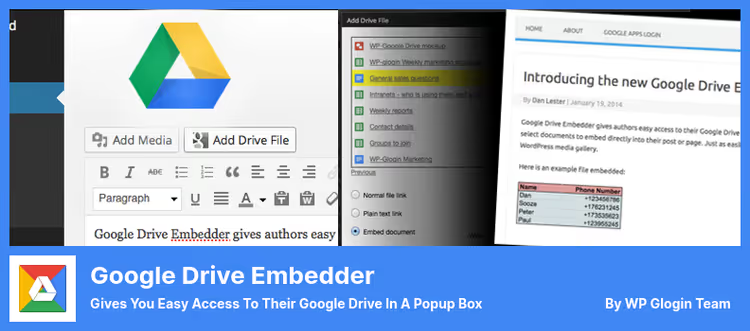
A plugin that adds an "insert file from Google Drive" button to the WordPress editor. You click, a popup with your Drive opens: you choose a document, specify the display method and the file appears in the post.
What it does. Supports viewing PDF, Word, ZIP, video and images directly in the reader's browser, through Google's built-in viewer. Google documents (Sheets, Slides, Forms) are also embedded without conversion. For each file you can choose one of three modes: embedded view, download link or edit link in Google Docs.
Where it's indispensable. Ideal for intranets and educational sites where you need to regularly publish updated documents: replaced a file in Drive, it updated automatically on the site, because the plugin pulls the current version, not a copy.
Cons. The free version doesn't support embedding Google folders and calendars. For this you need a Premium license (from $39/year). Also required is installing a second plugin, Google Apps Login (also from the developer, free) for OAuth authorization.
Key features:
- Works with PDF, Word, ZIP, video, images and native Google Docs formats
- Three modes: view, download, edit in Google Docs
- Access rights configuration: file is visible only to those who have access in Drive
- Embedding ICAL and XML calendars (Premium)
- Shared Drives support (Enterprise)
🔗 Google Drive Embedder on WordPress.org | 🔗 Premium version
2. EmbedPress

EmbedPress is a combine harvester for embedding: Google Drive, YouTube, Vimeo, Spotify, Google Maps, Twitter and 100+ more sources. You paste a URL, the plugin automatically determines the content type and picks the right player or viewer.
What it does. In the context of Google Drive: embeds documents, presentations, spreadsheets, PDFs and images directly from the cloud. The difference from Google Drive Embedder, you don't need to enter a popup Drive browser: just paste a link to the file in a Gutenberg or Elementor block. The plugin will figure it out itself.
Where it's indispensable. When on the site besides Drive files you need to embed video, audio, maps, social media posts and other multimedia content. One plugin covers all embedding scenarios, you don't need a zoo of 5-6 separate solutions.
Cons. The free version doesn't support navigation through Drive subfolders and logo customization on embedded content. The Pro version ($49/year) adds these capabilities, as well as CTA button customization and branding management.
Key features:
- 100+ sources: Google Drive, YouTube, Vimeo, Spotify, Twitter, Google Maps and others
- Works in Gutenberg, Elementor and the classic editor
- Automatic content type detection by URL
- Google Drive subfolder navigation (Pro)
- Logo and CTA button customization (Pro)
🔗 EmbedPress on WordPress.org | 🔗 Pro version
3. Use-your-Drive

The most powerful plugin in the roundup. Use-your-Drive is a full-fledged Google Drive file manager right inside WordPress: file browser, gallery, uploader, audio and video player, slider. Eight display modules, each customizable visually, without a single line of code.
What it does. Files stay in Google Drive, nothing is copied to the WordPress server. The reader sees a beautiful file browser with search, preview and the ability to download or upload a file (if you gave such a right). Personal folders are supported: each user or client gets their own space in your Drive.
Where it's indispensable. When you need to build a client portal, file exchange, document library or streaming platform. The plugin integrates with WooCommerce, Gravity Forms, Elementor, Divi, WPBakery. A client uploads documents through a form, they go into a dedicated folder on your Google Drive automatically.
Cons. No free version. Standard license: $36/year, commercial (for paid content): $99/year. For simple PDF embedding in a post it's excessive, but for serious Drive integration there are practically no alternatives.
Key features:
- 8 modules: file browser, gallery, uploader, audio/video player, slider and others
- Personal folders for users and clients
- Integration with WooCommerce, Gravity Forms, Elementor, Divi
- Support for multiple cloud accounts
- 14+ years of development, 25,000+ clients
🔗 Use-your-Drive on developer's site
4. Image and Video Gallery from Google Drive

A highly specialized and completely free plugin for one task: display a gallery of images or videos from a Google Drive folder on a WordPress page. No extra features, you chose a folder, inserted a shortcode, the gallery is ready.
What it does. After installation, a "Google Drive gallery" block appears in the editor. You choose a folder in Drive, and all images and videos from it are displayed as a responsive gallery with a lightbox. Each gallery has individual settings: number of columns, spacing, whether to show file names.
Where it's indispensable. When you need a regularly updated gallery: uploaded photos to a folder on Drive, they automatically appeared on the site. Perfect for photographers, event agencies, sports teams that add shots after each event.
Cons. Doesn't embed Google Docs and Google Sheets, only media files (images and video). For documents you need Google Drive Embedder or EmbedPress. The gallery pulls files directly from Drive, so loading speed depends on image size, it's recommended to compress photos before uploading to the folder.
Key features:
- Automatic sync: new files in Drive folder → appear in gallery
- Block for Gutenberg and shortcode for classic editor
- Individual settings for each gallery (columns, spacing, names)
- Support for video files in gallery
- Restricting gallery to a specific Drive folder (security)
🔗 Image and Video Gallery on WordPress.org
⁉️🤔 Frequently asked questions
Can you completely replace the WordPress media library with Google Drive?
Technically yes, with plugins at the level of Use-your-Drive, which doesn't copy files to the server at all. But you can't completely "disable" the native WordPress media library: themes and plugins expect that post images are in
/wp-content/uploads/. In practice they use a hybrid: covers and interface screenshots are stored locally, and documents, video and user content, in Drive.
Which plugin to choose if you only need to embed PDFs in posts?
Google Drive Embedder (free version). Specializes specifically in embedding documents: PDF, Word, Google Docs, with Google's native viewer. Not overloaded with gallery and video player features that you don't need.
Is it safe to give the plugin access to Google Drive?
Yes, if the plugin uses OAuth (all plugins from the roundup use it). You give access not to "all Drive", but to specific folders through sharing settings in Google. The plugin sees only those files to which you opened access by link. Plus you can revoke access at any time in the security settings of your Google account.
What about speed? Do files from Google Drive load slower?
With embedded view (embed), yes, the file is loaded through Google iframe, which adds 200-400 ms to loading. With direct download, speed is determined by your hosting and Google Drive channel (usually these are very fast servers). For galleries, image size is critical: don't upload 5 MB photos to Drive, compress to 200-300 KB, and the gallery will fly.
Why are there 4 plugins in the roundup, not 5?
The fifth participant,
Google Drive WP Mediafrom JoomUnited, was closed on WordPress.org in February 2025 due to security issues. Its functions are now available as a paid add-onGoogle Drive Integrationfor theWP Media Folderplugin, but as a standalone product it no longer exists.
What to install in 2026: final breakdown
The choice comes down to the scenario, not the budget, three of the four plugins have working free versions.
If you need to embed documents in posts and nothing else, take Google Drive Embedder. Minimum features, minimum setup, maximum reliability.
If besides documents you embed video, maps, social networks, install EmbedPress. One plugin for all embedding scenarios, and the free version is enough for most tasks.
If you're building a client portal with file exchange, Use-your-Drive is unrivaled. Yes, paid, but the standard license price, $36/year, for a full-fledged file manager with 8 modules and integrations, is a reasonable fee.
If you just need an automatic gallery from a Drive folder, Image and Video Gallery from Google Drive. Free, specialized, reliable.
And if none of the scenarios fit the task, write in the comments what exactly you need. Perhaps we'll expand the roundup in the next update.

A professional team of writers and editors specializing in creating quality content.