














🗂 5 best classified ads plugins for WordPress 2026 (free and paid)
You installed a classifieds plugin, but the submission form scares users from the first screen? Familiar situation. WordPress classifieds don't work out of the box: search must find by keywords, filters must not lose categories, and moderation must cut spam before publication.
Under the hood of the board lies a specific plugin. We tested five tools: from lightweight free cores to combines with WooCommerce, AI forms and geolocation. Here's what actually works in 2026.
💡 Quick overview:
- Choose a plugin for the task: lightweight start without budget, WPAdverts; flexible catalog with AI, Classified Listing; deep integration with WooCommerce, Directorist.
- Set up categories, custom fields and payment gateway: all five plugins support monetization out of the box or through addons.
- Launch your first board: install the plugin, create pages with shortcodes, check mobile layout. Takes an hour.
- Test the submission form as an unregistered user: moderation catches spam, search finds listings by keywords and location.
Comparison table
Plugin | Free version | Pro price | WooCommerce | Maps | AI features | WP.org rating |
|---|---|---|---|---|---|---|
WPAdverts | ✅ | From $59/year | ❌ (own payments) | ❌ (addon) | ❌ | 4.8 / 161 reviews |
Classified Listing | ✅ | $39/year | ✅ | ✅ Google Maps | ✅ AI forms | 4.7 / 120+ reviews |
Directorist | ✅ | From $103/year | ✅ | ✅ Google Maps + OSM | ✅ AI forms | 4.8 / 590+ reviews |
Classifier | ❌ | $39 (one-time) | ✅ | ✅ | ❌ | CodeCanyon |
AWP Classifieds | ✅ | From $49/year | ❌ | ❌ (addon) | ❌ | 4.5 / 200+ reviews |
1. WPAdverts
WPAdverts, the lightest plugin in the selection. If you need a board that doesn't conflict with your theme and doesn't load the server, this is your candidate. Developer Greg Winiarski has been maintaining the project for over 10 years, version 2.3.2 came out in June 2026.
The free core covers all the basics: submission of listings by anonymous and registered users, moderation queue, flags for complaints. Users edit and delete their listings directly from the frontend, without logging into the WordPress admin.
- Pros:
Minimal server load, fast loading even on cheap hosting
Perfect compatibility with any themes and plugins
Built-in payment module with bank transfer out of the box
Grid and list view with on-the-fly switching
Cons:
Extensions only in paid packages (Start-Up, Professional, Professional Plus)
No built-in integration with WooCommerce
Google Maps only through a separate addon
Price: Free core; Pro packages from $59 per year on the WPAdverts site.
Download: 🔗 WPAdverts on WordPress.org | 🔗 WPAdverts site
2. Classified Listing
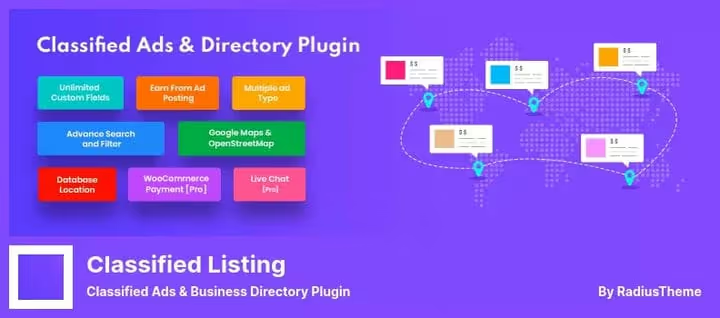
Classified Listing from RadiusTheme, this is a catalog builder, not just a classifieds board. One plugin covers business directories, job boards, real estate catalogs and auto directories. Version 5.4.4 came out on June 16, 2026.
In 2025-2026, the plugin received an AI enhancement. Forms are generated by niche description, listing texts are written by ChatGPT, Gemini or DeepSeek directly in the admin. Semantic search finds relevant listings even without exact word matches.
- Pros:
Drag-and-drop form builder with conditional logic
Unlimited custom fields (date, checkboxes, files, Repeater)
Built-in radius search via Google Places API and OpenStreetMap
Multi-criteria ratings and reviews
Mobile apps for Android and iOS
Cons:
Some key features (Stripe, subscriptions, bump-up) only in Pro
Abundance of settings requires time to master
Some addons are sold separately from the Pro license
Price: Free core; Pro from $39 per year according to the plugin page.
Download: 🔗 Classified Listing on WordPress.org | 🔗 RadiusTheme site
3. Directorist

Directorist, a plugin that builds a classifieds board on top of WooCommerce. Unlike lightweight solutions, here you get native support for dozens of Woo payment gateways, flexible taxes and full order management. On WordPress.org, the plugin has collected 590+ reviews and a 4.8 rating with 20,000+ active installations.
AI tools are built into the core: forms are generated for the catalog niche, listing texts via ChatGPT or Gemini. Monetization is flexible: subscription plans, one-time payments for placement, claim listings for business owners. Maps work both through Google Maps and through OpenStreetMap (free alternative).
- Pros:
Deep integration with WooCommerce, any Woo payment gateway
AI generation of forms and listing content in the core
Google Maps and OpenStreetMap with radius search
Mobile apps for Android and iOS
30+ extensions and 14+ ready-made catalog themes
Cons:
Requires WooCommerce (additional server load)
Main monetization features in paid extensions
Abundance of settings requires time to study
Price: Free core; Pro from $103 per year (license for 1 site).
Download: 🔗 Directorist on WordPress.org | 🔗 Directorist site
4. Classifier
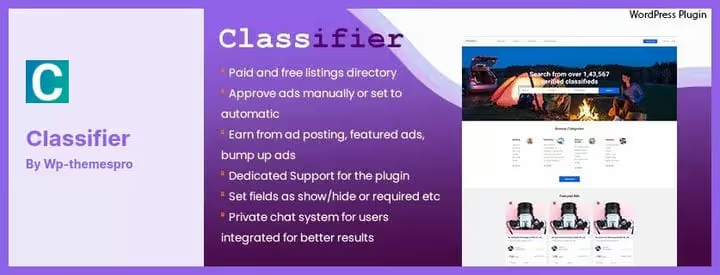
Classifier, a premium plugin with a ready-made frontend template out of the box. After activation, the board site looks complete: you don't need to pick a theme or layout pages separately. At the same time, the plugin doesn't touch the main theme and works in parallel with it.
Among the notable features: built-in chat between buyer and seller. Users communicate directly on the site without revealing email and phone. Search filters by categories and location.
- Pros:
Ready-made frontend template without additional configuration
Built-in buyer-seller chat
12 months of support included in the license
Compatibility with any WordPress theme
Cons:
Premium only, no free version
After 6 months, updates stop (license renewal needed)
Fewer addon ecosystem than WPAdverts or Classified Listing
Price: $39 on CodeCanyon (one-time, 6 months of updates).
Download: 🔗 Classifier on CodeCanyon
5. AWP Classifieds
AWP Classifieds (formerly Another WordPress Classifieds Plugin) is developed by the Strategy11 team, the same developers behind Formidable Forms and Business Directory Plugin. The plugin has been running since 2011, version 4.4.7 came out in May 2026, on WordPress.org more than 200 reviews.
The free core is powerful enough: categories with subcategories, payment via PayPal and Stripe, placement plans, email verification, integration with Akismet. For an extra fee, modules like Region Control (geo-restrictions), Featured Ads, Coupons, BuddyPress are unlocked.
- Pros:
Over 10 years on the market, proven stability
Powerful monetization: paid plans, credits, membership
BuddyPress integration for communities
CSV import of listings
Cons:
Interface looks outdated next to Classified Listing
Most extensions are paid addons
No built-in integration with WooCommerce
Price: Free core; paid modules from $49 per year on the plugin page.
Download: 🔗 AWP Classifieds on WordPress.org
Which classifieds plugin to choose for your task
All five plugins cover the basic needs of a classifieds board: categories, search, filters, submission forms, moderation, paid and free placements. The difference is in approaches to expansion and level of readiness out of the box.
WPAdverts and AWP Classifieds follow the "lightweight core and premium addons" path. Need a map, you buy it. Need Stripe, you buy it. At the start, you get a fast, unbloated plugin, and you build up functionality as the project grows.
Classified Listing and Directorist come from the "all inclusive" position. The first, through AI and drag-and-drop builder. The second, through native integration with WooCommerce and 30+ extensions. Classifier occupies the "turn on and ready" niche: minimum settings, maximum ready-made design.
Watch a comparison of top WordPress directory plugins: the video helps understand how the interfaces and approaches to building catalogs differ between different tools.
⁉️🤔 Frequently asked questions
Is a free plugin enough for a classifieds board?
For a start, yes. WPAdverts, Classified Listing and AWP Classifieds have working free cores with moderation, categories and basic payments. Limitations begin when you need Google Maps, Stripe, bumping listings or custom fields with conditional logic: this functionality is almost always in Pro.
Which plugin is better for WooCommerce?
Directorist is built on WooCommerce natively, that's its main feature. Classified Listing also supports WooCommerce payments through an addon, but the integration is less deep. If the store is already on Woo, take Directorist and don't complicate things.
What to choose for a local board in one city?
Classified Listing: radius search and three levels of locations (state, city, district) work out of the box. Plus OpenStreetMap as a free alternative to Google Maps. For a very simple scenario, WPAdverts with Location extension is enough.
Can you launch a board without a programmer?
Yes. Classifier and WPAdverts are configured completely from the admin. Classified Listing is a bit more complex due to the volume of options, but the drag-and-drop form builder removes the need to get into code. Directorist will require basic understanding of WooCommerce.
Do plugins slow down the site?
WPAdverts is specifically designed to be minimalist and in practice adds almost no load. AWP Classifieds and Classified Listing are heavier, but with normal hosting (not entry-level shared) there are no problems. Directorist adds the entire mass of WooCommerce, consider this when choosing a plan.
What to do if the plugin stopped updating?
Check the date of the last update on WordPress.org. More than a year without updates is a reason to look for an alternative. For premium plugins from CodeCanyon, keep in mind that after the support period ends, updates stop (for Classifier it's 6 months), and the license needs to be renewed.
Final breakdown: what to install in 2026
If the budget is zero and the site is on inexpensive hosting, WPAdverts. Minimum load, maximum compatibility, the free core is enough for a working board with moderation.
Need flexibility and don't want to get stuck in code, Classified Listing. Form builder, AI content generation, multi-criteria ratings and mobile apps. Best choice for those building a catalog as a business.
WooCommerce store and classifieds board in one bottle, Directorist. Native integration with Woo, 30+ extensions and AI tools in the core. The paid version is more expensive than competitors, but the capabilities are noticeably greater.
Want to turn on and forget about design, Classifier. Ready-made frontend template and built-in chat. The main thing is to remember about renewing the license every six months.
Time-tested classic with BuddyPress, AWP Classifieds. If you're building a community around the board, integration with BuddyPress outweighs the outdated interface.
Choose for the task, not for the slogan "most powerful." Each of the five plugins is strong in its own scenario, and weak in someone else's.

A professional team of writers and editors specializing in creating quality content.