














🚀 10 best WordPress directory plugins 2026
A WordPress directory is not just a list of companies. It's an asset that generates revenue: paid listings, ad placements, lead commissions. But between the idea of "I'll build something like Yelp" and a working site stands one question: which plugin to choose?
The WordPress repository has more than a dozen directory plugins. Some are only good enough for a simple directory, while others are full-featured marketplaces with geolocation and billing. The price range varies from zero to several hundred dollars a year, and more expensive doesn't always mean better.
We tested 10 current solutions on a test environment, comparing them by features, usability, and real cost of ownership. In this breakdown, honest pros, cons, and scenarios for which each plugin is actually suitable in 2026.
Where to start: key selection criteria
💡 Quick overview:
- Determine whether you need geolocation (maps, radius search), this immediately eliminates half the plugins.
- Check payment gateway support: at a minimum Stripe and PayPal, otherwise you can't launch paid listings.
- Make sure the plugin allows you to customize form fields, different niches need different data.
- Compare the cost of extensions: a free core is good, but needed features often go into premium add-ons.
Below is a summary table of all participants. A detailed breakdown of each is in separate sections.
Plugin | Free core | Starting price | WP.org rating | Directory type |
|---|---|---|---|---|
Directorist | Yes (wordpress.org) | $0 / Pro from $79/year | 4.8 ★ | Universal |
Business Directory Plugin | Yes (wordpress.org) | $0 / Pro from $199/year | 4.3 ★ | Business directory |
GeoDirectory | Yes (wordpress.org) | $0 / Add-ons from $39/year | 4.8 ★ | Geo directory |
Connections | Yes (wordpress.org) | $0 / Premium from $49/year | 4.5 ★ | Address book / Staff |
Sabai Directory | No (CodeCanyon) | $29 (one-time) | n/a | Local business |
Toolset | No (toolset.com) | from $69/year | n/a | Turnkey builder |
LDD Directory Lite | Yes (wordpress.org) | $0 / Extensions from $20 | 4.1 ★ | Lightweight directory |
Directory Pro | No (CodeCanyon) | $39 (one-time) | n/a | Mobile directory |
BePro Listings | Yes (wordpress.org) | $0 / Add-ons paid | 4.3 ★ | Simple listings |
Name Directory | Yes (wordpress.org) | $0 | 4.6 ★ | Glossary / index |
1. Directorist

Directorist from the WPWax team is one of the most feature-rich directory plugins with an open core on WordPress.org. The free version already includes frontend submission, customizable search filters, and user management. The plugin is compatible with Astra, Divi, Avada and ships with 25+ widgets for Elementor.
Pros: built-in SEO optimization with Yoast SEO support; CSV import; ratings and reviews; extension system (maps, payments, events). Cons: some critical features (billing, geolocation) go into paid add-ons; admin interface is overloaded.
Price: free core on wordpress.org; Pro plan from $79/year (2026).
🔗 Directorist on WordPress.org🔗 Live demo
2. Business Directory Plugin

Business Directory Plugin is a repository veteran that has existed since 2011. The free version can accept paid and free listings with spam protection via reCAPTCHA. The frontend is simple, the barrier to entry is low, a basic directory launches in half an hour.
Pros: stability and mature code; clear submission interface; several payment gateways in the premium version (Stripe, PayPal, PayFast). Cons: most in-demand features (Google maps, file uploads, reviews, discount codes) are hidden behind paid modules; the price of extensions adds up quickly.
Price: free core; premium modules from $199/year in a bundle.
🔗 Business Directory Plugin on WordPress.org🔗 Live demo
3. GeoDirectory

GeoDirectory from AyeCode Ltd positions itself as "the most advanced and scalable WordPress directory plugin in the world." Unlike competitors, it uses its own database tables instead of post meta, which provides performance on directories with hundreds of thousands of entries.
Pros: works out of the box with Gutenberg, Elementor, Divi, Beaver Builder; advanced search with geolocation; customizable email templates; badge system for featured listings. Cons: some add-ons are noticeably expensive; for non-geo directories the plugin is excessive.
Price: free core; add-ons from $39/year each or bundled from $229/year (4.8 ★ rating based on 700+ reviews, 2026).
🔗 GeoDirectory on WordPress.org🔗 Live demo
4. Connections Business Directory

Connections stands out among competitors with one trait: ascetic simplicity with unexpectedly deep capabilities. The plugin is compatible with all popular themes (Divi, Avada, Enfold, Elementor, Beaver Builder, Fusion) and is actively updated.
Pros: customizable fields (business hours, certifications, local time); open source on GitHub; translated by the community into dozens of languages; CSV import. Cons: some templates and extensions are only in premium subscription; interface looks spartan.
Price: free core on wordpress.org; premium templates and extensions from $49/year.
🔗 Connections on WordPress.org🔗 Connections website
5. Sabai Directory

Sabai Directory is sold on CodeCanyon with a rare model for the niche: one-time payment of $29. For this amount you get a full-featured premium plugin with responsive layout, interactive map, and search by keywords, categories, and geolocation.
Pros: one-time payment without subscription; drag-and-drop map; review voting (helpful/not helpful); several display methods (grid, list, map). Cons: 6 months of support in the base price, renewal is separate; community is smaller than the leaders.
Price: one-time payment of $29 on CodeCanyon.
🔗 Sabai Directory on CodeCanyon
6. Toolset

Toolset is not a classic directory plugin, but a builder for WordPress developers. You create custom post types, fields, and forms without programming, resulting in a directory tailored precisely to your niche.
Pros: full control over structure; integration with WPML for multilingual support; customizable search filters; works with Elementor, WooCommerce and Yoast SEO. Cons: requires time to configure; not a ready-made "out of the box" solution; subscription is more expensive than specialized plugins.
Price: from $69/year for a three-site bundle (2026, current at toolset.com).
🔗 Toolset official website🔗 Documentation on directories
7. LDD Directory Lite

LDD Directory Lite is a minimalist free plugin for quick directory launch. Installation, setup, and publishing the first listings takes minutes. Compatible with most themes and page builders.
Pros: simplicity and speed of deployment; Google Maps integration; grid and compact list display; extensions for reviews, social login, and export. Cons: base version functionality is limited; extension ecosystem is more modest than Directorist.
Price: free core on wordpress.org; extensions from $20.
🔗 LDD Directory Lite on WordPress.org🔗 Screenshots and demo
8. Directory Pro
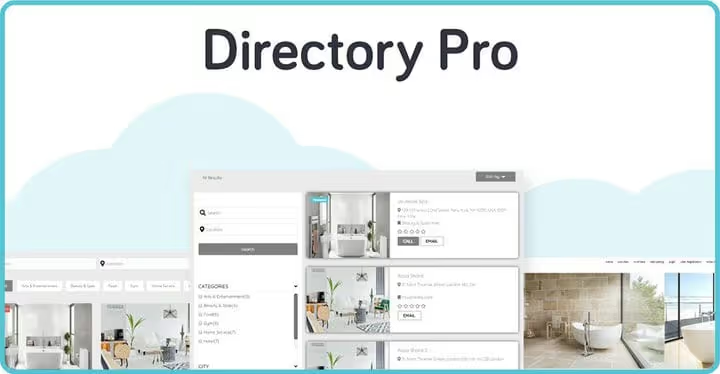
Directory Pro from CodeCanyon focuses on mobile responsiveness and a built-in control panel for both frontend and backend. The directory looks modern on any screen without additional configuration.
Pros: responsive design out of the box; Stripe and PayPal for accepting payments; VIP badges for premium listings; MailChimp integration. Cons: one-time purchase means updates are not guaranteed after support expires; small community.
Price: one-time payment of $39 on CodeCanyon.
🔗 Directory Pro on CodeCanyon🔗 Live demo
9. BePro Listings

BePro Listings from BePro Software allows you to create simple directories with support for images, documents, audio, and video. The free version works via shortcodes, displaying needed elements on specific pages.
Pros: multimedia support; shortcodes for flexible placement; proprietary BePro Cart payment module; unlimited payment packages. Cons: developer's site has not been updated since 2020; plugin may lag in compatibility with new WordPress versions.
Price: free core on wordpress.org; paid add-ons.
🔗 BePro Listings on WordPress.org🔗 Directory Theme
10. Name Directory

Name Directory is a niche plugin that builds not a business directory, but a glossary or name index. The approach differs from the rest: it's an alphabetical directory with search where the audience finds information by terms or names.
Pros: multiple directories on one site; management of title, description, and suggestion form display; customizable description length with "Read more" button; support for non-Latin characters. Cons: not suitable for commercial directories with listings and payments; an XSS vulnerability was discovered in early 2025 (CVE-2025-15283, fixed in the current version).
Price: completely free on wordpress.org.
🔗 Name Directory on WordPress.org🔗 Screenshots
Before making a decision, watch the overview video: a visual comparison of the five best directory plugins with demonstrations of interfaces and key features.
⁉️🤔 Frequently asked questions
Can you launch a directory completely free?
Yes, Directorist, GeoDirectory, Business Directory Plugin, Connections, LDD Directory Lite, BePro Listings, and Name Directory have free versions on WordPress.org. The functionality is enough for a basic directory. Paid listings, maps, and advanced search almost always require premium add-ons, budget from $39 to $199 per year for this.
Which plugin is best for geolocation and maps?
GeoDirectory is the undisputed leader: proprietary database tables, radius search, drag-and-drop map. In second place is Directorist with the Maps add-on. Sabai Directory is also good for local business, but inferior in the extension ecosystem.
What to choose for a commercial directory with payment acceptance?
Directorist Pro or GeoDirectory with the GetPaid add-on. Both support Stripe and PayPal, can create payment packages and accept transaction commissions. Business Directory Plugin also supports payments, but the feature bar is lower.
Will Toolset work instead of a ready-made directory plugin?
Toolset is justified when the directory is non-standard: say, a job aggregator with multi-level relationships or an industry registry with a dozen custom fields. For a typical business directory, Directorist or GeoDirectory will launch many times faster and cheaper. Count development time, it often outweighs the difference in license price.
Is it worth getting Sabai Directory or Directory Pro from CodeCanyon in 2026?
Both work and solve their tasks. Sabai Directory for $29 is the best value for features among non-subscription solutions. Directory Pro for $39 provides excellent mobile layout. The downside of the model is that updates and support are limited to a period after which you need to pay again.
Which directory plugin is the fastest in performance?
GeoDirectory uses its own tables instead of post meta, on directories with 10,000+ entries the difference in query speed becomes noticeable. For small directories (up to 1,000 listings) the difference between plugins is not critical, the bottleneck will be hosting and caching.
Summary: which directory plugin to choose
If you need a universal directory with a reserve of features, take Directorist. The free core covers most typical needs, premium extensions cover the rest without changing plugins.
If the directory relies on geolocation and maps, GeoDirectory. The proprietary database architecture and radius search are the best in the niche here.
If the budget is minimal and the directory is simple, LDD Directory Lite or Name Directory. The first for business listings, the second for indexes and directories.
If you need a maximally custom directory and have time for configuration, Toolset. Development costs will pay off with no compromises in data structure.
And one final tip: whatever plugin you choose, add popup windows to the site to collect visitor emails and live chat for support. A directory without connection to the audience leaves money on the table.

A professional team of writers and editors specializing in creating quality content.