














❌ Out of stock: 5 WooCommerce plugins that will bring back sales, 2026 collection
The product is out, the money is going. A buyer visits the page, sees "Out of stock" and silently leaves for a competitor. You lose not one sale, but an entire chain: a lead, a warmed-up interest, a potential repeat customer. And all because WooCommerce out of the box doesn't provide tools for working with out-of-stock products.
The problem runs deeper than it seems. The standard "Out of stock" status doesn't collect contacts of waiting customers, doesn't alert the warehouse manager about low stock, and doesn't turn the very fact of unavailability into a marketing opportunity. Every minute a product is missing from the shelf is lost revenue that nobody counts.
The good news: five plugins from this collection close the problem from different angles. One gives full control over stock right in the admin panel. Another collects email addresses of waiting customers and automatically sends notifications when items arrive. The third is a full-fledged inventory management system with purchases and suppliers. The fourth synchronizes stock between sales channels. And the fifth turns "out of stock" into a contact capture point with personalized popup campaigns. We tested each one on a test store, from installation to a real scenario.
💡 Quick overview:
- For quick stock management from a single table, install
Stock Manager for WooCommerce, free, no frills, 2 minutes to install - If the main task is to collect email addresses of waiting customers and automatically notify them of arrivals, get
Back In Stock Notifier, free core + background mailing without timeouts - When you have hundreds of SKUs and several suppliers, implement
ATUM, the most powerful free inventory management for WooCommerce - For multi-channel sales with fulfillment, connect
Veeqofrom Amazon, stock synchronization, label printing and shipping discounts for free
Comparison table
Plugin | Type | Price | Free version | WooCommerce | Main feature |
|---|---|---|---|---|---|
| Stock management | Free | ✅ | Yes | Single table with instant editing of all fields |
| Arrival notifications | Free | ✅ | Yes | Background mailing without timeouts |
| Full inventory management | Free | ✅ | Yes | Stock Central + purchases + suppliers |
| Fulfillment + stock | Free | ✅ | Yes | Multi-channel synchronization + Amazon shipping |
| Out-of-stock marketing | From $7/mo | ❌ | Yes | Behavioral popup campaigns with A/B tests |
1. Stock Manager for WooCommerce

A free plugin from storeapps that solves exactly one task: provides a single table for managing stock of all products. No extra features, just quick stock control from one screen.
In practice, this saves hours of manual monitoring. Instead of going into each product card and checking stock, you see all positions in one table. You change SKU, price, status and quantity right in the cell, without page reload. All product types are supported: simple, variable, grouped, external. Filters by categories, product type and stock status work instantly.
The stock change log deserves special mention. Every stock movement is logged: you can see when and by how much the quantity changed, who made the edits. For stores with multiple managers, this is critical: it's always clear where the shortage came from. And the CSV import and export function allows you to export all stock, edit in Excel and upload back.
The plugin is completely free, without a Pro version and hidden fees. Regularly updated: latest release in April 2026, compatibility with WordPress 6.9.4 and WooCommerce 10.7.0 confirmed.
Pros:
- Single table with instant inline editing of all fields
- Stock change log for each product
- Completely free, without Pro version and ads
- Regular updates, compatibility with current WP and WooCommerce versions
Cons:
- No notifications for customers about arrivals, only internal management
- CSV import and export require caution, the function is marked as experimental
- No built-in threshold notifications for administrator
Price: Free.
2. Back in stock notifier for WooCommerce

A free plugin from ProPluginsLab that does exactly what the name says: shows a subscription form on an out-of-stock product page and automatically sends email when the position returns to the warehouse. No magic, just works.
The key difference from competitors, verified in practice: background queue processing. When a product appears and 10,000 subscribers are waiting for notification, most plugins crash with timeout or send duplicates. Here emails go through a background process: the server doesn't choke, duplicates are excluded. Protection from spam subscriptions through built-in Google reCAPTCHA. For registered users, email is filled in automatically.
The free core covers the basic scenario completely. And if you need more, a dozen and a half paid addons: synchronization with Mailchimp and Klaviyo, SMS through Twilio, subscriber export to CSV, WPML and Polylang compatibility, double opt-in, sales tracking. You buy only what your store really needs.
Pros:
- Completely free core, installed and works
- Background mailing doesn't crash the server with a large waiting list
- Support for simple, variable, grouped products and subscriptions
- A dozen and a half addons for any integration
Cons:
- Advanced features only through paid addons
- No built-in analytics of subscriber conversion to buyers without Track Sales addon
- Basic subscription form design, customization through separate Custom CSS addon
Price: Free. Addons, from $19 each.
3. ATUM
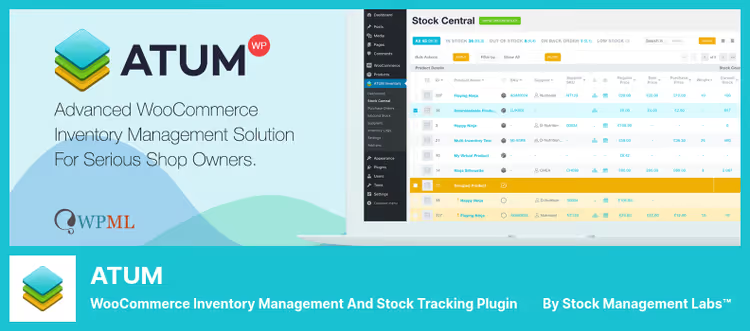
ATUM from Stock Management Labs is not just "another stock plugin". It's a full inventory management system inside WooCommerce. The developers combined 25 years of inventory management experience with a modern WordPress interface.
The center of everything is the Stock Central panel. A single table with all products: stock, SKU, suppliers, purchase and retail prices, status ("in stock", "low stock", "out"). You change any field right in the table, without entering the product card. Filters by categories, suppliers, status. Bulk editing. PDF export. Since version 1.9, a REST API has been added for external integrations.
A separate level is purchases and suppliers. You create a supplier order right from the admin panel, specify expected dates and quantities. Upon receipt, stock is updated automatically. Incoming stock is visible in a separate section: you always know what's coming and when. Inventory logs record every movement: reserve, customer return, warehouse damage, incoming delivery. And Locations allow you to distribute products by physical storage locations: warehouse, rack, shelf.
Statistics are not just "sold so much". ATUM shows lost sales (when the product was out of stock), sold positions, turnover by periods, stock level indicators with reorder forecast. An enterprise-level tool, and yet completely free. Paid addons add specific scenarios like multi-vendor or integration with external ERP.
Pros:
- Stock Central, a table with instant editing of all fields
- Purchases, suppliers, storage locations out of the box
- Lost sales and stock analytics in real time
- Free core handles stores with thousands of SKUs
Cons:
- Steep learning curve, interface is overloaded for a beginner
- Some advanced features require paid addons
- Overkill if you have 20 products and nothing to manage
Price: Free.
4. Veeqo
Veeqo has been owned by Amazon since 2021, and that explains a lot. Free fulfillment software that synchronizes stock between WooCommerce, Amazon, eBay, Shopify and other channels in real time. And yes, it's really free: Amazon earns on carrier commission from each label, and you get pre-negotiated UPS, USPS, FedEx and DHL discounts plus up to 5% cashback in Veeqo Credits.
How it works in practice. Connected WooCommerce, Amazon and Shopify, Veeqo pulled all products and stock. A sale on any channel instantly deducts stock everywhere, overselling is excluded. When falling below a set level, the system itself creates a replenishment order. An order arrived, digital picking with an optimized route through the warehouse. Printed 100 labels in one click. Shipped.
Amazon account protection deserves special mention. Shipping options that protect from A-to-Z claims and protect the OTDR metric are clearly marked in the interface. For Amazon sellers, this is critical: one shipping problem can crash the rating. Plus unlimited users and shipments, 24/7 support through AI agent Vera and a team of live experts.
Veeqo is suitable for those who already sell or plan to sell on multiple channels and want a single window for managing orders and stock. For a pure WooCommerce store without multi-channel functionality, the functionality is excessive, ATUM will give more for the same price, for free. But if Amazon, eBay or Shopify are in your stack, there are simply no alternatives in terms of price/feature ratio.
Pros:
- Free fulfillment with multi-channel synchronization in real time
- UPS/USPS/FedEx/DHL shipping discounts + up to 5% cashback
- Amazon account metrics protection
- Unlimited users and shipments
Cons:
- Owned by Amazon, some data lives in their infrastructure
- Advanced inventory management features are paid, from $19/mo
- Overkill for one WooCommerce without other channels
Price: Free. Advanced inventory features, from $19/mo.
5. OptinMonster

The fifth tool in the collection stands apart. OptinMonster is not an inventory management plugin and not an arrival notification system. It's a platform for conversion popup campaigns that can show personalized notifications to visitors, including about product unavailability.
Scenario: a buyer adds a product to the cart, and the position is out of stock. Standard WooCommerce shows "Product unavailable", and the visitor leaves. OptinMonster intercepts this moment and shows a popup with an offer to subscribe to arrival notification. Or offers a similar product. Or gives a promo code for the next purchase as an apology.
Targeting here is the main weapon. The campaign triggers by Exit-Intent (detects cursor movement to tab closing), by scroll percentage, by time on page, by cart content, by geolocation. A/B testing is built in: you drove traffic to two popup variants and see which converts better. 700+ ready templates, integration with all popular email services, revenue attribution for tracking revenue from each campaign.
OptinMonster won't replace a warehouse plugin. But it turns the very fact of product unavailability from a loss into a contact capture point. And a contact that was waiting for arrival buys many times more willingly than a cold lead.
Pros:
- Exit-Intent and behavioral triggers, the window shows at the right moment
- 700+ templates, assembled without code
- A/B testing and revenue attribution out of the box
- Integration with dozens of CRM and email platforms
Cons:
- This is not a specialized out-of-stock plugin, but a general tool for popup marketing
- No free version, plans from $7/mo
- Requires scenario setup, out-of-stock is not included out of the box
Price: From $7/mo with annual payment.
🔗 Official OptinMonster website
Setting up product arrival notifications can be done in five minutes. In this video, Barn2 shows the full cycle: plugin installation, subscription form activation and first mailing launch.
⁉️🤔 Frequently asked questions
Is it necessary to install a separate plugin for out-of-stock notifications, doesn't WooCommerce do this out of the box?
WooCommerce out of the box shows "Out of stock" status and allows enabling backorder, but doesn't collect email addresses of waiting customers and doesn't send arrival notifications. For a buyer to leave a contact and receive an email when the warehouse is replenished, a plugin is needed.
Back In Stock Notifiercloses this task for free in 5 minutes of installation.
Stock Manager and ATUM both manage stock, what's the difference?
Stock Manager for WooCommerceis a lightweight tool for quick stock editing in a single table: changed quantity, price, SKU and moved on.ATUMis a full inventory management system with purchases, suppliers, storage locations and lost sales analytics. ChooseStock Managerfor quick stock control without extras, andATUMfor deep inventory management with a history of every movement.
ATUM and Veeqo both manage warehouse, what's the difference?
ATUMis an accounting system inside the WordPress admin panel: Stock Central, purchases, suppliers, inventory logs, storage locations. You manage the warehouse manually, but with maximum detail.Veeqois an external fulfillment service from Amazon: synchronizes stock between sales channels, prints labels, calculates shipping. ChooseATUMfor deep inventory management in the admin panel, andVeeqofor multi-channel sales with shipping.
What to do if I have 30 products and none of these plugins is needed in full?
Take
Back In Stock Notifier, it weighs the least, is configured in a minute and solves the main task: not losing buyers when the product is out. The other four tools are for stores with hundreds of SKUs, multiple sales channels or a need for fine-tuning inventory management.
Can OptinMonster be used only for out-of-stock notifications?
Technically yes, but paying from $7/mo just for one out-of-stock campaign is irrational. OptinMonster unfolds when you use it to the fullest: lead collection, reducing abandoned carts, A/B tests, personalization by behavior. If the task is strictly "notify when available", get
Back In Stock Notifier. If you're already in the OptinMonster ecosystem or planning serious conversion marketing, an out-of-stock campaign will be a nice addition, not the main reason for purchase.
Which plugin to choose in 2026?
The most common scenario, "product is out, collect email and notify when available", is closed for free and without hassle by
Back In Stock Notifier. Installed in a minute, works without supervision, doesn't load the server with background mailing.If you need to quickly manage stock from a single table,Stock Manager for WooCommerceis unrivaled. Free, regularly updated, requires no training. For stores with dozens and hundreds of products, it saves hours weekly.When managing a warehouse with hundreds of positions and several suppliers,ATUMis unrivaled among free solutions. Stock Central with instant editing, purchases, suppliers, locations and lost sales analytics, such functionality doesn't exist even in many paid competitors.Selling on multiple channels, connectVeeqo. Stock synchronization in real time, label printing with Amazon discounts and protection from A-to-Z claims, and all this for free. For a multi-channel store, this is not "one of the options", but the only reasonable choice on the market in 2026.And takeOptinMonsterwhen you want to turn the very fact of product unavailability into a contact base growth point with personalized popup campaigns with A/B tests and revenue tracking.
Choose a plugin for your task, not for someone else's rating.

A professional team of writers and editors specializing in creating quality content.