














🔌 6 best WordPress Discord plugins 2026 (free and premium)
Every other community today has its own Discord server. But when a WordPress site is connected to it, the routine begins: posts are uploaded manually, member roles are updated through the Discord admin panel, and registrations from the server don't make it into the site database. Time that doesn't exist.
The right plugin eliminates this gap completely. A post flies to a channel automatically. Access to private Discord sections opens based on subscription level on the site. And the "Log in with Discord" button works without additional workarounds.
We've gathered 6 live WordPress solutions for Discord integration that are actively updated in 2026. Range: from lightweight webhook notification sending to full paid membership synchronization with server roles. No abandoned plugins or "theoretically working" schemes, only what handles real load.
💡 Quick overview:
- Sending posts and orders to Discord: WP Discord Post Plus separates channels by blog categories and WooCommerce categories; Init Pulse for Discord provides a minimalist webhook with role mentions and zero frontend load
- Role synchronization for membership sites: PMPro Discord Add-on or MemberPress Discord Add-on, a member pays for a subscription and immediately receives a server role, the subscription expires and the role is removed automatically
- SSO login through Discord: miniOrange Discord Integration with OAuth authorization, button setup without CSS, and avatar transfer to WordPress profile
- Branded invitation: WP Discord Invite turns
discord.gg/randomCodeintoyoursite.com/discordwith a click dashboard
Plugin comparison table
Plugin | Primary function | WooCommerce | Free | Active installations |
|---|---|---|---|---|
WP Discord Post Plus | Posts and orders to Discord | Yes | Yes | 700+ |
Init Pulse For Discord | Webhook notifications | No | Yes | 50+ |
PMPro Discord Add-on | PMPro role synchronization | No | Yes | 500+ |
WP Discord Invite | Vanity URL plus analytics | No | Yes | 1000+ |
miniOrange Discord | SSO plus Role Mapping | Yes | Lite / Pro $349 | 100+ |
MemberPress Discord Add-on | MemberPress role synchronization | No | Yes | 200+ |
1. WP Discord Post Plus
WP Discord Post Plus handles the main task: posts and WooCommerce orders go to the right Discord channels without a single extra action.
The logic is straightforward. For each blog category you set your own channel. For each product category, your own. A post or order goes to the first match. No spam in the general chat, no confusion between editorial notifications and orders.
A metabox with a "send to Discord" checkbox appears in the post editor. It's enabled by default, but for a specific post you can uncheck it with one click. The plugin sends only new publications, repeat sending when updating an existing post is excluded (this bug was fixed in version 1.0.2, May 2026).
For WooCommerce there's a separate panel: the webhook URL is tied to product categories. An order comes in, the webhook triggers Discord, the notification is sent. All logic is on the plugin side, you don't need to write your own bots.
Pros:
- Separate channels for posts and orders
- Unlimited number of channels
- Metabox in the editor with the ability to disable for a specific post
- Active support: v1.0.2 released in May 2026
Cons:
- Triggers only on new publications, updates to existing posts are not sent
- Negative reviews relate to old versions, critical bugs fixed in 1.0.2
Price: free.
🔗 WP Discord Post Plus on WordPress.org
2. Init Pulse for Discord

Init Pulse for Discord, a newcomer with a clear philosophy: minimal code, no frontend bloat, only webhook and message template. The plugin doesn't hang a single extra JS or CSS file on site visitors.
Triggers on post publication and update. The message template is assembled from five placeholders: post title {title}, title link {title_url}, direct URL {url}, excerpt {excerpt}, and site name {site_name}. Optionally you can attach the featured image as an embed, Discord will pick up the image automatically.
The main feature that WP Discord Post Plus doesn't have, role mentions. In category or tag settings you specify the Discord Role ID, and when published the channel receives <@&role_ID> New post. Editors see the notification in their channel, authors in theirs. For newsrooms with multiple departments this solves routing without additional tools.
The plugin doesn't support WooCommerce and custom post types yet, writes only to one channel. But for a classic blog or news site this is enough.
Pros:
- Zero frontend load
- Discord role mentions through category and tag binding
- Compatibility with WordPress 6.7+
- Open source on GitHub
Cons:
- No WooCommerce support
- One webhook link, one channel
- Doesn't work with custom post types
Price: free.
🔗 Init Pulse for Discord on WordPress.org
3. Connect Paid Memberships Pro to Discord
PMPro Discord Add-on from ExpressTechSoftwares closes the gap between paid membership on the site and roles on the Discord server. A member pays for a subscription, receives a role. The subscription expires, the role is removed automatically. No manual work for moderators.
The add-on works through the built-in WordPress scheduler: synchronization tasks are executed on schedule, not in real time. This is a deliberate limitation: Discord strictly rate-limits frequent API requests, especially on large servers. For communities up to 100-200 members the free version is enough. For larger servers there's Pro with cloud API for $49.
The interface is simple: go to Memberships → Discord Settings, connect the bot, map PMPro levels to Discord roles. A member clicks "Connect to Discord" in their profile, the system distributes access automatically. The administrator can manually change roles through WP Manage Users, send a Direct Message when the subscription expires, and set up a default role for new members.
The shortcode [discord_connect_button] is inserted on any site page. A member sees one button and through OAuth links the Discord account to their WordPress account.
Pros:
- Full cycle: connection, synchronization, role removal on subscription cancellation
[discord_connect_button]shortcode for any page- DM notifications about membership expiration
- Compatibility with PMPro Cancel on Next Payment Date
Cons:
- Synchronization delay due to scheduled work
- Pro version for $49 is practically necessary for servers with an audience over 200 people
Price: free version; Pro, $49.
🔗 PMPro Discord Add-on on WordPress.org
4. WP Discord Invite
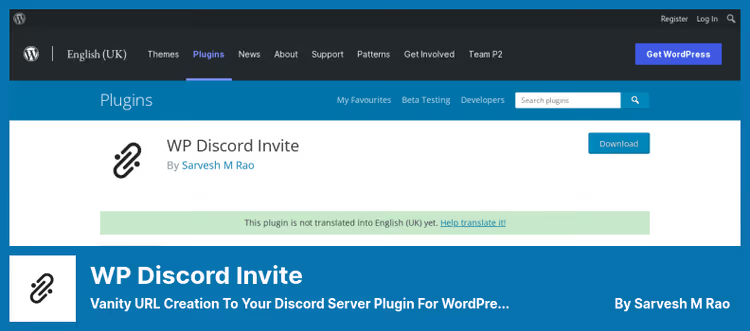
WP Discord Invite does exactly one thing, and does it flawlessly. Instead of discord.gg/randomSetOfCharacters you get yoursite.com/discord. Short, recognizable, memorable from the first time.
Version 2.6.0 (February 2026) brought a completely redesigned admin panel: card interface in WordPress 6.7 style, server icon upload through the media library, live embed card preview before publication. Rich Embed is configured flexibly: server name, description, color (standard Discord blue #5865f2), icon. The preview shows how the link will look in Discord, Twitter, Facebook, and WhatsApp.
The plugin counts transitions and displays a dashboard with statistics cards. The counter can be reset at any moment. Webhook notifications inform Discord about every click, activity is visible in real time.
From important security notes: in version 2.6.0 they closed XSS vulnerability CVE-2025-47638, added wp_strip_all_tags() to all text fields. The code is clean and regularly audited.
Pros:
- Branded URL on your own domain
- Click analytics dashboard with reset capability
- Embed preview before publication
- Closed CVEs, secure and maintained code
Cons:
- Only one invitation per site
- No multi-server mode and bulk invitations
Price: free.
🔗 WP Discord Invite on WordPress.org
5. miniOrange Discord Integration
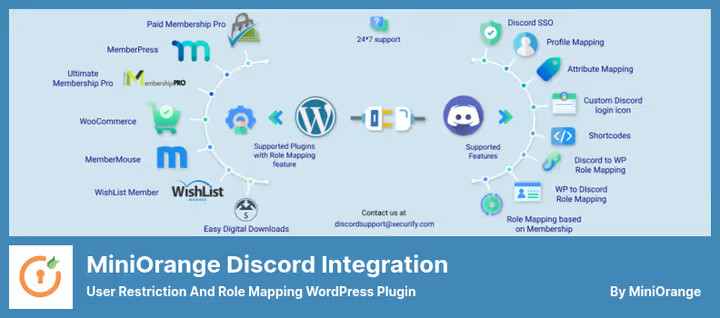
miniOrange Discord Integration, this is OAuth SSO plus role management in one plugin. A user enters the site through a Discord account, and the system automatically assigns them a WordPress role according to predefined rules.
In the free version (Lite): OAuth authorization, Discord avatar transfer to WordPress profile, flexible login button setup (color, shape, size, text) with live preview before publication, without a single line of CSS. The shortcode [miniorange_discord_login] displays the button on any page. Data is synchronized: username, display name, avatar.
The main limitation of the Lite version, no redirect after login. The user authorizes, but stays on the same page instead of being redirected to the personal account. This is exactly what the plugin is most often criticized for in reviews.
Pro version for $349 adds: reverse role mapping from WordPress to Discord, auto-posting to Discord channels, guild member management directly from the WordPress admin panel, integration with WooCommerce and MemberPress.
Pros:
- SSO through Discord OAuth without additional plugins
- Button setup in visual editor with live preview
- Avatar and profile attribute transfer
- Active development: v2.2.3, compatibility with WordPress 6.9
Cons:
- No redirect after login in Lite version
- Pro costs $349, a significant barrier for small projects
- Some declared functions are inactive in the free version
Price: Lite, free; Pro, $349.
🔗 miniOrange Discord Integration on WordPress.org
6. Connect MemberPress + Discord
If your membership site is built on MemberPress, this add-on from ExpressTechSoftwares will link it to the Discord server on the same principle as the PMPro version. The mechanics are familiar: role assignment by subscription level, automatic removal on expiration, DM warnings about membership ending.
The difference from the PMPro variant, downgrade support. When downgrading a subscription level, old Discord roles are removed, new ones are assigned. This is critical for sites with multi-tier plans, where a member moves from Premium to Basic instead of just canceling a subscription.
In the admin panel there's a convenient search for members by Discord Username or Discord ID, no need to switch between interfaces. Shortcode for the connect button: [mepr_discord_button]. A member clicks one button in their profile and links Discord to the MemberPress account.
The free version is designed for servers up to 100-200 members. Pro for $49 provides cloud API for large communities, email support, and custom integration consulting.
Pros:
- Full role synchronization with MemberPress, including downgrade scenario
- Member search by Discord ID directly in the WordPress admin panel
- DM on subscription expiration
[mepr_discord_button]shortcode for any page
Cons:
- Officially tested up to WordPress 6.7, no fresh data on compatibility with newer versions
- In old versions there were complaints about unstable role removal
Price: free version; Pro, $49.
🔗 MemberPress + Discord Add-on on WordPress.org
⁉️🤔 Frequently asked questions
Do I need a separate Discord bot for these plugins?
Yes, most solutions in the collection need one. Created in Discord Developer Portal: Applications → New Application → Bot → Add Bot. Copy the Token, paste into plugin settings, invite the bot to the server. Exception, WP Discord Invite: it only needs the server invite code, no bot required.
Do I need to pay for using the Discord API?
Discord API is free for bots. None of the plugins in the collection require payment for API access itself. Pro versions from miniOrange and ExpressTechSoftwares add functionality (redirect, cloud API, support), but basic scenarios work for free.
Which plugin should I choose for a WooCommerce store?
WP Discord Post Plus. It's the only one in the collection that can separate channels for orders and posts and supports WooCommerce out of the box. miniOrange also works with WooCommerce, but only in the Pro version for $349.
Do the plugins work with Gutenberg and the classic editor?
All six plugins are editor-independent. They integrate at the WordPress hooks level (
wp_insert_post,transition_post_status) and trigger regardless of which editor you publish the post in.
Can I connect multiple Discord servers to one site?
Most solutions support only one server. WP Discord Post Plus allows one bot to work with multiple channels within one server, but not with different servers. For a multi-server scenario, custom development will be required.
The plugin doesn't send notifications, what should I check?
First, double-check the webhook URL in the plugin settings. Second step: in Server Settings → Roles Discord the bot role should be above all other roles in the list. Error
50001: Missing Accessin logs is almost always fixed by dragging the bot role to the top and saving the role order.
Which Discord plugin to choose for a specific task
Go through your scenario, each point leads to one plugin:
Just send posts to a channel, Init Pulse for Discord. Minimal settings, open code, role mentions through categories. For a blog or news site it's more than enough.
Posts plus WooCommerce orders to different channels, WP Discord Post Plus. Separate routing, metabox in the editor, free.
Selling access to a private Discord server, PMPro Discord Add-on or MemberPress Discord Add-on. Roles by subscription, automatic removal on expiration, DM notifications. The choice comes down to which membership plugin your site is built on.
Need a branded invite link with analytics, WP Discord Invite. Free, stylish, with a click dashboard and XSS protection.
SSO login with advanced features, miniOrange Discord Integration. Profile attribute transfer, button setup without code. If you only need simple Discord login without role mapping, consider Nextend Social Login (Discord in Pro tier).
All six plugins are free to start. Installed through Plugins → Add New in a minute, actively updated in 2026, and work with current WordPress versions.
Detailed guide to configuring PMPro-Discord AddOn: from creating an application in Discord Developer Portal to role mapping. The logic fully applies to the MemberPress version as well, the connection is identical.

A professional team of writers and editors specializing in creating quality content.