














🚗 7 best car rental plugins for WordPress 2026 (free and premium)
Launching a car rental website on WordPress is a task that looks simple until you open the plugin catalog. Dozens of solutions with overlapping names, some not updated in years, and prices ranging from zero to hundreds of dollars. We tested and selected seven truly working tools, from lightweight WooCommerce integrations to full-featured booking systems with maps, pricing plans, and online payments.
The car rental plugin market splits into two camps. Standalone native systems live inside the WordPress engine and don't depend on external services. CRM integrations work as a bridge between the site and a cloud-based fleet management platform. The first approach gives full control and one-time payment. The second, ready infrastructure for medium and large businesses. The list includes both options.
💡 Quick overview:
- Determine whether you need a standalone (native) system or integration with external CRM, this affects site architecture
- Choose a plugin based on scale: for a small fleet a budget solution is enough, for a car park you need VikRentCar Pro or Car Rental System
- Install the plugin, configure pricing grids and availability calendar, without this booking won't work
- Connect a payment gateway (Stripe/PayPal) and set up email notifications, the client must receive confirmation instantly
- Check the mobile version: more than half of bookings come from phones
Plugin comparison table
Plugin | Type | Price (from) | Free version | Payments | Suitable for |
|---|---|---|---|---|---|
Car Rental Booking System | Native | $40 | No | PayPal, Stripe, cash | Small and medium fleet |
RNB (WooCommerce Rental) | WooCommerce | $29 | No | WooCommerce gateways | WooCommerce stores |
Advance Car Rental Booking | WooCommerce | $19 | No | PayPal, Payoneer, Stripe | Budget start |
BRW (Booking Rental WooCommerce) | WooCommerce | $39 | No | WooCommerce gateways | Hybrid rental (cars, boats) |
VikRentCar | Native + CRM | $0 / $120 | Yes (Lite) | Own + bank gateways | Professional fleet |
Car Rental System | Native | $85 | No | PayPal, Stripe, bank transfer | Medium and large business |
RentSyst | CRM integration | $0 / $25/mo | Yes (Lite) | Via CRM | Fleets with external CRM |
1. Car Rental Booking System
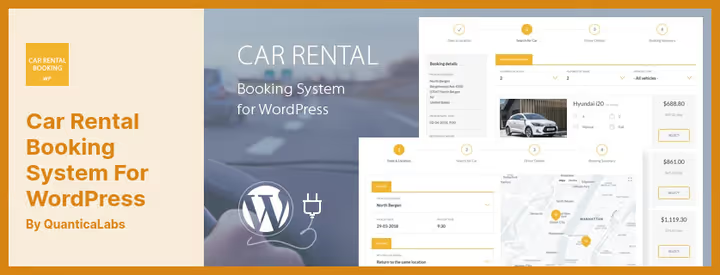
A standalone native plugin not tied to WooCommerce. Works on its own booking engine: the client selects dates, car class, additional options and immediately sees the final price. Out of the box comes integration with Google Maps for geolocation of pickup and return points, as well as Google Calendar for schedule synchronization.
The plugin calculates cost by flexible rules: you can set separate rates for weekdays and weekends, establish minimum driver age and limit maximum rental days. For international clients multilingualism works, the interface is translated into several languages. Notifications come via Telegram, convenient for prompt communication with clients.
Pros:
- Independent of WooCommerce, clean native architecture
- Built-in Google Maps and Google Calendar synchronization
- Telegram notifications and multilingualism out of the box
Cons:
- No free version for testing
- Admin interface looks outdated compared to competitors
Price: $40 (one-time, single site license).
🔗 Car Rental Booking System on CodeCanyon🔗 Live demo
2. RNB, WooCommerce Rental Plugin
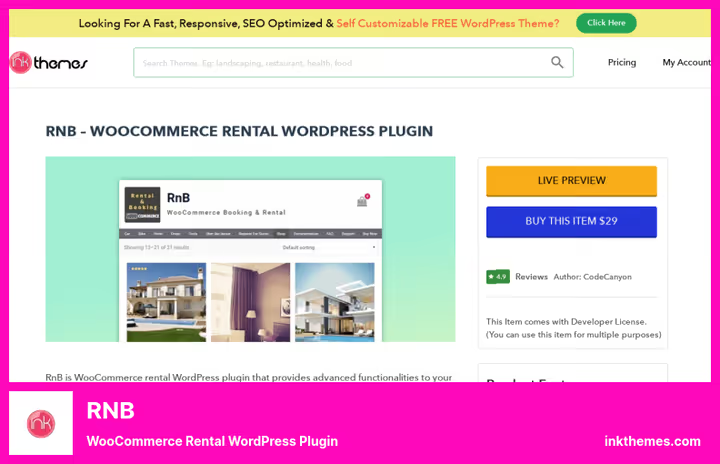
RNB extends WooCommerce, turning a regular online store into a rental platform. If the site already runs on WooCommerce, this is the fastest way to add rental without rebuilding the architecture. The plugin adds parameters to products: booking period, cost per day/hour/month, deposit amount and buffer time between orders.
Built-in management panel tracks orders, cancellations, date changes and payment status. For the client everything looks like familiar shopping: selected a car, specified dates, paid, received confirmation by email. Under the hood, standard WooCommerce gateways, meaning Stripe, PayPal and dozens of local payment systems work out of the box.
Pros:
- Deep integration with WooCommerce, familiar interface
- Flexible rates: day, hour, month
- Clear order management panel
Cons:
- Tied to WooCommerce ecosystem, excessive for sites without a store
- Price higher than the nearest budget competitor
Price: $29 (year of updates and support).
3. Advance Car Rental Booking Management

Advance Car Rental Booking Management, another WooCommerce solution, but with focus on configuration flexibility. Besides passenger cars, the plugin without modifications handles motorcycle, bicycle, boat and even taxi rental. For each transport type you can create a separate category with its own pricing rules.
Main feature, zonal pricing. You set rental cost depending on client location, and the system calculates distance between points by postal codes. For businesses with multiple pickup points this is a decisive function. The plugin also can block specific dates and set intervals between bookings, useful if the car needs to be washed and checked between clients.
Pros:
- Zonal rates by postal codes
- Support for different transport types in one plugin
- Lowest price in the list
Cons:
- Dependency on WooCommerce
- Admin interface overloaded with settings
Price: $19 (year of support, most affordable license in the list).
🔗 Advance Car Rental on CodeCanyon🔗 Live demo
4. BRW, Booking Rental WooCommerce

BRW covers the same niche as the two previous plugins, but with emphasis on multi-format rental. One order can include several items: the client books a car, child seat and GPS navigator in one transaction. Calendar shows availability for each object separately, and the system automatically calculates total cost considering seasonal coefficients.
The plugin is noticeably faster to set up than Advance Car Rental: basic configuration takes 15-20 minutes. For clients there's a convenient search with filters by date, transport type and price. Confirmation and cancellation notifications come automatically, administrator participation is not required. Among limitations: no built-in map, geolocation requires a third-party plugin.
Pros:
- Multi-item orders: one transaction for several items
- Seasonal pricing coefficients
- Quick setup, 15-20 minutes to launch
Cons:
- No built-in map, needs third-party plugin
- Only WooCommerce gateways
Price: $39 (12 months of support).
🔗 BRW on CodeCanyon🔗 Live demo
5. VikRentCar
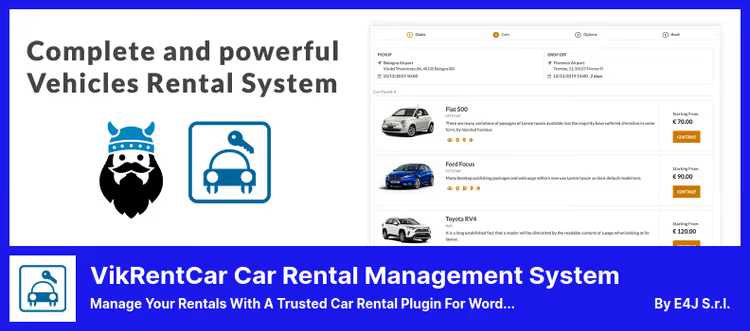
VikRentCar, the most mature plugin in the list. The original system has been developed since 2008 and was initially created for Joomla, the WordPress version inherited the same powerful engine. Today this is a full-featured fleet management platform: eight frontend variants, seasonal rates, customizable pricing plans and built-in payment acceptance system through real bank gateways.
Free Lite version from official WordPress.org catalog covers basic needs: car catalog, availability calendar, booking. Pro version for $120 adds seasonal pricing, reports and charts, discount coupons, customer database management and ability to set minimum and maximum rental duration. Separately worth noting restrictions by days of week: car pickup can be allowed only from Monday to Friday.
In practice VikRentCar covers scenarios that other plugins require modifications for: rental with driver, insurance rates, non-refundable rates. On WordPress.org the plugin collected 30 reviews and is steadily updated, latest release, May 2026.
Pros:
- 18 years of development, most mature engine on the market
- Own bank gateways and eight frontend variants
- Free Lite version with upgrade option
Cons:
- Learning curve above average
- Part of documentation only in English
Price: Free (Lite) / $120 (Pro).
🔗 VikRentCar Lite on WordPress.org🔗 VikRentCar Pro on VikWP
6. Car Rental System, Native WordPress Plugin
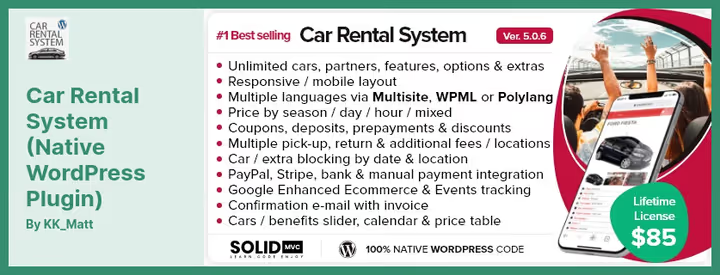
Another native plugin not tied to WooCommerce. Unlike VikRentCar, here emphasis is on deployment simplicity: installed, added cars, configured rates, site ready to accept orders. The plugin supports unlimited items, for each you can set separate price per day and hour.
Built-in Google Maps displays pickup points, and the client can choose convenient location directly from the booking form. Among technical advantages: clean code, developer claims readable architecture which simplifies customization, multilingualism support, email notifications and payment invoices. Among supported payment methods: PayPal, Stripe, bank transfer and manual processing.
In practice Car Rental System shows well in scenarios where besides cars you need to rent motorcycles or taxis, the plugin was initially designed as multi-transport. Among cons: price above market average, support limited to standard CodeCanyon term (12 months, then paid).
Pros:
- Native architecture without WooCommerce
- Multi-transport out of the box
- Clean code base, convenient for customization
Cons:
- High price on the market
- Paid extended support after first year
Price: $85 (including 12 months of support).
🔗 Car Rental System on CodeCanyon🔗 Live demo
7. RentSyst, CRM for fleet
RentSyst, fundamentally different approach. This is not just a plugin, but a bridge between WordPress site and cloud CRM fleet management system. You install free plugin, connect it to your RentSyst account, and the entire fleet automatically synchronizes with the site. Bookings accepted through the site instantly go to CRM without delays and manual data transfer.
This approach is convenient for companies that already keep records in a separate system or plan to scale. Instead of configuring rates and calendars in WordPress admin, you manage everything from one window. The plugin is free (only active RentSyst subscription from $25/mo needed), regularly updated, latest version released in June 2026, supports filters by car characteristics and brand color scheme customization.
Among limitations: the plugin is not fully compatible with Elementor and DIVI, for sites on these builders modifications will be required. Plus, translating interface to Russian is possible, but part of strings are hard-coded in PHP, requires manual editing or Loco Translate.
Pros:
- Ready CRM infrastructure with automatic synchronization
- Free plugin, active updates
- Fleet management from one window, not tied to WordPress admin
Cons:
- Mandatory monthly CRM subscription
- Limited compatibility with Elementor and DIVI
Price: Free (plugin) / from $25/mo (CRM subscription).
🔗 RentSyst on WordPress.org🔗 RentSyst website
Watch a video overview of building a car rental site on WordPress, it shows the full cycle from plugin installation to accepting the first order.
⁉️🤔 Frequently asked questions
Is WooCommerce needed to launch car rental on WordPress?
No, not necessarily. Three plugins out of seven in the list, Car Rental Booking System, VikRentCar and Car Rental System, are standalone native solutions with built-in payment gateways. WooCommerce integration (RNB, Advance, BRW) is justified if you already have a store running on WooCommerce and want to add rental without changing architecture. The choice between native and WooCommerce plugin comes down to one thing: do you have an online store. If yes, take RNB plugin or BRW. If the site is created from scratch for rental, VikRentCar free or native Car Rental Booking will give cleaner architecture without extra dependencies.
Which plugin is suitable for a small fleet of 3-5 cars?
Advance Car Rental Booking or VikRentCar Lite (free). For a small fleet you don't need complex CRM integrations. Advance will cover basic scenarios for minimal price, and VikRentCar Lite will give a professional foundation with upgrade option to Pro when the business grows. In practice: if budget is limited, start with VikRentCar Lite. This is the only free native plugin in the list built on an engine from 2008 and actively supported.
Can I connect online card payment?
Yes, all plugins from the list support at least PayPal and Stripe. VikRentCar and Car Rental System additionally offer direct bank transfer and manual payment processing. RentSyst works through CRM system payment integrations, the list of available gateways depends on your pricing plan. Practice shows: the fewer steps between car selection and payment, the higher conversion. VikRentCar Pro gives the greatest flexibility: you can set up partial prepayment, full online payment or payment on pickup.
How does a native plugin differ from CRM integration?
Native plugin, standalone system inside WordPress. All data (rates, calendar, clients) is stored in your database. You fully control the site and don't depend on an external service. CRM integration (RentSyst), bridge between site and cloud platform. You manage the fleet in CRM, and the plugin only displays data and accepts orders. Plus: ready infrastructure for large business. Minus: monthly fee and dependency on third-party service. Conclusion: native, for full control and one-time payment, CRM, for fleet from 20 cars with multiple managers.
What to do if the plugin conflicts with the theme?
Check three things. First: open browser console (F12 → Console) on the booking page, red lines will point to specific conflict. Second: temporarily switch theme to standard, for example Twenty Twenty-Five. If the plugin worked, the problem is in the theme. Third: contact plugin developer. VikRentCar and RentSyst have active support that helps with CSS conflicts. In most cases the problem is solved by a couple of lines of custom CSS. Most developers provide documentation on plugin CSS classes, use it for fine-tuning.
Is it safe to transmit card data through the plugin?
Yes, when using standard gateways. Plugins don't store card data, they redirect the user to a secure Stripe or PayPal page or use tokenization. Be sure to enable SSL certificate on the site (free via Let's Encrypt) and keep plugins updated. All solutions from the list regularly receive security updates, VikRentCar and RentSyst were updated in May-June 2026.
What to install in 2026: decision matrix
The answer depends on three factors: business scale, site technical base and budget. We compiled recommendations into a short matrix:
- Launching site from scratch, budget is limited, free VikRentCar or budget Advance. The first will give professional foundation, the second, lowest entry price.
- Already have a store on WooCommerce, RNB on InkThemes will organically integrate into existing architecture. No need to rebuild the site.
- Fleet from 10 cars, need analytics and reports, VikRentCar Pro. The only plugin with charts, statistics and seasonal rates out of the box.
- Already have CRM for fleet management, RentSyst. Free plugin will connect site to your system in 10 minutes.
- Need maximum flexibility of rates and zones, native Car Rental System. Zonal pricing by postal codes, unique feature that competitors don't have.
All seven plugins solve the task of car rental on WordPress. The difference, in implementation details that become critical specifically for your business model. Test 2-3 options on demo sites, links are in each block, and choose the one where admin fits your processes, not the other way around.

A professional team of writers and editors specializing in creating quality content.